Loading...
Loading...
Loading...
Loading...
Loading...
Loading...
Loading...
Loading...
Loading...
Loading...
Loading...
Loading...
Loading...
Loading...
Loading...
Loading...
The Agent SDK lets you embed Claude Code's autonomous agent loop in your own applications. The SDK is a standalone package that gives you programmatic control over tools, permissions, cost limits, and output. You don't need the Claude Code CLI installed to use it.
When you start an agent, the SDK runs the same execution loop that powers Claude Code: Claude evaluates your prompt, calls tools to take action, receives the results, and repeats until the task is complete. This page explains what happens inside that loop so you can build, debug, and optimize your agents effectively.
Every agent session follows the same cycle:
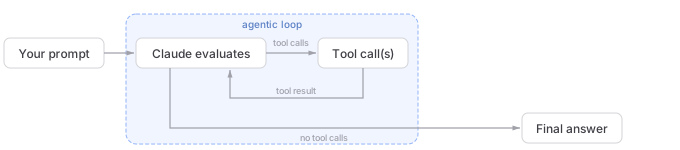
SystemMessage with subtype "init" containing session metadata.AssistantMessage containing the text and any tool call requests.AssistantMessage with the text response (no tool calls), followed by a ResultMessage with the final text, token usage, cost, and session ID.A quick question ("what files are here?") might take one or two turns of calling Glob and responding with the results. A complex task ("refactor the auth module and update the tests") can chain dozens of tool calls across many turns, reading files, editing code, and running tests, with Claude adjusting its approach based on each result.
A turn is one round trip inside the loop: Claude produces output that includes tool calls, the SDK executes those tools, and the results feed back to Claude automatically. This happens without yielding control back to your code. Turns continue until Claude produces output with no tool calls, at which point the loop ends and the final result is delivered.
Consider what a full session might look like for the prompt "Fix the failing tests in auth.ts".
First, the SDK sends your prompt to Claude and yields a SystemMessage with the session metadata. Then the loop begins:
Bash to run npm test. The SDK yields an AssistantMessage with the tool call, executes the command, then yields a UserMessage with the output (three failures).Read on auth.ts and auth.test.ts. The SDK returns the file contents and yields an AssistantMessage.Edit to fix auth.ts, then calls Bash to re-run npm test. All three tests pass. The SDK yields an AssistantMessage.AssistantMessage with this text, then a ResultMessage with the same text plus cost and usage.That was four turns: three with tool calls, one final text-only response.
You can cap the loop with max_turns / maxTurns, which counts tool-use turns only. For example, max_turns=2 in the loop above would have stopped before the edit step. You can also use max_budget_usd / maxBudgetUsd to cap turns based on a spend threshold.
Without limits, the loop runs until Claude finishes on its own, which is fine for well-scoped tasks but can run long on open-ended prompts ("improve this codebase"). Setting a budget is a good default for production agents. See Turns and budget below for the option reference.
As the loop runs, the SDK yields a stream of messages. Each message carries a type that tells you what stage of the loop it came from. The five core types are:
SystemMessage: session lifecycle events. The subtype field distinguishes them: "init" is the first message (session metadata), and "compact_boundary" fires after compaction. In TypeScript, the compact boundary is its own SDKCompactBoundaryMessage type rather than a subtype of SDKSystemMessage.AssistantMessage: emitted after each Claude response, including the final text-only one. Contains text content blocks and tool call blocks from that turn.UserMessage: emitted after each tool execution with the tool result content sent back to Claude. Also emitted for any user inputs you stream mid-loop.StreamEvent: only emitted when partial messages are enabled. Contains raw API streaming events (text deltas, tool input chunks). See Stream responses.ResultMessage: the last message, always. Contains the final text result, token usage, cost, and session ID. Check the subtype field to determine whether the task succeeded or hit a limit. See Handle the result.These five types cover the full agent loop lifecycle in both SDKs. The TypeScript SDK also yields additional observability events (hook events, tool progress, rate limits, task notifications) that provide extra detail but are not required to drive the loop. See the Python message types reference and TypeScript message types reference for the complete lists.
Which messages you handle depends on what you're building:
ResultMessage to get the output, cost, and whether the task succeeded or hit a limit.AssistantMessage to see what Claude is doing each turn, including which tools it called.include_partial_messages in Python, includePartialMessages in TypeScript) to get StreamEvent messages in real time. See Stream responses in real-time.How you check message types depends on the SDK:
isinstance() against classes imported from claude_agent_sdk (for example, isinstance(message, ResultMessage)).type string field (for example, message.type === "result"). AssistantMessage and UserMessage wrap the raw API message in a .message field, so content blocks are at message.message.content, not message.content.Tools give your agent the ability to take action. Without tools, Claude can only respond with text. With tools, Claude can read files, run commands, search code, and interact with external services.
The SDK includes the same tools that power Claude Code:
| Category | Tools | What they do |
|---|---|---|
| File operations | Read, Edit, Write | Read, modify, and create files |
| Search | Glob, Grep | Find files by pattern, search content with regex |
| Execution | Bash | Run shell commands, scripts, git operations |
| Web | WebSearch, WebFetch | Search the web, fetch and parse pages |
| Discovery | ToolSearch | Dynamically find and load tools on-demand instead of preloading all of them |
| Orchestration | Agent, Skill, AskUserQuestion, TodoWrite | Spawn subagents, invoke skills, ask the user, track tasks |
Beyond built-in tools, you can:
Claude determines which tools to call based on the task, but you control whether those calls are allowed to execute. You can auto-approve specific tools, block others entirely, or require approval for everything. Three options work together to determine what runs:
allowed_tools / allowedTools auto-approves listed tools. A read-only agent with ["Read", "Glob", "Grep"] in its allowed tools list runs those tools without prompting. Tools not listed are still available but require permission.disallowed_tools / disallowedTools blocks listed tools, regardless of other settings. See Permissions for the order that rules are checked before a tool runs.permission_mode / permissionMode controls what happens to tools that aren't covered by allow or deny rules. See Permission mode for available modes.You can also scope individual tools with rules like "Bash(npm:*)" to allow only specific commands. See Permissions for the full rule syntax.
When a tool is denied, Claude receives a rejection message as the tool result and typically attempts a different approach or reports that it couldn't proceed.
When Claude requests multiple tool calls in a single turn, both SDKs can run them concurrently or sequentially depending on the tool. Read-only tools (like Read, Glob, Grep, and MCP tools marked as read-only) can run concurrently. Tools that modify state (like Edit, Write, and Bash) run sequentially to avoid conflicts.
Custom tools default to sequential execution. To enable parallel execution for a custom tool, mark it as read-only in its annotations: readOnly in TypeScript or readOnlyHint in Python.
You can limit how many turns the loop takes, how much it costs, how deeply Claude reasons, and whether tools require approval before running. All of these are fields on ClaudeAgentOptions (Python) / Options (TypeScript).
| Option | What it controls | Default |
|---|---|---|
Max turns (max_turns / maxTurns) | Maximum tool-use round trips | No limit |
Max budget (max_budget_usd / maxBudgetUsd) | Maximum cost before stopping | No limit |
When either limit is hit, the SDK returns a ResultMessage with a corresponding error subtype (error_max_turns or error_max_budget_usd). See Handle the result for how to check these subtypes and ClaudeAgentOptions / Options for syntax.
The effort option controls how much reasoning Claude applies. Lower effort levels use fewer tokens per turn and reduce cost. Not all models support the effort parameter. See Effort for which models support it.
| Level | Behavior | Good for |
|---|---|---|
"low" | Minimal reasoning, fast responses | File lookups, listing directories |
"medium" | Balanced reasoning | Routine edits, standard tasks |
"high" | Thorough analysis | Refactors, debugging |
"max" | Maximum reasoning depth | Multi-step problems requiring deep analysis |
If you don't set effort, the Python SDK leaves the parameter unset and defers to the model's default behavior. The TypeScript SDK defaults to "high".
effort trades latency and token cost for reasoning depth within each response. Extended thinking is a separate feature that produces visible chain-of-thought blocks in the output. They are independent: you can set effort: "low" with extended thinking enabled, or effort: "max" without it.
Use lower effort for agents doing simple, well-scoped tasks (like listing files or running a single grep) to reduce cost and latency. effort is set at the top-level query() options, not per-subagent.
The permission mode option (permission_mode in Python, permissionMode in TypeScript) controls whether the agent asks for approval before using tools:
| Mode | Behavior |
|---|---|
"default" | Tools not covered by allow rules trigger your approval callback; no callback means deny |
"acceptEdits" | Auto-approves file edits, other tools follow default rules |
"plan" | No tool execution; Claude produces a plan for review |
"dontAsk" | Never prompts. Tools pre-approved by permission rules run, everything else is denied |
"auto" (TypeScript only) | Uses a model classifier to approve or deny each tool call. See Auto mode for availability and behavior |
"bypassPermissions" | Runs all allowed tools without asking. Cannot be used when running as root on Unix. Use only in isolated environments where the agent's actions cannot affect systems you care about |
For interactive applications, use "default" with a tool approval callback to surface approval prompts. For autonomous agents on a dev machine, "acceptEdits" auto-approves file edits while still gating Bash behind allow rules. Reserve "bypassPermissions" for CI, containers, or other isolated environments. See Permissions for full details.
If you don't set model, the SDK uses Claude Code's default, which depends on your authentication method and subscription. Set it explicitly (for example, model="claude-sonnet-4-6") to pin a specific model or to use a smaller model for faster, cheaper agents. See models for available IDs.
The context window is the total amount of information available to Claude during a session. It does not reset between turns within a session. Everything accumulates: the system prompt, tool definitions, conversation history, tool inputs, and tool outputs. Content that stays the same across turns (system prompt, tool definitions, CLAUDE.md) is automatically prompt cached, which reduces cost and latency for repeated prefixes.
Here's how each component affects context in the SDK:
| Source | When it loads | Impact |
|---|---|---|
| System prompt | Every request | Small fixed cost, always present |
| CLAUDE.md files | Session start, when settingSources is enabled | Full content in every request (but prompt-cached, so only the first request pays full cost) |
| Tool definitions | Every request | Each tool adds its schema; use MCP tool search to load tools on-demand instead of all at once |
| Conversation history | Accumulates over turns | Grows with each turn: prompts, responses, tool inputs, tool outputs |
| Skill descriptions | Session start (with setting sources enabled) | Short summaries; full content loads only when invoked |
Large tool outputs consume significant context. Reading a big file or running a command with verbose output can use thousands of tokens in a single turn. Context accumulates across turns, so longer sessions with many tool calls build up significantly more context than short ones.
When the context window approaches its limit, the SDK automatically compacts the conversation: it summarizes older history to free space, keeping your most recent exchanges and key decisions intact. The SDK emits a message with type: "system" and subtype: "compact_boundary" in the stream when this happens (in Python this is a SystemMessage; in TypeScript it is a separate SDKCompactBoundaryMessage type).
Compaction replaces older messages with a summary, so specific instructions from early in the conversation may not be preserved. Persistent rules belong in CLAUDE.md (loaded via settingSources) rather than in the initial prompt, because CLAUDE.md content is re-injected on every request.
You can customize compaction behavior in several ways:
PreCompact hook: Run custom logic before compaction occurs, for example to archive the full transcript. The hook receives a trigger field (manual or auto). See hooks./compact as a prompt string to trigger compaction on demand. (Slash commands sent this way are SDK inputs, not CLI-only shortcuts. See slash commands in the SDK.)A few strategies for long-running agents:
tools field on AgentDefinition to scope subagents to the minimum set they need, and use MCP tool search to load tools on demand instead of preloading all of them.ToolSearch tool can help by loading tools on-demand instead of preloading all of them. See MCP tool search for configuration."low" for agents that only need to read files or list directories. This reduces token usage and cost.For a detailed breakdown of per-feature context costs, see Understand context costs.
Each interaction with the SDK creates or continues a session. Capture the session ID from ResultMessage.session_id (available in both SDKs) to resume later. The TypeScript SDK also exposes it as a direct field on the init SystemMessage; in Python it's nested in SystemMessage.data.
When you resume, the full context from previous turns is restored: files that were read, analysis that was performed, and actions that were taken. You can also fork a session to branch into a different approach without modifying the original.
See Session management for the full guide on resume, continue, and fork patterns.
In Python, ClaudeSDKClient handles session IDs automatically across multiple calls. See the Python SDK reference for details.
When the loop ends, the ResultMessage tells you what happened and gives you the output. The subtype field (available in both SDKs) is the primary way to check termination state.
| Result subtype | What happened | result field available? |
|---|---|---|
success | Claude finished the task normally | Yes |
error_max_turns | Hit the maxTurns limit before finishing | No |
error_max_budget_usd | Hit the maxBudgetUsd limit before finishing | No |
error_during_execution | An error interrupted the loop (for example, an API failure or cancelled request) | No |
error_max_structured_output_retries | Structured output validation failed after the configured retry limit | No |
The result field (the final text output) is only present on the success variant, so always check the subtype before reading it. All result subtypes carry total_cost_usd, usage, num_turns, and session_id so you can track cost and resume even after errors. In Python, total_cost_usd and usage are typed as optional and may be None on some error paths, so guard before formatting them. See Tracking costs and usage for details on interpreting the usage fields.
The result also includes a stop_reason field (string | null in TypeScript, str | None in Python) indicating why the model stopped generating on its final turn. Common values are end_turn (model finished normally), max_tokens (hit the output token limit), and refusal (the model declined the request). On error result subtypes, stop_reason carries the value from the last assistant response before the loop ended. To detect refusals, check stop_reason === "refusal" (TypeScript) or stop_reason == "refusal" (Python). See SDKResultMessage (TypeScript) or ResultMessage (Python) for the full type.
Hooks are callbacks that fire at specific points in the loop: before a tool runs, after it returns, when the agent finishes, and so on. Some commonly used hooks are:
| Hook | When it fires | Common uses |
|---|---|---|
PreToolUse | Before a tool executes | Validate inputs, block dangerous commands |
PostToolUse | After a tool returns | Audit outputs, trigger side effects |
UserPromptSubmit | When a prompt is sent | Inject additional context into prompts |
Stop | When the agent finishes | Validate the result, save session state |
SubagentStart / SubagentStop | When a subagent spawns or completes | Track and aggregate parallel task results |
PreCompact | Before context compaction | Archive full transcript before summarizing |
Hooks run in your application process, not inside the agent's context window, so they don't consume context. Hooks can also short-circuit the loop: a PreToolUse hook that rejects a tool call prevents it from executing, and Claude receives the rejection message instead.
Both SDKs support all the events above. The TypeScript SDK includes additional events that Python does not yet support. See Control execution with hooks for the complete event list, per-SDK availability, and the full callback API.
This example combines the key concepts from this page into a single agent that fixes failing tests. It configures the agent with allowed tools (auto-approved so the agent runs autonomously), project settings, and safety limits on turns and reasoning effort. As the loop runs, it captures the session ID for potential resumption, handles the final result, and prints the total cost.
import asyncio
from claude_agent_sdk import query, ClaudeAgentOptions, ResultMessage


async def run_agent():
    session_id = None

    async for message in query(
        prompt="Find and fix the bug causing test failures in the auth module",
        options=ClaudeAgentOptions(
            allowed_tools=[
                "Read",
                "Edit",
                "Bash",
                "Glob",
                "Grep",
            ],  # Listing tools here auto-approves them (no prompting)
            setting_sources=[
                "project"
            ],  # Load CLAUDE.md, skills, hooks from current directory
            max_turns=30,  # Prevent runaway sessions
            effort="high",  # Thorough reasoning for complex debugging
        ),
    ):
        # Handle the final result
        if isinstance(message, ResultMessage):
            session_id = message.session_id  # Save for potential resumption

            if message.subtype == "success":
                print(f"Done: {message.result}")
            elif message.subtype == "error_max_turns":
                # Agent ran out of turns. Resume with a higher limit.
                print(f"Hit turn limit. Resume session {session_id} to continue.")
            elif message.subtype == "error_max_budget_usd":
                print("Hit budget limit.")
            else:
                print(f"Stopped: {message.subtype}")
            if message.total_cost_usd is not None:
                print(f"Cost: ${message.total_cost_usd:.4f}")


asyncio.run(run_agent())Now that you understand the loop, here's where to go depending on what you're building:
For the broader conceptual picture of the agentic loop (not SDK-specific), see How Claude Code works.
Was this page helpful?