Define tools
Specify tool schemas, write effective descriptions, and control when Claude calls your tools.
Prerequisites
- Familiarity with the tool use overview
- A Claude API key and a working SDK or cURL setup
Specifying client tools
Client tools are specified in the tools top-level parameter of the API request. Anthropic-schema client tools, such as the bash and text editor tools, are declared by a date-versioned type; see each tool's page, linked from the Tool reference, for the fields it accepts. The computer use and browser use tools are client toolsets: a single entry with no name that declares a fixed set of member tools. A user-defined tool definition includes:
| Parameter | Description |
|---|---|
name | The name of the tool. Must match the regex ^[a-zA-Z0-9_-]{1,128}$. |
description | A detailed plaintext description of what the tool does, when it should be used, and how it behaves. |
input_schema | A JSON Schema object defining the expected parameters for the tool. |
input_examples | (Optional) An array of example input objects to help Claude understand how to use the tool. See Providing tool use examples. |
For the full set of optional properties available on any single tool definition, including cache_control, strict, defer_loading, and allowed_callers, see the Tool reference. A client toolset entry accepts cache_control and allowed_callers on the entry and sets defer_loading per member; see Client toolsets.
{
  "name": "get_weather",
  "description": "Get the current weather in a given location",
  "input_schema": {
    "type": "object",
    "properties": {
      "location": {
        "type": "string",
        "description": "The city and state, e.g. San Francisco, CA"
      },
      "unit": {
        "type": "string",
        "enum": ["celsius", "fahrenheit"],
        "description": "The unit of temperature, either 'celsius' or 'fahrenheit'"
      }
    },
    "required": ["location"]
  }
}
This tool, named get_weather, expects an input object with a required location string and an optional unit string that must be either "celsius" or "fahrenheit".
Tool use system prompt
When you call the Claude API with the tools parameter, the API constructs a special system prompt from the tool definitions, tool configuration, and any user-specified system prompt. The constructed prompt is designed to instruct the model to use the specified tool(s) and provide the necessary context for the tool to operate properly:
In this environment you have access to a set of tools you can use to answer the user's question.
{{ FORMATTING INSTRUCTIONS }}
String and scalar parameters should be specified as is, while lists and objects should use JSON format. Note that spaces for string values are not stripped. The output is not expected to be valid XML and is parsed with regular expressions.
Here are the functions available in JSONSchema format:
{{ TOOL DEFINITIONS IN JSON SCHEMA }}
{{ USER SYSTEM PROMPT }}
{{ TOOL CONFIGURATION }}Best practices for tool definitions
To get the best performance out of Claude when using tools, follow these guidelines:
- Provide extremely detailed descriptions. This is by far the most important factor in tool performance. Your descriptions should explain every detail about the tool, including:
- What the tool does
- When it should be used (and when it shouldn't)
- What each parameter means and how it affects the tool's behavior
- Any important caveats or limitations, such as what information the tool does not return if the tool name is unclear. The more context you can give Claude about your tools, the better it will be at deciding when and how to use them. Aim for at least 3–4 sentences for each tool description, more if the tool is complex.
- Prioritize descriptions, but consider using
input_examplesfor complex tools. Clear descriptions are most important, but for tools with complex inputs, nested objects, or format-sensitive parameters, you can use theinput_examplesfield to provide schema-validated examples. See Providing tool use examples for details. - Consolidate related operations into fewer tools. Rather than creating a separate tool for every action (
create_pr,review_pr,merge_pr), group them into a single tool with anactionparameter. Fewer, more capable tools reduce selection ambiguity and make your tool surface easier for Claude to navigate. - Use meaningful namespacing in tool names. When your tools span multiple services or resources, prefix names with the service (for example,
github_list_prs,slack_send_message). This makes tool selection unambiguous as your library grows, and is especially important when using tool search. - Design tool responses to return only high-signal information. Return semantic, stable identifiers (for example, slugs or UUIDs) rather than opaque internal references, and include only the fields Claude needs to reason about its next step. Bloated responses waste context and make it harder for Claude to extract what matters.
{
  "name": "get_stock_price",
  "description": "Retrieves the current stock price for a given ticker symbol. The ticker symbol must be a valid symbol for a publicly traded company on a major US stock exchange like NYSE or NASDAQ. The tool will return the latest trade price in USD. It should be used when the user asks about the current or most recent price of a specific stock. It will not provide any other information about the stock or company.",
  "input_schema": {
    "type": "object",
    "properties": {
      "ticker": {
        "type": "string",
        "description": "The stock ticker symbol, e.g. AAPL for Apple Inc."
      }
    },
    "required": ["ticker"]
  }
}{
"name": "get_stock_price",
"description": "Gets the stock price for a ticker.",
"input_schema": {
"type": "object",
"properties": {
"ticker": {
"type": "string"
}
},
"required": ["ticker"]
}
}The good description clearly explains what the tool does, when to use it, what data it returns, and what the ticker parameter means. The poor description is too brief and leaves Claude with many open questions about the tool's behavior and usage.
Providing tool use examples
You can provide concrete examples of valid tool inputs to help Claude understand how to use your tools more effectively. This is particularly useful for complex tools with nested objects, optional parameters, or format-sensitive inputs.
Basic usage
Add an optional input_examples field to your tool definition with an array of example input objects. Each example must be valid according to the tool's input_schema:
client = anthropic.Anthropic()

response = client.messages.create(
    model="claude-opus-5-5",
    max_tokens=1024,
    tools=[
        {
            "name": "get_weather",
            "description": "Get the current weather in a given location",
            "input_schema": {
                "type": "object",
                "properties": {
                    "location": {
                        "type": "string",
                        "description": "The city and state, e.g. San Francisco, CA",
                    },
                    "unit": {
                        "type": "string",
                        "enum": ["celsius", "fahrenheit"],
                        "description": "The unit of temperature",
                    },
                },
                "required": ["location"],
            },
            "input_examples": [
                {"location": "San Francisco, CA", "unit": "fahrenheit"},
                {"location": "Tokyo, Japan", "unit": "celsius"},
                {
                    "location": "New York, NY"  # 'unit' is optional
                },
            ],
        }
    ],
    messages=[{"role": "user", "content": "What's the weather like in San Francisco?"}],
)

print(response)
Examples are included in the prompt alongside your tool schema, showing Claude concrete patterns for well-formed tool calls. This helps Claude understand when to include optional parameters, what formats to use, and how to structure complex inputs.
Requirements and limitations
- Schema validation - Each example must be valid according to the tool's
input_schema. Invalid examples return a 400 error - Not supported for server-side tools or client toolsets - Input examples work on user-defined and Anthropic-schema client tools other than the computer use and browser use toolsets, but not on server tools such as web search or code execution
- Token cost - Examples add to prompt tokens: ~20–50 tokens for simple examples, ~100–200 tokens for complex nested objects
Controlling Claude's output
Forcing tool use
In some cases, you may want Claude to use a specific tool to answer the user's question, even if Claude would otherwise answer directly without calling a tool. You can do this by specifying the tool in the tool_choice field of the request.
Not every model and setting supports forced tool use. Where it isn't supported, tool_choice: {"type": "any"} and tool_choice: {"type": "tool", "name": "..."} fail, while tool_choice: {"type": "auto"} (the default) and tool_choice: {"type": "none"} still work:
| Model or setting | Restriction | What to use instead |
|---|---|---|
Manual extended thinking (thinking: {type: "enabled"}) | any and tool are not supported and result in an error | auto or none. Adaptive thinking itself doesn't block forced tool use (Claude Opus 5 supports it with thinking on); the models in the next row reject forced tool use regardless of thinking settings |
| Claude Opus 5.5, Claude Fable 5.1, and Claude Mythos 5.1 | any and tool return a 400 error | auto with strict tool use to guarantee schema-valid tool inputs, or structured outputs when you need a response in a fixed JSON shape. Prompting still influences which tool auto picks. none is also supported |
On models that support it, the highlighted lines are the only difference from a standard tool use request:
client = anthropic.Anthropic()

tools = [
    {
        "name": "get_weather",
        "description": "Get the current weather in a given location",
        "input_schema": {
            "type": "object",
            "properties": {
                "location": {
                    "type": "string",
                    "description": "The city and state, e.g. San Francisco, CA",
                }
            },
            "required": ["location"],
        },
    }
]

response = client.messages.create(
    model="claude-opus-5",
    max_tokens=1024,
    tools=tools,
    tool_choice={"type": "tool", "name": "get_weather"},
    messages=[{"role": "user", "content": "What's the weather like in San Francisco?"}],
)

print(response)
When working with the tool_choice parameter, there are four possible options:
autoallows Claude to decide whether to call any provided tools or not. This is the default value whentoolsare provided.anytells Claude that it must use one of the provided tools, but doesn't force a particular tool.toolforces Claude to always use a particular tool.noneprevents Claude from using any tools. This is the default value when notoolsare provided.
This diagram illustrates how each option works:
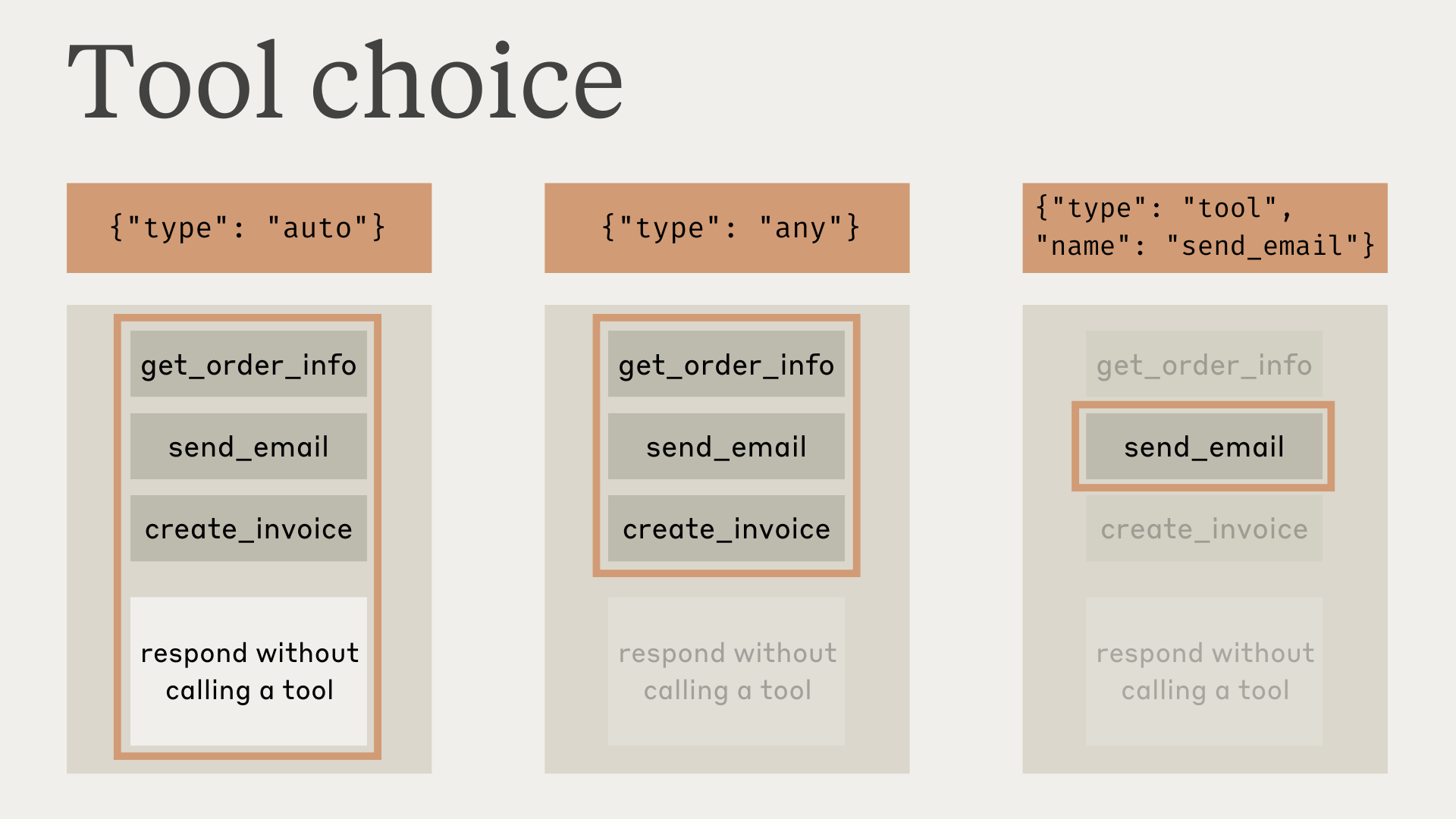
Note that when you have tool_choice as any or tool, the API prefills the assistant message to force a tool to be used. This means that the models will not emit a natural language response or explanation before tool_use content blocks, even if explicitly asked to do so.
Testing has shown that this should not reduce performance. If you would like the model to provide natural language context or explanations while still requesting that the model use a specific tool, you can use {"type": "auto"} for tool_choice (the default) and add explicit instructions in a user message. For example: What's the weather like in London? Use the get_weather tool in your response.
Model responses with tools
When using tools, Claude often comments on what it's doing or responds naturally to the user before calling tools.
For example, given the prompt "What's the weather like in San Francisco right now, and what time is it there?", Claude might respond with:
{
  "role": "assistant",
  "content": [
    {
      "type": "text",
      "text": "I'll help you check the current weather and time in San Francisco."
    },
    {
      "type": "tool_use",
      "id": "toolu_01A09q90qw90lq917835lq9",
      "name": "get_weather",
      "input": { "location": "San Francisco, CA" }
    }
  ]
}
This natural response style helps users understand what Claude is doing and creates a more conversational interaction. You can guide the style and content of these responses through your system prompts and by providing <examples> in your prompts.
It's important to note that Claude may use various phrasings and approaches when explaining its actions. Your code should treat these responses like any other assistant-generated text, and not rely on specific formatting conventions.
Next steps
Parse tool_use blocks and format tool_result responses.
Let the SDK handle the agentic loop automatically.
Directory of Anthropic-provided tools and optional properties.
Was this page helpful?