Loading...
Loading...
Loading...
Loading...
Loading...
Loading...
Loading...
Loading...
Loading...
Loading...
Loading...
Loading...
Loading...
Loading...
Loading...
Loading...
Prompt caching optimizes your API usage by allowing resuming from specific prefixes in your prompts. This significantly reduces processing time and costs for repetitive tasks or prompts with consistent elements.
This feature is eligible for Zero Data Retention (ZDR). When your organization has a ZDR arrangement, data sent through this feature is not stored after the API response is returned.
There are two ways to enable prompt caching:
cache_control field at the top level of your request. The system automatically applies the cache breakpoint to the last cacheable block and moves it forward as conversations grow. Best for multi-turn conversations where the growing message history should be cached automatically.cache_control directly on individual content blocks for fine-grained control over exactly what gets cached.The simplest way to start is with automatic caching:
client = anthropic.Anthropic()

response = client.messages.create(
    model="claude-opus-4-7",
    max_tokens=1024,
    cache_control={"type": "ephemeral"},
    system="You are an AI assistant tasked with analyzing literary works. Your goal is to provide insightful commentary on themes, characters, and writing style.",
    messages=[
        {
            "role": "user",
            "content": "Analyze the major themes in 'Pride and Prejudice'.",
        }
    ],
)
print(response.usage.model_dump_json())
With automatic caching, the system caches all content up to and including the last cacheable block. On subsequent requests with the same prefix, cached content is reused automatically.
When you send a request with prompt caching enabled:
This is especially useful for:
By default, the cache has a 5-minute lifetime. The cache is refreshed for no additional cost each time the cached content is used.
If you find that 5 minutes is too short, Anthropic also offers a 1-hour cache duration at additional cost.
For more information, see 1-hour cache duration.
Prompt caching caches the full prefix
Prompt caching references the entire prompt - tools, system, and messages (in that order) up to and including the block designated with cache_control.
Prompt caching introduces a new pricing structure. The table below shows the price per million tokens for each supported model:
| Model | Base Input Tokens | 5m Cache Writes | 1h Cache Writes | Cache Hits & Refreshes | Output Tokens |
|---|---|---|---|---|---|
| Claude Opus 4.7 | $5 / MTok | $6.25 / MTok | $10 / MTok | $0.50 / MTok | $25 / MTok |
| Claude Opus 4.6 | $5 / MTok | $6.25 / MTok | $10 / MTok | $0.50 / MTok | $25 / MTok |
| Claude Opus 4.5 | $5 / MTok | $6.25 / MTok | $10 / MTok | $0.50 / MTok | $25 / MTok |
| Claude Opus 4.1 | $15 / MTok | $18.75 / MTok | $30 / MTok | $1.50 / MTok | $75 / MTok |
| Claude Opus 4 (deprecated) | $15 / MTok | $18.75 / MTok | $30 / MTok | $1.50 / MTok | $75 / MTok |
| Claude Sonnet 4.6 | $3 / MTok | $3.75 / MTok | $6 / MTok | $0.30 / MTok | $15 / MTok |
| Claude Sonnet 4.5 | $3 / MTok | $3.75 / MTok | $6 / MTok | $0.30 / MTok | $15 / MTok |
| Claude Sonnet 4 (deprecated) | $3 / MTok | $3.75 / MTok | $6 / MTok | $0.30 / MTok | $15 / MTok |
| Claude Haiku 4.5 | $1 / MTok | $1.25 / MTok | $2 / MTok | $0.10 / MTok | $5 / MTok |
| Claude Haiku 3.5 (retired, except on Bedrock and Vertex AI) | $0.80 / MTok | $1 / MTok | $1.60 / MTok | $0.08 / MTok | $4 / MTok |
The table above reflects the following pricing multipliers for prompt caching:
These multipliers stack with other pricing modifiers such as the Batch API discount and data residency. See pricing for full details.
Prompt caching (both automatic and explicit) is supported on all active Claude models.
Automatic caching is the simplest way to enable prompt caching. Instead of placing cache_control on individual content blocks, add a single cache_control field at the top level of your request body. The system automatically applies the cache breakpoint to the last cacheable block.
client = anthropic.Anthropic()

response = client.messages.create(
    model="claude-opus-4-7",
    max_tokens=1024,
    cache_control={"type": "ephemeral"},
    system="You are a helpful assistant that remembers our conversation.",
    messages=[
        {"role": "user", "content": "My name is Alex. I work on machine learning."},
        {
            "role": "assistant",
            "content": "Nice to meet you, Alex! How can I help with your ML work today?",
        },
        {"role": "user", "content": "What did I say I work on?"},
    ],
)
print(response.usage.model_dump_json())With automatic caching, the cache point moves forward automatically as conversations grow. Each new request caches everything up to the last cacheable block, and previous content is read from cache.
| Request | Content | Cache behavior |
|---|---|---|
| Request 1 | System + User(1) + Asst(1) + User(2) ◀ cache | Everything written to cache |
| Request 2 | System + User(1) + Asst(1) + User(2) + Asst(2) + User(3) ◀ cache | System through User(2) read from cache; Asst(2) + User(3) written to cache |
| Request 3 | System + User(1) + Asst(1) + User(2) + Asst(2) + User(3) + Asst(3) + User(4) ◀ cache | System through User(3) read from cache; Asst(3) + User(4) written to cache |
The cache breakpoint automatically moves to the last cacheable block in each request, so you don't need to update any cache_control markers as the conversation grows.
By default, automatic caching uses a 5-minute TTL. You can specify a 1-hour TTL at 2x the base input token price:
{ "cache_control": { "type": "ephemeral", "ttl": "1h" } }Automatic caching is compatible with explicit cache breakpoints. When used together, the automatic cache breakpoint uses one of the 4 available breakpoint slots.
This lets you combine both approaches. For example, use an explicit breakpoint to cache your system prompt, while automatic caching handles the conversation:
{
  "model": "claude-opus-4-7",
  "max_tokens": 1024,
  "cache_control": { "type": "ephemeral" },
  "system": [
    {
      "type": "text",
      "text": "You are a helpful assistant.",
      "cache_control": { "type": "ephemeral" }
    }
  ],
  "messages": [{ "role": "user", "content": "What are the key terms?" }]
}Automatic caching uses the same underlying caching infrastructure. Pricing, minimum token thresholds, context ordering requirements, and the 20-block lookback window all apply the same as with explicit breakpoints.
cache_control with the same TTL, automatic caching is a no-op.cache_control with a different TTL, the API returns a 400 error.Automatic caching is available on the Claude API, Claude Platform on AWS, and Microsoft Foundry (beta). Bedrock and Vertex AI do not support automatic caching.
For more control over caching, you can place cache_control directly on individual content blocks. This is useful when you need to cache different sections that change at different frequencies, or need fine-grained control over exactly what gets cached.
Place static content (tool definitions, system instructions, context, examples) at the beginning of your prompt. Mark the end of the reusable content for caching using the cache_control parameter.
Cache prefixes are created in the following order: tools, system, then messages. This order forms a hierarchy where each level builds upon the previous ones.
You can use just one cache breakpoint at the end of your static content, and the system will automatically find the longest prefix that a prior request already wrote to the cache. Understanding how this works helps you optimize your caching strategy.
Three core principles:
Cache writes happen only at your breakpoint. Marking a block with cache_control writes exactly one cache entry: a hash of the prefix ending at that block. The system does not write entries for any earlier position. Because the hash is cumulative, covering everything up to and including the breakpoint, changing any block at or before the breakpoint produces a different hash on the next request.
Cache reads look backward for entries that prior requests wrote. On each request the system computes the prefix hash at your breakpoint and checks for a matching cache entry. If none exists, it walks backward one block at a time, checking whether the prefix hash at each earlier position matches something already in the cache. It is looking for prior writes, not for stable content.
The lookback window is 20 blocks. The system checks at most 20 positions per breakpoint, counting the breakpoint itself as the first. If the system finds no matching entry in that window, checking stops (or resumes from the next explicit breakpoint, if any).
Example: Lookback in a growing conversation
You append new blocks each turn and set cache_control on the final block of each request:
Common mistake: Breakpoint on content that changes every request
Your prompt has a large static system context (blocks 1 through 5) followed by a per-request block containing a timestamp and the user message (block 6). You set cache_control on block 6:
The lookback does not find stable content behind your breakpoint and cache it. It finds entries that prior requests already wrote, and writes happen only at breakpoints. Move cache_control to block 5, the last block that stays the same across requests, and every subsequent request reads the cached prefix. Automatic caching hits the same trap: it places the breakpoint on the last cacheable block, which in this structure is the one that changes every request, so use an explicit breakpoint on block 5 instead.
Key takeaway: Place cache_control on the last block whose prefix is identical across the requests you want to share a cache. In a growing conversation the final block works as long as each turn adds fewer than 20 blocks: earlier content never changes, so the next request's lookback finds the prior write. For a prompt with a varying suffix (timestamps, per-request context, the incoming message), place the breakpoint at the end of the static prefix, not on the varying block.
You can define up to 4 cache breakpoints if you want to:
Important limitation: The lookback can only find entries that earlier requests already wrote. If a growing conversation pushes your breakpoint 20 or more blocks past the last write, the lookback window misses it. Add a second breakpoint closer to that position from the start so a write accumulates there before you need it.
Cache breakpoints themselves don't add any cost. You are only charged for:
Adding more cache_control breakpoints doesn't increase your costs - you still pay the same amount based on what content is actually cached and read. The breakpoints simply give you control over what sections can be cached independently.
On the Claude API, Claude Platform on AWS, Vertex AI, and Microsoft Foundry (beta), the minimum cacheable prompt length is:
Model availability varies by platform.
Shorter prompts cannot be cached, even if marked with cache_control. Any requests to cache fewer than this number of tokens will be processed without caching, and no error is returned. To verify whether a prompt was cached, check the response usage fields: if both cache_creation_input_tokens and cache_read_input_tokens are 0, the prompt was not cached (likely because it did not meet the minimum length requirement).
If your prompt falls just short of the minimum for your model and platform, expanding the cached content to reach the threshold is often worthwhile. Cache reads cost significantly less than uncached input tokens, so reaching the minimum can reduce costs for frequently reused prompts.
Bedrock is an AWS-operated platform. On Bedrock, see the Bedrock prompt caching documentation for the per-model minimums, failure behavior, and usage-field names that apply.
For concurrent requests, note that a cache entry only becomes available after the first response begins. If you need cache hits for parallel requests, wait for the first response before sending subsequent requests.
Currently, "ephemeral" is the only supported cache type, which by default has a 5-minute lifetime.
Most blocks in the request can be cached. This includes:
tools arraysystem arraymessages.content array, for both user and assistant turnsmessages.content array, in user turnsmessages.content array, in both user and assistant turnsEach of these elements can be cached, either automatically or by marking them with cache_control.
While most request blocks can be cached, there are some exceptions:
Thinking blocks cannot be cached directly with cache_control. However, thinking blocks CAN be cached alongside other content when they appear in previous assistant turns. When cached this way, they DO count as input tokens when read from cache.
Sub-content blocks (like citations) themselves cannot be cached directly. Instead, cache the top-level block.
In the case of citations, the top-level document content blocks that serve as the source material for citations can be cached. This allows you to use prompt caching with citations effectively by caching the documents that citations will reference.
Empty text blocks cannot be cached.
Modifications to cached content can invalidate some or all of the cache.
As described in Structuring your prompt, the cache follows the hierarchy: tools → system → messages. Changes at each level invalidate that level and all subsequent levels.
The following table shows which parts of the cache are invalidated by different types of changes. ✘ indicates that the cache is invalidated, while ✓ indicates that the cache remains valid.
| What changes | Tools cache | System cache | Messages cache | Impact |
|---|---|---|---|---|
| Tool definitions | ✘ | ✘ | ✘ | Modifying tool definitions (names, descriptions, parameters) invalidates the entire cache |
| Web search toggle | ✓ | ✘ | ✘ | Enabling/disabling web search modifies the system prompt |
| Citations toggle | ✓ | ✘ | ✘ | Enabling/disabling citations modifies the system prompt |
| Speed setting | ✓ | ✘ | ✘ | Switching between speed: "fast" and standard speed invalidates system and message caches |
| Tool choice | ✓ | ✓ | ✘ | Changes to tool_choice parameter only affect message blocks |
| Images | ✓ | ✓ | ✘ | Adding/removing images anywhere in the prompt affects message blocks |
| Thinking parameters | ✓ | ✓ | ✘ | Changes to extended thinking settings (enable/disable, budget) affect message blocks |
| Non-tool results passed to extended thinking requests | ✓ | ✓ | Model-specific | On Opus 4.5+ and Sonnet 4.6+, thinking blocks are preserved by default, so the cache remains valid (✓). On earlier Opus/Sonnet models and all Haiku models, all previously-cached thinking blocks are stripped from context, and any messages that follow those thinking blocks are removed from the cache (✘). For more details, see Caching with thinking blocks. |
Monitor cache performance using these API response fields, within usage in the response (or message_start event if streaming):
cache_creation_input_tokens: Number of tokens written to the cache when creating a new entry.cache_read_input_tokens: Number of tokens retrieved from the cache for this request.input_tokens: Number of input tokens which were not read from or used to create a cache (that is, tokens after the last cache breakpoint).Understanding the token breakdown
The input_tokens field represents only the tokens that come after the last cache breakpoint in your request - not all the input tokens you sent.
To calculate total input tokens:
total_input_tokens = cache_read_input_tokens + cache_creation_input_tokens + input_tokensSpatial explanation:
cache_read_input_tokens = tokens before breakpoint already cached (reads)cache_creation_input_tokens = tokens before breakpoint being cached now (writes)input_tokens = tokens after your last breakpoint (not eligible for cache)Example: If you have a request with 100,000 tokens of cached content (read from cache), 0 tokens of new content being cached, and 50 tokens in your user message (after the cache breakpoint):
cache_read_input_tokens: 100,000cache_creation_input_tokens: 0input_tokens: 50This is important for understanding both costs and rate limits, as input_tokens will typically be much smaller than your total input when using caching effectively.
When using extended thinking with prompt caching, thinking blocks have special behavior:
Automatic caching alongside other content: While thinking blocks cannot be explicitly marked with cache_control, they get cached as part of the request content when you make subsequent API calls with tool results. This commonly happens during tool use when you pass thinking blocks back to continue the conversation.
Input token counting: When thinking blocks are read from cache, they count as input tokens in your usage metrics. This is important for cost calculation and token budgeting.
Cache invalidation patterns:
cache_control markersFor more details on cache invalidation, see What invalidates the cache.
Example with tool use:
Request 1: User: "What's the weather in Paris?"
Response: [thinking_block_1] + [tool_use block 1]

Request 2:
User: ["What's the weather in Paris?"],
Assistant: [thinking_block_1] + [tool_use block 1],
User: [tool_result_1, cache=True]
Response: [thinking_block_2] + [text block 2]
# Request 2 caches its request content (not the response)
# The cache includes: user message, thinking_block_1, tool_use block 1, and tool_result_1

Request 3:
User: ["What's the weather in Paris?"],
Assistant: [thinking_block_1] + [tool_use block 1],
User: [tool_result_1, cache=True],
Assistant: [thinking_block_2] + [text block 2],
User: [Text response, cache=True]
# On earlier Opus/Sonnet and all Haiku models, non-tool-result user block causes prior thinking blocks to be stripped; on Opus 4.5+/Sonnet 4.6+ they are kept
On earlier Opus/Sonnet models and all Haiku models, all previous thinking blocks are removed from context at this point. On Opus 4.5+ and Sonnet 4.6+, prior thinking blocks are kept by default and remain part of the cached prefix.
For more detailed information, see the extended thinking documentation.
As of February 5, 2026, prompt caching uses workspace-level isolation instead of organization-level isolation. Caches are isolated per workspace, ensuring data separation between workspaces within the same organization. This applies to the Claude API, Claude Platform on AWS, and Microsoft Foundry (beta); Bedrock and Vertex AI maintain organization-level cache isolation. If you use multiple workspaces, review your caching strategy to account for this difference.
Organization and workspace isolation: Caches are isolated between organizations. Different organizations never share caches, even if they use identical prompts. As of February 5, 2026, caches are also isolated per workspace within an organization on the Claude API, Claude Platform on AWS, and Microsoft Foundry (beta); Bedrock and Vertex AI continue to use organization-level isolation only.
Exact matching: Cache hits require 100% identical prompt segments, including all text and images up to and including the block marked with cache control.
Output token generation: Prompt caching has no effect on output token generation. The response you receive is identical to what you would get if prompt caching were not used.
To optimize prompt caching performance:
Tailor your prompt caching strategy to your scenario:
If experiencing unexpected behavior:
cache_control markers are in the same locationstool_choice and image usage remain consistent between callstool_use content blocks have stable ordering as some languages (for example, Swift, Go) randomize key order during JSON conversion, breaking cachesChanges to tool_choice or the presence/absence of images anywhere in the prompt will invalidate the cache, requiring a new cache entry to be created. For more details on cache invalidation, see What invalidates the cache.
If you find that 5 minutes is too short, Anthropic also offers a 1-hour cache duration at additional cost.
The 1-hour cache duration is available on the Claude API, Claude Platform on AWS, Vertex AI, and Microsoft Foundry (beta). Bedrock does not support the 1-hour cache duration.
To use the extended cache, include ttl in the cache_control definition like this:
"cache_control": {
  "type": "ephemeral",
  "ttl": "1h"
}
The response will include detailed cache information like the following:
{
  "usage": {
    "input_tokens": 2048,
    "cache_read_input_tokens": 1800,
    "cache_creation_input_tokens": 248,
    "output_tokens": 503,

    "cache_creation": {
      "ephemeral_5m_input_tokens": 148,
      "ephemeral_1h_input_tokens": 100
    }
  }
}
Note that the current cache_creation_input_tokens field equals the sum of the values in the cache_creation object.
If you have prompts that are used at a regular cadence (that is, system prompts that are used more frequently than every 5 minutes), continue to use the 5-minute cache, since this will continue to be refreshed at no additional charge.
The 1-hour cache is best used in the following scenarios:
The 5-minute and 1-hour cache behave the same with respect to latency. You will generally see improved time-to-first-token for long documents.
You can use both 1-hour and 5-minute cache controls in the same request, but with an important constraint: Cache entries with longer TTL must appear before shorter TTLs (that is, a 1-hour cache entry must appear before any 5-minute cache entries).
When mixing TTLs, the API determines three billing locations in your prompt:
A: The token count at the highest cache hit (or 0 if no hits).B: The token count at the highest 1-hour cache_control block after A (or equals A if none exist).C: The token count at the last cache_control block.If B and/or C are larger than A, they will necessarily be cache misses, because A is the highest cache hit.
You'll be charged for:
A.(B - A).(C - B).Here are 3 examples. This depicts the input tokens of 3 requests, each of which has different cache hits and cache misses. Each has a different calculated pricing, shown in the colored boxes, as a result.
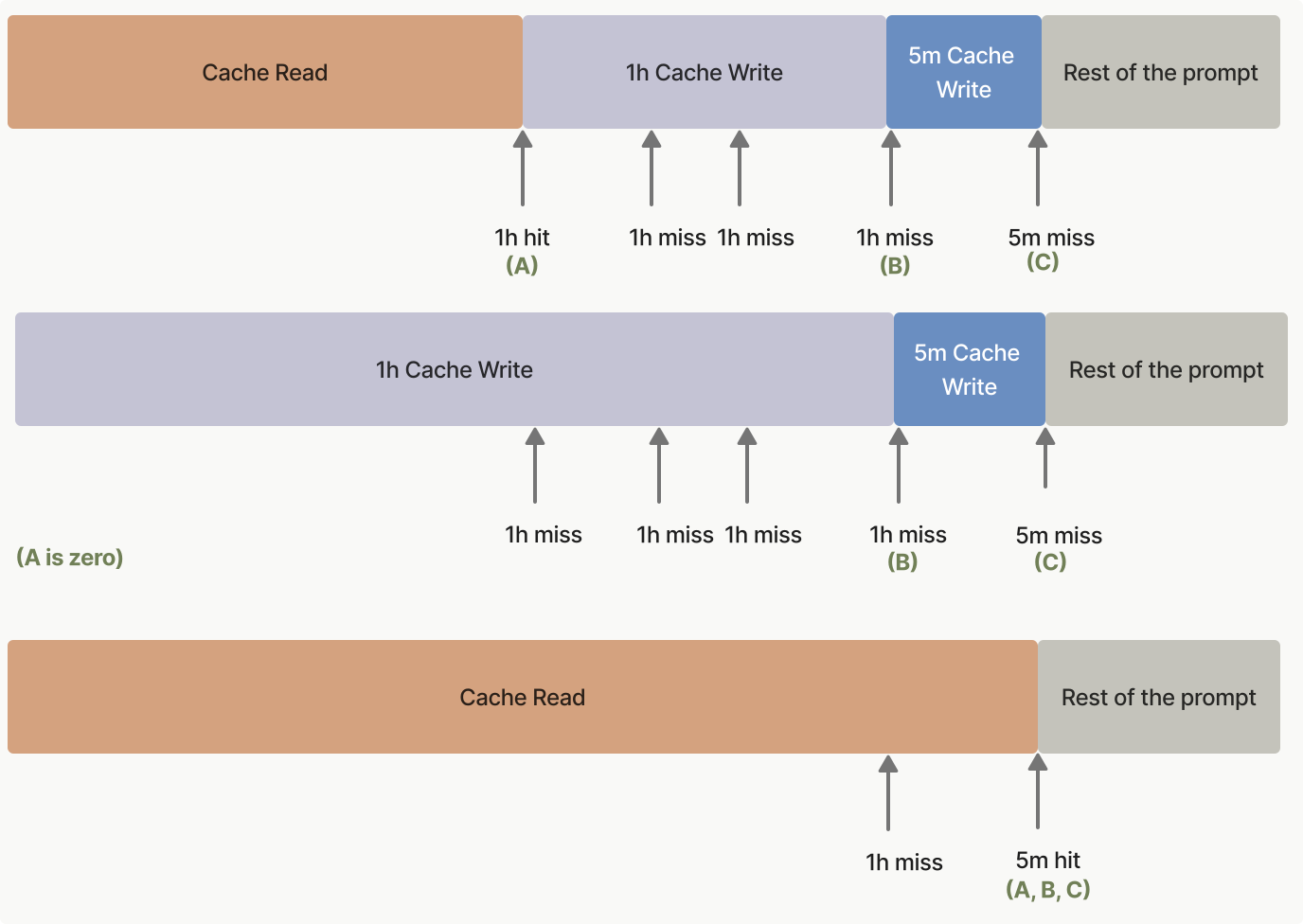
Cache pre-warming lets you load your system prompt or tool definitions into the prompt cache before a user triggers a real request. This eliminates the cache-miss latency penalty on the first user interaction, reducing time-to-first-token (TTFT) for latency-sensitive applications.
Set max_tokens: 0 in your request. The API runs the full prefill phase (reading your prompt into the model and writing the cache at any cache_control breakpoint), then returns immediately without generating any output. The response has an empty content array, stop_reason: "max_tokens", and a fully populated usage block.
Place the cache_control breakpoint on the last block that is shared with the follow-up request (typically your system prompt or tool definitions), not on the placeholder user message. Otherwise the cache entry is keyed to the placeholder and the follow-up request won't hit it. This means using an explicit cache breakpoint rather than automatic caching, since automatic caching places the breakpoint on the last block, which here is the placeholder. The placeholder user message can be any string with non-whitespace content (the examples here use "warmup"); its content is read during prefill but never answered.
A pre-warm request incurs a cache write charge if the prefix is not already cached, the same as any other request. Check usage.cache_creation_input_tokens in the response to confirm a write occurred. Zero output tokens are billed.
client = anthropic.Anthropic()

# Fire this before users arrive to warm the shared system-prompt cache.
prewarm = client.messages.create(
    model="claude-opus-4-7",
    max_tokens=0,
    system=[
        {
            "type": "text",
            "text": "You are an expert software engineer with deep knowledge of distributed systems...",
            "cache_control": {"type": "ephemeral"},
        }
    ],
    messages=[{"role": "user", "content": "warmup"}],
)
print(prewarm.stop_reason)  # "max_tokens"
print(prewarm.content)  # []
print(prewarm.usage)
The API returns an empty content array:
{
  "id": "msg_01XFDUDYJgAACzvnptvVoYEL",
  "type": "message",
  "role": "assistant",
  "content": [],
  "model": "claude-opus-4-7-20251101",
  "stop_reason": "max_tokens",
  "stop_sequence": null,
  "usage": {
    "input_tokens": 8,
    "cache_creation_input_tokens": 5120,
    "cache_read_input_tokens": 0,
    "cache_creation": {
      "ephemeral_5m_input_tokens": 5120,
      "ephemeral_1h_input_tokens": 0
    },
    "iterations": [
      {
        "input_tokens": 8,
        "output_tokens": 0,
        "cache_read_input_tokens": 0,
        "cache_creation_input_tokens": 5120,
        "cache_creation": {
          "ephemeral_5m_input_tokens": 5120,
          "ephemeral_1h_input_tokens": 0
        },
        "type": "message"
      }
    ],
    "output_tokens": 0,
    "service_tier": "standard",
    "inference_geo": "global"
  }
}Fire a pre-warm request when your application starts (or on a scheduled interval), then send real user requests after the pre-warm completes:
client = anthropic.Anthropic()

SYSTEM_PROMPT = [
    {
        "type": "text",
        "text": "You are an expert software engineer with deep knowledge of distributed systems...",
        "cache_control": {"type": "ephemeral"},
    }
]


def prewarm_cache() -> None:
    """Call this at application startup or on a scheduled interval."""
    client.messages.create(
        model="claude-opus-4-7",
        max_tokens=0,
        system=SYSTEM_PROMPT,
        messages=[{"role": "user", "content": "warmup"}],
    )


def respond(user_message: str) -> anthropic.types.Message:
    """The real user request; benefits from a warm cache."""
    return client.messages.create(
        model="claude-opus-4-7",
        max_tokens=1024,
        system=SYSTEM_PROMPT,
        messages=[{"role": "user", "content": user_message}],
    )


# Warm the cache before any user traffic arrives.
prewarm_cache()

# Later, when the user submits a message, the system-prompt prefix is already cached.
response = respond("How do I implement a binary search tree?")
print(response.content[0].text)
Keep in mind that the cache TTL still applies. For the default 5-minute cache, send a new pre-warm request at least every 5 minutes to keep the cache warm. For longer gaps between user requests, use the 1-hour cache duration instead.
A max_tokens: 0 request is rejected with an invalid_request_error if any of the following are set, since each implies output that a zero-token budget cannot produce:
stream: truethinking.type: "enabled")output_config.format)tool_choice of {"type": "tool", ...} or {"type": "any"}max_tokens: 0 is also rejected inside a Message Batches request. Pre-warming targets time-to-first-token, which does not apply to batch processing, and a cache entry written during batch processing would likely expire before the follow-up request runs.
Before max_tokens: 0 was available, some applications used max_tokens: 1 warm-up calls to achieve the same effect. The max_tokens: 0 approach is preferred: no output is produced, so there is no single-token reply to discard, no output tokens are billed, and the intent of the request is unambiguous.
To help you get started with prompt caching, the prompt caching cookbook provides detailed examples and best practices.
The following code snippets showcase various prompt caching patterns. These examples demonstrate how to implement caching in different scenarios, helping you understand the practical applications of this feature:
Prompt caching (both automatic and explicit) is ZDR eligible. Anthropic does not store the raw text of your prompts or Claude's responses.
KV (key-value) cache representations and cryptographic hashes of cached content are held in memory only and are not stored at rest. Cached entries have a minimum lifetime of 5 minutes (standard) or 1 hour (extended), after which they are promptly, though not immediately, deleted. Cache entries are isolated between organizations and, on the Claude API, Claude Platform on AWS, and Microsoft Foundry (beta), between workspaces within an organization.
For ZDR eligibility across all features, see API and data retention.
Was this page helpful?