Loading...
Loading...
Loading...
Loading...
Loading...
Loading...
Loading...
Loading...
Loading...
Loading...
Loading...
Loading...
Loading...
Loading...
Loading...
Loading...
This feature is eligible for Zero Data Retention (ZDR). When your organization has a ZDR arrangement, data sent through this feature is not stored after the API response is returned.
As conversations grow, you'll eventually approach context window limits. For long-running conversations and agentic workflows, server-side compaction is the primary strategy for context management.
The "context window" refers to all the text a language model can reference when generating a response, including the response itself. This is different from the large corpus of data the language model was trained on, and instead represents a "working memory" for the model. A larger context window allows the model to handle more complex and lengthy prompts, but more context isn't automatically better. As token count grows, accuracy and recall degrade, a phenomenon known as context rot. This makes curating what's in context just as important as how much space is available.
For more on why long contexts degrade and how to engineer around it, see Effective context engineering.
The following diagram illustrates the standard context window behavior for API requests1:
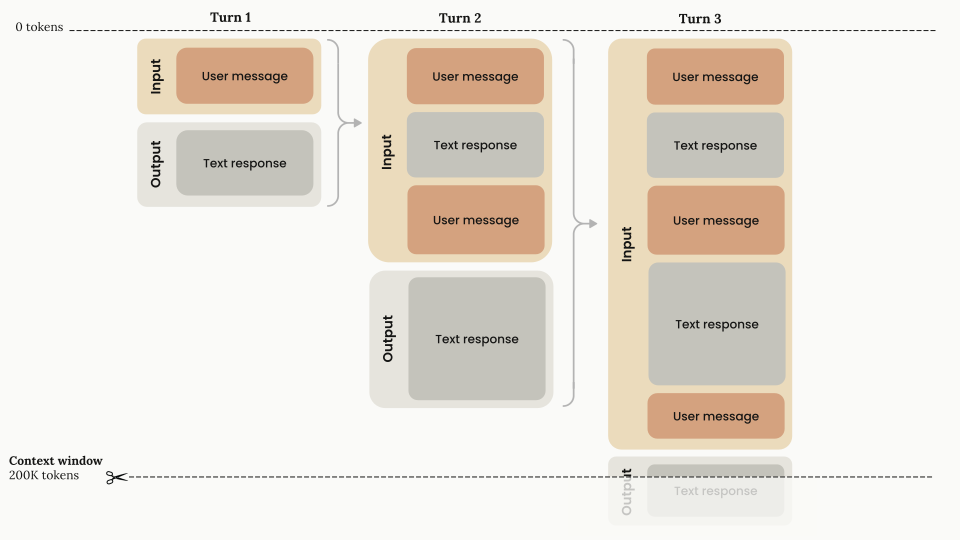
1Chat interfaces such as claude.ai can also manage the context window on a rolling "first in, first out" basis.
Everything in the request counts toward the context window: the system prompt, every message in messages (including tool results, images, and documents), and your tool definitions. The output Claude generates for the turn, including its extended thinking, counts too. Every response reports what the request consumed in its usage field. If you use prompt caching, the input count is split across input_tokens, cache_read_input_tokens, and cache_creation_input_tokens, and all three count toward the window. To estimate a request before you send it, use the token counting API.
Claude Opus 4.8, Claude Opus 4.7, Claude Opus 4.6, Claude Sonnet 5, and Claude Sonnet 4.6 have a 1M-token context window on the Claude API, Amazon Bedrock, Google Cloud, and Microsoft Foundry. Claude Mythos Preview also has a 1M-token context window.
Claude Fable 5 and Claude Mythos 5 (claude-fable-5 and claude-mythos-5) have a 1M-token context window, and a single request to these models can generate up to 128k output tokens (max_tokens). Other Claude models, including Claude Sonnet 4.5, have a 200k-token context window.
For every model with a 1M-token context window, 1M is the default: you don't need a beta header, and long-context requests are billed at standard pricing.
A single request can include up to 600 images or PDF pages (100 for models with a 200k-token context window). If you send many images or large documents, you might reach request size limits before the token limit.
See the model comparison table for a list of context window sizes by model.
With extended thinking, all input and output tokens, including thinking tokens, count toward the context window limit, with a few nuances in multi-turn situations.
The thinking budget tokens are a subset of your max_tokens parameter, are billed as output tokens, and count toward rate limits. With adaptive thinking, Claude determines its thinking allocation dynamically, so thinking token usage varies from request to request.
Whether thinking blocks from previous assistant turns stay in the context window depends on the model. On Claude Opus 4.5 and later Opus models, Claude Sonnet 4.6 and later Sonnet models, Claude Fable 5, Claude Mythos 5, and Claude Mythos Preview, the API keeps previous thinking blocks by default, and they count toward the context window like any other input tokens. On earlier Opus and Sonnet models and all Haiku models, the API automatically strips previous thinking blocks from the conversation history when you pass them back, which preserves token capacity for conversation content. For the per-model defaults, see thinking block preservation by model. To override the default in either direction, use thinking block clearing.
The following diagram shows how tokens are managed when extended thinking is enabled on a model that strips previous thinking blocks:
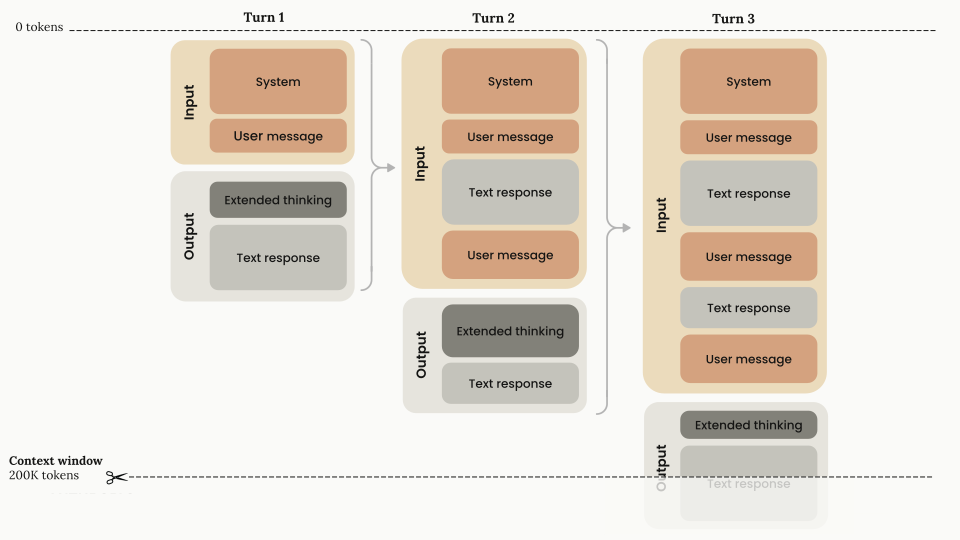
You can read more about the context window and extended thinking in the Extended thinking guide.
The following diagram illustrates how tokens are managed when you combine extended thinking with tool use on a model that strips previous thinking blocks:
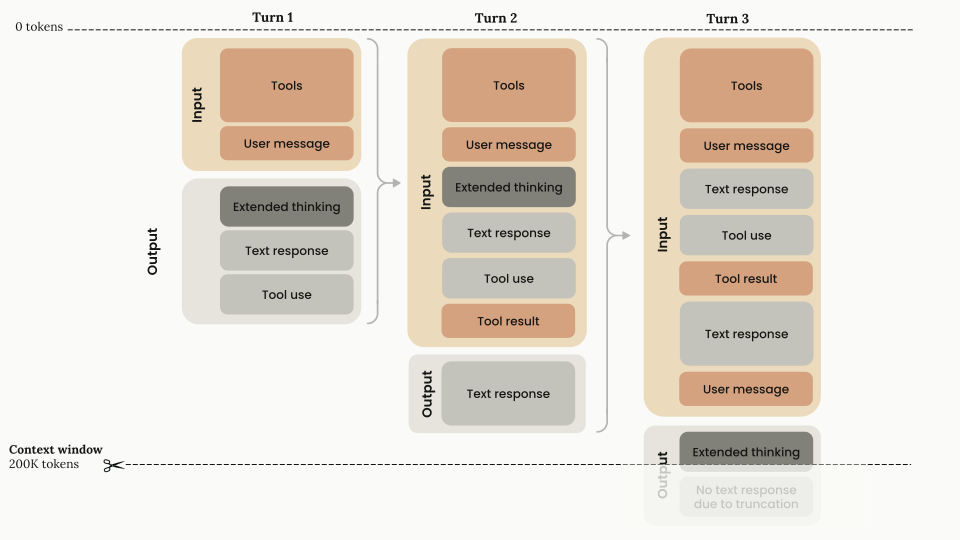
First turn architecture
Tool result handling (turn 2)
tool_result. You must return the extended thinking block with the corresponding tool results. This is the only case where you have to return thinking blocks.user message, unless interleaved thinking is enabled).New user turn (turn 3)
user turn.user turn outside the tool use cycle, Claude generates a new extended thinking block and continues from there.assistant turn.Most current Claude models support interleaved thinking, which lets Claude think between tool calls, including after it receives tool results. It is automatic on models with adaptive thinking. Claude Opus 4.5, Claude Sonnet 4.5, and earlier Claude 4 models require the interleaved-thinking-2025-05-14 beta header.
For more information about using tools with extended thinking, see Extended thinking with tool use.
To reduce the context consumed by the tool definitions themselves, see Manage tool context, or defer tool definitions with the tool search tool.
Claude Sonnet 5, Claude Sonnet 4.6, Claude Sonnet 4.5, and Claude Haiku 4.5 have context awareness: these models track their remaining context window (their "token budget") throughout a conversation. This lets the model manage long-running tasks against the space that remains rather than guess how many tokens are left. Context awareness is automatic: there is nothing for you to enable, and you never send the tags shown in this section yourself. The API injects them.
In the system prompt of every request, the API gives Claude its total context window:
<budget:token_budget>200000</budget:token_budget>The budget matches the context window available to your request: 1M tokens for Claude Sonnet 5 and Claude Sonnet 4.6, and 200k tokens for Claude Sonnet 4.5 and Claude Haiku 4.5. The examples in this section show a model with a 200k-token context window.
After each tool call, the API gives Claude an update on its remaining capacity:
<system_warning>Token usage: 35000/200000; 165000 remaining</system_warning>Image tokens are included in these budgets.
Newer models don't receive these injected tags. On Claude Opus 4.7 and later, Claude Fable 5, and Claude Mythos 5, you can give the model an explicit budget with task budgets, which are in beta.
For agents that span multiple sessions, design your state artifacts so that context recovery is fast when a new session starts. The memory tool's multi-session pattern walks through a concrete approach. See also Effective harnesses for long-running agents.
For prompting guidance on using context awareness, see Prompting best practices.
If your conversations regularly approach context window limits, use server-side compaction. Compaction automatically summarizes earlier parts of the conversation on the server, so the conversation can continue past the context window limit. It is available in beta for Claude Fable 5, Claude Mythos 5, Claude Opus 4.8, Claude Mythos Preview, Claude Opus 4.7, Claude Opus 4.6, Claude Sonnet 5, and Claude Sonnet 4.6.
For more specialized needs, context editing offers additional strategies:
Cached prompt prefixes still occupy the context window: prompt caching changes what you pay for those tokens, not whether they count.
If the input alone already exceeds the model's context window, the API returns a 400 invalid_request_error ("prompt is too long") on every model.
On Claude 4.5 models and newer, if input tokens plus max_tokens exceeds the context window size, the API accepts the request. If generation then reaches the context window limit, it stops with stop_reason: "model_context_window_exceeded". On earlier models, the API returns a validation error instead. To opt in to the model_context_window_exceeded behavior on those models, use the model-context-window-exceeded-2025-08-26 beta header. See Stop reasons and fallback for details.
To stay within context window limits, use the token counting API to estimate token usage before sending messages to Claude.
Server-side context compaction for managing long conversations that approach context window limits.
Automatically manage conversation context as it grows with context editing.
See the model comparison table for a list of context window sizes and input/output token pricing by model.
Give Claude enhanced reasoning for complex tasks and control how thinking content is returned.
Was this page helpful?