Loading...
Loading...
Loading...
Loading...
Loading...
Loading...
Loading...
Loading...
Loading...
Loading...
Loading...
Loading...
Loading...
Loading...
Loading...
Loading...
Was this page helpful?
扩展思考赋予 Claude 增强的推理能力,用于处理复杂任务,同时在提供最终答案之前,提供不同程度的逐步思考过程透明度。
以下模型支持扩展思考:
claude-opus-4-6) — 仅支持自适应思考;手动模式(type: "enabled")已弃用claude-opus-4-5-20251101)claude-opus-4-1-20250805)claude-opus-4-20250514)claude-sonnet-4-6) — 同时支持带交错模式的手动扩展思考和自适应思考claude-sonnet-4-5-20250929)claude-sonnet-4-20250514)claude-3-7-sonnet-20250219)(已弃用)claude-haiku-4-5-20251001)API 行为在 Claude Sonnet 3.7 和 Claude 4 模型之间有所不同,但 API 结构保持完全一致。
有关更多信息,请参阅不同模型版本之间的思考差异。
当扩展思考开启时,Claude 会创建 thinking 内容块,在其中输出其内部推理过程。Claude 在制定最终回复之前会整合这些推理中的洞察。
API 响应将包含 thinking 内容块,后跟 text 内容块。
以下是默认响应格式的示例:
{
  "content": [
    {
      "type": "thinking",
      "thinking": "Let me analyze this step by step...",
      "signature": "WaUjzkypQ2mUEVM36O2TxuC06KN8xyfbJwyem2dw3URve/op91XWHOEBLLqIOMfFG/UvLEczmEsUjavL...."
    },
    {
      "type": "text",
      "text": "Based on my analysis..."
    }
  ]
}
有关扩展思考响应格式的更多信息,请参阅 Messages API 参考。
以下是在 Messages API 中使用扩展思考的示例:
要开启扩展思考,请添加一个 thinking 对象,将 type 参数设置为 enabled,并将 budget_tokens 设置为扩展思考的指定 token 预算。对于 Claude Opus 4.6,我们建议改用 type: "adaptive" — 详情请参阅自适应思考。虽然 Opus 4.6 仍支持带 budget_tokens 的 type: "enabled",但它已被弃用,将在未来版本中移除。
budget_tokens 参数决定了 Claude 在其内部推理过程中允许使用的最大 token 数量。在 Claude 4 及更高版本的模型中,此限制适用于完整的思考 token,而不适用于摘要输出。更大的预算可以通过对复杂问题进行更深入的分析来提高响应质量,尽管 Claude 可能不会使用分配的全部预算,特别是在超过 32k 的范围内。
Claude Opus 4.6 支持最多 128K 输出 token。早期模型支持最多 64K 输出 token。
budget_tokens 必须设置为小于 max_tokens 的值。但是,当使用带工具的交错思考时,您可以超过此限制,因为 token 限制变为您的整个上下文窗口(200k token)。
With extended thinking enabled, the Messages API for Claude 4 models returns a summary of Claude's full thinking process. Summarized thinking provides the full intelligence benefits of extended thinking, while preventing misuse.
Here are some important considerations for summarized thinking:
Claude Sonnet 3.7 continues to return full thinking output.
In rare cases where you need access to full thinking output for Claude 4 models, contact our sales team.
您可以使用服务器发送事件 (SSE) 来流式传输扩展思考响应。
当为扩展思考启用流式传输时,您会通过 thinking_delta 事件接收思考内容。
有关通过 Messages API 进行流式传输的更多文档,请参阅流式消息。
以下是处理带思考的流式传输的方法:
流式输出示例:
event: message_start
data: {"type": "message_start", "message": {"id": "msg_01...", "type": "message", "role": "assistant", "content": [], "model": "claude-sonnet-4-6", "stop_reason": null, "stop_sequence": null}}

event: content_block_start
data: {"type": "content_block_start", "index": 0, "content_block": {"type": "thinking", "thinking": ""}}

event: content_block_delta
data: {"type": "content_block_delta", "index": 0, "delta": {"type": "thinking_delta", "thinking": "I need to find the GCD of 1071 and 462 using the Euclidean algorithm.\n\n1071 = 2 × 462 + 147"}}

event: content_block_delta
data: {"type": "content_block_delta", "index": 0, "delta": {"type": "thinking_delta", "thinking": "\n462 = 3 × 147 + 21\n147 = 7 × 21 + 0\n\nSo GCD(1071, 462) = 21"}}

// Additional thinking deltas...

event: content_block_delta
data: {"type": "content_block_delta", "index": 0, "delta": {"type": "signature_delta", "signature": "EqQBCgIYAhIM1gbcDa9GJwZA2b3hGgxBdjrkzLoky3dl1pkiMOYds..."}}

event: content_block_stop
data: {"type": "content_block_stop", "index": 0}

event: content_block_start
data: {"type": "content_block_start", "index": 1, "content_block": {"type": "text", "text": ""}}

event: content_block_delta
data: {"type": "content_block_delta", "index": 1, "delta": {"type": "text_delta", "text": "The greatest common divisor of 1071 and 462 is **21**."}}

// Additional text deltas...

event: content_block_stop
data: {"type": "content_block_stop", "index": 1}

event: message_delta
data: {"type": "message_delta", "delta": {"stop_reason": "end_turn", "stop_sequence": null}}

event: message_stop
data: {"type": "message_stop"}
当使用启用了思考的流式传输时,您可能会注意到文本有时以较大的块到达,与较小的逐 token 传输交替出现。这是预期行为,特别是对于思考内容。
流式传输系统需要批量处理内容以获得最佳性能,这可能导致这种"分块"传输模式,流式事件之间可能存在延迟。我们正在持续改进这一体验,未来的更新将专注于使思考内容的流式传输更加流畅。
扩展思考可以与工具使用一起使用,允许 Claude 对工具选择和结果处理进行推理。
在将扩展思考与工具使用结合时,请注意以下限制:
工具选择限制:带思考的工具使用仅支持 tool_choice: {"type": "auto"}(默认值)或 tool_choice: {"type": "none"}。使用 tool_choice: {"type": "any"} 或 tool_choice: {"type": "tool", "name": "..."} 将导致错误,因为这些选项会强制使用工具,这与扩展思考不兼容。
保留思考块:在工具使用期间,您必须将 thinking 块传回 API 以用于最后一条助手消息。将完整的未修改块传回 API 以保持推理连续性。
您不能在助手回合中途切换思考,包括在工具使用循环期间。整个助手回合应在单一思考模式下运行:
从模型的角度来看,工具使用循环是助手回合的一部分。助手回合在 Claude 完成其完整响应之前不会结束,这可能包括多次工具调用和结果。
例如,以下序列都是单个助手回合的一部分:
User: "What's the weather in Paris?"
Assistant: [thinking] + [tool_use: get_weather]
User: [tool_result: "20°C, sunny"]
Assistant: [text: "The weather in Paris is 20°C and sunny"]
即使有多条 API 消息,工具使用循环在概念上是一个连续助手响应的一部分。
当发生回合中途思考冲突时(例如在工具使用循环期间开启或关闭思考),API 会自动为该请求禁用思考。为了保持模型质量并保持在分布内,API 可能会:
这意味着尝试在回合中途切换思考不会导致错误,但思考将在该请求中被静默禁用。要确认思考是否处于活动状态,请检查响应中是否存在 thinking 块。
最佳实践:在每个回合开始时规划您的思考策略,而不是尝试在回合中途切换。
示例:在完成一个回合后切换思考
User: "What's the weather?"
Assistant: [tool_use] (thinking disabled)
User: [tool_result]
Assistant: [text: "It's sunny"]
User: "What about tomorrow?"
Assistant: [thinking] + [text: "..."] (thinking enabled - new turn)
通过在切换思考之前完成助手回合,您可以确保思考在新请求中确实被启用。
切换思考模式也会使消息历史的提示缓存失效。有关更多详情,请参阅扩展思考与提示缓存部分。
在工具使用期间,您必须将 thinking 块传回 API,并且必须将完整的未修改块传回 API。这对于维护模型的推理流程和对话完整性至关重要。
虽然您可以省略先前 assistant 角色回合中的 thinking 块,但我们建议在任何多轮对话中始终将所有思考块传回 API。API 将:
在对话中切换思考模式时,请记住整个助手回合(包括工具使用循环)必须在单一思考模式下运行。有关更多详情,请参阅在对话中切换思考模式。
当 Claude 调用工具时,它会暂停其响应构建以等待外部信息。当工具结果返回时,Claude 将继续构建该现有响应。这就需要在工具使用期间保留思考块,原因有以下几点:
推理连续性:思考块捕获了 Claude 导致工具请求的逐步推理过程。当您发布工具结果时,包含原始思考确保 Claude 可以从中断的地方继续其推理。
上下文维护:虽然工具结果在 API 结构中显示为用户消息,但它们是连续推理流的一部分。保留思考块可以在多次 API 调用之间维护这种概念流。有关上下文管理的更多信息,请参阅我们的上下文窗口指南。
重要提示:在提供 thinking 块时,连续 thinking 块的整个序列必须与模型在原始请求期间生成的输出匹配;您不能重新排列或修改这些块的序列。
Claude 4 模型中带工具使用的扩展思考支持交错思考,这使 Claude 能够在工具调用之间进行思考,并在收到工具结果后进行更复杂的推理。
通过交错思考,Claude 可以:
模型支持:
interleaved-thinking-2025-05-14 beta 头在 Opus 4.6 上已弃用,如果包含则会被安全忽略。thinking: {type: "enabled"})的 interleaved-thinking-2025-05-14 beta 头。您也可以使用自适应思考,它会自动启用交错思考。interleaved-thinking-2025-05-14 以启用交错思考。以下是交错思考的一些重要注意事项:
budget_tokens 可以超过 max_tokens 参数,因为它代表一个助手回合内所有思考块的总预算。interleaved-thinking-2025-05-14,不会产生任何效果(Opus 4.6 除外,在该模型上它已弃用并被安全忽略)。interleaved-thinking-2025-05-14 传递给 Claude Sonnet 4.6、Claude Opus 4.5、Claude Opus 4.1、Opus 4、Sonnet 4.5 或 Sonnet 4 以外的任何模型,您的请求将失败。提示缓存与思考结合使用有几个重要注意事项:
扩展思考任务通常需要超过 5 分钟才能完成。考虑使用 1 小时缓存持续时间来在较长的思考会话和多步骤工作流中保持缓存命中。
思考块上下文移除
缓存失效模式
在将扩展思考与工具使用结合时,思考块表现出特定的缓存行为,会影响 token 计数:
工作原理:
详细示例流程:
请求 1:
User: "What's the weather in Paris?"响应 1:
[thinking_block_1] + [tool_use block 1]请求 2:
User: ["What's the weather in Paris?"],
Assistant: [thinking_block_1] + [tool_use block 1],
User: [tool_result_1, cache=True]
响应 2:
[thinking_block_2] + [text block 2]请求 2 写入请求内容(而非响应)的缓存。缓存包括原始用户消息、第一个思考块、工具使用块和工具结果。
请求 3:
User: ["What's the weather in Paris?"],
Assistant: [thinking_block_1] + [tool_use block 1],
User: [tool_result_1, cache=True],
Assistant: [thinking_block_2] + [text block 2],
User: [Text response, cache=True]
对于 Claude Opus 4.5 及更高版本(包括 Claude Opus 4.6),默认情况下所有之前的思考块都会被保留。对于较旧的模型,由于包含了非工具结果的用户块,所有之前的思考块将被忽略。此请求将按以下方式处理:
User: ["What's the weather in Paris?"],
Assistant: [tool_use block 1],
User: [tool_result_1, cache=True],
Assistant: [text block 2],
User: [Text response, cache=True]
关键要点:
cache_control 标记,此缓存行为也会自动发生在较旧的 Claude 模型中(Claude Sonnet 3.7 之前),如果提示 token 和 max_tokens 的总和超过模型的上下文窗口,系统会自动调整 max_tokens 以适应上下文限制。这意味着您可以设置较大的 max_tokens 值,系统会根据需要静默减少它。
对于 Claude 3.7 和 4 系列模型,max_tokens(启用思考时包括您的思考预算)作为严格限制执行。如果提示 token + max_tokens 超过上下文窗口大小,系统现在将返回验证错误。
您可以阅读我们的上下文窗口指南以获得更深入的了解。
在启用思考的情况下计算上下文窗口使用量时,需要注意以下几点:
max_tokens 限制下图展示了启用扩展思考时的专门 token 管理方式:
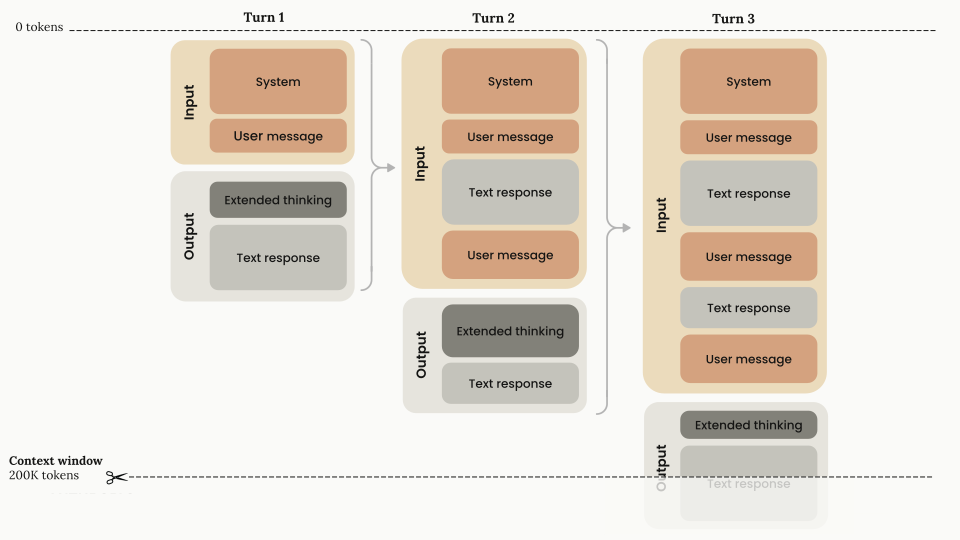
有效上下文窗口的计算方式为:
context window =
  (current input tokens - previous thinking tokens) +
  (thinking tokens + encrypted thinking tokens + text output tokens)
我们建议使用 token 计数 API 来获取您特定用例的准确 token 计数,特别是在处理包含思考的多轮对话时。
在将扩展思考与工具使用结合时,思考块必须被显式保留并与工具结果一起返回。
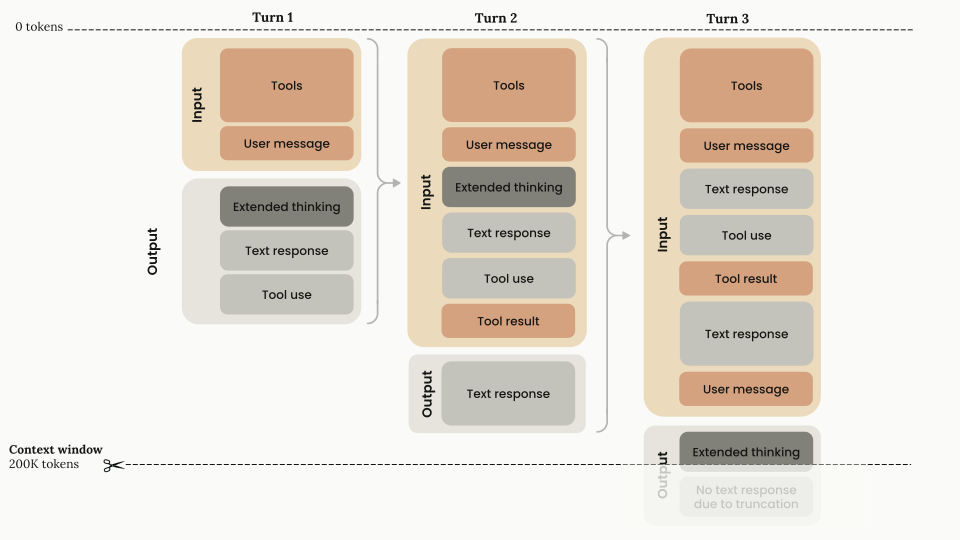
扩展思考与工具使用的有效上下文窗口计算变为:
context window =
  (current input tokens + previous thinking tokens + tool use tokens) +
  (thinking tokens + encrypted thinking tokens + text output tokens)
下图展示了扩展思考与工具使用的 token 管理方式:
鉴于扩展思考 Claude 3.7 和 4 系列模型的上下文窗口和 max_tokens 行为,您可能需要:
max_tokens 值此更改旨在提供更可预测和透明的行为,特别是在最大 token 限制已显著增加的情况下。
Full thinking content is encrypted and returned in the signature field. This field is used to verify that thinking blocks were generated by Claude when passed back to the API.
It is only strictly necessary to send back thinking blocks when using tools with extended thinking. Otherwise you can omit thinking blocks from previous turns, or let the API strip them for you if you pass them back.
If sending back thinking blocks, we recommend passing everything back as you received it for consistency and to avoid potential issues.
Here are some important considerations on thinking encryption:
signature_delta inside a content_block_delta event just before the content_block_stop event.signature values are significantly longer in Claude 4 models than in previous models.signature field is an opaque field and should not be interpreted or parsed - it exists solely for verification purposes.signature values are compatible across platforms (Claude APIs, Amazon Bedrock, and Vertex AI). Values generated on one platform will be compatible with another.Occasionally Claude's internal reasoning will be flagged by our safety systems. When this occurs, we encrypt some or all of the thinking block and return it to you as a redacted_thinking block. redacted_thinking blocks are decrypted when passed back to the API, allowing Claude to continue its response without losing context.
When building customer-facing applications that use extended thinking:
Here's an example showing both normal and redacted thinking blocks:
{
  "content": [
    {
      "type": "thinking",
      "thinking": "Let me analyze this step by step...",
      "signature": "WaUjzkypQ2mUEVM36O2TxuC06KN8xyfbJwyem2dw3URve/op91XWHOEBLLqIOMfFG/UvLEczmEsUjavL...."
    },
    {
      "type": "redacted_thinking",
      "data": "EmwKAhgBEgy3va3pzix/LafPsn4aDFIT2Xlxh0L5L8rLVyIwxtE3rAFBa8cr3qpPkNRj2YfWXGmKDxH4mPnZ5sQ7vB9URj2pLmN3kF8/dW5hR7xJ0aP1oLs9yTcMnKVf2wRpEGjH9XZaBt4UvDcPrQ..."
    },
    {
      "type": "text",
      "text": "Based on my analysis..."
    }
  ]
}
Seeing redacted thinking blocks in your output is expected behavior. The model can still use this redacted reasoning to inform its responses while maintaining safety guardrails.
If you need to test redacted thinking handling in your application, you can use this special test string as your prompt: ANTHROPIC_MAGIC_STRING_TRIGGER_REDACTED_THINKING_46C9A13E193C177646C7398A98432ECCCE4C1253D5E2D82641AC0E52CC2876CB
When passing thinking and redacted_thinking blocks back to the API in a multi-turn conversation, you must include the complete unmodified block back to the API for the last assistant turn. This is critical for maintaining the model's reasoning flow. We suggest always passing back all thinking blocks to the API. For more details, see the Preserving thinking blocks section.
Messages API 在 Claude Sonnet 3.7 和 Claude 4 系列模型之间对思考的处理方式不同,主要体现在编辑和摘要行为上。
请参阅下表进行简要比较:
| 功能 | Claude Sonnet 3.7 | Claude 4 模型(Opus 4.5 之前) | Claude Opus 4.5 | Claude Sonnet 4.6 | Claude Opus 4.6(自适应思考) |
|---|---|---|---|---|---|
| 思考输出 | 返回完整思考输出 | 返回摘要思考 | 返回摘要思考 | 返回摘要思考 | 返回摘要思考 |
| 交错思考 | 不支持 | 通过 interleaved-thinking-2025-05-14 beta 头支持 | 通过 interleaved-thinking-2025-05-14 beta 头支持 | 通过 interleaved-thinking-2025-05-14 beta 头或自适应思考自动支持 | 通过自适应思考自动支持(不支持 beta 头) |
| 思考块保留 | 跨轮次不保留 | 跨轮次不保留 | 默认保留 |
从 Claude Opus 4.5 开始(并延续到 Claude Opus 4.6),之前助手轮次的思考块默认保留在模型上下文中。这与较早的模型不同,较早的模型会从先前轮次中移除思考块。
思考块保留的优势:
重要注意事项:
对于较早的模型(Claude Sonnet 4.5、Opus 4.1 等),之前轮次的思考块继续从上下文中移除。扩展思考与提示缓存部分中描述的现有行为适用于这些模型。
For complete pricing information including base rates, cache writes, cache hits, and output tokens, see the pricing page.
The thinking process incurs charges for:
When extended thinking is enabled, a specialized system prompt is automatically included to support this feature.
When using summarized thinking:
The billed output token count will not match the visible token count in the response. You are billed for the full thinking process, not the summary you see.
max_tokens 大于 21,333 时,SDK 要求使用流式传输以避免长时间运行请求的 HTTP 超时。这是客户端验证,而非 API 限制。如果您不需要增量处理事件,请使用 .stream() 配合 .get_final_message()(Python)或 .finalMessage()(TypeScript)来获取完整的 Message 对象而无需处理单个事件——详见流式消息。使用流式传输时,请准备好在事件到达时处理思考和文本内容块。temperature 或 top_k 修改以及强制工具使用不兼容。top_p 设置为 1 到 0.95 之间的值。curl https://api.anthropic.com/v1/messages \
--header "x-api-key: $ANTHROPIC_API_KEY" \
--header "anthropic-version: 2023-06-01" \
--header "content-type: application/json" \
--data \
'{
"model": "claude-sonnet-4-6",
"max_tokens": 16000,
"thinking": {
"type": "enabled",
"budget_tokens": 10000
},
"messages": [
{
"role": "user",
"content": "Are there an infinite number of prime numbers such that n mod 4 == 3?"
}
]
}'curl https://api.anthropic.com/v1/messages \
--header "x-api-key: $ANTHROPIC_API_KEY" \
--header "anthropic-version: 2023-06-01" \
--header "content-type: application/json" \
--data \
'{
"model": "claude-sonnet-4-6",
"max_tokens": 16000,
"stream": true,
"thinking": {
"type": "enabled",
"budget_tokens": 10000
},
"messages": [
{
"role": "user",
"content": "What is the greatest common divisor of 1071 and 462?"
}
]
}'| 默认保留 |
| 默认保留 |
在我们的 cookbook 中探索思考的实际示例。