Skill 编写最佳实践
了解如何编写 Claude 能够发现并成功使用的高效 Skills。
好的 Skills 简洁、结构良好,并经过真实使用的测试。本指南提供实用的编写决策,帮助您编写 Claude 能够发现并有效使用的 Skills。
有关 Skills 工作原理的概念背景,请参阅 Skills 概述。
核心原则
简洁是关键
"Context window"(上下文窗口)是一种公共资源。您的 Skill 与 Claude 需要了解的所有其他内容共享上下文窗口,包括:
- 系统提示
- 对话历史
- 其他 Skills 的元数据
- 您的实际请求
并非 Skill 中的每个令牌(token)都会立即产生成本。启动时,只会预加载所有 Skills 的元数据(name 和 description)。Claude 仅在 Skill 变得相关时才读取 SKILL.md,并且仅在需要时才读取其他文件。然而,在 SKILL.md 中保持简洁仍然很重要:一旦 Claude 加载了它,每个令牌都会与对话历史和其他上下文竞争。
默认假设: Claude 已经非常聪明
只添加 Claude 尚不具备的上下文。对每条信息提出质疑:
- "Claude 真的需要这个解释吗?"
- "我可以假设 Claude 知道这一点吗?"
- "这一段值得它的令牌成本吗?"
好的示例:简洁(约 50 个令牌):
## Extract PDF text

Use pdfplumber for text extraction:

```python
import pdfplumber

with pdfplumber.open("file.pdf") as pdf:
    text = pdf.pages[0].extract_text()
```不好的示例:过于冗长(约 150 个令牌):
## Extract PDF text

PDF (Portable Document Format) files are a common file format that contains
text, images, and other content. To extract text from a PDF, you'll need to
use a library. There are many libraries available for PDF processing, but
pdfplumber is recommended because it's easy to use and handles most cases well.
First, you'll need to install it using pip. Then you can use the code below...简洁版本假设 Claude 已经了解 PDF 以及库的工作方式。
设置适当的自由度
使具体程度与任务的脆弱性和可变性相匹配。
高自由度(基于文本的指令):
适用于:
- 多种方法都有效
- 决策取决于上下文
- 由启发式方法指导
示例:
## Code review process

1. Analyze the code structure and organization
2. Check for potential bugs or edge cases
3. Suggest improvements for readability and maintainability
4. Verify adherence to project conventions中等自由度(伪代码或带参数的脚本):
适用于:
- 存在首选模式
- 可以接受一定的变化
- 配置会影响行为
示例:
## Generate report

Use this template and customize as needed:

```python
def generate_report(data, format="markdown", include_charts=True):
    # Process data
    # Generate output in specified format
    # Optionally include visualizations
```低自由度(特定脚本,参数很少或没有):
适用于:
- 操作脆弱且容易出错
- 一致性至关重要
- 必须遵循特定顺序
示例:
## Database migration

Run exactly this script:

```bash
python scripts/migrate.py --verify --backup
```

Do not modify the command or add additional flags.类比: 将 Claude 想象成一个探索路径的机器人:
- 两侧都是悬崖的狭窄桥梁: 只有一条安全的前进道路。提供具体的护栏和精确的指令(低自由度)。示例:必须按精确顺序运行的数据库迁移。
- 没有危险的开阔田野: 许多路径都能通向成功。给出大致方向,并相信 Claude 能找到最佳路线(高自由度)。示例:由上下文决定最佳方法的代码审查。
使用您计划使用的所有模型进行测试
Skills 作为模型的补充,因此其有效性取决于底层模型。请使用您计划搭配使用的所有模型测试您的 Skill。
按模型划分的测试注意事项:
- Claude Haiku(快速、经济):Skill 是否提供了足够的指导?
- Claude Sonnet(均衡):Skill 是否清晰高效?
- Claude Opus(强大的推理能力):Skill 是否避免了过度解释?
对 Opus 完美适用的内容可能需要为 Haiku 提供更多细节。如果您计划在多个模型中使用您的 Skill,请力求编写对所有模型都适用的指令。
Skill 结构
命名约定
使用一致的命名模式,使 Skills 更易于引用和讨论。考虑对 Skill 名称使用动名词形式(动词 + -ing),因为这能清楚地描述 Skill 提供的活动或能力。
请记住,name 字段只能使用小写字母、数字和连字符。
好的命名示例(动名词形式):
processing-pdfsanalyzing-spreadsheetsmanaging-databasestesting-codewriting-documentation
可接受的替代方案:
- 名词短语:
pdf-processing、spreadsheet-analysis - 面向动作:
process-pdfs、analyze-spreadsheets
避免:
- 模糊的名称:
helper、utils、tools - 过于通用:
documents、data、files - 保留字:
anthropic-helper、claude-tools - 在您的 skill 集合中使用不一致的模式
一致的命名使以下事项更容易:
- 在文档和对话中引用 Skills
- 一眼就能理解 Skill 的功能
- 组织和搜索多个 Skills
- 维护专业、统一的 skill 库
编写有效的描述
description 字段用于实现 Skill 发现,应同时包含 Skill 的功能以及何时使用它。
要具体并包含关键术语。同时包含 Skill 的功能以及何时使用它的具体触发条件/上下文。
每个 Skill 只有一个 description 字段。描述对于 skill 选择至关重要:Claude 使用它从可能超过 100 个可用 Skills 中选择正确的 Skill。您的描述必须提供足够的细节,让 Claude 知道何时选择此 Skill,而 SKILL.md 的其余部分则提供实现细节。
有效的示例:
PDF 处理 skill:
description: Extract text and tables from PDF files, fill forms, merge documents. Use when working with PDF files or when the user mentions PDFs, forms, or document extraction.Excel 分析 skill:
description: Analyze Excel spreadsheets, create pivot tables, generate charts. Use when analyzing Excel files, spreadsheets, tabular data, or .xlsx files.Git 提交助手 skill:
description: Generate descriptive commit messages by analyzing git diffs. Use when the user asks for help writing commit messages or reviewing staged changes.避免像这样的模糊描述:
description: Helps with documentsdescription: Processes datadescription: Does stuff with files渐进式披露模式
SKILL.md 作为概述,根据需要将 Claude 指向详细材料,就像入职指南中的目录一样。有关"progressive disclosure"(渐进式披露)工作原理的说明,请参阅概述中的 Skills 的工作原理。
实用指导:
- 将 SKILL.md 正文保持在 500 行以内以获得最佳性能
- 接近此限制时将内容拆分为单独的文件
- 使用以下模式有效地组织指令、代码和资源
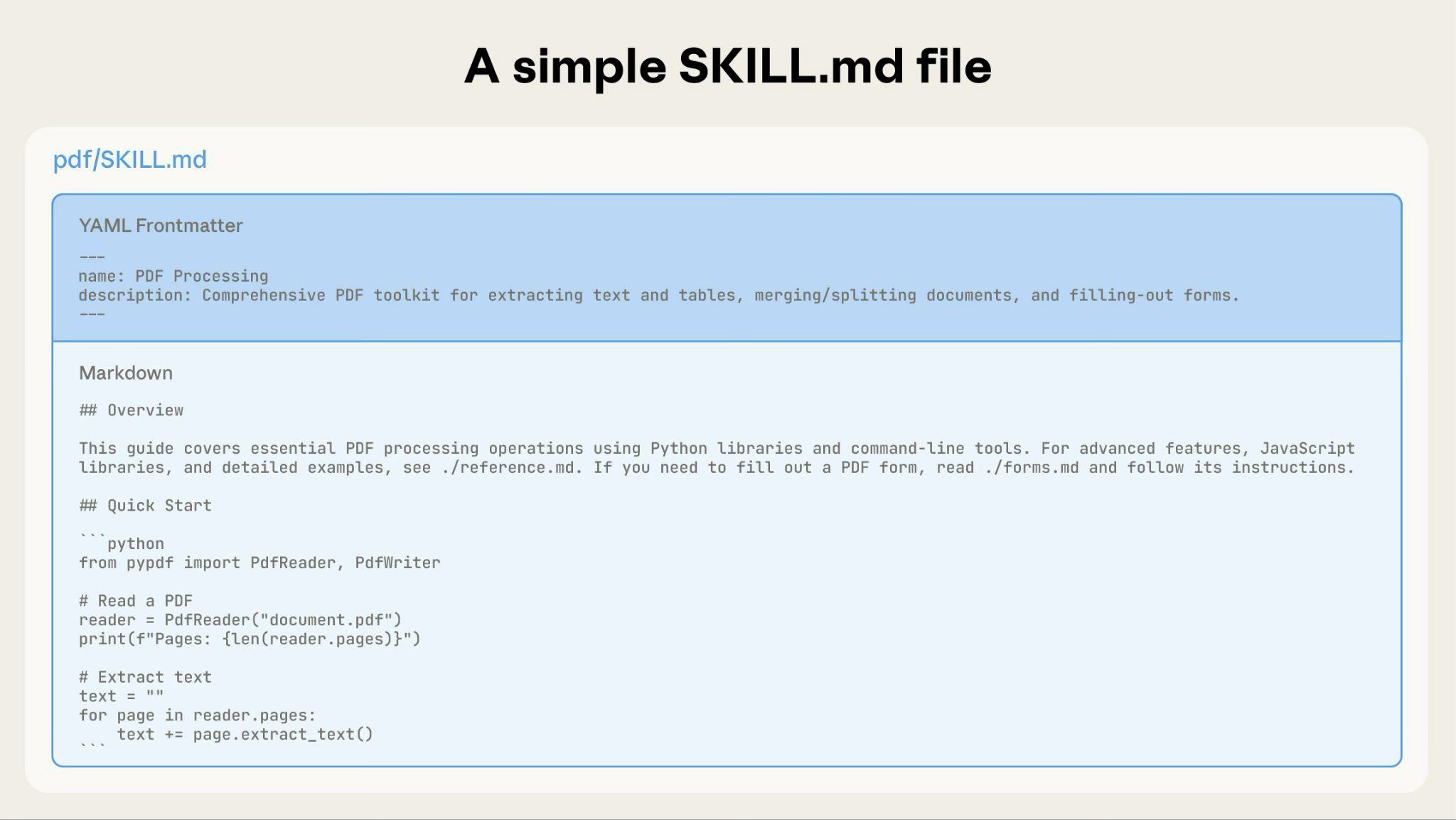
可视化概述:从简单到复杂
一个基本的 Skill 仅从一个包含元数据和指令的 SKILL.md 文件开始:
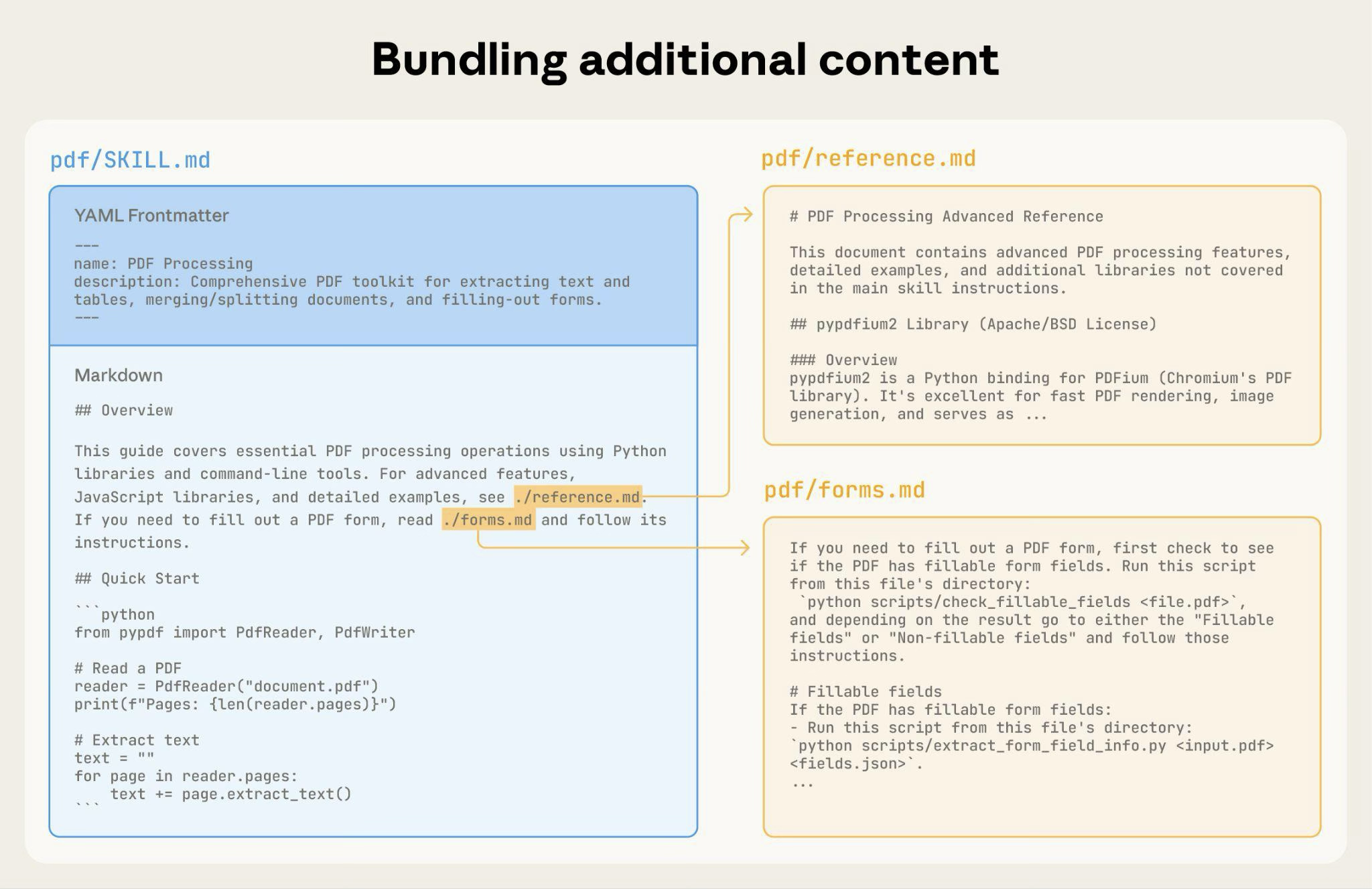
随着 Skill 的增长,您可以捆绑 Claude 仅在需要时才加载的其他内容:
完整的 Skill 目录结构可能如下所示:
pdf/SKILL.md:主要指令(触发时加载)FORMS.md:表单填写指南(按需加载)reference.md:API 参考(按需加载)examples.md:使用示例(按需加载)scripts/analyze_form.py:实用脚本(执行,不加载)fill_form.py:表单填写脚本validate.py:验证脚本
模式 1:带引用的高层指南
---
name: pdf-processing
description: Extracts text and tables from PDF files, fills forms, and merges documents. Use when working with PDF files or when the user mentions PDFs, forms, or document extraction.
---

# PDF Processing

## Quick start

Extract text with pdfplumber:
```python
import pdfplumber
with pdfplumber.open("file.pdf") as pdf:
    text = pdf.pages[0].extract_text()
```

## Advanced features

**Form filling**: See [FORMS.md](FORMS.md) for complete guide
**API reference**: See [REFERENCE.md](REFERENCE.md) for all methods
**Examples**: See [EXAMPLES.md](EXAMPLES.md) for common patternsClaude 仅在需要时才加载 FORMS.md、REFERENCE.md 或 EXAMPLES.md。
模式 2:按领域组织
对于涉及多个领域的 Skills,按领域组织内容以避免加载不相关的上下文。当用户询问销售指标时,Claude 只需读取与销售相关的 schema,而不需要财务或营销数据。这可以保持较低的令牌使用量并使上下文保持聚焦。
bigquery-skill/SKILL.md(概述和导航)reference/finance.md(收入、计费指标)sales.md(商机、销售管道)product.md(API 使用情况、功能)marketing.md(营销活动、归因)
# BigQuery Data Analysis

## Available datasets

**Finance**: Revenue, ARR, billing → See [reference/finance.md](reference/finance.md)
**Sales**: Opportunities, pipeline, accounts → See [reference/sales.md](reference/sales.md)
**Product**: API usage, features, adoption → See [reference/product.md](reference/product.md)
**Marketing**: Campaigns, attribution, email → See [reference/marketing.md](reference/marketing.md)

## Quick search

Find specific metrics using grep:

```bash
grep -i "revenue" reference/finance.md
grep -i "pipeline" reference/sales.md
grep -i "api usage" reference/product.md
```
模式 3:条件性细节
显示基本内容,链接到高级内容:
# DOCX Processing

## Creating documents

Use docx-js for new documents. See [DOCX-JS.md](DOCX-JS.md).

## Editing documents

For simple edits, modify the XML directly.

**For tracked changes**: See [REDLINING.md](REDLINING.md)
**For OOXML details**: See [OOXML.md](OOXML.md)Claude 仅在用户需要这些功能时才读取 REDLINING.md 或 OOXML.md。
避免深层嵌套引用
当文件是从其他被引用的文件中引用时,Claude 可能只会部分读取这些文件。遇到嵌套引用时,Claude 可能会使用 head -100 之类的命令来预览内容,而不是读取整个文件,从而导致信息不完整。
保持引用距离 SKILL.md 只有一层深度。所有参考文件都应直接从 SKILL.md 链接,以确保 Claude 在需要时读取完整的文件。
不好的示例:太深:
# SKILL.md
See [advanced.md](advanced.md)...

# advanced.md
See [details.md](details.md)...

# details.md
Here's the actual information...好的示例:一层深度:
# SKILL.md

**Basic usage**: [instructions in SKILL.md]
**Advanced features**: See [advanced.md](advanced.md)
**API reference**: See [reference.md](reference.md)
**Examples**: See [examples.md](examples.md)为较长的参考文件添加目录结构
对于超过 100 行的参考文件,请在顶部包含目录。这可以确保 Claude 即使在通过部分读取进行预览时也能看到可用信息的完整范围。
示例:
# API Reference

## Contents
- Authentication and setup
- Core methods (create, read, update, delete)
- Advanced features (batch operations, webhooks)
- Error handling patterns
- Code examples

## Authentication and setup
...

## Core methods
...然后 Claude 可以根据需要读取完整文件或跳转到特定部分。
有关这种基于文件系统的架构如何实现渐进式披露的详细信息,请参阅本指南后面的运行时环境部分。
工作流和反馈循环
对复杂任务使用工作流
将复杂操作分解为清晰、有序的步骤。对于特别复杂的工作流,提供一个清单,Claude 可以将其复制到响应中并在推进过程中逐项勾选。
示例 1:研究综合工作流(适用于不含代码的 Skills):
## Research synthesis workflow

Copy this checklist and track your progress:

```
Research Progress:
- [ ] Step 1: Read all source documents
- [ ] Step 2: Identify key themes
- [ ] Step 3: Cross-reference claims
- [ ] Step 4: Create structured summary
- [ ] Step 5: Verify citations
```

**Step 1: Read all source documents**

Review each document in the `sources/` directory. Note the main arguments and supporting evidence.

**Step 2: Identify key themes**

Look for patterns across sources. What themes appear repeatedly? Where do sources agree or disagree?

**Step 3: Cross-reference claims**

For each major claim, verify it appears in the source material. Note which source supports each point.

**Step 4: Create structured summary**

Organize findings by theme. Include:
- Main claim
- Supporting evidence from sources
- Conflicting viewpoints (if any)

**Step 5: Verify citations**

Check that every claim references the correct source document. If citations are incomplete, return to Step 3.此示例展示了工作流如何应用于不需要代码的分析任务。清单模式适用于任何复杂的多步骤流程。
示例 2:PDF 表单填写工作流(适用于含代码的 Skills):
## PDF form filling workflow

Copy this checklist and check off items as you complete them:

```
Task Progress:
- [ ] Step 1: Analyze the form (run analyze_form.py)
- [ ] Step 2: Create field mapping (edit fields.json)
- [ ] Step 3: Validate mapping (run validate_fields.py)
- [ ] Step 4: Fill the form (run fill_form.py)
- [ ] Step 5: Verify output (run verify_output.py)
```

**Step 1: Analyze the form**

Run: `python scripts/analyze_form.py input.pdf`

This extracts form fields and their locations, saving to `fields.json`.

**Step 2: Create field mapping**

Edit `fields.json` to add values for each field.

**Step 3: Validate mapping**

Run: `python scripts/validate_fields.py fields.json`

Fix any validation errors before continuing.

**Step 4: Fill the form**

Run: `python scripts/fill_form.py input.pdf fields.json output.pdf`

**Step 5: Verify output**

Run: `python scripts/verify_output.py output.pdf`

If verification fails, return to Step 2.清晰的步骤可以防止 Claude 跳过关键验证。清单有助于 Claude 和您跟踪多步骤工作流的进度。
实现反馈循环
常见模式: 运行验证器 → 修复错误 → 重复
这种模式可以大大提高输出质量。
示例 1:风格指南合规性(适用于不含代码的 Skills):
## Content review process

1. Draft your content following the guidelines in STYLE_GUIDE.md
2. Review against the checklist:
   - Check terminology consistency
   - Verify examples follow the standard format
   - Confirm all required sections are present
3. If issues found:
   - Note each issue with specific section reference
   - Revise the content
   - Review the checklist again
4. Only proceed when all requirements are met
5. Finalize and save the document这展示了使用参考文档而非脚本的验证循环模式。"验证器"是 STYLE_GUIDE.md,Claude 通过阅读和比较来执行检查。
示例 2:文档编辑流程(适用于含代码的 Skills):
## Document editing process

1. Make your edits to `word/document.xml`
2. **Validate immediately**: `python ooxml/scripts/validate.py unpacked_dir/`
3. If validation fails:
   - Review the error message carefully
   - Fix the issues in the XML
   - Run validation again
4. **Only proceed when validation passes**
5. Rebuild: `python ooxml/scripts/pack.py unpacked_dir/ output.docx`
6. Test the output document验证循环可以及早发现错误。
内容指南
避免时效性信息
不要包含会过时的信息:
不好的示例:有时效性(将会变得错误):
If you're doing this before August 2025, use the old API.
After August 2025, use the new API.好的示例(使用"旧模式"部分):
## Current method

Use the v2 API endpoint: `api.example.com/v2/messages`

## Old patterns

<details>
<summary>Legacy v1 API (deprecated 2025-08)</summary>

The v1 API used: `api.example.com/v1/messages`

This endpoint is no longer supported.
</details>旧模式部分提供历史背景,而不会使主要内容变得杂乱。
使用一致的术语
选择一个术语并在整个 Skill 中使用它:
好 - 一致:
- 始终使用 "API endpoint"
- 始终使用 "field"
- 始终使用 "extract"
不好 - 不一致:
- 混用 "API endpoint"、"URL"、"API route"、"path"
- 混用 "field"、"box"、"element"、"control"
- 混用 "extract"、"pull"、"get"、"retrieve"
一致性有助于 Claude 解析和遵循指令。
常见模式
模板模式
为输出格式提供模板。使严格程度与您的需求相匹配。
对于严格要求(例如 API 响应或数据格式):
## Report structure

ALWAYS use this exact template structure:

```markdown
# [Analysis Title]

## Executive summary
[One-paragraph overview of key findings]

## Key findings
- Finding 1 with supporting data
- Finding 2 with supporting data
- Finding 3 with supporting data

## Recommendations
1. Specific actionable recommendation
2. Specific actionable recommendation
```对于灵活指导(当适应性调整有用时):
## Report structure

Here is a sensible default format, but use your best judgment based on the analysis:

```markdown
# [Analysis Title]

## Executive summary
[Overview]

## Key findings
[Adapt sections based on what you discover]

## Recommendations
[Tailor to the specific context]
```

Adjust sections as needed for the specific analysis type.示例模式
对于输出质量依赖于查看示例的 Skills,请像常规提示一样提供输入/输出对:
## Commit message format

Generate commit messages following these examples:

**Example 1:**
Input: Added user authentication with JWT tokens
Output:
```
feat(auth): implement JWT-based authentication

Add login endpoint and token validation middleware
```

**Example 2:**
Input: Fixed bug where dates displayed incorrectly in reports
Output:
```
fix(reports): correct date formatting in timezone conversion

Use UTC timestamps consistently across report generation
```

**Example 3:**
Input: Updated dependencies and refactored error handling
Output:
```
chore: update dependencies and refactor error handling

- Upgrade lodash to 4.17.21
- Standardize error response format across endpoints
```

Follow this style: type(scope): brief description, then detailed explanation.与单纯的描述相比,示例能更清楚地向 Claude 传达所需的风格和详细程度。
条件工作流模式
引导 Claude 通过决策点:
## Document modification workflow

1. Determine the modification type:

   **Creating new content?** → Follow "Creation workflow" below
   **Editing existing content?** → Follow "Editing workflow" below

2. Creation workflow:
   - Use docx-js library
   - Build document from scratch
   - Export to .docx format

3. Editing workflow:
   - Unpack existing document
   - Modify XML directly
   - Validate after each change
- Repack when complete评估和迭代
先构建评估
在编写大量文档之前先创建评估。 这可以确保您的 Skill 解决的是真实问题,而不是记录想象中的问题。
评估驱动的开发:
- 识别差距: 在没有 Skill 的情况下让 Claude 执行代表性任务。记录具体的失败或缺失的上下文
- 创建评估: 构建三个测试这些差距的场景
- 建立基线: 衡量 Claude 在没有 Skill 时的表现
- 编写最少的指令: 只创建足以弥补差距并通过评估的内容
- 迭代: 执行评估,与基线比较,并进行改进
这种方法可以确保您解决的是实际问题,而不是预测可能永远不会出现的需求。
评估结构:
{
  "skills": ["pdf-processing"],
  "query": "Extract all text from this PDF file and save it to output.txt",
  "files": ["test-files/document.pdf"],
  "expected_behavior": [
    "Successfully reads the PDF file using an appropriate PDF processing library or command-line tool",
    "Extracts text content from all pages in the document without missing any pages",
    "Saves the extracted text to a file named output.txt in a clear, readable format"
  ]
}与 Claude 一起迭代开发 Skills
最有效的 Skill 开发流程涉及 Claude 本身。与一个 Claude 实例("Claude A")合作创建一个供其他实例("Claude B")使用的 Skill。Claude A 帮助您设计和完善指令,而 Claude B 在真实任务中测试它们。这之所以有效,是因为 Claude 模型既了解如何编写有效的智能体指令,也了解智能体需要什么信息。
创建新 Skill:
-
在没有 Skill 的情况下完成任务: 使用常规提示与 Claude A 一起解决问题。在工作过程中,您会自然地提供上下文、解释偏好并分享流程性知识。注意您反复提供了哪些信息。
-
识别可复用的模式: 完成任务后,确定您提供的哪些上下文对未来类似的任务有用。
示例: 如果您完成了一次 BigQuery 分析,您可能提供了表名、字段定义、过滤规则(例如"始终排除测试账户")以及常见的查询模式。
-
请 Claude A 创建 Skill: "创建一个 Skill 来捕获我们刚刚使用的这个 BigQuery 分析模式。包括表 schema、命名约定以及关于过滤测试账户的规则。"
-
审查简洁性: 检查 Claude A 是否添加了不必要的解释。询问:"删除关于胜率含义的解释 - Claude 已经知道了。"
-
改进信息架构: 请 Claude A 更有效地组织内容。例如:"将其组织成表 schema 放在单独的参考文件中。我们以后可能会添加更多表。"
-
在类似任务上测试: 在相关用例上与 Claude B(一个加载了该 Skill 的全新实例)一起使用该 Skill。观察 Claude B 是否找到了正确的信息、正确应用了规则并成功处理了任务。
-
根据观察进行迭代: 如果 Claude B 遇到困难或遗漏了某些内容,请带着具体情况回到 Claude A:"当 Claude 使用这个 Skill 时,它忘记了按日期过滤 Q4 的数据。我们是否应该添加一个关于日期过滤模式的部分?"
迭代现有 Skills:
改进 Skills 时,同样的分层模式会继续。您在以下各项之间交替:
- 与 Claude A 合作(帮助完善 Skill 的专家)
- 与 Claude B 测试(使用 Skill 执行实际工作的智能体)
- 观察 Claude B 的行为并将见解带回给 Claude A
-
在真实工作流中使用 Skill: 给 Claude B(已加载 Skill)实际任务,而不是测试场景
-
观察 Claude B 的行为: 记录它在哪里遇到困难、成功或做出意外选择
观察示例: "当我向 Claude B 索要区域销售报告时,它编写了查询但忘记过滤掉测试账户,尽管 Skill 中提到了这条规则。"
-
回到 Claude A 进行改进: 分享当前的 SKILL.md 并描述您观察到的情况。询问:"我注意到当我索要区域报告时,Claude B 忘记过滤测试账户。Skill 中提到了过滤,但也许不够突出?"
-
审查 Claude A 的建议: Claude A 可能会建议重新组织以使规则更加突出,使用更强烈的措辞,例如用 "MUST filter" 代替 "always filter",或重构工作流部分。
-
应用并测试更改: 使用 Claude A 的改进更新 Skill,然后在类似请求上再次与 Claude B 测试
-
根据使用情况重复: 在遇到新场景时继续这个观察-改进-测试循环。每次迭代都基于真实的智能体行为而非假设来改进 Skill。
收集团队反馈:
- 与队友分享 Skills 并观察他们的使用情况
- 询问:Skill 是否在预期时激活?指令是否清晰?缺少什么?
- 吸收反馈以弥补您自己使用模式中的差距
为什么这种方法有效: Claude A 了解智能体的需求,您提供领域专业知识,Claude B 通过真实使用揭示差距,而迭代改进基于观察到的行为而非假设来改进 Skills。
观察 Claude 如何浏览 Skills
在迭代 Skills 时,请注意 Claude 在实践中实际如何使用它们。留意:
- 意外的探索路径: Claude 是否以您未预料到的顺序读取文件?这可能表明您的结构不如您想象的那么直观
- 错过的关联: Claude 是否未能跟随指向重要文件的引用?您的链接可能需要更明确或更突出
- 过度依赖某些部分: 如果 Claude 反复读取同一个文件,请考虑该内容是否应该放在主 SKILL.md 中
- 被忽略的内容: 如果 Claude 从不访问某个捆绑文件,它可能是不必要的,或者在主要指令中没有得到很好的提示
根据这些观察而非假设进行迭代。Skill 元数据中的 'name' 和 'description' 尤为关键。Claude 在确定是否针对当前任务触发 Skill 时会使用它们。确保它们清楚地描述了 Skill 的功能以及何时应该使用它。
应避免的反模式
避免 Windows 风格的路径
始终在文件路径中使用正斜杠,即使在 Windows 上也是如此:
- ✓ 好:
scripts/helper.py、reference/guide.md - ✗ 避免:
scripts\helper.py、reference\guide.md
Unix 风格的路径在所有平台上都有效,而 Windows 风格的路径在 Unix 系统上会导致错误。
避免提供过多选项
除非必要,否则不要提供多种方法:
**Bad example: Too many choices** (confusing):
"You can use pypdf, or pdfplumber, or PyMuPDF, or pdf2image, or..."

**Good example: Provide a default** (with escape hatch):
"Use pdfplumber for text extraction:
```python
import pdfplumber
```

For scanned PDFs requiring OCR, use pdf2image with pytesseract instead."高级:包含可执行代码的 Skills
以下部分重点介绍包含可执行脚本的 Skills。如果您的 Skill 仅使用 markdown 指令,请跳至高效 Skills 清单。
解决问题,而非推给 Claude
为 Skills 编写脚本时,请处理错误情况,而不是推给 Claude。
好的示例:显式处理错误:
def process_file(path):
    """Process a file, creating it if it doesn't exist."""
    try:
        with open(path) as f:
            return f.read()
    except FileNotFoundError:
        # 使用默认内容创建文件,而不是直接失败
        print(f"File {path} not found, creating default")
        with open(path, "w") as f:
            f.write("")
        return ""
    except PermissionError:
        # 提供替代方案,而不是直接失败
        print(f"Cannot access {path}, using default")
return ""不好的示例:推给 Claude:
def process_file(path):
    # 直接失败,让 Claude 自行处理
return open(path).read()配置参数也应有依据并记录在案,以避免"巫术常量"(Ousterhout 定律)。如果您不知道正确的值,Claude 又如何确定它呢?
好的示例:自文档化:
# HTTP 请求通常在 30 秒内完成
# 较长的超时时间用于应对慢速连接
REQUEST_TIMEOUT = 30

# 三次重试在可靠性与速度之间取得平衡
# 大多数间歇性故障在第二次重试时即可解决
MAX_RETRIES = 3不好的示例:魔法数字:
TIMEOUT = 47  # Why 47?
RETRIES = 5 # Why 5?提供实用脚本
即使 Claude 可以编写脚本,预制脚本也具有优势:
实用脚本的好处:
- 比生成的代码更可靠
- 节省令牌(无需在上下文中包含代码)
- 节省时间(无需生成代码)
- 确保各次使用之间的一致性
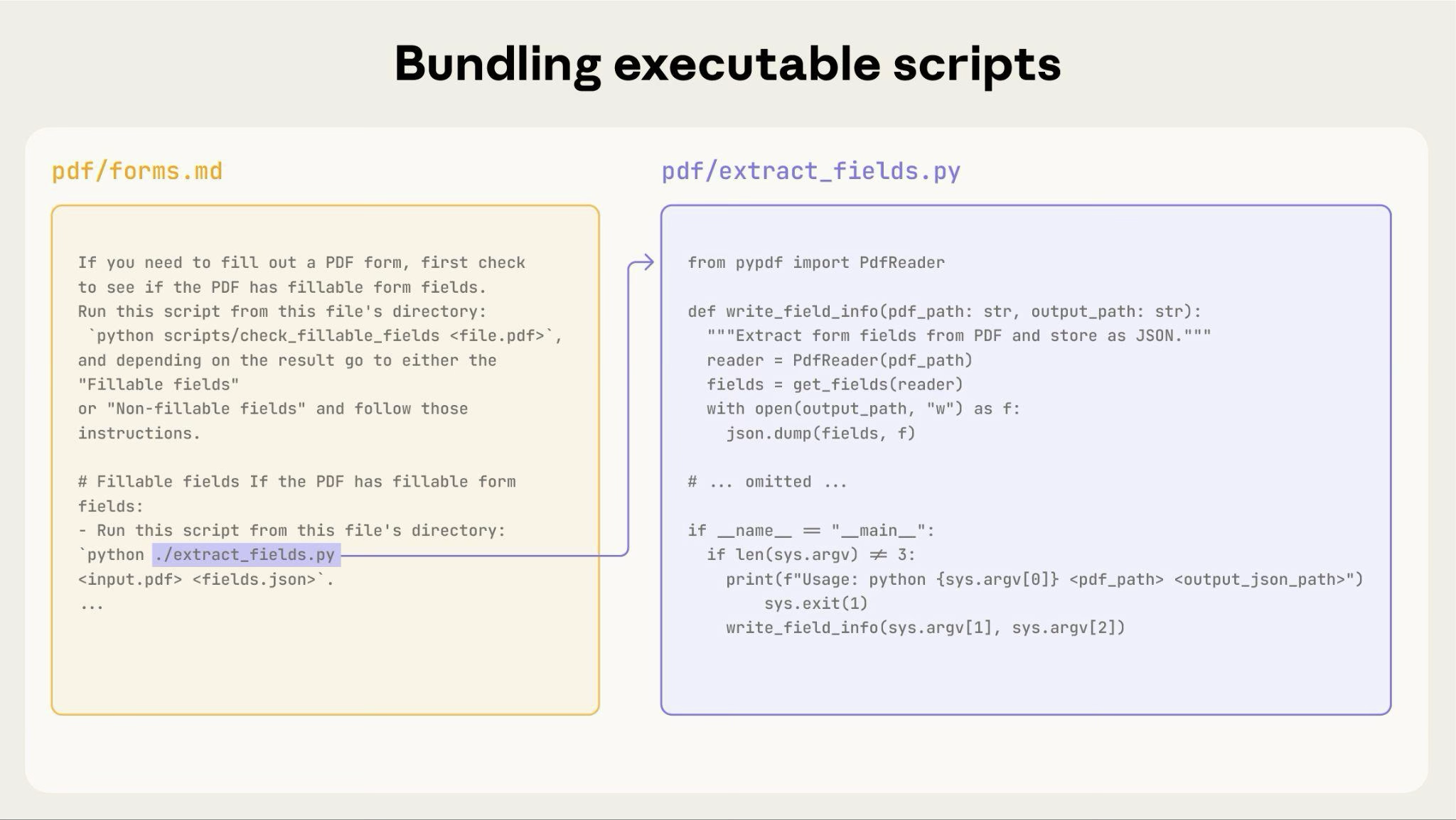
上图展示了可执行脚本如何与指令文件协同工作。指令文件(forms.md)引用脚本,Claude 可以执行它而无需将其内容加载到上下文中。
重要区别: 在您的指令中明确 Claude 应该:
- 执行脚本(最常见):"运行
analyze_form.py以提取字段" - 将其作为参考阅读(用于复杂逻辑):"有关字段提取算法,请参阅
analyze_form.py"
对于大多数实用脚本,首选执行,因为它更可靠、更高效。有关脚本执行工作原理的详细信息,请参阅下面的运行时环境部分。
示例:
## Utility scripts

**analyze_form.py**: Extract all form fields from PDF

```bash
python scripts/analyze_form.py input.pdf > fields.json
```

Output format:
```json
{
  "field_name": {"type": "text", "x": 100, "y": 200},
  "signature": {"type": "sig", "x": 150, "y": 500}
}
```

**validate_boxes.py**: Check for overlapping bounding boxes

```bash
python scripts/validate_boxes.py fields.json
# Returns: "OK" or lists conflicts
```

**fill_form.py**: Apply field values to PDF

```bash
python scripts/fill_form.py input.pdf fields.json output.pdf
```使用视觉分析
当输入可以渲染为图像时,让 Claude 分析它们:
## Form layout analysis

1. Convert PDF to images:
   ```bash
   python scripts/pdf_to_images.py form.pdf
   ```

2. Analyze each page image to identify form fields
3. Claude can see field locations and types visuallyClaude 的视觉能力有助于分析布局和结构。
创建可验证的中间输出
当 Claude 执行复杂、开放式的任务时,它可能会犯错。"计划-验证-执行"模式通过让 Claude 首先以结构化格式创建计划,然后在执行之前用脚本验证该计划,从而及早发现错误。
示例: 想象一下要求 Claude 根据电子表格更新 PDF 中的 50 个表单字段。如果没有验证,Claude 可能会引用不存在的字段、创建冲突的值、遗漏必填字段或错误地应用更新。
解决方案: 使用前面展示的工作流模式(PDF 表单填写),但添加一个在应用更改之前进行验证的中间 changes.json 文件。工作流变为:分析 → 创建计划文件 → 验证计划 → 执行 → 核实。
为什么这种模式有效:
- 及早发现错误: 验证在应用更改之前发现问题
- 机器可验证: 脚本提供客观验证
- 可逆的计划: Claude 可以在不触及原始文件的情况下迭代计划
- 清晰的调试: 错误消息指向具体问题
何时使用: 批量操作、破坏性更改、复杂的验证规则、高风险操作。
实现提示: 使验证脚本输出详细的具体错误消息,例如 "Field 'signature_date' not found. Available fields: customer_name, order_total, signature_date_signed",以帮助 Claude 修复问题。
包依赖
Skills 在代码执行环境中运行,具有特定于平台的限制:
- claude.ai: 可以从 npm 和 PyPI 安装包,并从 GitHub 仓库拉取
- Claude API: 没有网络访问权限,也不能在运行时安装包
在您的 SKILL.md 中列出所需的包,并在代码执行工具文档中验证它们是否可用。
运行时环境
Skills 在具有文件系统访问、bash 命令和代码执行能力的代码执行环境中运行。有关此架构的概念说明,请参阅概述中的 Skills 架构。
这对您的编写有何影响:
Claude 如何访问 Skills:
- 元数据预加载: 启动时,所有 Skills 的 YAML frontmatter 中的 name 和 description 会被加载到系统提示中
- 按需读取文件: Claude 在需要时使用 bash Read 工具从文件系统访问 SKILL.md 和其他文件
- 高效执行脚本: 实用脚本可以通过 bash 执行,而无需将其完整内容加载到上下文中。只有脚本的输出会消耗令牌
- 大文件没有上下文惩罚: 参考文件、数据或文档在实际读取之前不会消耗上下文令牌
- 文件路径很重要: Claude 像浏览文件系统一样浏览您的 skill 目录。使用正斜杠(
reference/guide.md),而不是反斜杠 - 描述性地命名文件: 使用能表明内容的名称:
form_validation_rules.md,而不是doc2.md - 为便于发现而组织: 按领域或功能组织目录
- 好:
reference/finance.md、reference/sales.md - 不好:
docs/file1.md、docs/file2.md
- 好:
- 捆绑全面的资源: 包含完整的 API 文档、大量示例、大型数据集;在访问之前没有上下文惩罚
- 对确定性操作首选脚本: 编写
validate_form.py,而不是要求 Claude 生成验证代码 - 明确执行意图:
- "运行
analyze_form.py以提取字段"(执行) - "有关提取算法,请参阅
analyze_form.py"(作为参考阅读)
- "运行
- 测试文件访问模式: 通过使用真实请求进行测试,验证 Claude 能够浏览您的目录结构
示例:
bigquery-skill/SKILL.md(概述,指向参考文件)reference/finance.md(收入指标)sales.md(销售管道数据)product.md(使用情况分析)
当用户询问收入时,Claude 读取 SKILL.md,看到对 reference/finance.md 的引用,并调用 bash 只读取该文件。sales.md 和 product.md 文件保留在文件系统上,在需要之前消耗零上下文令牌。这种基于文件系统的模型正是实现渐进式披露的关键。Claude 可以浏览并有选择地加载每个任务所需的确切内容。
有关技术架构的完整详细信息,请参阅 Skills 概述中的 Skills 的工作原理。
MCP 工具引用
如果您的 Skill 使用 MCP(Model Context Protocol)工具,请始终使用完全限定的工具名称以避免"找不到工具"错误。
格式: ServerName:tool_name
示例:
Use the BigQuery:bigquery_schema tool to retrieve table schemas.
Use the GitHub:create_issue tool to create issues.其中:
BigQuery和GitHub是 MCP 服务器名称bigquery_schema和create_issue是这些服务器中的工具名称
如果没有服务器前缀,Claude 可能无法定位工具,尤其是在有多个 MCP 服务器可用时。
避免假设工具已安装
不要假设包是可用的:
**Bad example: Assumes installation**:
"Use the pdf library to process the file."

**Good example: Explicit about dependencies**:
"Install required package: `pip install pypdf`

Then use it:
```python
from pypdf import PdfReader
reader = PdfReader("file.pdf")
```"技术说明
YAML frontmatter 要求
SKILL.md 的 frontmatter 需要 name 和 description 字段,并具有特定的验证规则:
name:最多 64 个字符,仅限小写字母/数字/连字符,不含 XML 标签,不含保留字description:最多 1,024 个字符,非空,不含 XML 标签
有关完整的结构详情,请参阅 Skills 概述。
令牌预算
将 SKILL.md 正文保持在 500 行以内以获得最佳性能。如果您的内容超过此限制,请使用前面描述的渐进式披露模式将其拆分为单独的文件。有关架构详情,请参阅 Skills 概述。
高效 Skills 清单
在分享 Skill 之前,请验证:
核心质量
- 描述具体并包含关键术语
- 描述同时包含 Skill 的功能以及何时使用它
- SKILL.md 正文在 500 行以内
- 其他详细信息放在单独的文件中(如果需要)
- 没有时效性信息(或放在"旧模式"部分)
- 全文术语一致
- 示例具体,而非抽象
- 文件引用只有一层深度
- 适当使用渐进式披露
- 工作流有清晰的步骤
代码和脚本
- 脚本解决问题,而不是推给 Claude
- 错误处理明确且有帮助
- 没有"巫术常量"(所有值都有依据)
- 所需的包已在指令中列出并验证可用
- 脚本有清晰的文档
- 没有 Windows 风格的路径(全部使用正斜杠)
- 关键操作有验证/核实步骤
- 对质量关键型任务包含反馈循环
测试
- 至少创建了三个评估
- 已使用 Haiku、Sonnet 和 Opus 测试
- 已使用真实使用场景测试
- 已吸收团队反馈(如适用)
后续步骤
创建您的第一个 Skill
在 Claude Code 中创建和管理 Skills
以编程方式上传和使用 Skills
Was this page helpful?