使用 Google Cloud KMS 設定 CMEK
建立 Google Cloud KMS 金鑰、授予 Anthropic 對其的存取權,並在 Claude Platform 或 Claude Enterprise 中使用該金鑰。
Claude Code
讓 Claude Code 為您設定此功能
/claude-api 協助我使用 Google Cloud KMS 設定客戶管理的加密金鑰開始之前
在 Claude 中:
- 客戶管理的加密金鑰(CMEK)已為您的組織開啟。
- 您已取得您的 Anthropic 組織 ID,即不含
org_前綴的 UUID。請從 Claude Console 中的 Organization 複製,或從 claude.ai 上的 Organization settings > Organization and access 複製。建立金鑰的人需要此 ID。 - 您是 Claude Platform 上的 Organization Admin,或是 Claude Enterprise 上的 Owner 或 Primary Owner。
- 在 Claude Platform 上,您擁有一個保留資料的工作區,最好是新的工作區,因為現有資料仍以 Anthropic 的金鑰加密。
- 在 Claude Enterprise 上,您了解哪些功能會關閉或變更。
在 Google Cloud 中:
- 已啟用 Cloud KMS API。
- 您可以建立金鑰環和金鑰,並對其設定 IAM 政策(
roles/cloudkms.admin或同等角色)。 - 已開啟 Cloud KMS Data Access 稽核日誌(Data Read 和 Data Write),讓 Cloud Logging 記錄 Anthropic 對您金鑰的使用情況。這些日誌預設為關閉。
- 如果您的 Google Cloud 組織強制執行網域限制共用(
constraints/iam.allowedPolicyMemberDomains),它會阻擋授予 Anthropic 服務帳戶的權限。請新增專案層級的例外,或允許 Anthropic 的 Cloud Identity 客戶 ID。請聯絡 Anthropic 以取得該 ID。
在 Google Cloud 中:建立金鑰
如果 Verify 或 Add 失敗,請參閱 Google Cloud KMS 的修正方法。
這些步驟會以小寫的 Anthropic 組織 ID(<ORGANIZATION_UUID>)為金鑰加上標籤,並授予 Anthropic 服務帳戶存取權:
anthropic-cmek-client-us@gcp-anthropic-cmek-clients.iam.gserviceaccount.com請只使用此位址,切勿使用透過電子郵件或聊天傳送的位址。
您可以使用任何 Cloud KMS 位置。若要獲得最低的延遲,請使用 us-east5 或 us-central1。Anthropic 強烈建議使用 HSM 保護。
若要使用您現有的金鑰,請先新增組織標籤。
建立或選擇金鑰環
在 Google Cloud 主控台中,前往 Key management 頁面。開啟一個金鑰環,或在
us-east5等位置建立一個金鑰環。設定金鑰
點擊 Create key 並輸入名稱。選擇以下選項:
- Protection level: HSM
- Key material: Generated key
- Purpose: Symmetric encrypt/decrypt
- Algorithm: Google symmetric key
新增組織標籤
點擊 Additional settings,然後點擊 Add label。輸入組織標籤:
- Key 1:
anthropic-org-<ORGANIZATION_UUID> - Value 1:
true
點擊 Create。
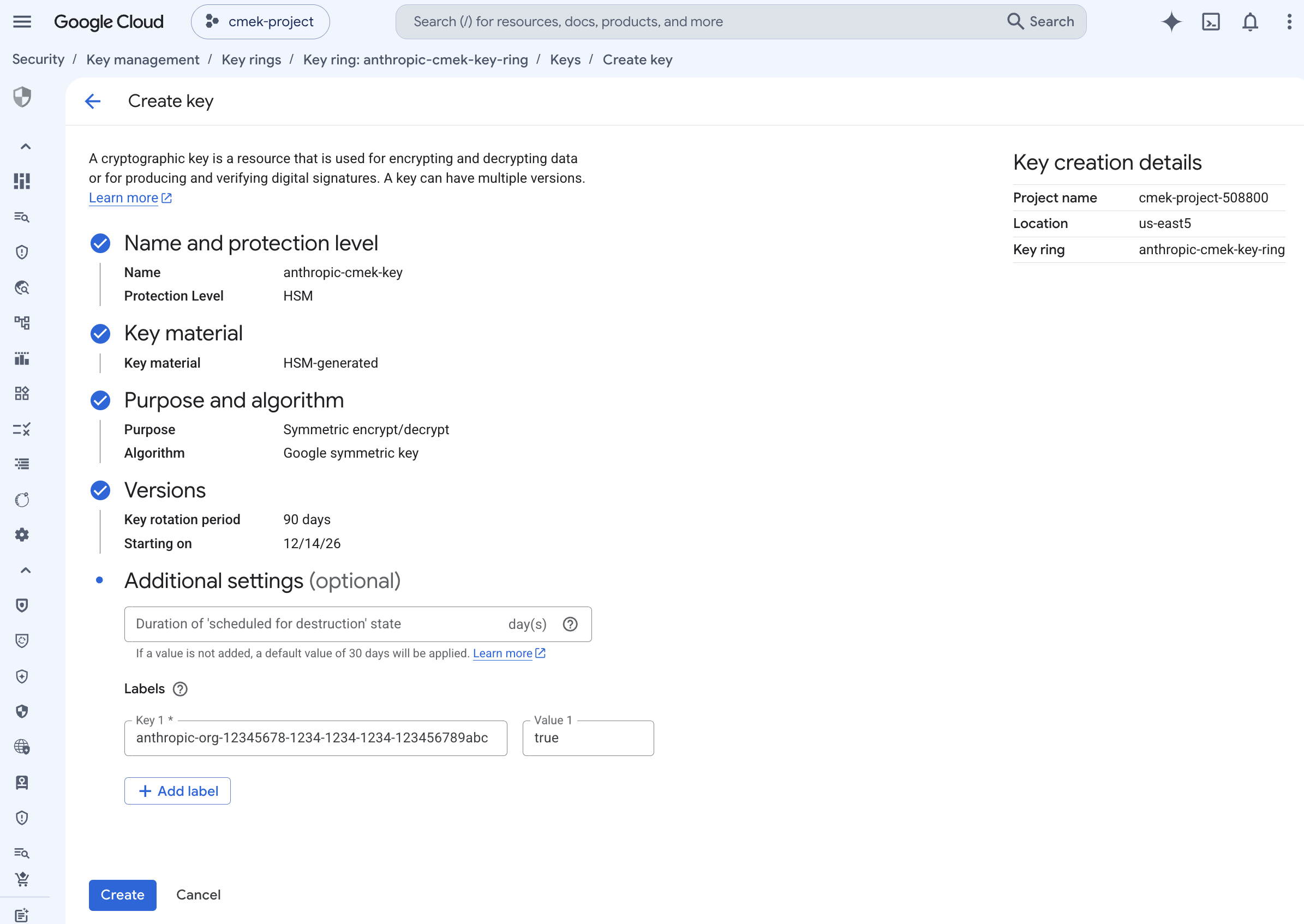
具有組織標籤、受 HSM 保護的對稱加密/解密金鑰。 - Key 1:
開啟金鑰的權限
在金鑰環詳細資料頁面上,選取金鑰旁的核取方塊。開啟 Permissions 面板並點擊 Grant access。
授予 Anthropic 服務帳戶對金鑰的存取權
確認 Resource 顯示的是金鑰,而不是金鑰環或專案。輸入以下值:
- New principals:
anthropic-cmek-client-us@gcp-anthropic-cmek-clients.iam.gserviceaccount.com - Role: Cloud KMS CryptoKey Encrypter/Decrypter
點擊 Add another role 並選擇 Cloud KMS Viewer。點擊 Save。
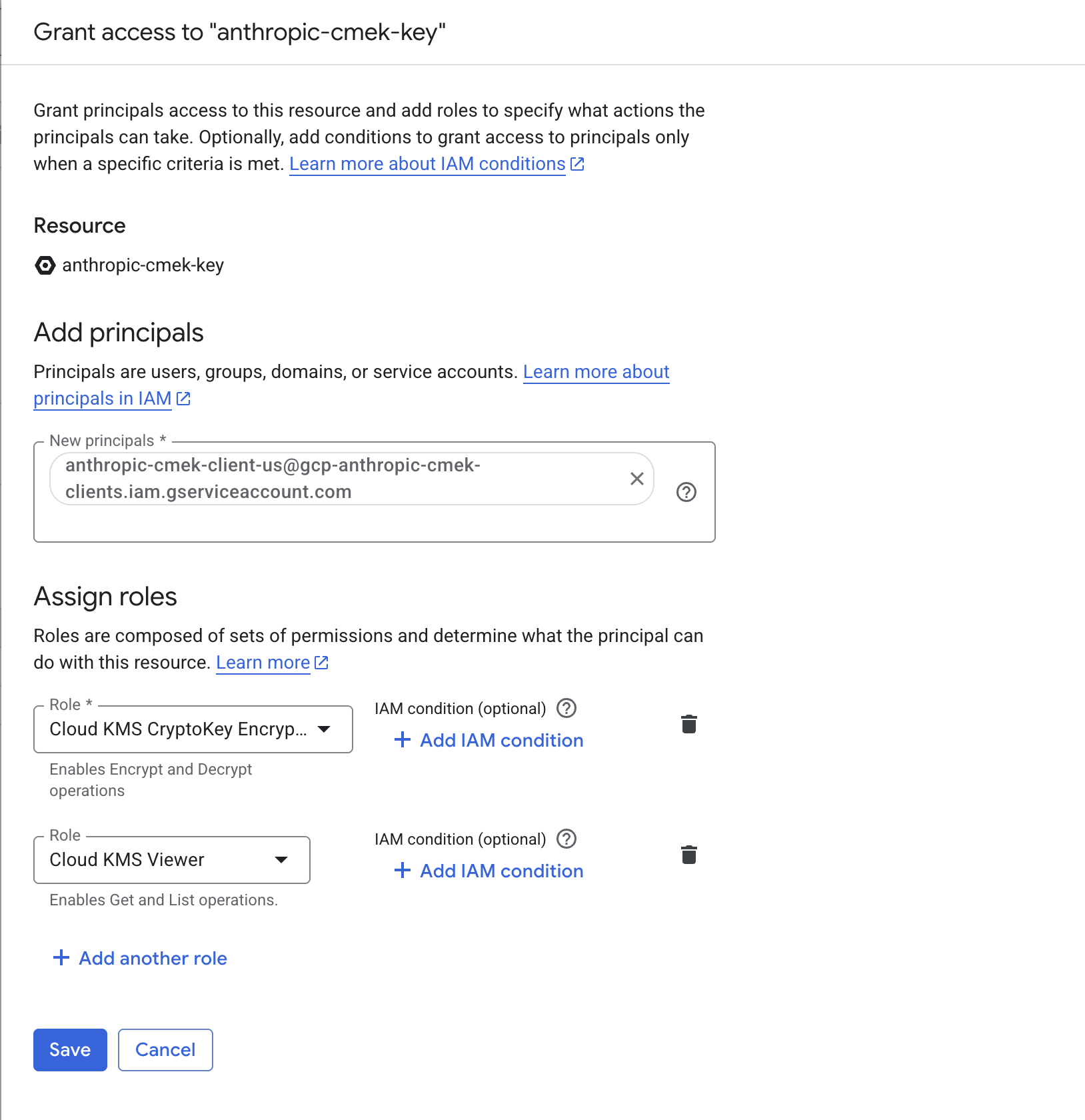
授予 Anthropic 服務帳戶兩個角色,範圍限定於該金鑰。 - New principals:
複製完整的金鑰資源名稱
在金鑰環詳細資料頁面上,開啟金鑰的 Actions 選單並點擊 Copy resource name。
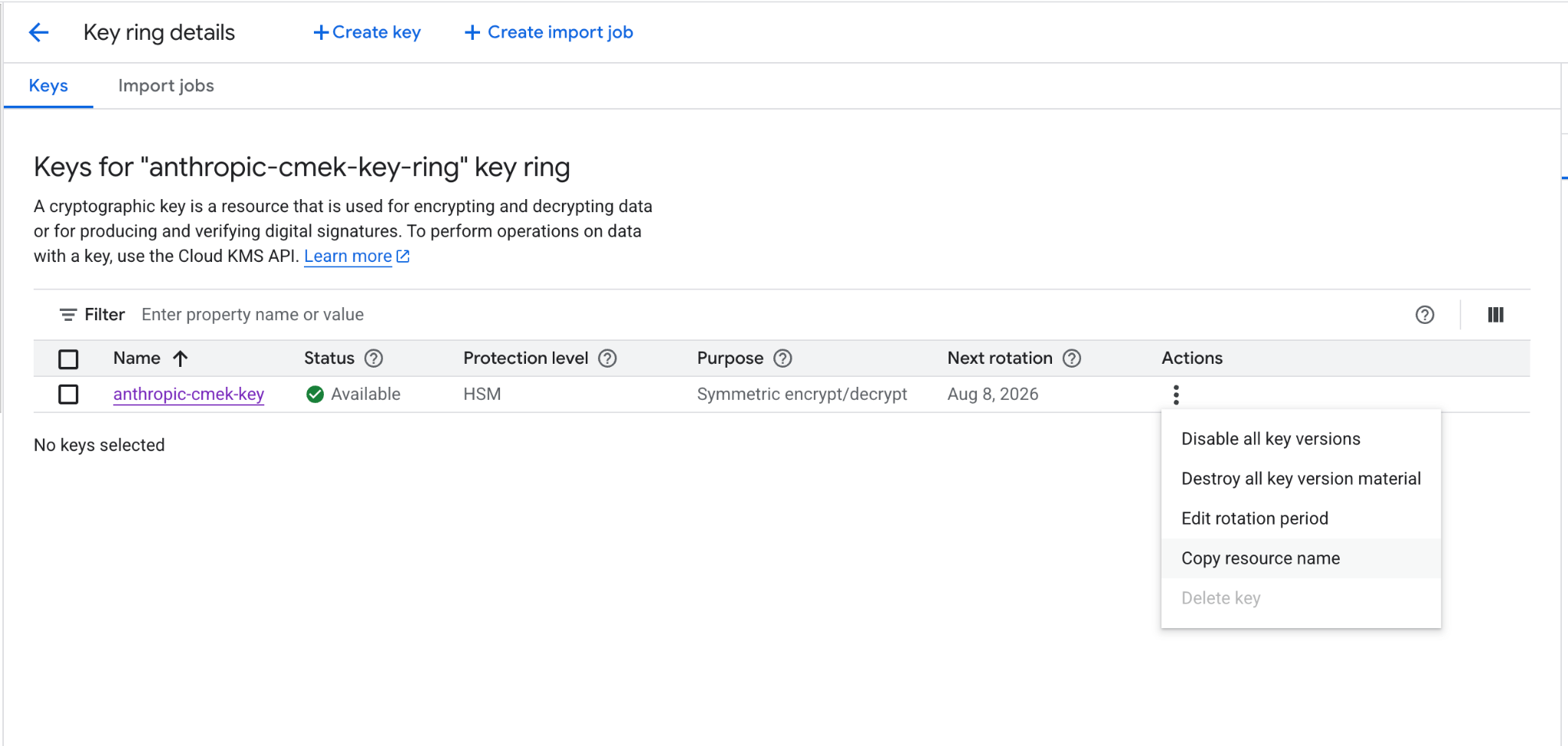
從動作選單複製金鑰的完整資源名稱。
在每個指令中,替換以下預留位置:
<your-project-id>: 您的 Google Cloud 專案 ID<region>: 金鑰的位置,例如us-east5<your-keyring-name>: 金鑰環的名稱<your-key-name>: 金鑰的名稱<ORGANIZATION_UUID>: 小寫的 Anthropic 組織 ID
建立或選擇金鑰環
如果您已有可重複使用的金鑰環,請略過此步驟。
gcloud kms keyrings create <your-keyring-name> \ --project=<your-project-id> \ --location=<region>建立金鑰
gcloud kms keys create <your-key-name> \ --project=<your-project-id> \ --location=<region> \ --keyring=<your-keyring-name> \ --purpose=encryption \ --protection-level=hsm \ --labels=anthropic-org-<ORGANIZATION_UUID>=true若要使用軟體保護,請省略
--protection-level=hsm。授予 Anthropic 服務帳戶對金鑰的存取權
執行以下兩個指令:
gcloud kms keys add-iam-policy-binding <your-key-name> \ --project=<your-project-id> \ --location=<region> \ --keyring=<your-keyring-name> \ --member="serviceAccount:anthropic-cmek-client-us@gcp-anthropic-cmek-clients.iam.gserviceaccount.com" \ --role=roles/cloudkms.cryptoKeyEncrypterDecryptergcloud kms keys add-iam-policy-binding <your-key-name> \ --project=<your-project-id> \ --location=<region> \ --keyring=<your-keyring-name> \ --member="serviceAccount:anthropic-cmek-client-us@gcp-anthropic-cmek-clients.iam.gserviceaccount.com" \ --role=roles/cloudkms.viewer取得完整的金鑰資源名稱
gcloud kms keys describe <your-key-name> \
  --project=<your-project-id> \
  --location=<region> \
  --keyring=<your-keyring-name> \
  --format="value(name)"
在 Claude 中新增金鑰的人需要該金鑰的完整資源名稱,格式如下:
projects/<your-project-id>/locations/<region>/keyRings/<your-keyring-name>/cryptoKeys/<your-key-name>為您現有的金鑰新增組織標籤
除非金鑰具有設為 true 的標籤 anthropic-org-<ORGANIZATION_UUID>(其中包含小寫的 Anthropic 組織 ID),否則驗證會失敗。若要新增此標籤,請執行:
gcloud kms keys update <your-key-name> \
  --project=<your-project-id> \
  --location=<region> \
  --keyring=<your-keyring-name> \
--update-labels=anthropic-org-<ORGANIZATION_UUID>=true其他值可在金鑰的完整資源名稱中找到,且此指令會保留現有的標籤。接著請跳至授予存取權的步驟。
在 Claude 中:新增並附加金鑰
若要在 Claude Platform 上以指令碼執行此部分,請改為使用 Admin API。
開啟加密金鑰設定
在 Claude Console 中,開啟 Data retention 頁面上的 Encryption keys。如果該區段不存在,請從頂端的下拉選單中選取 Organization。
新增金鑰
在 Encryption keys 下,點擊 Add key。輸入 Display name,選擇 Google Cloud KMS,然後點擊 Continue。
輸入金鑰資源名稱
確認您的金鑰具有對話方塊中顯示的 Organization label。將金鑰的完整資源名稱貼到 Key resource name 中,然後點擊 Add。
驗證金鑰
在 Encryption keys 清單中,按一下金鑰旁的 Verify。檢查通過時會顯示 Connected。如果改為顯示 Connection failed,請參閱疑難排解 CMEK。
在 Claude Enterprise 上,CMEK 適用於整個組織,且您只能新增單一金鑰。
新增金鑰會為每位使用者關閉或變更部分功能。若要先試用 CMEK,請使用另一個獨立的組織。
開啟加密金鑰設定
前往 claude.ai > Organization settings > Data and privacy 並找到 Encryption keys。
新增金鑰
點擊 Add key。輸入 Display name 並選擇 Google Cloud KMS。選取核取方塊以確認您已閱讀 CMEK 文件,然後點擊 Continue。
輸入金鑰資源名稱
確認您的金鑰具有對話方塊中顯示的 Organization label。將金鑰的完整資源名稱貼到 Key resource name 中,然後點擊 Add。
Was this page helpful?