使用 Azure Key Vault 設定 CMEK
建立 Azure Key Vault 金鑰、授予 Anthropic 對您金鑰的存取權,並在 Claude Platform 或 Claude Enterprise 中使用該金鑰。
Claude Code
讓 Claude Code 為您設定此功能
/claude-api 協助我使用 Azure Key Vault 設定客戶管理的加密金鑰開始之前
在 Claude 中:
- 客戶管理的加密金鑰(CMEK)已為您的組織開啟。
- 您已取得您的 Anthropic 組織 ID,即不含
org_前綴的 UUID。請從 Claude Console 中的 Organization 複製,或從 claude.ai 上的 Organization settings > Organization and access 複製。建立金鑰的人需要此 ID。 - 您是 Claude Platform 上的 Organization Admin,或是 Claude Enterprise 上的 Owner 或 Primary Owner。
- 在 Claude Platform 上,您擁有一個保留資料的工作區,最好是新的工作區,因為現有資料仍以 Anthropic 的金鑰加密。
- 在 Claude Enterprise 上,您了解哪些功能會關閉或變更。
在 Azure 中:
- 您可以在您的金鑰保存庫中建立金鑰,並在其上指派 RBAC 角色。
- 您可以在您的 Entra 租用戶中建立服務主體(Application Administrator、Cloud Application Administrator 或同等的自訂角色)。
- 保存庫具有針對
AuditEvent日誌類別的診斷設定。若沒有此設定,Anthropic 對您金鑰執行的操作將不會留下任何稽核軌跡。
在 Azure 中:建立金鑰
如果 Verify 或 Add 失敗,請參閱 Azure Key Vault 的修正方式。
以下步驟會授予 Anthropic 的多租用戶應用程式對您金鑰的存取權:
- Name:
anthropic-cmek-client-us - Client ID:
8635ae1a-3e5d-44e8-a4ed-e0f614466f87
請僅使用此用戶端 ID 和名稱,切勿使用透過電子郵件或聊天傳送的 ID 和名稱。此應用程式不會要求任何 Microsoft Graph 權限。
檢查保存庫
若要獲得最低的延遲,請使用位於 northcentralus 或 eastus2 的保存庫。請先在 Azure CLI 或 Cloud Shell 中執行以下命令:
az keyvault show --name <your-vault-name> \
--query "{rbac:properties.enableRbacAuthorization, purge:properties.enablePurgeProtection, pub:properties.publicNetworkAccess, net:properties.networkAcls.defaultAction, ipRules:properties.networkAcls.ipRules, uri:properties.vaultUri, tenantId:properties.tenantId}"| 欄位 | 必須為 |
|---|---|
rbac | true |
purge | true。如果為 false 或 null,請先開啟清除保護。開啟後即無法再關閉。 |
pub | "Enabled"。不支援私人端點。 |
net | "Allow",或 "Deny" 並在 ipRules 中包含 Anthropic 的輸出 IP 位址 |
複製 uri(保存庫 URI)和 tenantId。
建立金鑰並授予存取權
在本頁中,<ORGANIZATION_UUID> 是您的 Anthropic 組織 ID,以小寫表示。若要使用您現有的金鑰,請先新增組織標籤。
建立 Anthropic 的服務主體
從入口網站的頂端導覽列開啟 Cloud Shell。執行以下命令:
az ad sp create --id 8635ae1a-3e5d-44e8-a4ed-e0f614466f87如果服務主體已存在,請繼續下一個步驟。
確認服務主體已存在
前往 Microsoft Entra ID > Enterprise applications,並清除預設的應用程式類型篩選條件。搜尋
anthropic-cmek-client-us。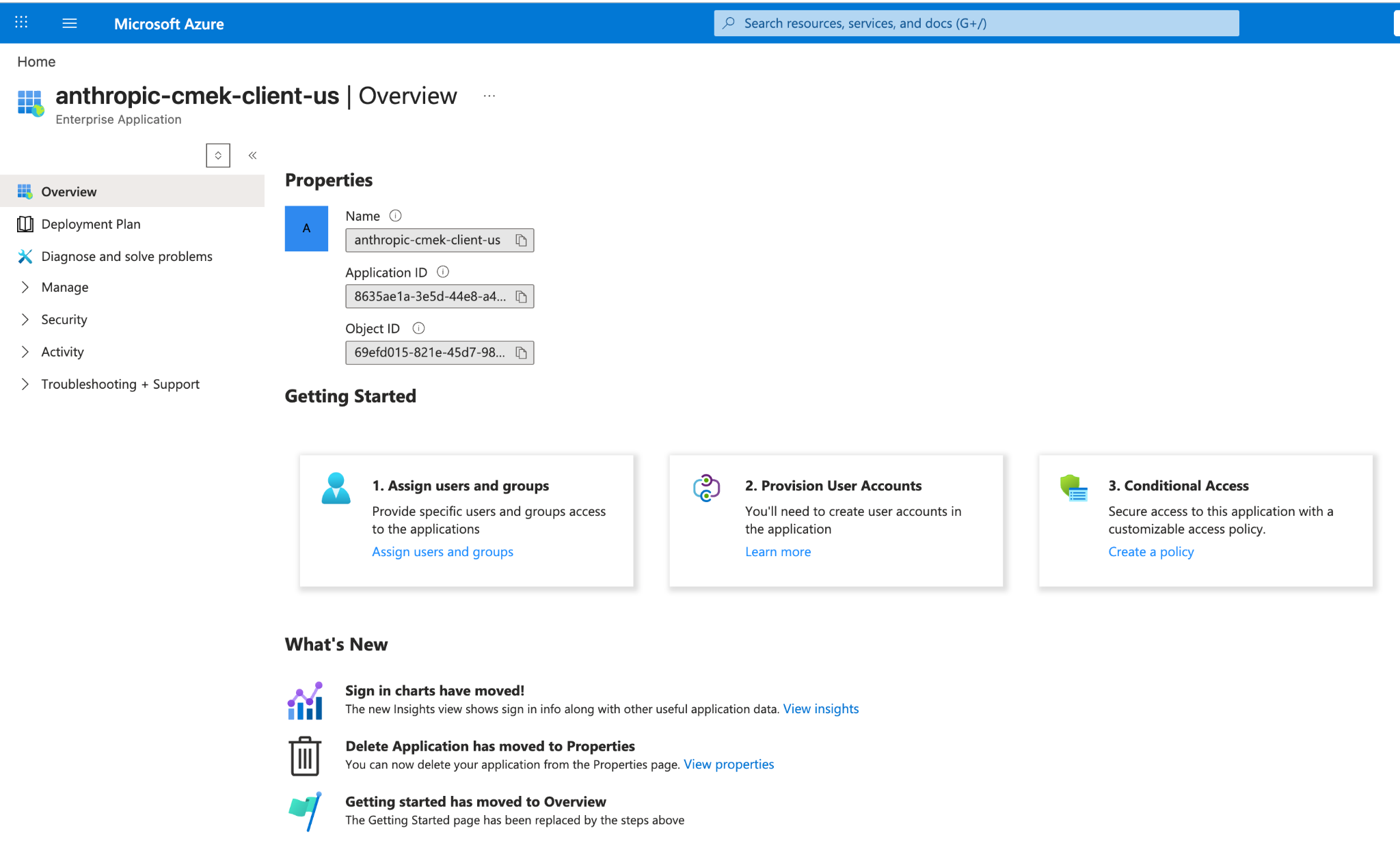
Entra 企業應用程式中的 anthropic-cmek-client-us 服務主體。 開啟 Create a key 頁面
開啟您的金鑰保存庫並選取 Keys。按一下 Generate/Import。
在您的保存庫中建立 RSA 金鑰
設定以下值:
- Name: 金鑰的名稱
- Key type: RSA
- RSA key size: 3072 或更大
按一下 Tags 旁的連結。
新增組織標籤
輸入以下值:
- Tag Name:
anthropic-org-<ORGANIZATION_UUID> - Tag Value:
true
按一下 OK,然後按一下 Create。
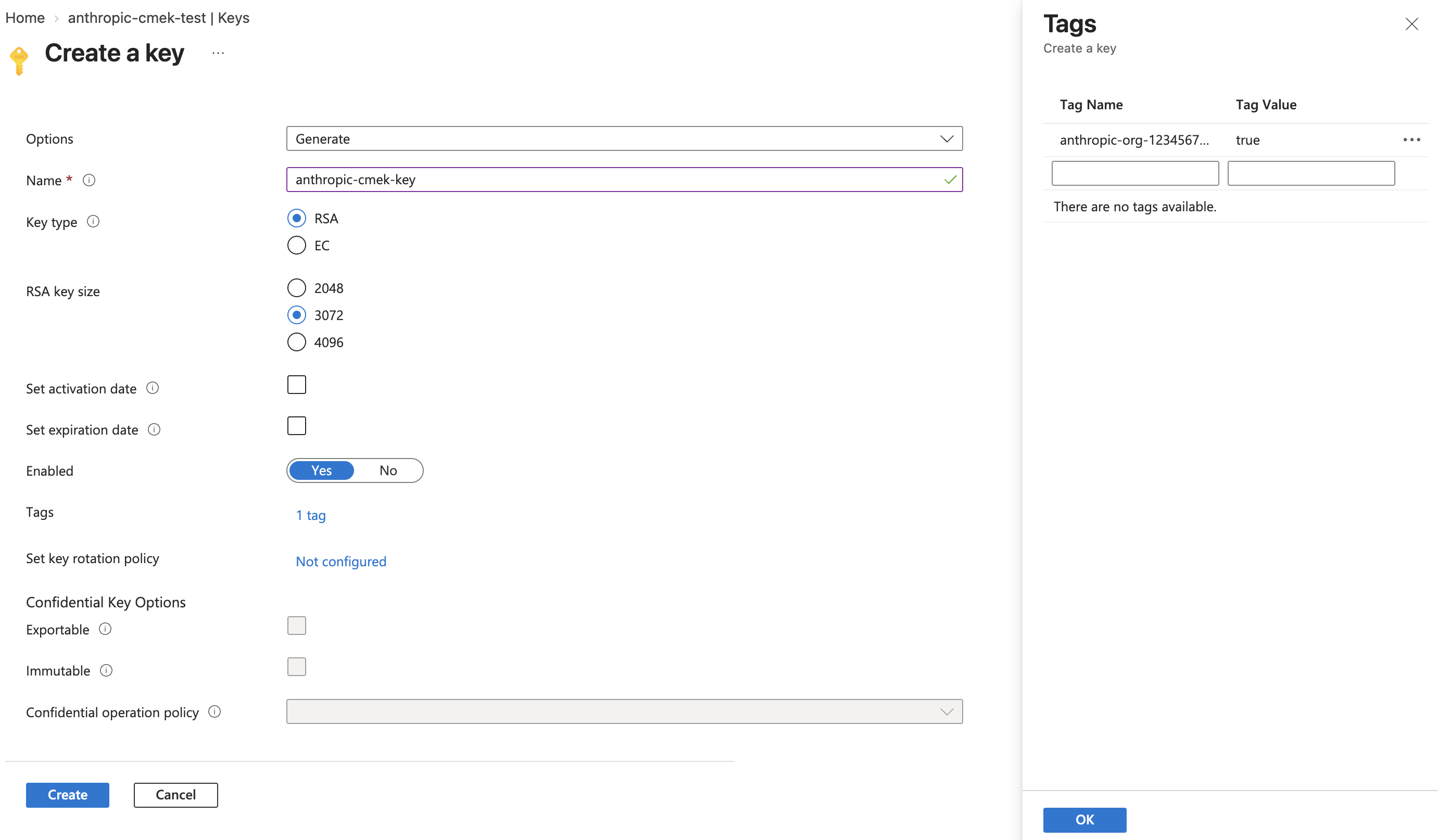
建立大小為 3072 或更大的 RSA 金鑰,並將標籤 anthropic-org-<ORGANIZATION_UUID> 設為 true。 - Tag Name:
限制允許的操作
開啟新金鑰,然後開啟其目前版本。在 Permitted operations 下,清除 Wrap Key 和 Unwrap Key 以外的所有核取方塊。按一下 Save。
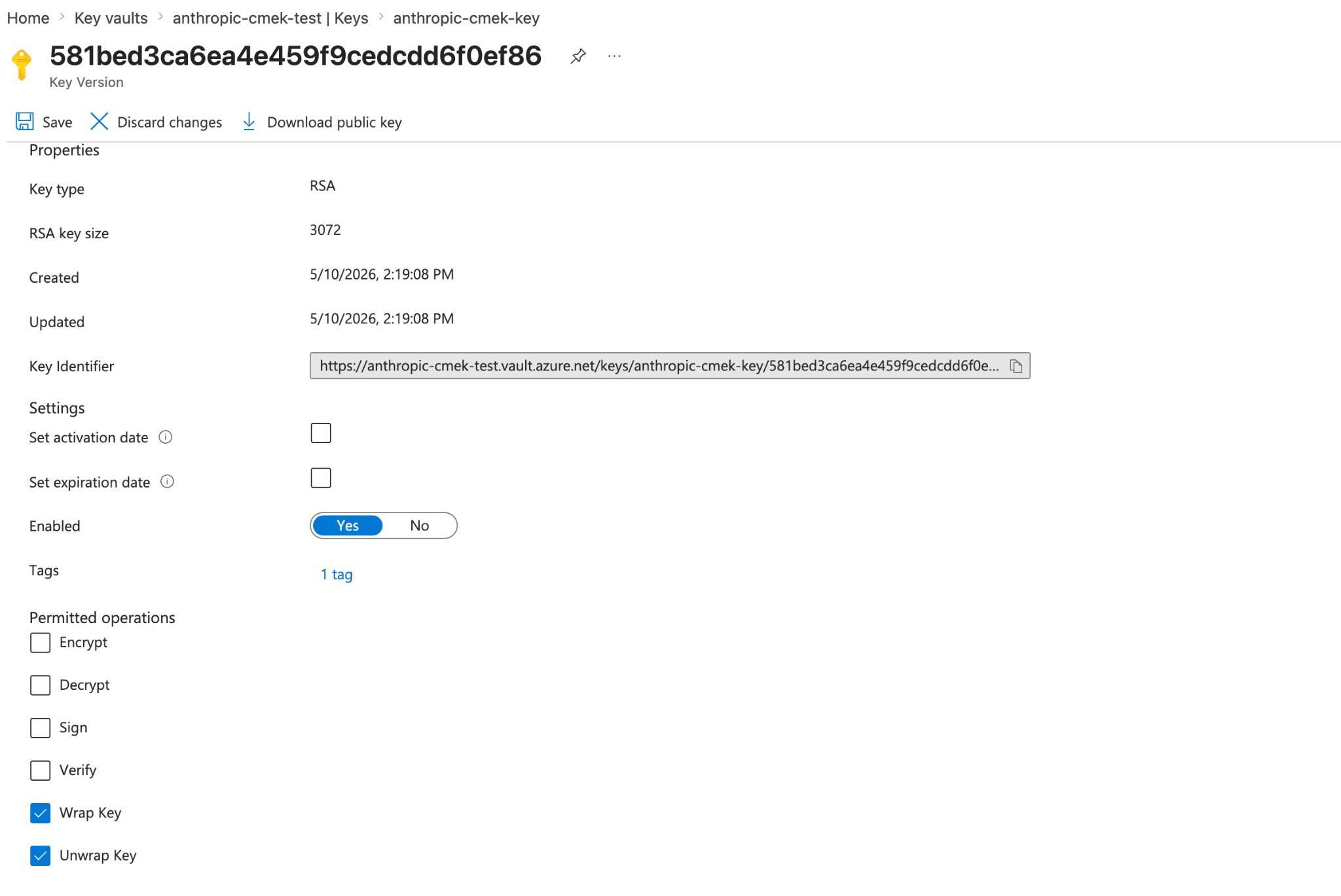
將允許的操作限制為 Wrap Key 和 Unwrap Key。金鑰版本會顯示組織標籤。 開啟金鑰的存取控制
開啟金鑰本身,而非保存庫。選取其 Access control (IAM) 索引標籤,然後按一下 Add > Add role assignment。
選取角色
在 Role 索引標籤上,選取 Key Vault Crypto User。按一下 Next。
新增 Anthropic 的服務主體
在 Members 索引標籤上,按一下 Select members。搜尋
anthropic-cmek-client-us並選取它。按一下 Select,然後按一下 Next。檢閱並指派
在 Review + assign 索引標籤上,按一下 Review + assign。
建立 Anthropic 的服務主體
az ad sp create --id 8635ae1a-3e5d-44e8-a4ed-e0f614466f87從輸出中複製
id欄位。如果命令以「already exists」錯誤結束,請改用以下命令取得
id:az ad sp show --id 8635ae1a-3e5d-44e8-a4ed-e0f614466f87 --query id -o tsv在您的保存庫中建立 RSA 金鑰
az keyvault key create \ --vault-name <your-vault-name> \ --name <your-key-name> \ --kty RSA --size 3072 \ --ops wrapKey unwrapKey \ --tags anthropic-org-<ORGANIZATION_UUID>=true取代預留位置:
<your-vault-name>: 您的金鑰保存庫名稱<your-key-name>: 金鑰的名稱<ORGANIZATION_UUID>: 您的 Anthropic 組織 ID,以小寫表示
若要使用 HSM 支援的金鑰,請使用
--kty RSA-HSM。授予 Anthropic 服務主體對您金鑰的存取權
VAULT_ID=$(az keyvault show --name <your-vault-name> --query id -o tsv) az role assignment create \ --role "Key Vault Crypto User" \ --assignee-object-id <sp-object-id> \ --assignee-principal-type ServicePrincipal \ --scope "${VAULT_ID}/keys/<your-key-name>"取代預留位置:
<your-vault-name>: 您的金鑰保存庫名稱<sp-object-id>: 第一個步驟中的id值<your-key-name>: 金鑰的名稱
在 Claude 中新增金鑰的人員需要保存庫 URI、金鑰名稱和租用戶 ID。
為您現有的金鑰新增組織標籤
若沒有組織標籤,驗證將會失敗。金鑰必須是 RSA,且為 3072 位元或更大。
請在 Azure CLI 或 Cloud Shell 中執行以下命令,而不是建立金鑰。此命令會將金鑰限制為 wrapKey 和 unwrapKey。它也會取代目前版本的標籤,因此請在 --tags 中以 name=value 的格式列出您想保留的任何標籤。
az keyvault key set-attributes \
  --vault-name <your-vault-name> \
  --name <your-key-name> \
  --ops wrapKey unwrapKey \
--tags anthropic-org-<ORGANIZATION_UUID>=true您仍需要完成服務主體和角色指派的步驟。
在 Claude 中:新增並附加金鑰
若要在 Claude Platform 上以指令碼執行此部分,請改為使用 Admin API。
開啟加密金鑰設定
在 Claude Console 中,開啟 Data retention 頁面上的 Encryption keys。如果該區段不存在,請從頂端的下拉選單中選取 Organization。
新增金鑰
在 Encryption keys 下,按一下 Add key。輸入 Display name,選取 Azure Key Vault,然後按一下 Continue。
輸入金鑰詳細資料
確認您的金鑰具有對話方塊中顯示的 Organization tag。輸入 Vault URI、Key name 和 Tenant ID,將 Client ID 留空,然後按一下 Add。
驗證金鑰
在 Encryption keys 清單中,按一下金鑰旁的 Verify。檢查通過時會顯示 Connected。如果改為顯示 Connection failed,請參閱疑難排解 CMEK。
在 Claude Enterprise 上,CMEK 適用於整個組織,且您只能新增單一金鑰。
新增金鑰會為每位使用者關閉或變更部分功能。若要先試用 CMEK,請使用另一個獨立的組織。
開啟加密金鑰設定
前往 claude.ai > Organization settings > Data and privacy 並找到 Encryption keys。
新增金鑰
按一下 Add key。輸入 Display name 並選取 Azure Key Vault。選取核取方塊以確認您已閱讀 CMEK 文件,然後按一下 Continue。
輸入金鑰詳細資料
確認您的金鑰具有對話方塊中顯示的 Organization tag。輸入 Vault URI、Key name 和 Tenant ID,將 Client ID 留空,然後按一下 Add。
Was this page helpful?