使用 AWS KMS 設定 CMEK
建立 AWS KMS 金鑰、授予 Anthropic 對該金鑰的存取權,並在 Claude Platform 或 Claude Enterprise 中使用它。
Claude Code
讓 Claude Code 為您設定此功能
/claude-api 協助我使用 AWS KMS 設定客戶管理的加密金鑰如果您的 Claude Console 側邊欄顯示 Account managed by AWS,請改為依照在 Claude Platform on AWS 上設定 CMEK 進行操作。
開始之前
在 Claude 中:
- 客戶管理的加密金鑰(CMEK)已為您的組織開啟。
- 您已取得您的 Anthropic 組織 ID,即不含
org_前綴的 UUID。請從 Claude Console 中的 Organization 複製,或從 claude.ai 上的 Organization settings > Organization and access 複製。建立金鑰的人需要此 ID。 - 您是 Claude Platform 上的 Organization Admin,或是 Claude Enterprise 上的 Owner 或 Primary Owner。
- 在 Claude Platform 上,您擁有一個保留資料的工作區,最好是新的工作區,因為現有資料仍以 Anthropic 的金鑰加密。
- 在 Claude Enterprise 上,您了解哪些功能會關閉或變更。
在 AWS 中:
- 您可以建立 AWS KMS 金鑰並設定其金鑰政策(
kms:CreateKey和kms:PutKeyPolicy)。 - 任何對 AWS KMS 存取的 IP 限制都允許 Anthropic 的輸出 IP 位址。
在 AWS 中:建立金鑰
若 Verify 或 Add 失敗,請參閱 AWS KMS 的修正方法。
撰寫金鑰政策
此政策授予 Anthropic 的 IAM 角色對您的金鑰的存取權。請僅使用本頁公布的角色 ARN,絕不要使用透過電子郵件或聊天傳送的角色 ARN。將政策複製到文字編輯器中:
{
  "Version": "2012-10-17",
  "Statement": [
    {
      "Sid": "AccountRootAdmin",
      "Effect": "Allow",
      "Principal": {
        "AWS": "arn:aws:iam::<AWS_ACCOUNT_ID>:root"
      },
      "Action": "kms:*",
      "Resource": "*"
    },
    {
      "Sid": "AllowAnthropicCMEKCrypto",
      "Effect": "Allow",
      "Principal": {
        "AWS": "arn:aws:iam::915198916910:role/anthropic-cmek-client-us"
      },
      "Action": ["kms:Encrypt", "kms:Decrypt"],
      "Resource": "*",
      "Condition": {
        "StringEquals": {
          "kms:EncryptionContext:anthropic:org_uuid": ["<ORGANIZATION_UUID>"]
        }
      }
    },
    {
      "Sid": "AllowAnthropicCMEKDescribe",
      "Effect": "Allow",
      "Principal": {
        "AWS": "arn:aws:iam::915198916910:role/anthropic-cmek-client-us"
      },
      "Action": "kms:DescribeKey",
      "Resource": "*"
    }
  ]
}
將 <AWS_ACCOUNT_ID> 替換為您的 AWS 帳戶 ID,並將 <ORGANIZATION_UUID> 替換為您的 Anthropic 組織 ID。請保留 kms:EncryptionContext:anthropic:org_uuid 條件,否則驗證會失敗。
您也可以列出工作區的隔間 ID,以將金鑰限制於特定工作區。如果您要替換已在保護 Claude 資料之金鑰上的政策,請再新增一個政策陳述式。
建立金鑰
您可以在任何 AWS 商業區域中建立金鑰。為獲得最低的延遲,請使用 us-east-2。
若要使用您在 AWS KMS 中已有的金鑰,請替換其金鑰政策。
開啟 Create key 精靈
開啟 AWS KMS 主控台,並切換到該金鑰所在的區域。前往 Customer managed keys,然後按一下 Create key。
Configure key
請確認已選取以下選項:
- Key type: Symmetric
- Key usage: Encrypt and decrypt
- Advanced options > Key material origin: KMS
- Advanced options > Regionality: Single-Region key
按一下 Next。
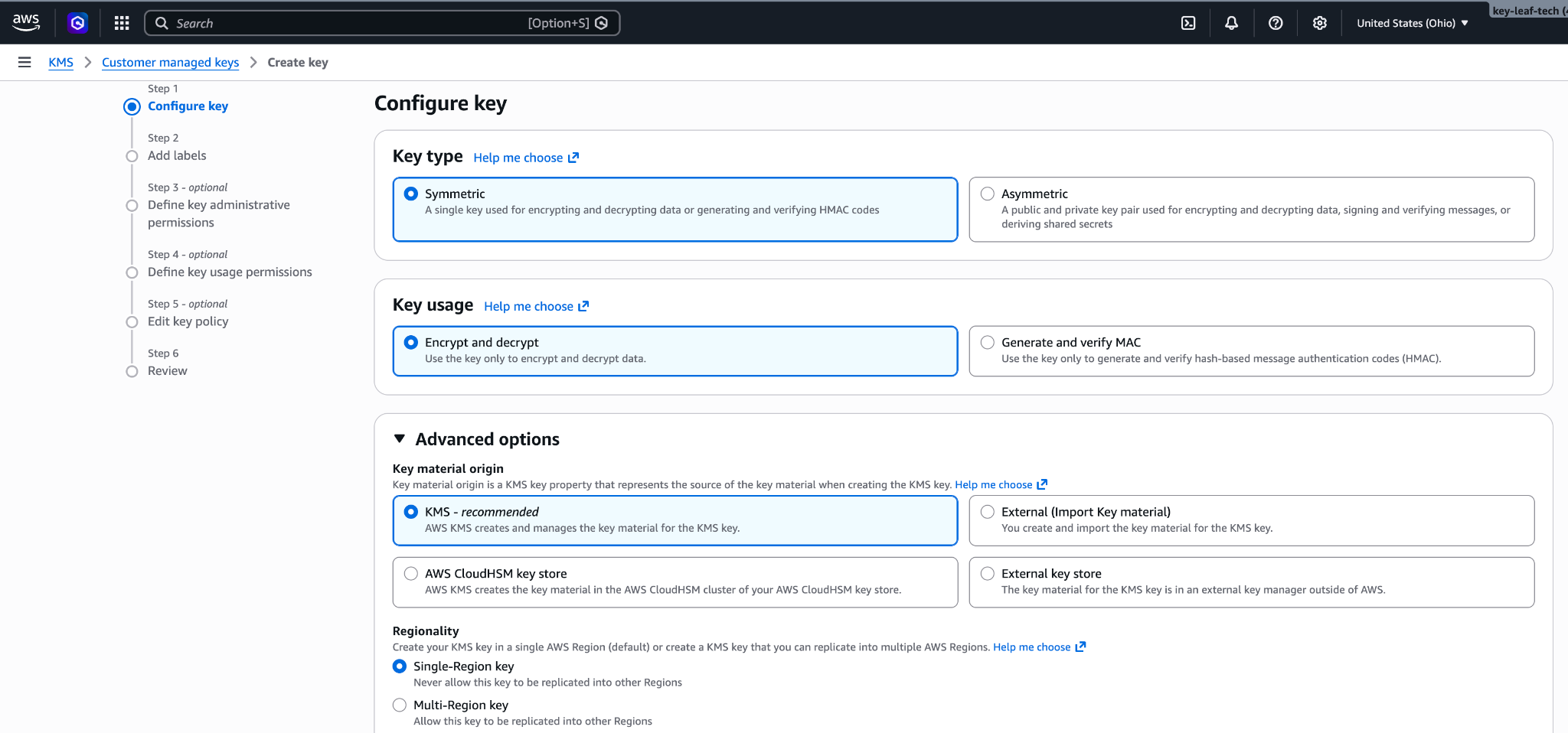
對稱、加密與解密、單一區域金鑰。 Add labels
為金鑰輸入 Alias,例如
anthropic-cmek。按一下 Next。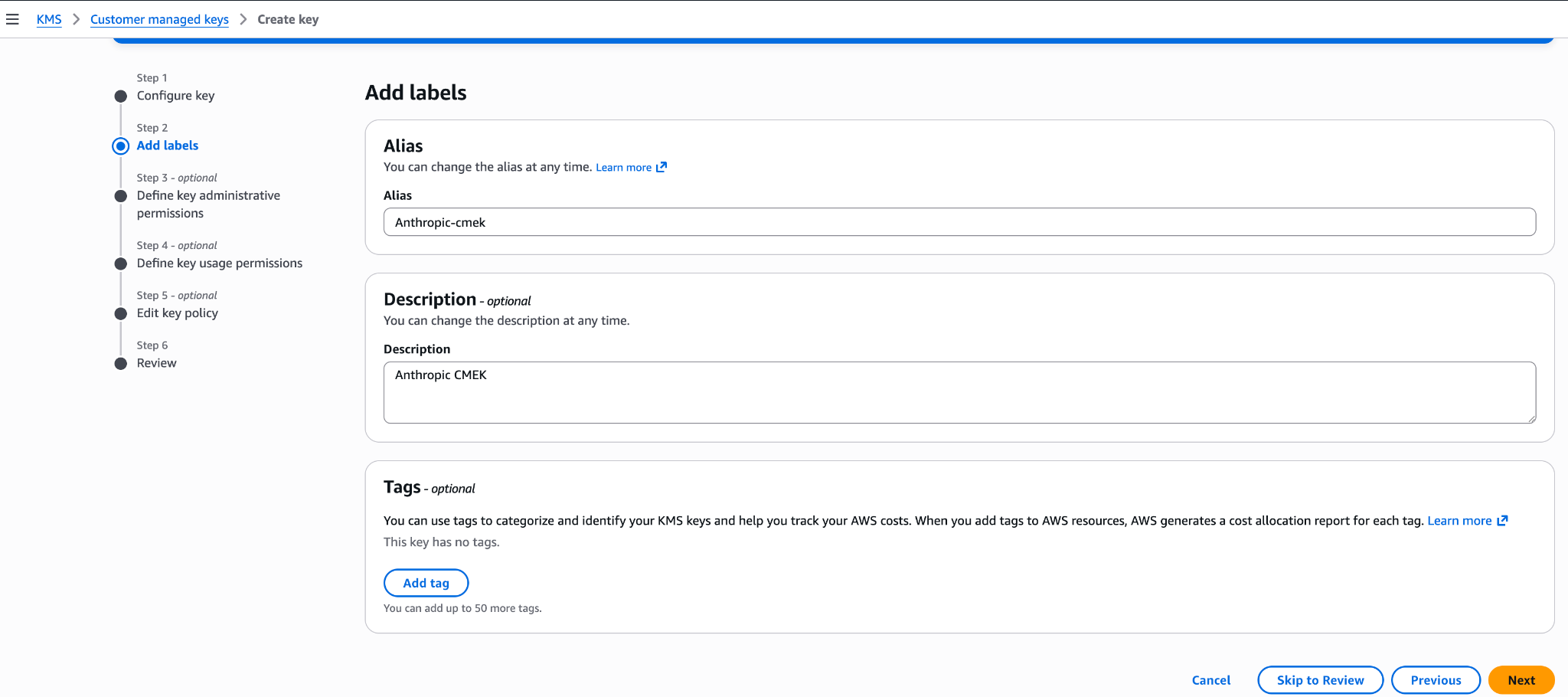
金鑰的別名。 Define key administrative permissions
請勿選取任何金鑰管理員。您的金鑰政策已賦予您的 AWS 帳戶完整的管理控制權。按一下 Next。
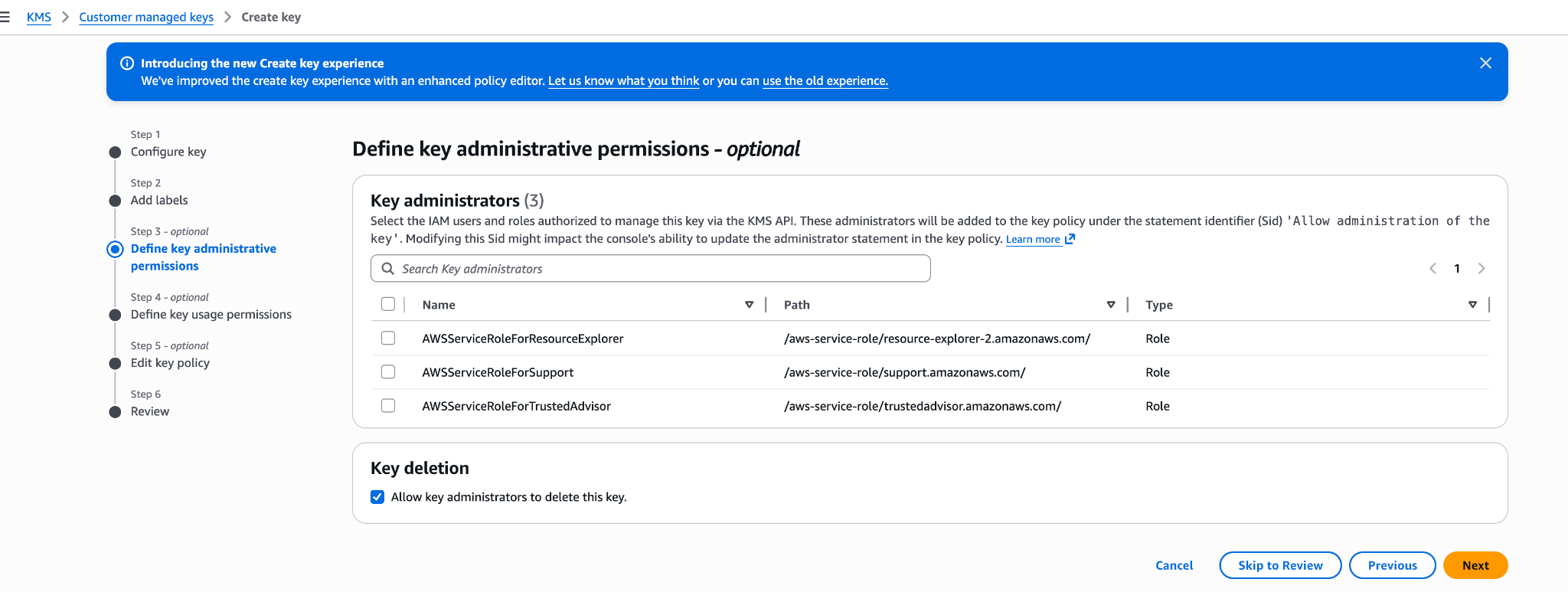
將金鑰管理員保留空白。 Define key usage permissions
請勿選取任何金鑰使用者,也不要在 Other AWS accounts 下新增任何項目。您的金鑰政策已授予所需的存取權。按一下 Next。
Edit key policy
按一下 Edit。將整個政策換成您的金鑰政策,然後按一下 Next。
Review
按一下 Finish。
複製金鑰 ARN
在 Customer managed keys 中,開啟新金鑰並複製其 ARN。在 Claude 中新增此金鑰的人需要用到它。
將您的金鑰政策儲存為 key-policy.json,然後建立金鑰。將 <REGION> 換成金鑰所在的區域。
aws kms create-key \
  --region <REGION> \
  --description "Anthropic CMEK" \
  --key-usage ENCRYPT_DECRYPT \
--policy file://key-policy.json從輸出中複製 KeyMetadata.Arn。在 Claude 中新增此金鑰的人需要用到此 ARN。
在 Claude 中每次檢查金鑰,都會在 CloudTrail 中新增四個預期的存取遭拒錯誤。您可以將其篩選掉。
在 Claude 中:新增並附加金鑰
若要在 Claude Platform 上以指令碼執行此部分,請改為使用 Admin API。
開啟加密金鑰設定
在 Claude Console 中,開啟 Data retention 頁面上的 Encryption keys。如果該區段不存在,請從頂端的下拉選單中選取 Organization。
新增金鑰
在 Encryption keys 下,點擊 Add key。輸入 Display name,選取 AWS KMS,然後點擊 Continue。
輸入金鑰 ARN
確認您的金鑰政策包含對話方塊中顯示的 Organization ID for the key policy。將金鑰 ARN 貼到 KMS key ARN 中,然後點擊 Add。
驗證金鑰
在 Encryption keys 清單中,按一下金鑰旁的 Verify。檢查通過時會顯示 Connected。如果改為顯示 Connection failed,請參閱疑難排解 CMEK。
在 Claude Enterprise 上,CMEK 適用於整個組織,且您只能新增單一金鑰。
新增金鑰會為每位使用者關閉或變更部分功能。若要先試用 CMEK,請使用另一個獨立的組織。
開啟加密金鑰設定
前往 claude.ai > Organization settings > Data and privacy 並找到 Encryption keys。
新增金鑰
點擊 Add key。輸入 Display name 並選取 AWS KMS。勾選核取方塊以確認您已閱讀 CMEK 文件,然後點擊 Continue。
輸入金鑰 ARN
確認您的金鑰政策包含對話方塊中顯示的 Organization ID for the key policy。將金鑰 ARN 貼到 KMS key ARN 中,然後點擊 Add。
Was this page helpful?