Configure Google Cloud KMS for CMEK
Use Google Cloud KMS to provide an encryption key for your organization.
claude "/claude-api help me configure a customer-managed encryption key with Google Cloud KMS"This guide walks through configuring a Google Cloud KMS key as a customer-managed encryption key (CMEK) for your Anthropic organization.
Prerequisites
- A Google Cloud project with billing enabled.
- The Cloud KMS API enabled (
cloudkms.googleapis.com). - Permissions to create KMS key rings and keys, and to set IAM policy on them (
roles/cloudkms.adminor equivalent). - An Anthropic Admin API key for your organization.
- The
gcloudCLI installed and authenticated. - Cloud KMS Data Access audit logs enabled for the project (IAM & Admin > Audit Logs > Cloud Key Management Service, with
DATA_READandDATA_WRITE). These are off by default; without them, Anthropic's encrypt and decrypt operations produce no entries in Cloud Logging.
Anthropic service account email
To have Anthropic use your encryption key, you must give Anthropic's service account a key it can use for encrypting data. The service account email for Anthropic CMEK is:
anthropic-cmek-client-us@gcp-anthropic-cmek-clients.iam.gserviceaccount.comEncryption key setup
Create or choose a key ring
Skip this step if you already have a key ring to reuse. Key rings are regional. Choose a single-region US location such as
us-east5that matches the Anthropic geography you are configuring. Multi-region locations likeusandglobalare not supported.gcloud kms keyrings create <your-keyring-name> \ --project=<your-project-id> \ --location=<region>Create the crypto key
Create a symmetric key with the
ENCRYPT_DECRYPTpurpose. Anthropic strongly recommends HSM protection: Cloud KMS HSM keys are FIPS 140-2 Level 3 validated, and the cost delta over software keys is small.The
--labelsoption adds the organization label,anthropic-org-<ORGANIZATION_UUID>with the valuetrue, where<ORGANIZATION_UUID>is your Anthropic organization ID in lowercase. The label is required for Anthropic to validate the key.gcloud kms keys create <KEY_NAME> \ --project=<PROJECT_ID> \ --location=<REGION> \ --keyring=<KEYRING_NAME> \ --purpose=encryption \ --protection-level=hsm \ --labels=anthropic-org-<ORGANIZATION_UUID>=trueFor software protection instead, omit
--protection-level=hsm. Nothing else in this guide changes.You can also create the key from the Google Cloud Console. Open the key ring, click Create key, select Generated key, set the purpose and algorithm to symmetric encrypt and decrypt, and choose HSM under protection level.
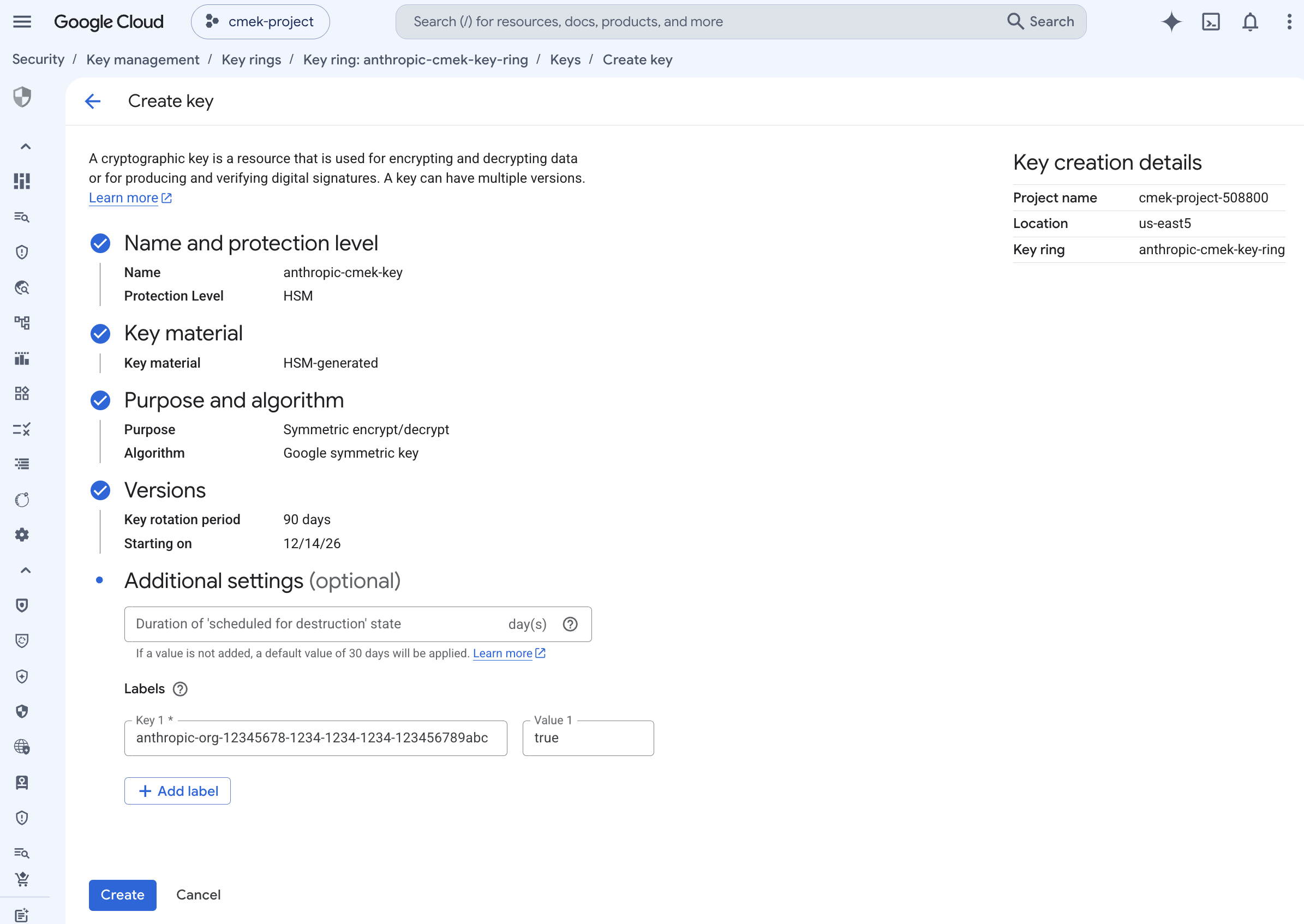
Create an HSM-protected symmetric encrypt/decrypt key with the organization label. To share one key among several Anthropic organizations, add one such label for each organization. A key can carry at most 64 labels, including your own.
Grant Anthropic's service account access to the key
Two key-level IAM bindings are required. Both are scoped to the single crypto key, not project-wide or keyring-wide.
Encrypt and decrypt, which Anthropic uses to encrypt and decrypt the data keys that protect your workspace data (envelope encryption):
gcloud kms keys add-iam-policy-binding <your-key-name> \ --project=<your-project-id> \ --location=<region> \ --keyring=<your-keyring-name> \ --member="serviceAccount:anthropic-cmek-client-us@gcp-anthropic-cmek-clients.iam.gserviceaccount.com" \ --role=roles/cloudkms.cryptoKeyEncrypterDecrypterViewer, for the metadata read (
cryptoKeys.get) Anthropic performs at startup to validate the key's purpose and algorithm:gcloud kms keys add-iam-policy-binding <your-key-name> \ --project=<your-project-id> \ --location=<region> \ --keyring=<your-keyring-name> \ --member="serviceAccount:anthropic-cmek-client-us@gcp-anthropic-cmek-clients.iam.gserviceaccount.com" \ --role=roles/cloudkms.viewerFrom the Console, select the key, open the Permissions panel, click Grant access, and add the service account with both the Cloud KMS CryptoKey Encrypter/Decrypter and Cloud KMS Viewer roles. Make sure you are on the key's permissions page, not the key ring or project, so the grant is scoped to this key only.
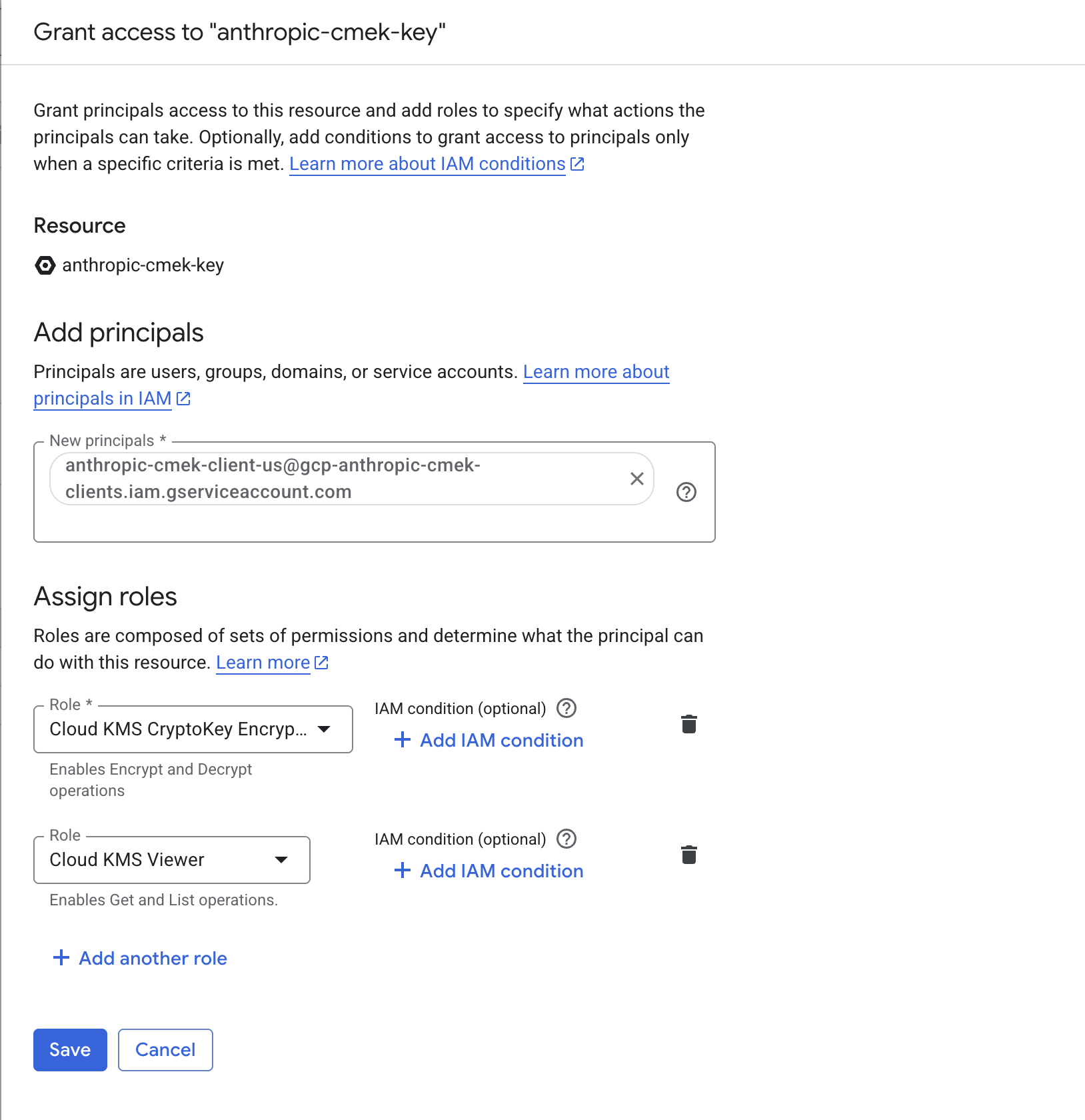
Grant the Anthropic service account both roles, scoped to the key. Note the full key resource name
You pass this to Anthropic when you register the key. The format is:
projects/<your-project-id>/locations/<region>/keyRings/<your-keyring-name>/cryptoKeys/<your-key-name>Retrieve it with:
gcloud kms keys describe <your-key-name> \ --project=<your-project-id> \ --location=<region> \ --keyring=<your-keyring-name> \ --format="value(name)"From the Console, open the key's details page and click Copy resource name.
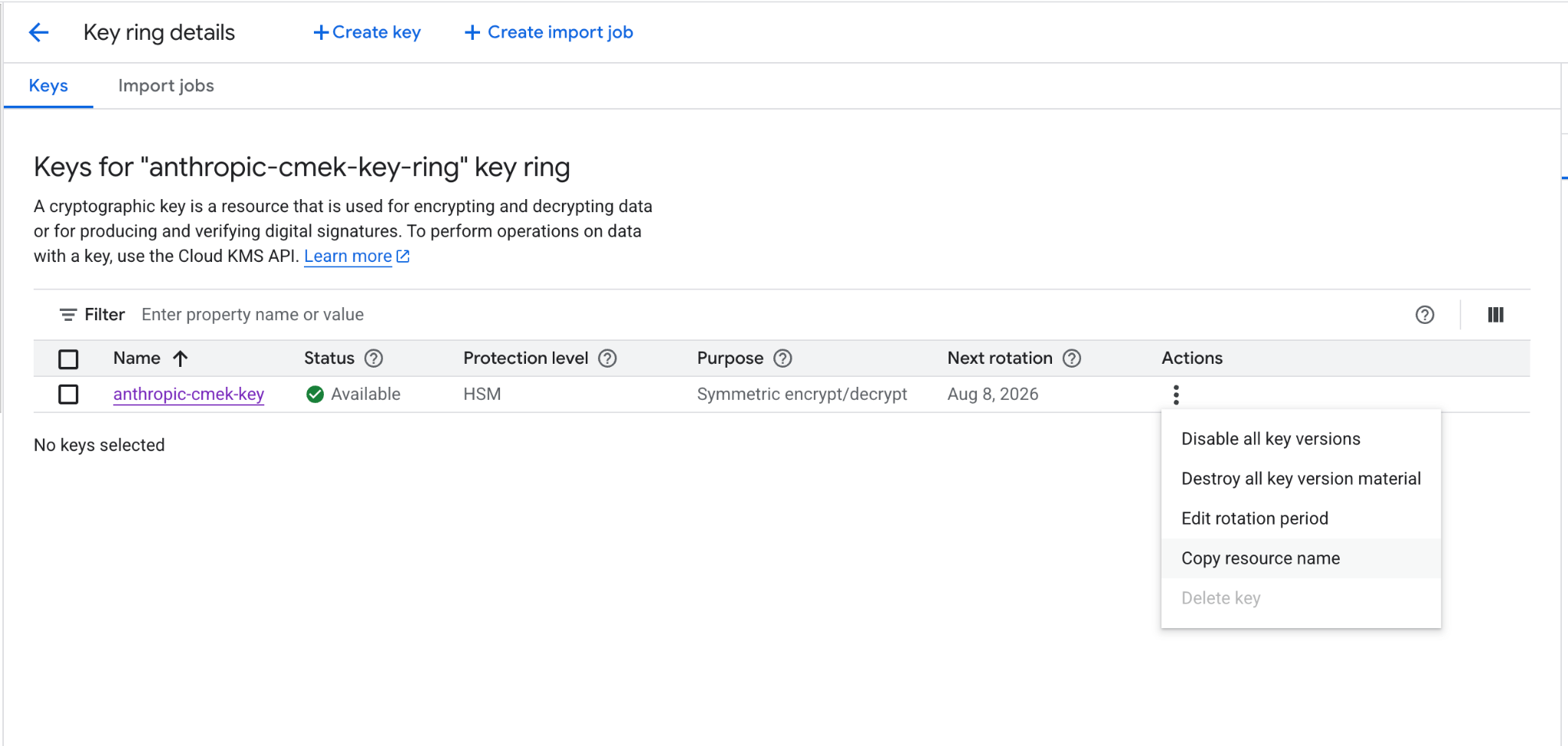
Copy the key's full resource name from the actions menu.
Register the key with Anthropic
How you register the key depends on which product you use.
You can set up the key in the Claude Console or through the Admin API, with the same result.
Register the key with Anthropic
In the Claude Console, go to the Data retention page (
platform.claude.com/settings/privacy). If you don't see Encryption keys, select Organization from the dropdown menu at the top of the page. Under Encryption keys, click Add key. Enter a display name, choose Google Cloud KMS, and click Continue. Paste the full key resource name into Key resource name, and click Add.The key details step shows the organization label. Add it to the key, as the create step describes, before you click Add.
Validate the key
In the Encryption keys list, click Verify next to the key. Connected appears when the check passes. If it fails, a message gives the reason.
Attach the key to a workspace
In the Claude Console, go to the Data retention page (
platform.claude.com/settings/privacy) and select the workspace from the dropdown menu at the top of the page. Under Encryption key, select the key, click Save, and confirm. Attaching a key can't be undone. For a workspace that already receives requests, the key can take up to a day to take effect.
Register the key with Anthropic
Create an external key configuration through the Admin API, using the resource name from the Note the full key resource name step under Encryption key setup.
Pythonclient = anthropic.Anthropic() external_key = client.organization.external_keys.create( display_name="<friendly-name>", geo="us", provider_config={ "type": "gcp", "key_name": "projects/<your-project-id>/locations/<region>/keyRings/<your-keyring-name>/cryptoKeys/<your-key-name>", }, ) print(f"id: {external_key.id}") print(f"display_name: {external_key.display_name}")The response contains the external key ID:
{ "type": "external_key", "id": "ekey_<id>", "display_name": "<friendly-name>" }Validate the key
Trigger an encrypt and decrypt round-trip against your key.
Pythonclient = anthropic.Anthropic() validation = client.organization.external_keys.validate("ekey_<id>") print(f"status: {validation.status}") print(f"error: {validation.error}")A successful response looks like this:
{ "type": "external_key_validation", "status": "success", "error": null }If validation fails, common causes are:
- VPC Service Controls: if a service perimeter protects Cloud KMS in your project, add Anthropic to an access level on the perimeter (or exclude the key's project) so Anthropic can reach the key.
- Domain restricted sharing: the
constraints/iam.allowedPolicyMemberDomainsorg policy can strip the Anthropic service account binding (see the earlier note). Confirm the binding is present withgcloud kms keys get-iam-policy <your-key-name> --project=<your-project-id> --location=<region> --keyring=<your-keyring-name>. - Disabled or destroyed key version: confirm the key's primary version is enabled, and not disabled, scheduled for destruction, or destroyed.
Attach the key to a workspace
Once the key is validated, attach it to a new workspace before you send any requests to that workspace. For a workspace that already receives requests, the key can take up to a day to take effect.
Pythonclient = anthropic.Anthropic() workspace = client.organization.workspaces.update( "<workspace-id>", external_key_id="ekey_<id>" ) print(f"id: {workspace.id}") print(f"external_key_id: {workspace.external_key_id}")
In claude.ai > Organization settings > Data and privacy, open Encryption keys, then click Add key. Choose Google Cloud, paste the full key resource name from the previous step, and click Continue. Anthropic validates the key with an encrypt and decrypt round-trip. Once it shows as verified, your organization is CMEK-protected from that point forward.
On Claude Enterprise, CMEK applies to the whole organization, so there is no separate workspace attach step, and an organization can have only one key.
Terraform
For infrastructure-as-code deployments, the same steps map to the google provider with the google_kms_key_ring, google_kms_crypto_key, and google_kms_crypto_key_iam_member resources.
Was this page helpful?