Configure AWS KMS for CMEK
Use AWS KMS to provide an encryption key for your organization.
claude "/claude-api help me configure a customer-managed encryption key with AWS KMS"This guide walks through configuring an AWS KMS key as a customer-managed encryption key (CMEK) for your Anthropic organization.
Prerequisites
- An AWS account with permissions to create KMS keys and set key policies (
kms:CreateKeyandkms:PutKeyPolicy). - An Anthropic Admin API key for your organization.
- The AWS CLI installed and authenticated.
Amazon Resource Name (ARN) for Anthropic
To have Anthropic use your encryption key, you must give Anthropic's IAM role a KMS key it can use for encrypting data. The ARN for Anthropic CMEK is:
arn:aws:iam::915198916910:role/anthropic-cmek-client-usEncryption key setup
Create the KMS key with a cross-account key policy
The key policy grants Anthropic's IAM role cross-account access. Three statements are required:
- Account root admin: the standard KMS pattern. Your account retains full admin control.
- Anthropic encrypt and decrypt: the
kms:Encryptandkms:Decryptactions, which Anthropic uses to encrypt and decrypt the data keys that protect your workspace data (envelope encryption). - Anthropic describe: the metadata read Anthropic performs at startup. It is granted separately because
DescribeKeyhas noEncryptionContextparameter, so anEncryptionContextcondition on this action would always deny.
To find your AWS account ID, run
aws sts get-caller-identity --query Account --output text.In the policy, replace
<AWS_ACCOUNT_ID>with your AWS account ID and<ORGANIZATION_UUID>with your organization ID. TheStringEqualscondition onkms:EncryptionContext:anthropic:org_uuidbinds the key to your Anthropic organization, and validation refuses a key without it. To share one key among several Anthropic organizations, list each organization ID in the condition value.Save the policy as
key-policy.json. To create the key in the AWS Console instead, paste the policy there, as described later in this step.key-policy.json{ "Version": "2012-10-17", "Statement": [ { "Sid": "AccountRootAdmin", "Effect": "Allow", "Principal": { "AWS": "arn:aws:iam::<AWS_ACCOUNT_ID>:root" }, "Action": "kms:*", "Resource": "*" }, { "Sid": "AllowAnthropicCMEKCrypto", "Effect": "Allow", "Principal": { "AWS": "arn:aws:iam::915198916910:role/anthropic-cmek-client-us" }, "Action": ["kms:Encrypt", "kms:Decrypt"], "Resource": "*", "Condition": { "StringEquals": { "kms:EncryptionContext:anthropic:org_uuid": ["<ORGANIZATION_UUID>"] } } }, { "Sid": "AllowAnthropicCMEKDescribe", "Effect": "Allow", "Principal": { "AWS": "arn:aws:iam::915198916910:role/anthropic-cmek-client-us" }, "Action": "kms:DescribeKey", "Resource": "*" } ] }aws kms create-key \ --region <REGION> \ --description "Anthropic CMEK" \ --key-usage ENCRYPT_DECRYPT \ --policy file://key-policy.jsonCapture
KeyMetadata.Arnfrom the output. You need it when you register the key in the next step.Anthropic validates the key when you verify it or attach it to a workspace. Each validation adds four access-denied errors to CloudTrail. These are expected. If you need to filter them out, filter on all three of the following values. The first one alone isn't enough, because any caller can set it:
requestParameters.encryptionContext.associatedData:Y21lay12YWxpZGF0aW9uuserIdentity.accountId:915198916910resources.ARN:arn:aws:kms:<REGION>:<AWS_ACCOUNT_ID>:key/<KEY_ID>
You can also create the key from the AWS Console. Choose a symmetric key with the encrypt and decrypt key usage, a single-region key, and KMS key material origin. The Create-key wizard commits a key policy at its Review step: If you add Anthropic's account ID
915198916910under key usage permissions there, the generated policy grants the whole Anthropic account broader actions (such askms:ReEncrypt*andkms:GenerateDataKey*) with noEncryptionContextcondition, and validation refuses it. To avoid leaving an over-permissive key, finish the wizard with administrative permissions only, then open the key's Key policy tab and replace the JSON with thekey-policy.jsonpolicy shown earlier in this step.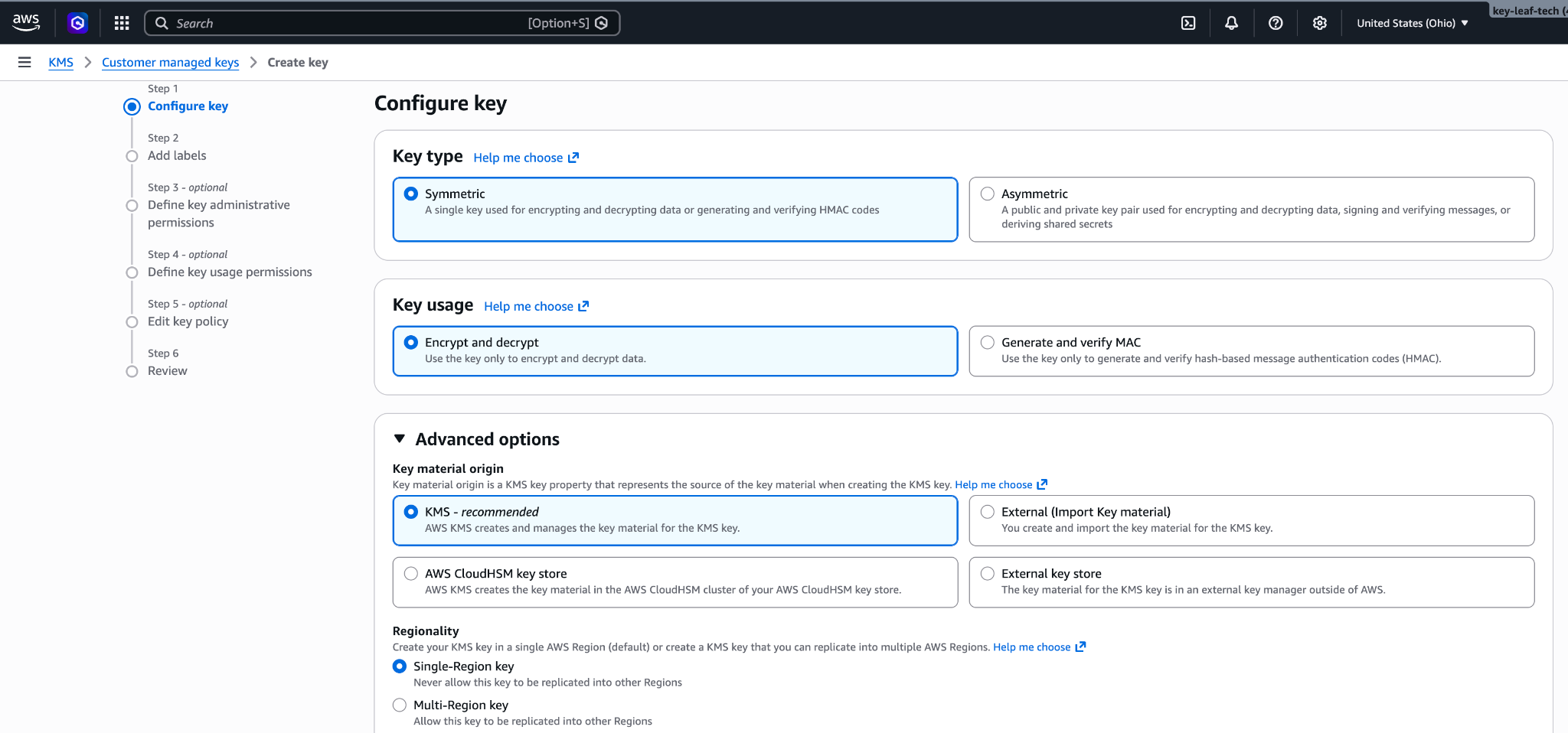
Configure key: symmetric, encrypt and decrypt, single-region key. 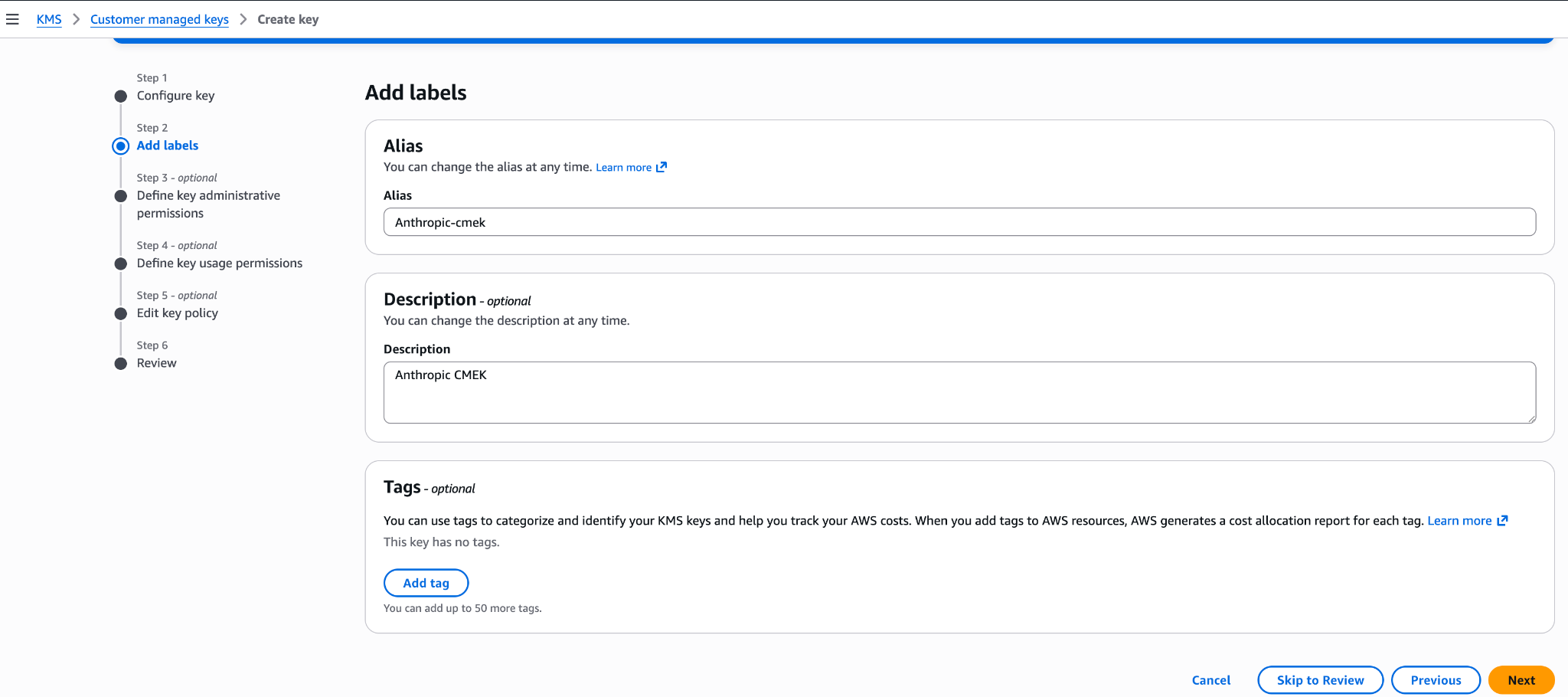
Add an alias and description for the key. 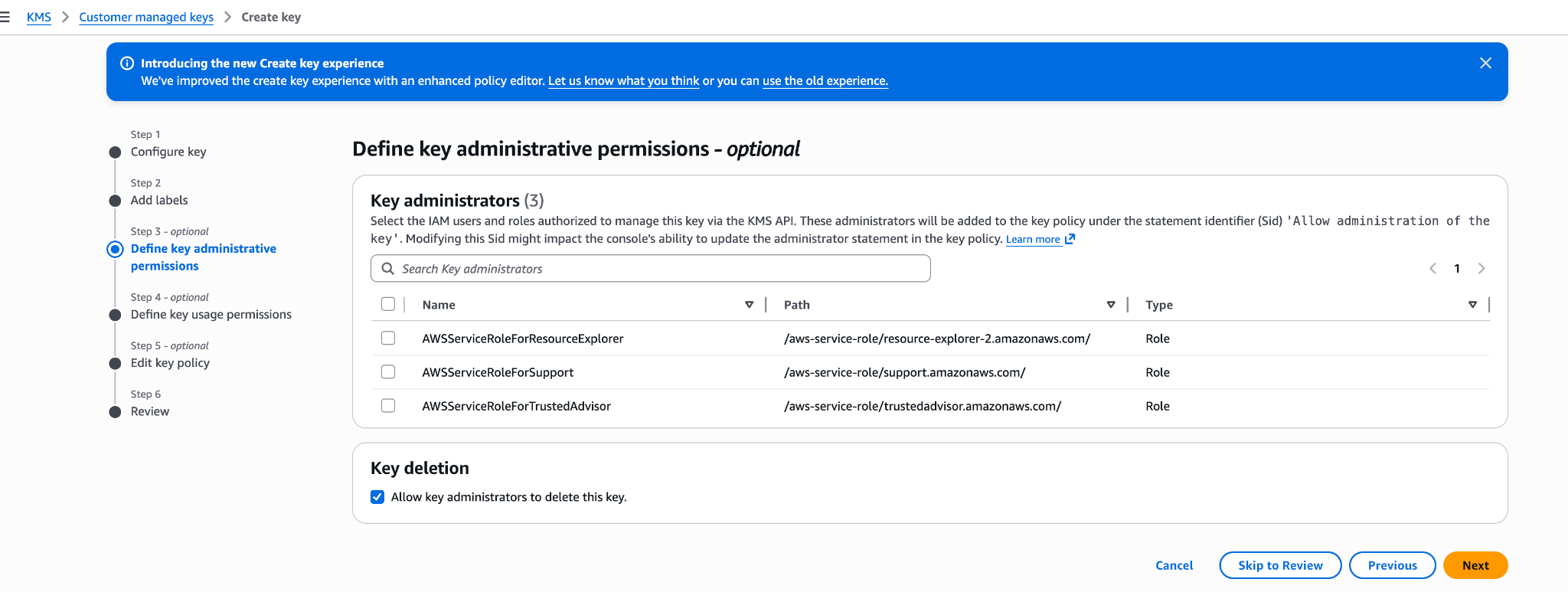
Define key administrative permissions (optional). Your account retains full admin control. 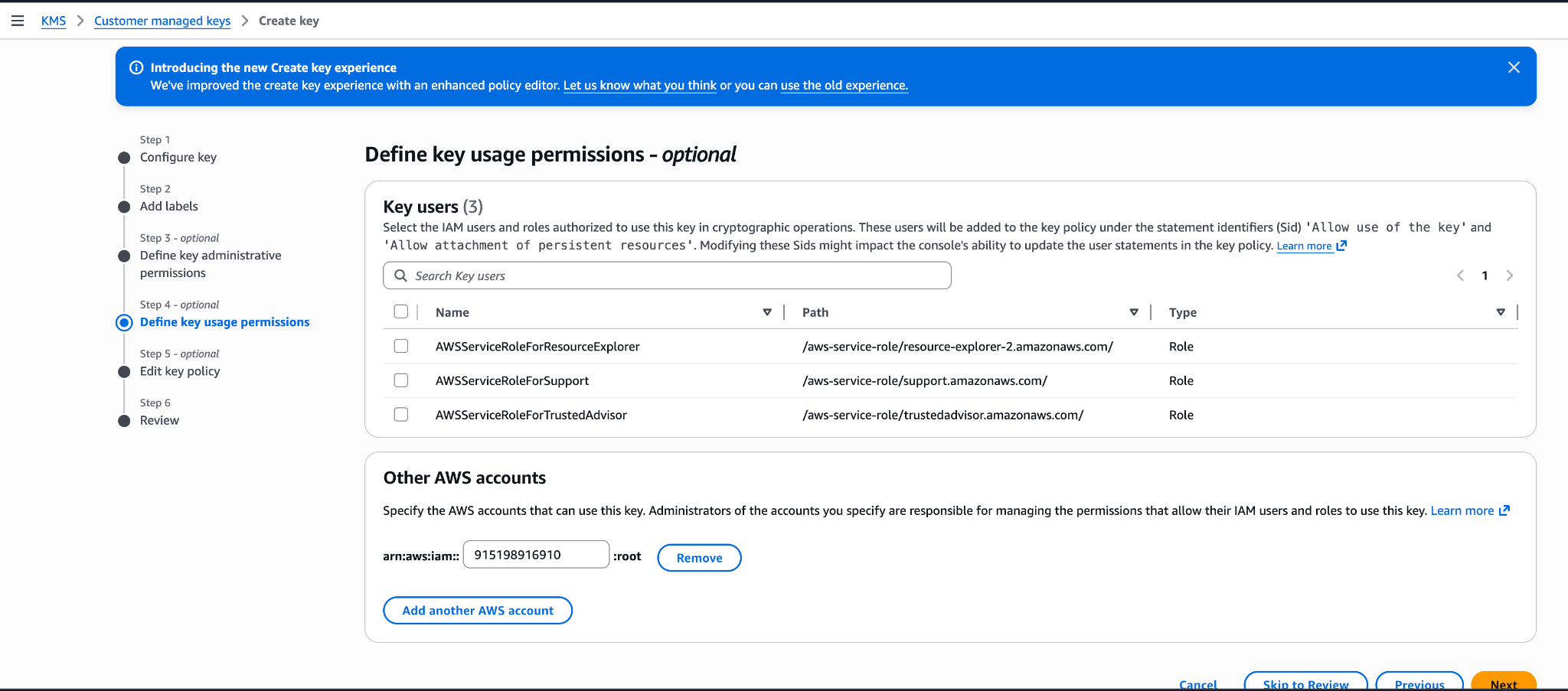
Do not add Anthropic's account ID here. This wizard step produces an over-permissive policy. Leave usage permissions empty and edit the Key policy JSON after creation (see the preceding key policy).
Register the key with Anthropic
How you register the key depends on which product you use.
You can set up the key in the Claude Console or through the Admin API, with the same result.
Register the key with Anthropic
In the Claude Console, go to the Data retention page (
platform.claude.com/settings/privacy). If you don't see Encryption keys, select Organization from the dropdown menu at the top of the page. Under Encryption keys, click Add key. Enter a display name, choose AWS KMS, and click Continue. Paste the key ARN into KMS key ARN, and click Add.The key details step shows your organization ID. Add it to the key policy before you click Add.
Validate the key
In the Encryption keys list, click Verify next to the key. Connected appears when the check passes. If it fails, a message gives the reason.
Attach the key to a workspace
In the Claude Console, go to the Data retention page (
platform.claude.com/settings/privacy) and select the workspace from the dropdown menu at the top of the page. Under Encryption key, select the key, click Save, and confirm. Attaching a key can't be undone. For a workspace that already receives requests, the key can take up to a day to take effect.
Register the key with Anthropic
Create an external key configuration through the Admin API.
Pythonclient = anthropic.Anthropic() external_key = client.organization.external_keys.create( display_name="<friendly-name>", geo="us", provider_config={"type": "aws", "kms_arn": "<key-arn-from-create-key-step>"}, ) print(f"id: {external_key.id}") print(f"display_name: {external_key.display_name}")The response contains the external key ID:
{ "type": "external_key", "id": "ekey_<id>", "display_name": "<friendly-name>" }Validate the key
Trigger an encrypt and decrypt round-trip against your key.
Pythonclient = anthropic.Anthropic() validation = client.organization.external_keys.validate("ekey_<id>") print(f"status: {validation.status}") print(f"error: {validation.error}")A successful response looks like this:
{ "type": "external_key_validation", "status": "success", "error": null }If validation fails, common causes are:
- Encryption context mismatch: If the policy has a
kms:EncryptionContext:anthropic:compartment_uuidcondition, make sure it lists the compartment ID of each workspace the key is attached to. Validation sends the compartment ID of the workspace it checks. An older key whose compartment statement still allowskms:Encryptis validated with the all-zeros value (00000000-0000-0000-0000-000000000000) while it isn't attached, so keep that value in its list. - Resource control policies (RCPs): If your AWS organization has an RCP that denies KMS operations when
aws:PrincipalOrgIDdoes not match your org, it blocks Anthropic's cross-account role. The RCP needs a carve-out for this key or for Anthropic's role ARN. Service control policies do not apply here, because they do not evaluate for external principals calling through resource-based policies. - Access granted through IAM instead of the key policy: Cross-account KMS access must be granted in the key policy itself, not through an IAM policy in your account. Check with
aws kms get-key-policy --key-id <id> --policy-name default. - Region mismatch: Confirm the key's region is one Anthropic operates in for the geo tier you configured.
- Encryption context mismatch: If the policy has a
Attach the key to a workspace
Once the key is validated, attach it to a new workspace before you send any requests to that workspace. For a workspace that already receives requests, the key can take up to a day to take effect.
Pythonclient = anthropic.Anthropic() workspace = client.organization.workspaces.update( "<workspace-id>", external_key_id="ekey_<id>" ) print(f"id: {workspace.id}") print(f"external_key_id: {workspace.external_key_id}")
In claude.ai > Organization settings > Data and privacy, open Encryption keys, then click Add key. Choose AWS and click Continue, then paste the Key ARN from the previous step and click Add. Anthropic validates the key with an encrypt and decrypt round-trip. Once it shows as verified, your organization is CMEK-protected from that point forward.
The key details step of this flow displays your Organization ID for the key policy with a copy button. Substitute that value for <ORGANIZATION_UUID> in the key policy. You can open the flow to copy the ID before you create the key.
On Claude Enterprise, CMEK applies to the whole organization, so there is no separate workspace attach step, and an organization can have only one key.
Set up CMEK on Claude Platform on AWS
On Claude Platform on AWS, CMEK uses AWS KMS keys only, and setup differs from the preceding sections in these ways:
- Principal: Your key policy grants access to the AWS service principal
aws-external-anthropic.amazonaws.com. Anthropic's IAM role and account ID are not used, so the ARN for Anthropic does not apply. - Key requirements: The key must be a symmetric KMS key with encrypt and decrypt usage, single-region, and in the same AWS account and region as the workspace you attach it to. Cross-account keys are not supported: the key must be in the AWS account that hosts your organization. Multi-region keys (key IDs that begin with
mrk-) and alias ARNs are rejected when you register the key; use the key ARN. - No separate validation step: Apart from those checks on the key ARN at registration, the key is validated when you attach it to a workspace. The attach call performs an encrypt/decrypt round against the key with that workspace's compartment ID as the encryption context, so a key policy problem surfaces at attach time rather than at registration. An
EncryptionContextcondition therefore needs no all-zeros entry. - Where you manage keys: Register and attach keys in the Claude Console, signed in through AWS with the Admin role. The external key endpoints are also available on Claude Platform on AWS, authorized through IAM actions; there, a key is identified by its KMS key ARN rather than an
ekey_ID.
Prerequisites
- The AWS account that hosts your Claude Platform on AWS organization, with permissions to create KMS keys and set key policies (
kms:CreateKeyandkms:PutKeyPolicy). - The Admin role in the Claude Console for Claude Platform on AWS. See Using the Claude Console.
- For the IAM principal you sign in to the Claude Console with: besides
aws-external-anthropic:AssumeConsole, the IAM actions for the operations you perform there, because registering, listing, and attaching keys go through the AWS gateway. Registering a key isRegisterKey(withListKeysandGetKeyto view registrations), and attaching one isUpdateWorkspaceorCreateWorkspace. The external key actions (andCreateWorkspace) are account-scoped, so grant them onResource: "*"; a policy limited to workspace ARNs does not include them. - For the IAM principal that attaches the key to a workspace (the identity you signed in to the Claude Console with):
kms:DescribeKey,kms:Encrypt, andkms:Decrypton the key. Your principal's access to the key is checked when you attach it, in addition to the service principal's. - Optional, for the key picker in the Claude Console:
kms:ListKeysandkms:DescribeKeyfor the principal you sign in with. Without them, paste the key ARN instead.
Create the KMS key
The key policy has three statements: your account's root admin statement; a statement that lets the Claude Platform on AWS service principal encrypt, decrypt, and generate data keys; and a separate statement for kms:DescribeKey. The crypto statement carries an optional EncryptionContext condition that binds the key to the workspaces you list. DescribeKey is granted separately because it has no EncryptionContext parameter, so an EncryptionContext condition on that action would always deny.
If you plan to use the optional EncryptionContext condition shown here, create the workspace first (without a key), copy its compartment ID, and substitute it for <compartment-uuid>. To find the ID in the Claude Console, go to the Data retention page (platform.claude.com/settings/privacy) and select the workspace from the dropdown menu at the top of the page. The ID is under Encryption key, in the Compartment ID field. You can also read it from the compartment_id field returned by the Get Workspace endpoint. If you don't plan to use the condition, delete the Condition block from that statement.
export YOUR_ACCOUNT=$(aws sts get-caller-identity --query Account --output text)

aws kms create-key \
  --region <workspace-region> \
  --description "Anthropic CMEK (Claude Platform on AWS)" \
  --key-usage ENCRYPT_DECRYPT \
  --policy "{
    \"Version\": \"2012-10-17\",
    \"Statement\": [
      {
        \"Sid\": \"AccountRootAdmin\",
        \"Effect\": \"Allow\",
        \"Principal\": {\"AWS\": \"arn:aws:iam::${YOUR_ACCOUNT}:root\"},
        \"Action\": \"kms:*\",
        \"Resource\": \"*\"
      },
      {
        \"Sid\": \"AllowClaudePlatformOnAWSCrypto\",
        \"Effect\": \"Allow\",
        \"Principal\": {\"Service\": \"aws-external-anthropic.amazonaws.com\"},
        \"Action\": [\"kms:Encrypt\", \"kms:Decrypt\", \"kms:GenerateDataKey\"],
        \"Resource\": \"*\",
        \"Condition\": {
          \"StringEquals\": {
            \"kms:EncryptionContext:anthropic:compartment_uuid\": [
              \"<compartment-uuid>\"
            ]
          }
        }
      },
      {
        \"Sid\": \"AllowClaudePlatformOnAWSDescribe\",
        \"Effect\": \"Allow\",
        \"Principal\": {\"Service\": \"aws-external-anthropic.amazonaws.com\"},
        \"Action\": \"kms:DescribeKey\",
        \"Resource\": \"*\"
      }
    ]
}"Capture KeyMetadata.Arn from the output. You need it when you register the key.
The EncryptionContext condition is optional. Every encrypt, decrypt, and data-key call made for a workspace, including the attach-time check, carries that workspace's compartment ID as anthropic:compartment_uuid, so the condition lists the compartment ID of each workspace you attach the key to and needs no all-zeros entry. Adding it binds the key to the workspaces you list at the IAM layer as well. Because a compartment ID exists only once its workspace exists, the order is: create the workspace, put its compartment ID in the condition (at key creation, or later with kms:PutKeyPolicy), then attach the key. Before attaching the key to each additional workspace, add that workspace's compartment ID the same way. To start without it, delete the Condition block from the AllowClaudePlatformOnAWSCrypto statement; if you add it later, include the compartment ID of every workspace the key is already attached to.
You can further restrict both service-principal statements with an aws:SourceArn condition. The service passes the workspace's ARN (arn:aws:aws-external-anthropic:<region>:<account-id>:workspace/<workspace-id>) as the source ARN on every call it makes with your key, so "ArnLike": {"aws:SourceArn": "arn:aws:aws-external-anthropic:*:<account-id>:workspace/*"} limits the grant to workspaces in your own AWS account, and a list of full workspace ARNs limits it to those workspaces. This condition is not required; the EncryptionContext condition on its own binds the key to the workspaces you list.
You can also create the key from the AWS Console: choose a symmetric key with the encrypt and decrypt key usage, a single-region key, and KMS key material origin, in the workspace's region. Leave key usage permissions empty in the Create-key wizard, then open the key's Key policy tab and replace the JSON with the policy shown here.
Register and attach the key
Register the key
In the Claude Console, go to the Data retention page (
platform.claude.com/settings/privacy). If you don't see Encryption keys, select Organization from the dropdown menu at the top of the page. Under Encryption keys, click Add key. Enter a display name, then choose the key from the key picker or choose Enter ARN manually and paste the key ARN, and click Add. The key must be in the AWS account that hosts your organization; cross-account keys are not supported. The picker lists the enabled, customer-managed, symmetric, single-region keys in your account in one of your organization's regions; for a key the picker doesn't list, enter the ARN. It lists keys only if the principal you signed in with can callkms:ListKeysandkms:DescribeKey.Attach the key to a workspace
Attach the key to a new workspace before you send any requests to that workspace. For a workspace that already receives requests, the key can take up to a day to take effect. In the Claude Console, go to the Data retention page (
platform.claude.com/settings/privacy) and select the workspace from the dropdown menu at the top of the page. Under Encryption key, select the key, click Save, and confirm. You can also select a key when you create a workspace in the Claude Console, but only if your key policy does not yet name specific workspaces (noEncryptionContextcondition), because the workspace's compartment ID is assigned at creation. Once attached, a workspace's key can't be changed.This is when the key is validated: the attach call checks your principal's access to the key and performs an encrypt/decrypt round against it with the workspace's compartment ID as the encryption context, so a problem with either the key policy or your principal's permissions surfaces as an error on that call. If the attach fails with a KMS access error, check the following:
- The key policy names the
aws-external-anthropic.amazonaws.comservice principal and grantskms:Encrypt,kms:Decrypt, andkms:GenerateDataKey, pluskms:DescribeKeyin a separate statement that has noEncryptionContextcondition. - Any
EncryptionContextcondition includes this workspace's compartment ID, and anyaws:SourceArncondition you added matches this workspace's ARN. - The key is enabled, single-region, and in the same AWS account and region as the workspace.
- The principal you are signed in as has
kms:DescribeKey,kms:Encrypt, andkms:Decrypton the key. - No service control policy or resource control policy in your AWS organization prevents the service principal or your principal from using the key.
- If the policy looks right and the attach still fails, find the denied
kms:event in CloudTrail in the key's account (it shows the calling principal and, for cryptographic calls, the encryption context), then correct the condition withkms:PutKeyPolicyand retry.
- The key policy names the
Terraform
For infrastructure-as-code deployments, the same steps map to the aws provider with the aws_kms_key and aws_kms_alias resources.
Was this page helpful?