使用 Azure Key Vault 设置 CMEK
创建 Azure Key Vault 密钥,授予 Anthropic 对该密钥的访问权限,并在 Claude Platform 或 Claude Enterprise 中使用该密钥。
Claude Code
让 Claude Code 为您设置此功能
/claude-api 帮我使用 Azure Key Vault 配置客户管理的加密密钥开始之前
在 Claude 中:
- 客户管理的加密密钥(CMEK)已为您的组织开启。
- 您已获得您的 Anthropic 组织 ID,即不带
org_前缀的 UUID。您可以从 Claude Console 中的 Organization 复制它,也可以从 claude.ai 上的 Organization settings > Organization and access 复制它。创建密钥的人需要此 ID。 - 您是 Claude Platform 上的 Organization Admin,或 Claude Enterprise 上的 Owner 或 Primary Owner。
- 在 Claude Platform 上,您拥有一个保留数据的工作区,最好是新的工作区,因为现有数据仍受 Anthropic 的密钥保护。
- 在 Claude Enterprise 上,您了解哪些功能会关闭或发生变化。
在 Azure 中:
- 您可以在密钥保管库中创建密钥,并在其上分配 RBAC 角色。
- 您可以在 Entra 租户中创建服务主体(Application Administrator、Cloud Application Administrator 或同等的自定义角色)。
- 保管库已为
AuditEvent日志类别配置诊断设置。如果没有该设置,Anthropic 对您的密钥执行的操作将不会留下任何审计记录。
在 Azure 中:创建密钥
如果 Verify 或 Add 失败,请参阅 Azure Key Vault 的修复方法。
以下步骤会授予 Anthropic 的多租户应用程序对您的密钥的访问权限:
- 名称:
anthropic-cmek-client-us - 客户端 ID:
8635ae1a-3e5d-44e8-a4ed-e0f614466f87
请仅使用此客户端 ID 和名称,切勿使用通过电子邮件或聊天发送给您的客户端 ID 或名称。该应用程序不请求任何 Microsoft Graph 权限。
检查保管库
为获得最低延迟,请使用位于 northcentralus 或 eastus2 的保管库。首先在 Azure CLI 或 Cloud Shell 中运行以下命令:
az keyvault show --name <your-vault-name> \
--query "{rbac:properties.enableRbacAuthorization, purge:properties.enablePurgeProtection, pub:properties.publicNetworkAccess, net:properties.networkAcls.defaultAction, ipRules:properties.networkAcls.ipRules, uri:properties.vaultUri, tenantId:properties.tenantId}"| 字段 | 必须为 |
|---|---|
rbac | true |
purge | true。如果为 false 或 null,请先启用清除保护。启用后无法再次关闭。 |
pub | "Enabled"。不支持专用终结点。 |
net | "Allow",或 "Deny" 且 ipRules 中包含 Anthropic 的出站 IP 地址 |
复制 uri(保管库 URI)和 tenantId。
创建密钥并授予访问权限
在本页中,<ORGANIZATION_UUID> 是小写形式的您的 Anthropic 组织 ID。如需使用您已有的密钥,请先添加组织标签。
创建 Anthropic 的服务主体
从门户的顶部导航栏打开 Cloud Shell。运行以下命令:
az ad sp create --id 8635ae1a-3e5d-44e8-a4ed-e0f614466f87如果该服务主体已存在,请继续执行下一步。
确认服务主体存在
前往 Microsoft Entra ID > Enterprise applications,并清除默认的应用程序类型筛选器。搜索
anthropic-cmek-client-us。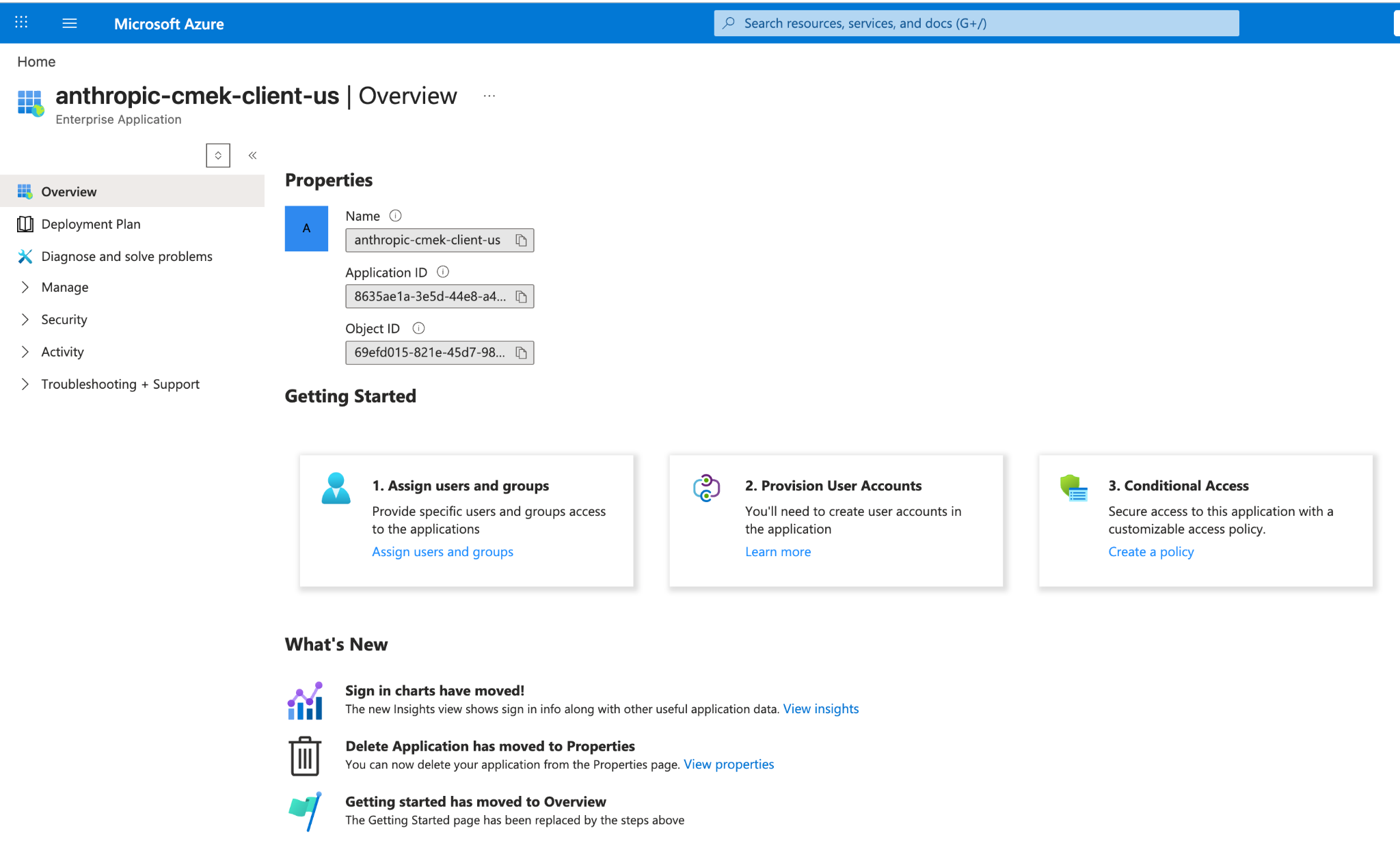
Entra 企业应用程序中的 anthropic-cmek-client-us 服务主体。 打开 Create a key 页面
打开您的密钥保管库并选择 Keys。点击 Generate/Import。
在您的保管库中创建 RSA 密钥
设置以下值:
- Name: 密钥的名称
- Key type: RSA
- RSA key size: 3072 或更大
点击 Tags 旁边的链接。
添加组织标签
输入以下值:
- Tag Name:
anthropic-org-<ORGANIZATION_UUID> - Tag Value:
true
点击 OK,然后点击 Create。
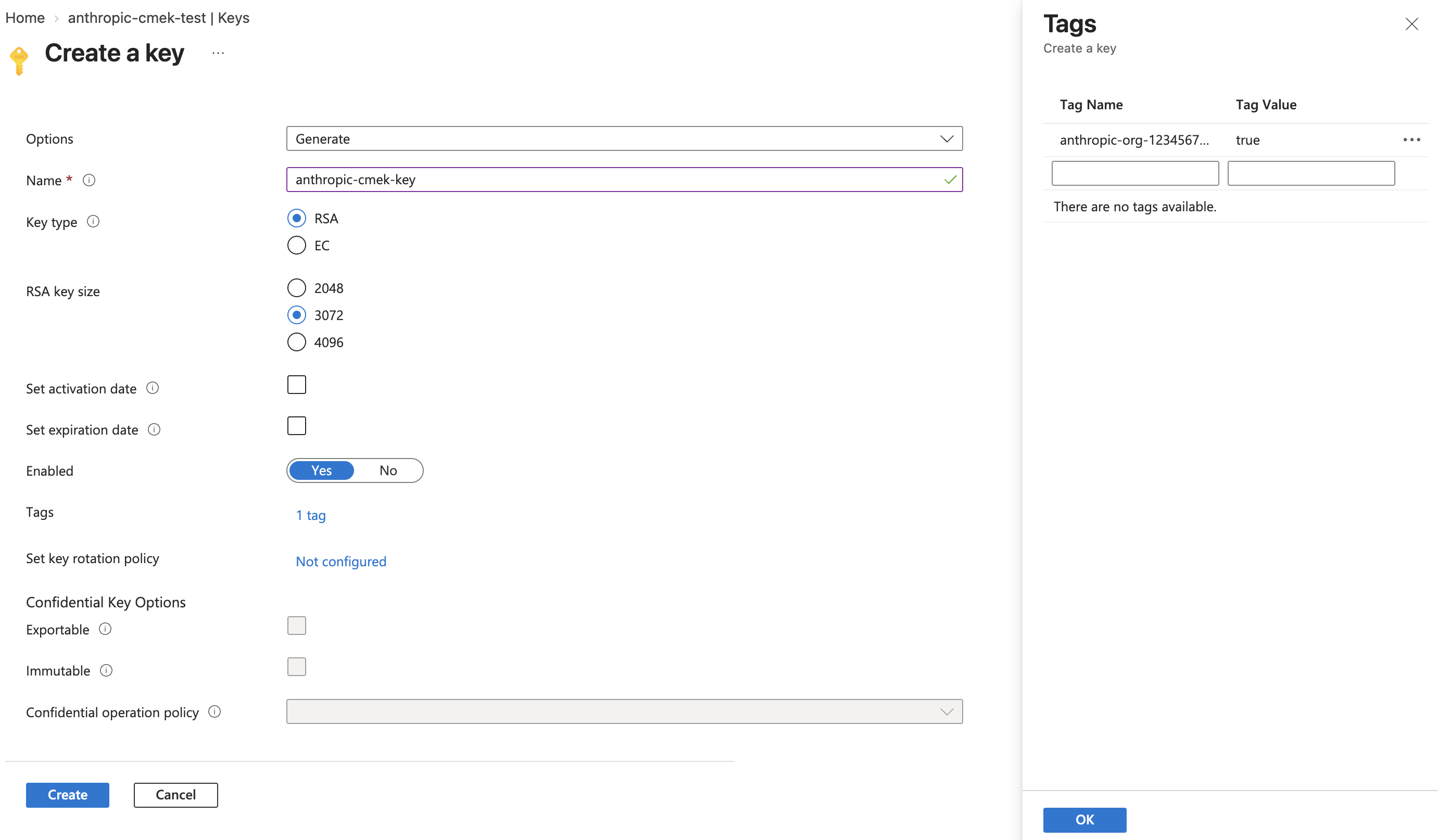
创建大小为 3072 或更大的 RSA 密钥,并将标签 anthropic-org-<ORGANIZATION_UUID> 设置为 true。 - Tag Name:
限制允许的操作
打开新密钥,然后打开其当前版本。在 Permitted operations 下,清除除 Wrap Key 和 Unwrap Key 之外的所有复选框。点击 Save。
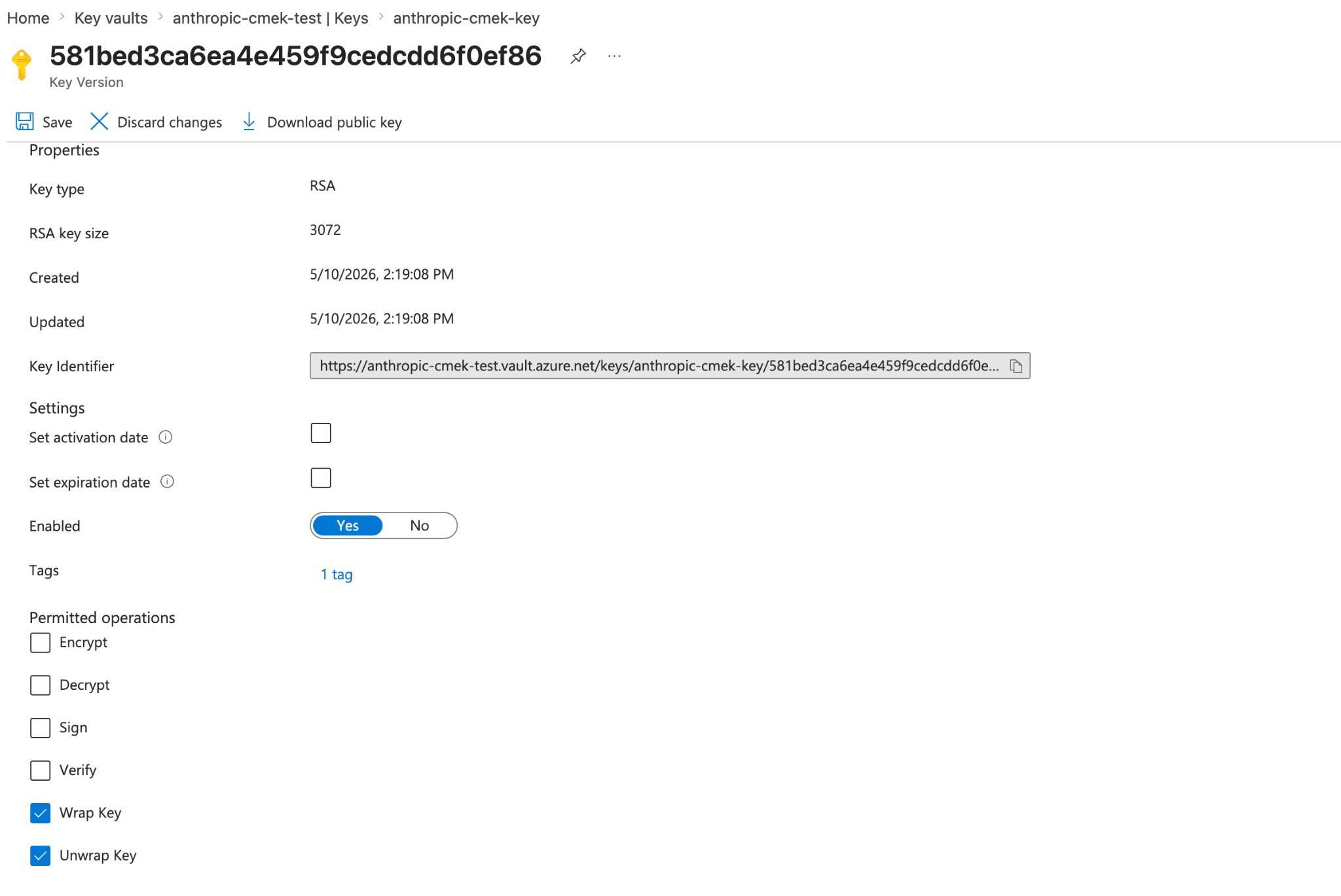
将允许的操作限制为 Wrap Key 和 Unwrap Key。密钥版本显示组织标签。 打开密钥的访问控制
打开密钥本身,而不是保管库。选择其 Access control (IAM) 选项卡,然后点击 Add > Add role assignment。
选择角色
在 Role 选项卡上,选择 Key Vault Crypto User。点击 Next。
添加 Anthropic 的服务主体
在 Members 选项卡上,点击 Select members。搜索
anthropic-cmek-client-us并选择它。点击 Select,然后点击 Next。审阅并分配
在 Review + assign 选项卡上,点击 Review + assign。
创建 Anthropic 的服务主体
az ad sp create --id 8635ae1a-3e5d-44e8-a4ed-e0f614466f87从输出中复制
id字段。如果命令因 "already exists" 错误而退出,请改用以下命令获取
id:az ad sp show --id 8635ae1a-3e5d-44e8-a4ed-e0f614466f87 --query id -o tsv在您的保管库中创建 RSA 密钥
az keyvault key create \ --vault-name <your-vault-name> \ --name <your-key-name> \ --kty RSA --size 3072 \ --ops wrapKey unwrapKey \ --tags anthropic-org-<ORGANIZATION_UUID>=true替换占位符:
<your-vault-name>: 您的密钥保管库的名称<your-key-name>: 密钥的名称<ORGANIZATION_UUID>: 小写形式的您的 Anthropic 组织 ID
如需使用 HSM 支持的密钥,请使用
--kty RSA-HSM。授予 Anthropic 服务主体对您的密钥的访问权限
VAULT_ID=$(az keyvault show --name <your-vault-name> --query id -o tsv) az role assignment create \ --role "Key Vault Crypto User" \ --assignee-object-id <sp-object-id> \ --assignee-principal-type ServicePrincipal \ --scope "${VAULT_ID}/keys/<your-key-name>"替换占位符:
<your-vault-name>: 您的密钥保管库的名称<sp-object-id>: 第一步中的id值<your-key-name>: 密钥的名称
在 Claude 中添加密钥的人员需要保管库 URI、密钥名称和租户 ID。
为您已有的密钥添加组织标签
如果没有组织标签,验证将会失败。密钥必须是 RSA 类型,且大小为 3072 位或更大。
无需创建新密钥,而是在 Azure CLI 或 Cloud Shell 中运行以下命令。该命令会将密钥限制为 wrapKey 和 unwrapKey。它还会覆盖当前版本的标签,因此请将您想保留的所有标签以 name=value 形式列在 --tags 中。
az keyvault key set-attributes \
  --vault-name <your-vault-name> \
  --name <your-key-name> \
  --ops wrapKey unwrapKey \
--tags anthropic-org-<ORGANIZATION_UUID>=true您仍然需要完成服务主体和角色分配步骤。
在 Claude 中:添加并附加密钥
如需在 Claude Platform 上通过脚本完成这一部分,请改为使用 Admin API。
打开加密密钥设置
在 Claude Console 中,打开 Data retention 页面上的 Encryption keys。如果该部分不存在,请从顶部的下拉菜单中选择 Organization。
添加密钥
在 Encryption keys 下,点击 Add key。输入 Display name,选择 Azure Key Vault,然后点击 Continue。
输入密钥详细信息
检查您的密钥是否带有对话框中显示的 Organization tag。输入 Vault URI、Key name 和 Tenant ID,将 Client ID 留空,然后点击 Add。
验证密钥
在 Encryption keys 列表中,点击密钥旁边的 Verify。检查通过时会显示 Connected。如果显示的是 Connection failed,请参阅 CMEK 故障排除。
在 Claude Enterprise 上,CMEK 适用于整个组织,并且您只能添加一个密钥。
添加密钥会为每位用户关闭或更改某些功能。如需先试用 CMEK,请使用单独的组织。
打开加密密钥设置
前往 claude.ai > Organization settings > Data and privacy,找到 Encryption keys。
添加密钥
点击 Add key。输入 Display name 并选择 Azure Key Vault。勾选复选框以确认您已阅读 CMEK 文档,然后点击 Continue。
输入密钥详细信息
检查您的密钥是否带有对话框中显示的 Organization tag。输入 Vault URI、Key name 和 Tenant ID,将 Client ID 留空,然后点击 Add。
Was this page helpful?