定義工具
指定工具結構描述、撰寫有效的描述,並控制 Claude 何時呼叫您的工具。
先決條件
- 熟悉工具使用概覽
- 一組 Claude API 金鑰,以及可運作的 SDK 或 cURL 環境
指定用戶端工具
「Client tools」(用戶端工具)是在 API 請求的 tools 頂層參數中指定的。採用 Anthropic 結構描述的用戶端工具(例如 bash 與文字編輯器工具)是透過帶有日期版本的 type 來宣告;請參閱工具參考中連結的各工具頁面,以了解其接受的欄位。電腦使用與瀏覽器使用工具屬於用戶端工具集:即單一項目、不含 name,並宣告一組固定的成員工具。使用者自訂的工具定義包含:
| 參數 | 說明 |
|---|---|
name | 工具的名稱。必須符合正規表示式 ^[a-zA-Z0-9_-]{1,128}$。 |
description | 詳細的純文字描述,說明工具的功能、應在何時使用,以及其行為方式。 |
input_schema | 一個 JSON Schema 物件,定義工具預期的參數。 |
input_examples | (選填)範例輸入物件的陣列,協助 Claude 了解如何使用該工具。請參閱提供工具使用範例。 |
如需任何單一工具定義可用的完整選用屬性集合(包括 cache_control、strict、defer_loading 與 allowed_callers),請參閱工具參考。用戶端工具集項目在項目層級接受 cache_control 與 allowed_callers,並針對每個成員設定 defer_loading;請參閱用戶端工具集。
{
  "name": "get_weather",
  "description": "Get the current weather in a given location",
  "input_schema": {
    "type": "object",
    "properties": {
      "location": {
        "type": "string",
        "description": "The city and state, e.g. San Francisco, CA"
      },
      "unit": {
        "type": "string",
        "enum": ["celsius", "fahrenheit"],
        "description": "The unit of temperature, either 'celsius' or 'fahrenheit'"
      }
    },
    "required": ["location"]
  }
}
這個名為 get_weather 的工具預期接收一個輸入物件,其中包含必填的 location 字串,以及選用的 unit 字串,後者必須為 "celsius" 或 "fahrenheit"。
工具使用系統提示
當您使用 tools 參數呼叫 Claude API 時,API 會根據工具定義、工具設定以及任何使用者指定的系統提示,建構一個特殊的「system prompt」(系統提示)。所建構的提示旨在指示模型使用指定的工具,並提供工具正常運作所需的上下文:
In this environment you have access to a set of tools you can use to answer the user's question.
{{ FORMATTING INSTRUCTIONS }}
String and scalar parameters should be specified as is, while lists and objects should use JSON format. Note that spaces for string values are not stripped. The output is not expected to be valid XML and is parsed with regular expressions.
Here are the functions available in JSONSchema format:
{{ TOOL DEFINITIONS IN JSON SCHEMA }}
{{ USER SYSTEM PROMPT }}
{{ TOOL CONFIGURATION }}工具定義的最佳實務
為了在使用工具時讓 Claude 發揮最佳效能,請遵循以下準則:
- 提供極為詳細的描述。 這是影響工具效能最重要的因素。您的描述應說明工具的每個細節,包括:
- 工具的功能
- 應於何時使用(以及何時不應使用)
- 每個參數的意義,以及它如何影響工具的行為
- 任何重要的注意事項或限制,例如當工具名稱不夠明確時,該工具不會回傳哪些資訊。您能提供給 Claude 的工具相關上下文越多,它就越能判斷何時以及如何使用這些工具。每個工具描述至少應有 3–4 句,若工具較為複雜則應更多。
- 以描述為優先,但對於複雜工具可考慮使用
input_examples。 清楚的描述最為重要,但對於具有複雜輸入、巢狀物件或對格式敏感之參數的工具,您可以使用input_examples欄位來提供經結構描述驗證的範例。詳情請參閱提供工具使用範例。 - 將相關操作整合為較少的工具。 與其為每個動作建立獨立的工具(
create_pr、review_pr、merge_pr),不如將它們整合為帶有action參數的單一工具。數量較少但功能較強的工具可減少選擇上的歧義,並讓 Claude 更容易掌握您的工具介面。 - 在工具名稱中使用有意義的命名空間。 當您的工具橫跨多個服務或資源時,請以服務名稱作為前綴(例如
github_list_prs、slack_send_message)。這能在您的工具庫成長時讓工具選擇不致混淆,在使用工具搜尋時尤其重要。 - 將工具回應設計為僅回傳高訊號的資訊。 回傳具語意且穩定的識別碼(例如 slug 或 UUID),而非不透明的內部參照,並且只包含 Claude 推理下一步所需的欄位。臃腫的回應會浪費上下文,並讓 Claude 更難擷取重要資訊。
{
  "name": "get_stock_price",
  "description": "Retrieves the current stock price for a given ticker symbol. The ticker symbol must be a valid symbol for a publicly traded company on a major US stock exchange like NYSE or NASDAQ. The tool will return the latest trade price in USD. It should be used when the user asks about the current or most recent price of a specific stock. It will not provide any other information about the stock or company.",
  "input_schema": {
    "type": "object",
    "properties": {
      "ticker": {
        "type": "string",
        "description": "The stock ticker symbol, e.g. AAPL for Apple Inc."
      }
    },
    "required": ["ticker"]
  }
}{
"name": "get_stock_price",
"description": "Gets the stock price for a ticker.",
"input_schema": {
"type": "object",
"properties": {
"ticker": {
"type": "string"
}
},
"required": ["ticker"]
}
}良好的描述清楚說明了工具的功能、何時使用、回傳哪些資料,以及 ticker 參數的意義。不良的描述則過於簡短,讓 Claude 對工具的行為與用法留下許多疑問。
提供工具使用範例
您可以提供有效工具輸入的具體範例,協助 Claude 更有效地理解如何使用您的工具。這對於具有巢狀物件、選用參數或對格式敏感之輸入的複雜工具特別有用。
基本用法
在您的工具定義中加入選用的 input_examples 欄位,其值為範例輸入物件的陣列。每個範例都必須符合該工具的 input_schema:
client = anthropic.Anthropic()

response = client.messages.create(
    model="claude-opus-5-5",
    max_tokens=1024,
    tools=[
        {
            "name": "get_weather",
            "description": "Get the current weather in a given location",
            "input_schema": {
                "type": "object",
                "properties": {
                    "location": {
                        "type": "string",
                        "description": "The city and state, e.g. San Francisco, CA",
                    },
                    "unit": {
                        "type": "string",
                        "enum": ["celsius", "fahrenheit"],
                        "description": "The unit of temperature",
                    },
                },
                "required": ["location"],
            },
            "input_examples": [
                {"location": "San Francisco, CA", "unit": "fahrenheit"},
                {"location": "Tokyo, Japan", "unit": "celsius"},
                {
                    "location": "New York, NY"  # 'unit' is optional
                },
            ],
        }
    ],
    messages=[{"role": "user", "content": "What's the weather like in San Francisco?"}],
)

print(response)
範例會與您的工具結構描述一同納入提示中,向 Claude 展示格式正確之工具呼叫的具體模式。這有助於 Claude 理解何時應包含選用參數、應使用何種格式,以及如何組織複雜的輸入。
需求與限制
- 結構描述驗證 - 每個範例都必須符合該工具的
input_schema。無效的範例會回傳 400 錯誤 - 不支援伺服器端工具或用戶端工具集 - 輸入範例適用於使用者自訂工具,以及除電腦使用與瀏覽器使用工具集以外的 Anthropic 結構描述用戶端工具,但不適用於網頁搜尋或程式碼執行等伺服器工具
- Token 成本 - 範例會增加提示 token:簡單範例約 20–50 個 token,複雜的巢狀物件約 100–200 個 token
控制 Claude 的輸出
強制工具使用
在某些情況下,您可能希望 Claude 使用特定工具來回答使用者的問題,即使 Claude 原本會不呼叫工具而直接回答。您可以在請求的 tool_choice 欄位中指定該工具來達成此目的。
並非所有模型與設定都支援強制工具使用。在不支援的情況下,tool_choice: {"type": "any"} 與 tool_choice: {"type": "tool", "name": "..."} 會失敗,而 tool_choice: {"type": "auto"}(預設值)與 tool_choice: {"type": "none"} 仍可運作:
| 模型或設定 | 限制 | 替代方案 |
|---|---|---|
手動擴展思考(thinking: {type: "enabled"}) | 不支援 any 和 tool,使用時會導致錯誤 | 使用 auto 或 none。自適應思考本身不會阻擋強制工具使用(Claude Opus 5 在開啟思考時支援此功能);下一列中的模型無論思考設定為何,都會拒絕強制工具使用 |
| Claude Opus 5.5、Claude Fable 5.1 和 Claude Mythos 5.1 | any 和 tool 會回傳 400 錯誤 | 使用 auto 搭配嚴格工具使用以確保工具輸入符合結構描述,或在您需要固定 JSON 格式的回應時使用結構化輸出。提示仍會影響 auto 選擇哪個工具。也支援 none |
在支援的模型上,標示的行是與標準工具使用請求唯一的差異:
client = anthropic.Anthropic()

tools = [
    {
        "name": "get_weather",
        "description": "Get the current weather in a given location",
        "input_schema": {
            "type": "object",
            "properties": {
                "location": {
                    "type": "string",
                    "description": "The city and state, e.g. San Francisco, CA",
                }
            },
            "required": ["location"],
        },
    }
]

response = client.messages.create(
    model="claude-opus-5",
    max_tokens=1024,
    tools=tools,
    tool_choice={"type": "tool", "name": "get_weather"},
    messages=[{"role": "user", "content": "What's the weather like in San Francisco?"}],
)

print(response)
使用 tool_choice 參數時,有四種可能的選項:
auto允許 Claude 自行決定是否呼叫任何提供的工具。這是提供tools時的預設值。any告訴 Claude 必須使用所提供工具中的其中一個,但不強制特定工具。tool強制 Claude 一律使用特定工具。none阻止 Claude 使用任何工具。這是未提供tools時的預設值。
下圖說明了每個選項的運作方式:
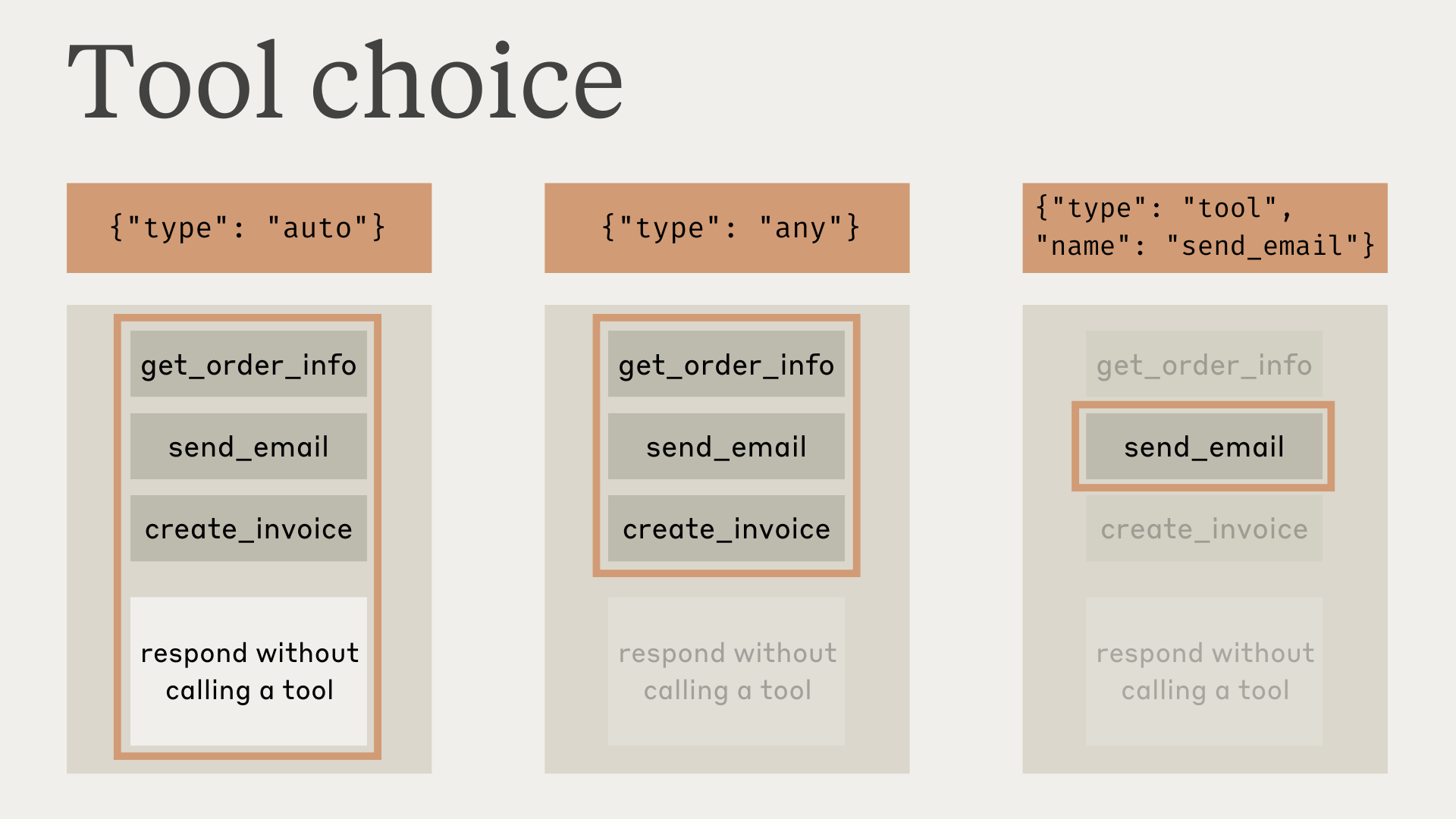
請注意,當您將 tool_choice 設為 any 或 tool 時,API 會預先填入助理訊息以強制使用工具。這表示即使明確要求,模型也不會在 tool_use 內容區塊之前輸出自然語言回應或說明。
測試顯示這不應降低效能。如果您希望模型在仍被要求使用特定工具的同時提供自然語言上下文或說明,您可以將 tool_choice 設為 {"type": "auto"}(預設值),並在 user 訊息中加入明確的指示。例如:What's the weather like in London? Use the get_weather tool in your response.
使用工具時的模型回應
使用工具時,Claude 經常會在呼叫工具之前說明它正在做什麼,或自然地回應使用者。
例如,對於提示「What's the weather like in San Francisco right now, and what time is it there?」,Claude 可能會回應:
{
  "role": "assistant",
  "content": [
    {
      "type": "text",
      "text": "I'll help you check the current weather and time in San Francisco."
    },
    {
      "type": "tool_use",
      "id": "toolu_01A09q90qw90lq917835lq9",
      "name": "get_weather",
      "input": { "location": "San Francisco, CA" }
    }
  ]
}
這種自然的回應風格有助於使用者理解 Claude 正在做什麼,並營造更具對話感的互動。您可以透過系統提示以及在提示中提供 <examples> 來引導這些回應的風格與內容。
需要注意的是,Claude 在說明其動作時可能會使用各種不同的措辭與方式。您的程式碼應將這些回應視為與其他任何助理生成的文字相同,而不應依賴特定的格式慣例。
後續步驟
Was this page helpful?