定义工具
指定工具模式、编写有效的描述,并控制 Claude 何时调用您的工具。
前提条件
- 熟悉工具使用概述
- 一个 Claude API 密钥以及可用的 SDK 或 cURL 环境
指定客户端工具
"Client tools"(客户端工具)在 API 请求的 tools 顶层参数中指定。Anthropic 模式的客户端工具(例如 bash 和文本编辑器工具)通过带日期版本的 type 声明;请参阅工具参考中链接的各工具页面,了解其接受的字段。计算机使用和浏览器使用工具是客户端工具集:一个没有 name 的单一条目,声明一组固定的成员工具。用户定义的工具定义包括:
| 参数 | 描述 |
|---|---|
name | 工具的名称。必须匹配正则表达式 ^[a-zA-Z0-9_-]{1,128}$。 |
description | 详细的纯文本描述,说明工具的功能、使用时机以及行为方式。 |
input_schema | 一个 JSON Schema 对象,用于定义工具的预期参数。 |
input_examples | (可选)示例输入对象数组,帮助 Claude 理解如何使用该工具。请参阅提供工具使用示例。 |
有关任何单个工具定义上可用的全部可选属性(包括 cache_control、strict、defer_loading 和 allowed_callers),请参阅工具参考。客户端工具集条目在条目上接受 cache_control 和 allowed_callers,并按成员设置 defer_loading;请参阅客户端工具集。
{
  "name": "get_weather",
  "description": "Get the current weather in a given location",
  "input_schema": {
    "type": "object",
    "properties": {
      "location": {
        "type": "string",
        "description": "The city and state, e.g. San Francisco, CA"
      },
      "unit": {
        "type": "string",
        "enum": ["celsius", "fahrenheit"],
        "description": "The unit of temperature, either 'celsius' or 'fahrenheit'"
      }
    },
    "required": ["location"]
  }
}
这个名为 get_weather 的工具期望一个输入对象,其中包含必需的 location 字符串和可选的 unit 字符串,后者必须是 "celsius" 或 "fahrenheit"。
工具使用系统提示
当您使用 tools 参数调用 Claude API 时,API 会根据工具定义、工具配置以及任何用户指定的系统提示构建一个特殊的 "system prompt"(系统提示)。构建的提示旨在指示模型使用指定的工具,并为工具正常运行提供必要的上下文:
In this environment you have access to a set of tools you can use to answer the user's question.
{{ FORMATTING INSTRUCTIONS }}
String and scalar parameters should be specified as is, while lists and objects should use JSON format. Note that spaces for string values are not stripped. The output is not expected to be valid XML and is parsed with regular expressions.
Here are the functions available in JSONSchema format:
{{ TOOL DEFINITIONS IN JSON SCHEMA }}
{{ USER SYSTEM PROMPT }}
{{ TOOL CONFIGURATION }}工具定义的最佳实践
为了在使用工具时让 Claude 发挥最佳性能,请遵循以下准则:
- 提供极其详细的描述。 这是迄今为止影响工具性能的最重要因素。您的描述应解释有关工具的每个细节,包括:
- 工具的功能
- 何时应使用(以及何时不应使用)
- 每个参数的含义及其如何影响工具的行为
- 任何重要的注意事项或限制,例如在工具名称不明确时工具不会返回哪些信息。您能为 Claude 提供的有关工具的上下文越多,它在决定何时以及如何使用工具方面就会表现得越好。每个工具描述至少应有 3–4 句话,如果工具复杂则应更多。
- 优先考虑描述,但对于复杂工具可考虑使用
input_examples。 清晰的描述最为重要,但对于具有复杂输入、嵌套对象或格式敏感参数的工具,您可以使用input_examples字段提供经过模式验证的示例。详情请参阅提供工具使用示例。 - 将相关操作合并为更少的工具。 与其为每个操作创建单独的工具(
create_pr、review_pr、merge_pr),不如将它们组合为一个带有action参数的工具。更少但功能更强的工具可以减少选择歧义,并使 Claude 更容易浏览您的工具集合。 - 在工具名称中使用有意义的命名空间。 当您的工具跨越多个服务或资源时,请在名称前加上服务前缀(例如
github_list_prs、slack_send_message)。随着工具库的增长,这可以使工具选择不产生歧义,在使用工具搜索时尤为重要。 - 设计工具响应以仅返回高信号信息。 返回语义化、稳定的标识符(例如 slug 或 UUID),而不是不透明的内部引用,并且仅包含 Claude 推理下一步所需的字段。臃肿的响应会浪费上下文,并使 Claude 更难提取重要内容。
{
  "name": "get_stock_price",
  "description": "Retrieves the current stock price for a given ticker symbol. The ticker symbol must be a valid symbol for a publicly traded company on a major US stock exchange like NYSE or NASDAQ. The tool will return the latest trade price in USD. It should be used when the user asks about the current or most recent price of a specific stock. It will not provide any other information about the stock or company.",
  "input_schema": {
    "type": "object",
    "properties": {
      "ticker": {
        "type": "string",
        "description": "The stock ticker symbol, e.g. AAPL for Apple Inc."
      }
    },
    "required": ["ticker"]
  }
}{
"name": "get_stock_price",
"description": "Gets the stock price for a ticker.",
"input_schema": {
"type": "object",
"properties": {
"ticker": {
"type": "string"
}
},
"required": ["ticker"]
}
}良好的描述清楚地解释了工具的功能、何时使用、返回什么数据以及 ticker 参数的含义。糟糕的描述过于简短,给 Claude 留下了许多关于工具行为和用法的未解问题。
提供工具使用示例
您可以提供有效工具输入的具体示例,帮助 Claude 更有效地理解如何使用您的工具。这对于具有嵌套对象、可选参数或格式敏感输入的复杂工具特别有用。
基本用法
在工具定义中添加一个可选的 input_examples 字段,其中包含一组示例输入对象。每个示例都必须符合工具的 input_schema:
client = anthropic.Anthropic()

response = client.messages.create(
    model="claude-opus-5-5",
    max_tokens=1024,
    tools=[
        {
            "name": "get_weather",
            "description": "Get the current weather in a given location",
            "input_schema": {
                "type": "object",
                "properties": {
                    "location": {
                        "type": "string",
                        "description": "The city and state, e.g. San Francisco, CA",
                    },
                    "unit": {
                        "type": "string",
                        "enum": ["celsius", "fahrenheit"],
                        "description": "The unit of temperature",
                    },
                },
                "required": ["location"],
            },
            "input_examples": [
                {"location": "San Francisco, CA", "unit": "fahrenheit"},
                {"location": "Tokyo, Japan", "unit": "celsius"},
                {
                    "location": "New York, NY"  # 'unit' is optional
                },
            ],
        }
    ],
    messages=[{"role": "user", "content": "What's the weather like in San Francisco?"}],
)

print(response)
示例会与您的工具模式一起包含在提示中,向 Claude 展示格式正确的工具调用的具体模式。这有助于 Claude 理解何时包含可选参数、使用什么格式以及如何构造复杂输入。
要求和限制
- 模式验证 - 每个示例都必须符合工具的
input_schema。无效示例会返回 400 错误 - 不支持服务器端工具或客户端工具集 - 输入示例适用于用户定义的工具以及除计算机使用和浏览器使用工具集之外的 Anthropic 模式客户端工具,但不适用于网页搜索或代码执行等服务器工具
- 令牌成本 - 示例会增加提示令牌:简单示例约 20–50 个令牌,复杂嵌套对象约 100–200 个令牌
控制 Claude 的输出
强制工具使用
在某些情况下,您可能希望 Claude 使用特定工具来回答用户的问题,即使 Claude 原本会不调用工具而直接回答。您可以通过在请求的 tool_choice 字段中指定工具来实现这一点。
并非所有模型和设置都支持强制工具使用。在不支持的情况下,tool_choice: {"type": "any"} 和 tool_choice: {"type": "tool", "name": "..."} 会失败,而 tool_choice: {"type": "auto"}(默认值)和 tool_choice: {"type": "none"} 仍然有效:
| 模型或设置 | 限制 | 替代方案 |
|---|---|---|
手动扩展思考(thinking: {type: "enabled"}) | 不支持 any 和 tool,使用时会导致错误 | 使用 auto 或 none。自适应思考本身不会阻止强制工具使用(Claude Opus 5 在开启思考时支持强制工具使用);下一行中的模型无论思考设置如何都会拒绝强制工具使用 |
| Claude Opus 5.5、Claude Fable 5.1 和 Claude Mythos 5.1 | any 和 tool 会返回 400 错误 | 使用 auto 并结合严格工具使用来确保工具输入符合模式;如果您需要固定 JSON 结构的响应,则使用结构化输出。提示仍会影响 auto 选择哪个工具。同样支持 none |
在支持该功能的模型上,高亮显示的行是与标准工具使用请求的唯一区别:
client = anthropic.Anthropic()

tools = [
    {
        "name": "get_weather",
        "description": "Get the current weather in a given location",
        "input_schema": {
            "type": "object",
            "properties": {
                "location": {
                    "type": "string",
                    "description": "The city and state, e.g. San Francisco, CA",
                }
            },
            "required": ["location"],
        },
    }
]

response = client.messages.create(
    model="claude-opus-5",
    max_tokens=1024,
    tools=tools,
    tool_choice={"type": "tool", "name": "get_weather"},
    messages=[{"role": "user", "content": "What's the weather like in San Francisco?"}],
)

print(response)
使用 tool_choice 参数时,有四个可能的选项:
auto允许 Claude 决定是否调用任何提供的工具。这是提供了tools时的默认值。any告诉 Claude 必须使用所提供工具中的一个,但不强制使用特定工具。tool强制 Claude 始终使用特定工具。none阻止 Claude 使用任何工具。这是未提供tools时的默认值。
下图说明了每个选项的工作方式:
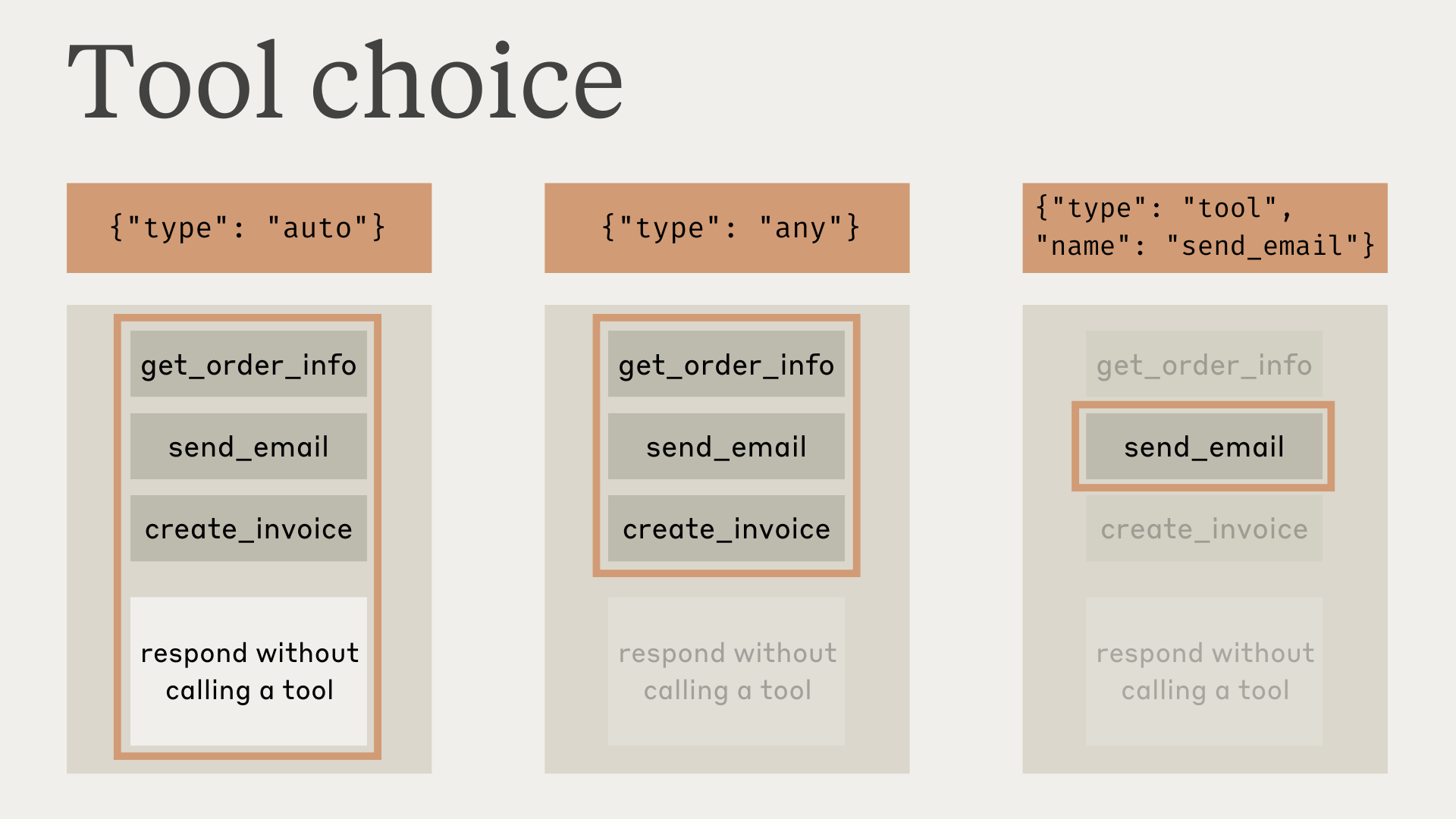
请注意,当您将 tool_choice 设置为 any 或 tool 时,API 会预填充助手消息以强制使用工具。这意味着模型不会在 tool_use 内容块之前输出自然语言响应或解释,即使被明确要求这样做。
测试表明这不会降低性能。如果您希望模型在仍被要求使用特定工具的同时提供自然语言上下文或解释,可以将 tool_choice 设为 {"type": "auto"}(默认值),并在 user 消息中添加明确的指令。例如:What's the weather like in London? Use the get_weather tool in your response.
使用工具时的模型响应
使用工具时,Claude 通常会在调用工具之前对其正在做的事情进行说明,或自然地回应用户。
例如,对于提示"旧金山现在的天气怎么样,那里现在几点?",Claude 可能会这样回应:
{
  "role": "assistant",
  "content": [
    {
      "type": "text",
      "text": "I'll help you check the current weather and time in San Francisco."
    },
    {
      "type": "tool_use",
      "id": "toolu_01A09q90qw90lq917835lq9",
      "name": "get_weather",
      "input": { "location": "San Francisco, CA" }
    }
  ]
}
这种自然的响应风格有助于用户理解 Claude 正在做什么,并创造更具对话性的交互。您可以通过系统提示以及在提示中提供 <examples> 来引导这些响应的风格和内容。
需要注意的是,Claude 在解释其操作时可能会使用各种措辞和方式。您的代码应将这些响应视为与任何其他助手生成的文本一样,而不应依赖特定的格式约定。
后续步骤
Was this page helpful?