
Context Engineering for AI Agents: Memory vs. Compaction vs. Tool Clearing
Introduction
A common challenge when building long-horizon agents is managing context. Tool results, the model's own reasoning, and user messages all accumulate, and eventually you either hit the token limit or start paying for context that isn't helping anymore. Studies on needle-in-a-haystack style benchmarking have uncovered the concept of context rot(opens in new tab): as the number of tokens in the context window increases, the model's ability to accurately recall information from that context decreases. So, even before the hard context limit is reached, the agent may be getting less out of each token.
Our engineering blog on effective context engineering for AI agents(opens in new tab) frames this as a resource problem: context is finite with diminishing marginal returns, and the core discipline is finding the smallest set of high-signal tokens that maximize the likelihood of your desired outcome. There are several levers for this: subagents that isolate work in their own context, programmatic tool calling that keeps large results out of the window entirely, and others.
This cookbook focuses on three: compaction, tool-result clearing, and memory. All three are effective strategies for context engineering, but since they all operate to make the context window more efficient in different ways, they can be hard to distinguish. Understanding those distinctions is what lets you map each tool to the part of your workload it actually helps with. Alongside other core context management strategies like utilizing subagents, these three are crucial for teams building long-running agents to understand. They also all have first-party API support, so you can adopt them without building orchestration infrastructure.
- Compaction distills the contents of a context window into a high-fidelity summary, letting the agent continue with minimal performance degradation when the conversation gets long.
- Tool-result clearing addresses the bloat from tool use itself. As an agent pulls in tools and calls them, the results pile up, and deciding how much of that tool output to keep becomes an increasingly important part of managing context. Clearing drops old, re-fetchable results while keeping the record that the call happened.
- Memory is structured note-taking: the agent writes to persistent external storage so it can track progress across tasks and sessions without keeping everything in active context.
Claude Code(opens in new tab) employs multiple of these strategies in production: compaction for long conversations and two complementary memory systems for cross-session persistence. Our API offers first-party implementations of all three: server-side compaction(opens in new tab), context editing(opens in new tab) (which includes tool-result clearing), and the memory tool(opens in new tab). This cookbook works through how to think about designing with them: when each one applies, how to configure them, what changes when you use them independently vs. together, and sample use-cases where different combinations make sense.
The examples center on a long-running research agent: one that reads a corpus of documents, takes notes, and builds on its findings across multiple sessions. It's a useful test case because it naturally hits all three problems: bulky document reads (clearing), long analytical conversations (compaction), and knowledge that needs to survive between sessions (memory).
What you'll learn
- How to cap in-session token growth with
clear_tool_useswhen an agent's context is dominated by large, re-fetchable tool results like file reads and API responses - How to keep long conversations going with server-side compaction, including how to serialize the
compactionblock back and probe what survives the summary - How to persist agent knowledge across sessions by implementing a file-backed memory handler that the model drives itself, so Session 2 picks up where Session 1 left off
- How to implement each primitive most effectively, replacing the default compaction prompt to preserve what your agent needs, guiding what the agent writes to
/memories, and testing clearing configs against your own workload's tool-use pattern - How to diagnose which part of the context problem your workload actually has, and pick the primitive that targets it, with a framework for mapping workload characteristics to the right tool
Prerequisites
To run this notebook, you will need:
- Anthropic API key set as
ANTHROPIC_API_KEYin your environment or a.envfile (get one here(opens in new tab)) - Python 3.11+ with the
anthropic,python-dotenv, andmatplotlibpackages installed research_corpus.pyalongside this notebook (included in the repository). It definesCORPUS, a dict of eight synthetic review documents on model organisms for aging research (~40K tokens each, ~320K tokens total), plus probe questions used later to test what survives compaction. You can swap in your own documents by replacing the dict.
Running from the cookbooks repo? Ensure your working directory is
tool_use/context_engineeringbefore running the notebook.
Step 0: Environment Setup
Create a .env file in this directory with your Anthropic API key:
anthropic SDK 0.84.0, model claude-sonnet-4-6
CORPUS is a dict of 8 synthetic documents held in Python memory.
When the agent calls read_file, the content is served from this dict and
lands directly in the agent's context window — no disk I/O involved.

  celegans_review.md         ~41,260 tokens
  drosophila_review.md       ~41,200 tokens
  mouse_review.md            ~41,155 tokens
  zebrafish_review.md        ~41,095 tokens
  killifish_review.md        ~41,115 tokens
  yeast_review.md            ~41,101 tokens
  nmr_review.md              ~41,017 tokens
  rhesus_review.md           ~41,012 tokens

  Total corpus: ~328,955 tokens
The Problem: A Long-Running Research Agent
The agent in this cookbook plays the role of a biology researcher writing a comparative review of model organisms for aging and longevity research. The task is realistic enough to matter: it involves reading through a corpus of review documents (one per organism), extracting comparable facts (lifespan, genetic tractability, translational relevance), taking structured notes, and synthesizing findings across everything read.
This kind of work is where context management starts to bite. Each document is around 40K tokens (narrative plus extensive appendix tables of intervention data), and the task asks the agent to read them in two batches: four high-throughput organisms (C. elegans, Drosophila, yeast, killifish) first, then four low-throughput organisms (mouse, zebrafish, naked mole-rat, rhesus). The two-batch structure is an experimental design choice for this cookbook: it produces a context trajectory that climbs past the compaction trigger on the first batch and past the 200K reference line on the second, so each primitive's effect on the trajectory is visible in the same run. Without context management, the agent's context grows to hundreds of thousands of tokens mid-task. And since the work spans sessions, even a completed run starts the next session with no memory of what was learned.
The research task
The agent's concrete assignment: compare the model organisms in /research/ on three dimensions (lifespan and experimental throughput, genetic tractability, and translational relevance to human aging), reading the eight review documents in two batches and taking notes as it goes, then writing a comparative synthesis.
How the Three APIs Map to the Problem
Each API targets a different kind of context growth. Understanding which kind you're facing is the first step to picking the right tool.
Conceptually
Compaction is the practice of taking a conversation nearing the context window limit, summarizing its contents, and reinitiating with that summary. It aims to distill the context window in a high-fidelity manner so the agent can continue with minimal performance degradation. The art of compaction lies in what to keep versus what to discard: overly aggressive compaction can lose subtle but critical context whose importance only becomes apparent later. The summary preserves architectural decisions, unresolved questions, and key facts while discarding redundant content; it's lossy by design, but handles all context growth, not just tool results. Compaction is a whole-transcript operation: user messages, assistant messages, tool calls, tool results, even prior compaction blocks are all flattened into the summary.
Tool-result clearing, by contrast, is a sub-transcript operation. It walks the message list and surgically replaces tool_result content blocks, leaving everything else — user messages, assistant reasoning, the tool_use record — untouched. When an agent calls tools, the results become part of the conversation history and count against the context budget on every subsequent turn. Much of that content is re-fetchable: file contents the agent can re-read, API responses it can re-request. Clearing replaces old tool_result blocks with a short placeholder, keeping the tool_use record so the model still knows it made the call, but dropping the bulky payload. Once a tool has been called deep in the message history, the agent rarely needs to see the raw result again; clearing is one of the safest, lightest-touch ways to recover that space. If the agent does need the data, it just calls the tool again.
Memory, or structured note-taking, is a technique where the agent regularly writes notes persisted outside the context window, then pulls them back in at later times. This provides persistent memory with minimal overhead: the agent tracks progress across complex tasks, maintaining critical context that would otherwise be lost across dozens of tool calls or across context resets. After a reset (a new session, or after compaction), the agent reads its own notes and continues. You implement the storage backend, so you control what's stored and for how long.
Beyond enabling these primitives, it's also important to understand how to implement them most effectively: the default behavior gets you started, but the quality of a compaction summary and the usefulness of what lands in memory both depend on guidance you provide. Each primitive's section below includes a subsection on effective implementation.
Tactically
| API | Identifier | Beta header | Triggered by | Configurable knobs |
|---|---|---|---|---|
| Compaction | compact_20260112 | compact-2026-01-12 | Token threshold (server-side, min 50K) | trigger (default 150K), instructions, pause_after_compaction |
| Tool clearing | clear_tool_uses_20250919 | context-management-2025-06-27 | Token threshold (server-side) | trigger (default 100K), keep (default 3 tool uses), clear_at_least, exclude_tools, clear_tool_inputs |
| Memory tool | memory_20250818 | none (standalone) | The model (it's a tool call) | Client implements: view, create, str_replace, insert, delete, rename |
Mapped to the research agent
For the research agent specifically, the three problems line up cleanly:
- The agent's running commentary ("C. elegans is 18-day lifespan with genome-wide RNAi, mouse is 30 months but costs $100K per cohort...") and the user's follow-up questions accumulate into a long dialogue. That's a compaction problem.
- Reading eight ~40K-token review documents produces roughly 320K tokens of tool-result volume, significantly into the range where model performance decays from context rot. Most of it the agent could re-read on demand. That's a clearing problem.
- The work spans multiple sessions. If Session 1 determined that killifish is the shortest-lived vertebrate (4-6 months), we want Session 2 to retain that finding and build on it rather than rediscover it from scratch. That's a memory problem.
A rough mental model for prioritizing: compaction compresses the whole window when it grows too large, clearing drops stale re-fetchable data inside the window, and memory moves information out of the window so it survives across sessions. Each layer adds config to tune and interactions to understand, so it's worth starting with the one that matches the bottleneck you're actually observing.
The Research Agent
Before exploring each primitive, we set up the agent itself: tool schemas, tool execution, and an agent loop that can be run with or without any context-management configuration. Everything is inline so you can see the full loop.
Baseline: no context management
First we run the agent with no context-management configuration. With the large corpus (each document is ~40K tokens with its appendix tables), context accumulates fast. We'll look at the same run under two lenses: what happens on a 1M-token window, and what would happen on a 200K window.
Part 1: On a 1M-token window
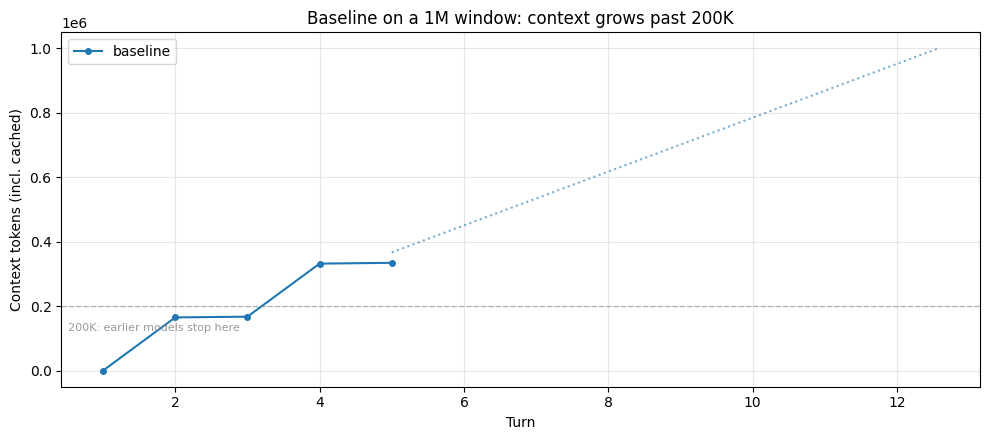
Claude Sonnet 4.6 and Claude Opus 4.6 both provide a 1M-token context window(opens in new tab). For this task, the baseline's total input stays under that limit: the agent reads the full corpus and synthesizes without hitting a hard wall. The trajectory below shows the run climbing to hundreds of thousands of tokens, with the dotted line projecting continued growth at the same rate.
┌─ [baseline]
│  turn  1  ctx=  1,058
│            read_file        /research/celegans_review.md  → ~27,465 tok
│            read_file        /research/drosophila_review.md  → ~27,435 tok
│            read_file        /research/yeast_review.md  → ~27,320 tok
│            read_file        /research/killifish_review.md  → ~27,349 tok
│  turn  2  ctx=166,043
│            record_finding   "## BATCH 1 NOTES: High-Throughput Model Organisms ..."
│  turn  3  ctx=168,242
│            read_file        /research/mouse_review.md  → ~27,390 tok
│            read_file        /research/zebrafish_review.md  → ~27,363 tok
│            read_file        /research/nmr_review.md  → ~27,287 tok
│            read_file        /research/rhesus_review.md  → ~27,285 tok
│  turn  4  ctx=332,821
│            record_finding   "## BATCH 2 NOTES: Low-Throughput Model Organisms —..."
│  turn  5  ctx=335,279  (final answer)
└─ completed: 5 turns, peak ctx 335,279, final ctx 335,279, 0 context event(s)


Peak context: 335,279 tokens across 5 turns
File reads: 8, Notes: 2

The run stayed within the 1M window. The dotted line projects where continued growth at the same rate would land, capped at 1M.
========================================================================
WHAT THE MODEL IS ATTENDING TO at the end of the baseline run
========================================================================

Context breakdown (335,279 tokens total per API usage):

  File-read results          ~ 322,946 tokens  (  8 blocks, 96.3%)
  Tool-call records          ~   6,287 tokens  ( 10 blocks,  1.9%)
  Agent reasoning text       ~   5,660 tokens  (  5 blocks,  1.7%)
  User/task prompts          ~     357 tokens  (  1 blocks,  0.1%)
  Other tool results         ~      26 tokens  (  2 blocks,  0.0%)

First document read: celegans_review.md at turn 1.
The breakdown above makes the scale concrete. The model is carrying hundreds of thousands of tokens of file contents on every turn, most of it documents the agent already processed and took notes on. The first document read is still in the window, but by the end of the run it's sitting behind hundreds of thousands of tokens of other tool results plus all the agent's reasoning and notes. It hasn't been removed; it's competing with everything else for attention. This is where context rot shows up: recall of details from that depth degrades as the window fills, even though the content is technically present. And prefill latency scales with context length, so every turn pays to process the full pile.
Part 2: On a 200K-token window
Earlier models cap at 200K tokens. On those models, the same baseline run hits a hard wall: the API rejects the next request once context exceeds the limit, and the task stops mid-run.
The cell below finds the turn where the baseline first crossed 200K and shows what the run looks like from a 200K model's perspective: same trajectory up to that point, then a hard stop.
⚠ Baseline HIT THE CONTEXT WINDOW LIMIT.
  Completed 3 turns before the API rejected the next request.
  Last successful context: 168,242 tokens
  File reads attempted: 8
  Notes taken: 2

  The agent stopped mid-task. Without context management, it cannot continue past this point.
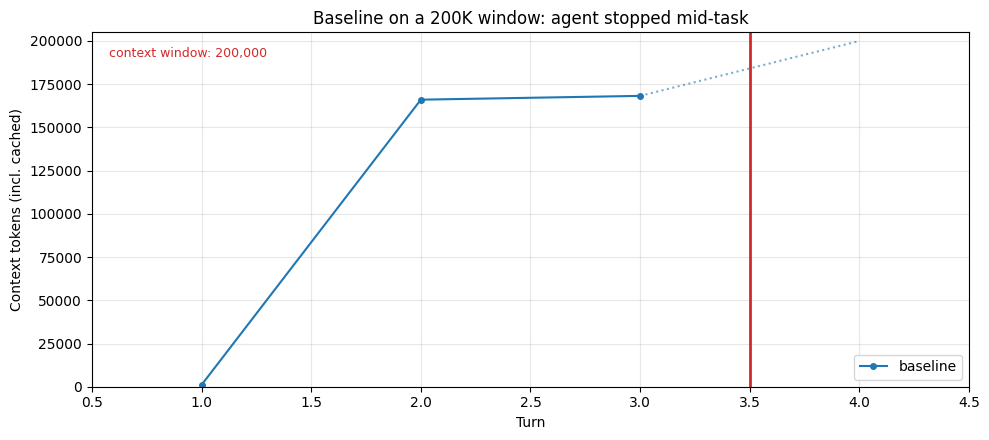
Both failure modes come from the same underlying problem: the context window fills with hundreds of thousands of tokens of file content, most of it already processed and noted. What differs is how the failure surfaces. On a 200K window it's a hard stop: the API rejects the next request and the task ends mid-phase. On a 1M window the agent keeps running, but context rot sets in as the window fills: an early document read is still technically present, but by the end of the run it's buried under everything read since, and the model's ability to recall its details degrades. The agent completes, but the quality of the synthesis depends on recall that's fighting against that pile. Prefill latency scales with it too: every turn pays to process the full context, regardless of how much of it is still useful.
The primitives below each address this by keeping the working set small enough that neither failure mode bites: the window doesn't fill, so smaller models don't stop and larger models don't degrade. Plots include the dashed 200K reference line so you can see where an earlier model would have been cut off.
Compaction
Compaction(opens in new tab) is a useful strategy for managing context in long-running conversations: it takes a conversation nearing the context window limit, summarizes its contents, and reinitiates with that summary. This addresses the agent's own reasoning text, user back-and-forth, and decisions made over the course of a session. The specific sequence of actions and exact wording from earlier turns won't be preserved, but the goals, decisions, and major discoveries the agent made are summarized — what the summary retains depends on your compaction prompt, which we cover below.
At its core, compaction distills the contents of a context window in a high-fidelity manner, enabling the agent to continue with minimal performance degradation. The trade-off is in choosing what the summary must retain versus what it can safely drop: overly aggressive compaction can lose subtle but critical context whose importance only becomes apparent later. The summary preserves key decisions and facts but may drop specific numbers or exact phrasing. It costs inference (the summarizer model runs), but handles all context growth, not just tool results.
How it works under the hood
Here's a minimal sample implementation of compaction. Our first-party API provides a robust, tested version (automatic triggering at a token threshold, a typed content block that slots natively into the conversation, correct tool-use pairing), but the ~25-line version below makes the mechanism concrete: render the conversation to text, ask the model to summarize it, replace the old messages with that summary.
Conversation size: ~741 → ~449 tokens (39% reduction)

Summary produced:
[conversation summary]
## Summary: Model Organisms for Aging Research

### Key Facts Learned
| Organism | Lifespan | Study Duration | Human Orthology | Standout Feature |
|---|---|---|---|---|
| *C. elegans* | 18-day median | 4–6 weeks | ~40% | Genome-wide RNAi; high throughput |
| *Drosophila* | 60–80 days | 3–4 months | ~60% | Tissue-specific genetics; cardiac/neuro models |
| Mouse | 24–30 months | ~3 years | ~85% | Best translational predictor; expensive ($100K+/cohort) |
| Killifish | 4–6 months | <1 year | ~70% | Shortest-lived vertebrate; thin toolkit |
| Yeast | ~25 divisions | 1–2 weeks | ~30% | Mechanistic screening; poor translation |
| Naked mole-rat | >37 years | N/A | — | Negligible senescence; no genetic control |

### Core Tradeoff
**Throughput ↔ Translational relevance** —
...
The sample above demonstrates the mechanism: the model produces a condensed version of the conversation that the agent can continue from.
Using the API
Our API provides this natively as the compact_20260112 context edit. It triggers automatically at a token threshold (minimum 50K), returns a typed compaction content block that slots into the conversation natively, and handles tool-use pairing across the summary boundary. When compaction fires, you serialize the compaction block back ({"type": "compaction", "content": block.content}) and the API drops everything before it on the next request.
API Documentation: Compaction — platform.claude.com(opens in new tab)
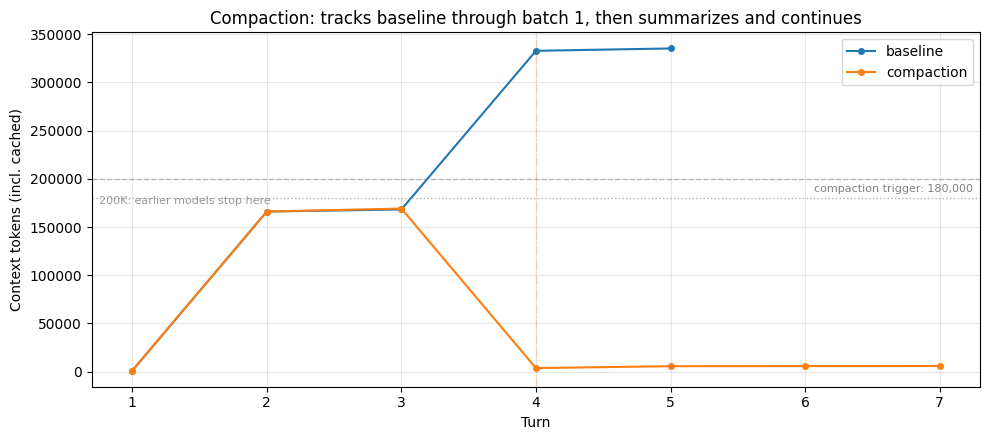
Here's the research agent running with compaction configured. We set the trigger at 180K so the first batch of reads (~165K) stays under it: the compaction trajectory tracks the baseline through that batch, then diverges when the second batch pushes context past the trigger. Watch for ⊟ COMPACTION lines in the output and the drop on the plot where the summary replaces the earlier conversation.
┌─ [compaction]
│  turn  1  ctx=  1,129
│            read_file        /research/celegans_review.md  → ~27,465 tok
│            read_file        /research/drosophila_review.md  → ~27,435 tok
│            read_file        /research/yeast_review.md  → ~27,320 tok
│            read_file        /research/killifish_review.md  → ~27,349 tok
│  turn  2  ctx=166,103
│            record_finding   "## BATCH 1 DETAILED NOTE: High-Throughput Model Or..."
│  turn  3  ctx=169,164
│            read_file        /research/mouse_review.md  → ~27,390 tok
│            read_file        /research/zebrafish_review.md  → ~27,363 tok
│            read_file        /research/nmr_review.md  → ~27,287 tok
│            read_file        /research/rhesus_review.md  → ~27,285 tok
│  ⊟ COMPACTION (turn 4): ~2,783-token summary replaces prior turns
│  turn  5  ctx=  5,635
│            search_files     'comparative aging model organisms synthesis pipeline translational'
│  turn  6  ctx=  5,751
│            search_files     'aging model organism review'
│  turn  7  ctx=  5,829  (final answer)
└─ completed: 7 turns, peak ctx 169,164, final ctx 5,829, 1 context event(s)


Baseline:    completed turn 5, peak 335,279 tokens
Compaction:  completed turn 7, peak 169,164 tokens, 1 compaction event(s)
  Compaction #1 at turn 4: ~2,783-token summary

→ Baseline climbed to 335,279 tokens; compaction kept the peak at 169,164. On a smaller context window the baseline would have been cut off mid-task; here it completed, but every turn paid to process the full pile.
======================================================================
WHAT COMPACTION COSTS: what the summary preserved vs. dropped
======================================================================
Last compaction at turn 4 produced a ~2,783-token summary. The file content read before that point was distilled into this.

Checking the summary text directly for six details: three HIGH-LEVEL facts (central to the task, likely summarized) and three OBSCURE specifics (appendix table cells, unlikely to make the cut).

── HIGH-LEVEL FACTS (expected to survive) ──
  ✓ in summary       looking for '18' — What is the approximate median lifespan of C. elegans at 20°C?
  ✓ in summary       looking for 'killifish' — Which model organism is the shortest-lived vertebrate used in aging research?
  ✓ in summary       looking for '60' — Roughly what percentage of human disease genes have Drosophila orthologs?

── OBSCURE SPECIFICS (expected to be lost) ──
  ✗ not in summary   looking for '61' — In the appendix Table A5, what is the I-squared heterogeneity value for the NAD+ precursor intervention?
  ✗ not in summary   looking for '55' — In appendix Table A2, what was the effect magnitude for the IIS reduction intervention in cohort 2?
  ✗ not in summary   looking for '0.72' — In appendix Table A7, what is the PhenoAge-like epigenetic clock acceleration ratio under DR for liver tissue?

======================================================================
RESULT: high-level 3/3 preserved, obscure 0/3 preserved
======================================================================

Excerpt from the summary (first ~600 chars):

  ## Task Overview
  I am a biology research analyst writing a comparative review of model organisms for aging research. The task has three phases:
  1. **BATCH 1 (DONE):** Read and record a note on four high-throughput models (C. elegans, Drosophila, yeast, killifish)
  2. **BATCH 2 (IN PROGRESS):** Read four low-throughput models (mouse, zebrafish, NMR, rhesus) and record a single note — **FILES HAVE BEEN READ, NOTE NOT YET RECORDED**
  3. **FINAL:** Write a comprehensive comparative synthesis contrasting both batches

  ---

  ## Current State

  ### Batch 1 — COMPLETE
  - All four files read: `celegans_revi…
Analysis
The baseline keeps climbing until it either hits a context-window limit (a hard stop on smaller windows) or accumulates enough tokens that context rot meaningfully degrades recall. Compaction addresses both: when context crosses the trigger, the older conversation is replaced by a model-generated summary and context drops sharply. The agent continues with a lean window instead of an ever-growing one.
The probe above checks the summary text directly for a mix of details. The pattern that tends to emerge: high-level facts central to the task (lifespan figures the agent noted, organism identities, major comparisons) usually survive in the summary. Obscure specifics (a single cell in an appendix table, a heterogeneity statistic) usually don't. This is a meaningful difference from tool-result clearing: clearing drops tool results wholesale so the content is gone until re-fetched, while compaction keeps the substance in compressed form but loses verbatim detail.
What compaction gets you is a general-purpose way to keep the window lean: it handles dialogue and tool results together, the important content survives in summarized form, and the agent keeps working under conditions where it would otherwise be cut off or swamped. What it doesn't get you is verbatim fidelity on specifics, or cross-session persistence. If your context bloat is mostly re-fetchable tool output, clearing is cheaper and lossless (the agent can just call the tool again). If it's dialogue and reasoning that can't be re-fetched, compaction is the right fit.
Implementing compaction effectively
The instructions parameter lets you replace the default summarization prompt entirely. The compaction docs(opens in new tab) give the default prompt verbatim:
You have written a partial transcript for the initial task above. Please write a summary of the transcript. The purpose of this summary is to provide continuity so you can continue to make progress towards solving the task in a future context, where the raw history above may not be accessible and will be replaced with this summary. Write down anything that would be helpful, including the state, next steps, learnings etc. You must wrap your summary in a
<summary></summary>block.
This helps give you a place to start. However, custom instructions don't supplement this prompt — they completely replace it. So if you provide your own, you're responsible for the full framing. The docs' example for a coding context is "Focus on preserving code snippets, variable names, and technical decisions."
For this cookbook's research agent, you might write something that names the specific details the probe above showed are at risk of being lost:
Tool-Result Clearing
When an agent calls tools, each result gets appended to the conversation as a tool_result block (context editing docs(opens in new tab)). Those blocks count toward the input-token budget on every subsequent turn, even after the agent has processed the content and moved on. For tools that are re-callable (file reads, API queries, search), carrying the verbatim result forward is often unnecessary; the agent can just call the tool again if it needs to.
Clearing replaces old tool_result blocks with a short placeholder string. The tool_use block that preceded it stays, so the model retains a record that it made the call (and with what input), but the bulky response body is gone. This is the cheapest of the three primitives: no inference cost, just a mechanical edit to the message list.
How it works under the hood
To make the mechanism concrete, here's a minimal sample implementation of tool-result clearing. Our first-party API provides a robust, tested version of this (automatic triggering, correct block-pairing invariants, tool exclusions, and more), but seeing the ~15-line version makes the core operation tangible: walk the message list, find tool_result blocks, replace the content of all but the most recent few with a placeholder.
Cleared 2 of 3 tool results (keep=1 leaves the most recent)
Message-list size: ~128,740 → ~43,060 tokens (67% reduction)

What each tool_result looks like now:

  [tool_use]  read_file(/research/celegans_review.md)
  [tool_result] '[cleared to save context]'  (← cleared)

  [tool_use]  read_file(/research/drosophila_review.md)
  [tool_result] '[cleared to save context]'  (← cleared)

  [tool_use]  read_file(/research/mouse_review.md)
  [tool_result] '# Model Organism Review: Mus musculus in Aging Research  The laboratory mouse is'... (~41,155 tokens retained)
The sample above shows the mechanism. What's missing from it: token counting and automatic triggering, correct tool_use/tool_result pairing invariants, tool-specific exclusions, and awareness on the model side that clearing happened.
Using the API
Our API provides this natively as the clear_tool_uses_20250919 context edit. It handles token counting and triggering server-side, preserves block pairing, and lets you exempt specific tools from clearing (useful when the memory tool is also active, as we'll see later). When clearing fires, the response includes context_management.applied_edits with details on how many tool uses were cleared and how many tokens were freed.
There's also
clear_thinking_20251015for extended-thinking blocks. Same config shape, differenttype. It must be the first entry in theeditsarray if you're using both.
API Documentation: Context editing — platform.claude.com(opens in new tab)
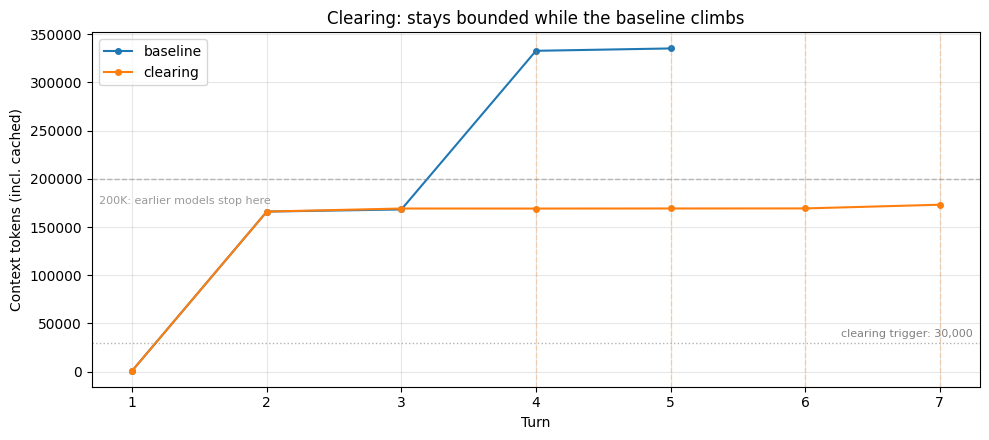
Here's the research agent running with clearing enabled. The baseline's context climbed with every file read; clearing keeps this run bounded by dropping old tool results whenever context climbs past the trigger. Watch for ✂ CLEARING lines in the output; dashed vertical lines on the plot mark each firing.
┌─ [clearing]
│  turn  1  ctx=  1,058
│            read_file        /research/celegans_review.md  → ~27,465 tok
│            read_file        /research/drosophila_review.md  → ~27,435 tok
│            read_file        /research/yeast_review.md  → ~27,320 tok
│            read_file        /research/killifish_review.md  → ~27,349 tok
│  turn  2  ctx=166,043
│            record_finding   "## BATCH 1 NOTES: High-Throughput Model Organisms ..."
│  turn  3  ctx=169,211
│            read_file        /research/mouse_review.md  → ~27,390 tok
│            read_file        /research/zebrafish_review.md  → ~27,363 tok
│            read_file        /research/nmr_review.md  → ~27,287 tok
│            read_file        /research/rhesus_review.md  → ~27,285 tok
│  ✂ CLEARING (turn 4): 4 tool results cleared, ~163,817 tokens freed
│  turn  4  ctx=169,174
│            record_finding   ""
│  ✂ CLEARING (turn 5): 4 tool results cleared, ~163,811 tokens freed
│  turn  5  ctx=169,255
│            record_finding   ""
│  ✂ CLEARING (turn 6): 4 tool results cleared, ~163,807 tokens freed
│  turn  6  ctx=169,313
│            record_finding   "## BATCH 2 NOTES: Low-Throughput Model Organisms (..."
│  ✂ CLEARING (turn 7): 4 tool results cleared, ~162,930 tokens freed
│  turn  7  ctx=173,137  (final answer)
└─ completed: 7 turns, peak ctx 173,137, final ctx 173,137, 4 context event(s)


Baseline:  completed turn 5, peak 335,279 tokens
Clearing:  completed turn 7, peak 173,137 tokens

→ Baseline climbed to 335,279 tokens; clearing kept the peak at 173,137. On a smaller context window the baseline would have been cut off; here both completed, but the baseline was attending to far more on every turn.

Clearing events: 4
File reads: baseline=8, clearing=8
============================================================
WHAT CLEARING COSTS: reads no longer in context
============================================================
Total file reads across session: 8
Last clearing event fired at turn 7 (keep=4)

Reads cleared from context: 7
  ✗ turn  1: /research/celegans_review.md
  ✗ turn  1: /research/drosophila_review.md
  ✗ turn  1: /research/yeast_review.md
  ✗ turn  1: /research/killifish_review.md
  ✗ turn  3: /research/mouse_review.md
  ✗ turn  3: /research/zebrafish_review.md
  ✗ turn  3: /research/nmr_review.md

Reads still in context (within the keep=4 window or after the last clearing): 1
  ✓ turn  3: /research/rhesus_review.md

The cleared reads above are gone from the conversation. If the agent needs that content again, it must call read_file again; the information is re-fetchable, but the original read is no longer visible in context.
Analysis
The baseline keeps climbing; the clearing run stays bounded. Once context is past the trigger (30K here) and there are more than keep tool uses on record, clearing fires server-side: tool results older than the most recent keep are replaced with placeholders and context drops back down. The dashed lines on the plot mark each firing. That bounded window means the run doesn't hit a hard limit on smaller models, and it doesn't accumulate into the range where context rot degrades recall.
The second cell above shows what this costs. Every file read except the most recent few is gone from context. When the agent reaches the synthesis phase, it has two options. It can work from its own notes plus whatever recent reads survived the last clearing: if the notes were thorough, this is fine; if they were sparse, the synthesis misses details the agent saw but didn't record. Or it can re-fetch cleared content by calling read_file again: the clearing run may show more file reads than the baseline for the same documents, because some reads were cleared before the agent was done with them. How much the second path costs depends on your tools: re-reading a local file is nearly free, but re-calling a rate-limited or slow API is not. Tuning keep and trigger shifts where the agent lands between these two.
What clearing gets you is a bounded window at no inference cost, avoiding both the hard-limit cutoff and the recall degradation that comes with a large accumulated context. What it doesn't get you is any help with content that isn't a tool result (the agent's own reasoning, user messages) or any persistence across sessions.
Implementing clearing effectively
Unlike compaction and memory, clearing has no prompt to tune, and the knobs are all numeric (trigger, keep, clear_at_least) or list-based (exclude_tools). One trade-off to understand: clearing invalidates cached prompt prefixes. To account for this, clear enough tokens to make the cache invalidation worthwhile; the clear_at_least parameter ensures a minimum number of tokens is cleared each time. You'll incur cache write costs each time clearing fires, but subsequent requests can reuse the newly cached prefix.
The right values for trigger and keep depend on how your agent uses tool results: how large they are, how often the agent revisits them, whether re-fetching is cheap. The clearing run above used trigger=30K and keep=4; the all-three run later uses a higher trigger and keep=6 so clearing and compaction split the work. Test a few configurations against your own agent's workload: the context_management.applied_edits field in each response shows how many tool uses and tokens were cleared, which makes the effect of each config directly observable.
Memory Tool
The memory tool(opens in new tab) enables Claude to store and retrieve information across conversations through a memory file directory. Claude can create, read, update, and delete files that persist between sessions, allowing it to build knowledge over time without keeping everything in the context window.
This is the key primitive for just-in-time context retrieval: rather than loading all relevant information upfront, agents store what they learn in memory and pull it back on demand. This keeps the active context focused on what's currently relevant, which is critical for long-running workflows where loading everything at once would overwhelm the window. Clearing and compaction both operate on the current context; neither helps when a new session starts and the window is empty. Memory solves that problem.
The memory tool operates client-side: Claude makes tool calls to perform memory operations, and your application executes those operations locally. This gives you complete control over where and how the data is stored. The API provides the tool protocol and auto-injects a system prompt establishing the memory-checking behavior; you implement the storage backend.
How it works under the hood
Here's a minimal sample implementation: a key-value store you write to after a session and read from before the next one. Our first-party API provides the robust version (the model decides what and when to save as part of its reasoning, full file operations, auto-injected protocol prompt), but this ~10-line version makes the core pattern concrete.
Session-2 opening prompt would include:

Prior research notes:
- lifespans: C. elegans: ~18 days. Mouse: ~24-30 months. Killifish: 4-6 months (shortest vertebrate).
- tractability: Worm has genome-wide RNAi by feeding. Mouse has Cre-lox conditionals. Killifish toolkit still thin.
The sample above shows the pattern, but it puts you in charge of deciding what to save and when to load it. That's exactly the work the model is better positioned to do: it knows, mid-reasoning, what facts matter and when it needs to recall them.
Using the API
Our API provides this natively as the memory_20250818 tool. The model decides what and when to save as part of its tool-use loop, an auto-injected system prompt establishes the protocol ("always view your memory directory before doing anything else"), and the tool offers full file operations rather than key-value. This is a client-side tool: the API provides the protocol, you implement the file backend.
API Documentation: Memory tool — platform.claude.com(opens in new tab)
Here's a complete handler implementing all six commands.
Security note: the
_resolvemethod guards against path traversal (../../etc/passwd). In production you'd also want to cap file sizes and total directory size. See the Memory Cookbook(opens in new tab) for deeper memory patterns.
Demonstrating the benefit
To see the effect concretely, we run the agent across three sessions:
- Session 1 does the initial research pass and writes its findings to
/memories. - Session 2 (without memory) runs a follow-up task with an empty memory directory. It has to rediscover everything from scratch.
- Session 2 (with memory) runs the same follow-up task but with access to Session 1's saved files. It reads those first and builds on them instead of re-researching.
The comparison between the two Session 2 runs is where the memory benefit becomes visible.
┌─ [memory/s1]
│  turn  1  ctx=  1,941
│            memory           view /memories
│  turn  2  ctx=  2,025
│            search_files     'C. elegans aging lifespan'
│            search_files     'mouse aging model organism'
│            search_files     'killifish aging'
│            search_files     'yeast aging replicative chronological'
│  turn  3  ctx=  2,386
│            search_files     'aging model organism review'
│            search_files     'lifespan genetics'
│  turn  4  ctx=  2,576
│            search_files     'review'  → ~205 tok
│            search_files     'organism'  → ~205 tok
│  turn  5  ctx=  3,296
│            read_file        /research/celegans_review.md  → ~27,465 tok
│            read_file        /research/mouse_review.md  → ~27,390 tok
│            read_file        /research/killifish_review.md  → ~27,349 tok
│            read_file        /research/yeast_review.md  → ~27,320 tok
│  turn  6  ctx=168,218
│            memory           create /memories/aging_model_organisms_comparison.md
│  turn  7  ctx=171,354
│            record_finding   "Four aging model organism reviews fully read and s..."
│  turn  8  ctx=171,935  (final answer)
└─ completed: 8 turns, peak ctx 171,935, final ctx 171,935, 0 context event(s)

============================================================
What Session 1 wrote to /memories:
============================================================

▸ aging_model_organisms_comparison.md (~2,999 tokens)
  # Comparative Notes: Four Model Organisms in Aging Research
  ## Source files read: /research/celegans_review.md, mouse_review.md, killifish_review.md, yeast_review.md
  ## Session status: COMPLETE — all four reviews read, notes synthesised

  ---

  ## 1. C. elegans (Caenorhabditis elegans)

  ### Lifespan
  - Wild-type median: ~18 days at 20°C (N2 strain)
  ...
┌─ [memory/s2-without]
│  turn  1  ctx=  1,952
│            memory           view /memories
│  turn  2  ctx=  2,056
│            search_files     'C. elegans aging model organism'
│            search_files     'Drosophila aging model organism'
│            search_files     'yeast aging model organism'
│            search_files     'killifish aging model organism'
│  turn  3  ctx=  2,415
│            search_files     'aging model organism lifespan'
│            search_files     'mouse aging research'
│            search_files     'naked mole-rat longevity'
│            search_files     'rhesus macaque aging'
│  turn  4  ctx=  2,755
│            search_files     'model organism'  → ~205 tok
│            search_files     'aging research review'
│            search_files     'lifespan genetics'
│  turn  5  ctx=  3,277
│            read_file        /research/celegans_review.md  → ~27,465 tok
│            read_file        /research/drosophila_review.md  → ~27,435 tok
│            read_file        /research/yeast_review.md  → ~27,320 tok
│            read_file        /research/killifish_review.md  → ~27,349 tok
│  turn  6  ctx=168,250
│            read_file        /research/mouse_review.md  → ~27,390 tok
│            read_file        /research/zebrafish_review.md  → ~27,363 tok
│            read_file        /research/nmr_review.md  → ~27,287 tok
│            read_file        /research/rhesus_review.md  → ~27,285 tok
│  turn  7  ctx=332,824
│            memory           create /memories/organism_notes.md
│  turn  8  ctx=333,872
│            record_finding   "All 8 organism review documents read and key facts..."
│  turn  9  ctx=333,977  (final answer)
└─ completed: 9 turns, peak ctx 333,977, final ctx 333,977, 0 context event(s)
┌─ [memory/s2-with]
│  turn  1  ctx=  1,952
│            memory           view /memories
│  turn  2  ctx=  2,043
│            memory           view /memories/aging_model_organisms_comparison.md  → ~2,707 tok
│  turn  3  ctx=  5,737
│            read_file        /research/drosophila_review.md  → ~27,435 tok
│            read_file        /research/zebrafish_review.md  → ~27,363 tok
│            read_file        /research/nmr_review.md  → ~27,287 tok
│            read_file        /research/rhesus_review.md  → ~27,285 tok
│  turn  4  ctx=170,401
│            memory           str_replace /memories/aging_model_organisms_comparison.md
│  turn  5  ctx=172,415
│            record_finding   "All eight model organism reviews fully read and sy..."
│  turn  6  ctx=172,623  (final answer)
└─ completed: 6 turns, peak ctx 172,623, final ctx 172,623, 0 context event(s)

============================================================
What Session 2 (with memory) read from /memories:
============================================================

[memory view] /memories
  └ aging_model_organisms_comparison.md

[memory view] /memories/aging_model_organisms_comparison.md
  └    1	# Comparative Notes: Four Model Organisms in Aging Research
     2	## Source files read: /research/celegans_review.md, mouse_review.md, killifish_review.md, yeast_review.md
     3	## Session status: COMPLETE — all four reviews read, notes synthesised
     4
     5	---
     6
     7	## 1. C. elegans (Caenorhabditis elegans)
     8
     9	### Lifespan
    10	-...
  └ # Model Organism Review: Drosophila melanogaster in Aging Research

  Drosophila melanogaster, the common fruit fly, has been a genetic model for
  over a century and an aging model since Pearl's demographic work in the
  1920s. It occupies a useful middle ground: more complex than C. elegans
  (tissue diversity, a functional heart, behavioral repertoire) ...
  └ # Model Organism Review: Danio rerio (Zebrafish) in Aging Research

  Zebrafish are a vertebrate model with particular strengths in developmental
  biology and regeneration that have been increasingly adopted for aging
  research over the past decade. Their transparent larvae and high fecundity
  make them competitive with invertebrates for some screening ...
  └ # Model Organism Review: Heterocephalus glaber (Naked Mole-Rat)

  The naked mole-rat is an eusocial rodent from East African burrows with a
  maximum lifespan exceeding 30 years, roughly ten times that of a similarly
  sized mouse. It is studied as a model of exceptional longevity rather than
  as a general aging model: the question is what makes it long-...
  └ # Model Organism Review: Macaca mulatta (Rhesus Macaque)

  Rhesus macaques are the primary non-human primate model for aging research.
  With a maximum lifespan of ~40 years and physiology closely mirroring human,
  they represent the closest experimentally accessible approximation to human
  aging, at correspondingly high cost.

  ## Lifespan and throughpu...

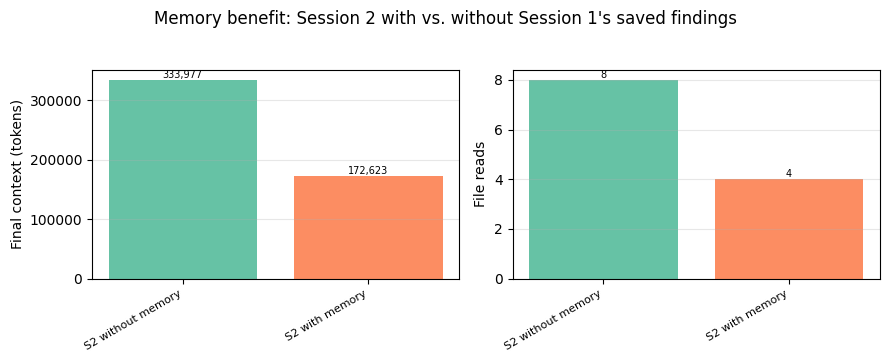
[memory str_replace] /memories/aging_model_organisms_comparison.mdSession 2 comparison: Without memory: 8 file reads, 2 memory ops, peak ctx 333,977 With memory: 4 file reads, 3 memory ops, peak ctx 172,623 → Memory saved 4 file read(s): the agent pulled Session 1's findings from /memories instead of re-reading the source documents. This comparison shows memory working well because Session 1's notes were comprehensive. If Session 1 had saved sparse or poorly organized notes, Session 2 would fall back to re-reading source documents. Memory's value depends on the agent's judgment about what to write.
Analysis
The comparison makes the benefit concrete. Session 2 without memory has nothing to draw on; /memories is empty, so it has to go back to the source documents to rediscover the same facts. Session 2 with memory opens by reading /memories (the auto-injected protocol makes this a default first move), finds Session 1's saved findings, and can build a synthesis from those instead of re-reading every source document.
This is just-in-time retrieval in practice: rather than loading all prior knowledge into the first prompt, the agent pulls the relevant pieces from memory on demand. The file-read counts and final context in the bar chart quantify the difference directly.
What memory gets you is cross-session persistence with lossless fidelity on whatever the agent chose to save. What it doesn't get you is any help with in-session context growth (Session 1's peak context is still high) and it adds tool-call overhead for every read and write. Memory solves the cross-session problem; clearing and compaction solve the in-session one.
Implementing memory effectively
The memory_20250818 tool auto-injects a system prompt establishing a check-memory-first protocol and an assume-interruption mindset ("ALWAYS VIEW YOUR MEMORY DIRECTORY BEFORE DOING ANYTHING ELSE... Your context window might be reset at any moment"). This handles the basic mechanics. Beyond that, the memory tool docs(opens in new tab) describe several ways to shape what the model saves:
Topical guidance. You can steer what gets written with a simple system-prompt instruction: "Only write down information relevant to <topic> in your memory system." For this cookbook's research agent, that might be "save comparative findings and key figures, not raw document contents."
Keeping /memories organized. If you observe the model creating cluttered memory files, try adding: "when editing your memory folder, always try to keep its content up-to-date, coherent and organized. You can rename or delete files that are no longer relevant. Do not create new files unless necessary." This keeps the directory from accumulating half-overlapping notes across sessions.
Initializer-session structure. For multi-session work, try running a dedicated first session that sets up memory artifacts before substantive work begins: a progress log, a feature checklist, references to any setup scripts. Subsequent sessions open by reading those artifacts to recover state. Pre-seeding /memories this way gives later sessions a consistent structure to work within instead of each session inventing its own organization.
Storage hygiene. On the client-side, you can also track file sizes to prevent unbounded growth, consider clearing out memory files that haven't been accessed in an extended time, and validate against path traversal.
Summary: What Each Primitive Does
| Primitive | Operates on | What's traded away | Solves |
|---|---|---|---|
| Compaction | The whole conversation in the current window | Verbatim detail compressed into a summary; obscure specifics may be lost | All in-session growth |
| Clearing | Tool results in the current window | Old tool results are gone from context (must re-fetch if needed again) | Tool-result bloat |
| Memory | External storage, across windows | Tool-call overhead; only as good as what the agent chose to save | Cross-session persistence |
The chart below puts the three solo runs side by side, plus the baseline. Note that memory's Session 2 is a different task (follow-up synthesis) so the absolute numbers aren't directly comparable to the others; what matters for memory is the S2-with vs. S2-without comparison shown above.
Run                  Status             Context events
------------------------------------------------------------
  baseline           completed          none
  clearing           completed          4 clearing
  compaction         completed          1 compaction
  memory (S2 with)   completed          none
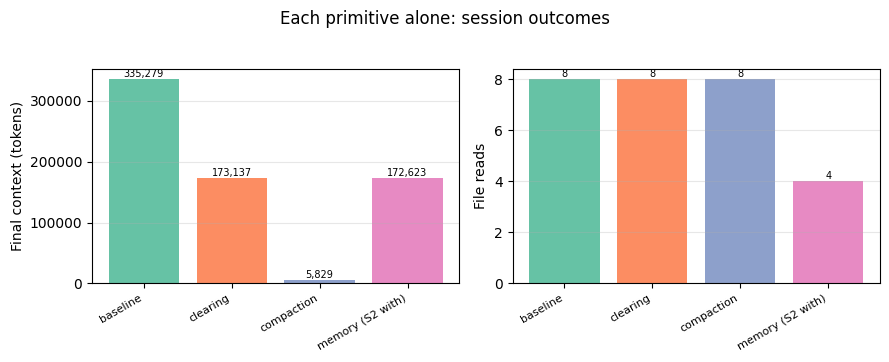
The three primitives address different slices of the context problem, which is why they compose rather than compete. Clearing and compaction manage what's inside the current window; memory moves information out of the window so it survives across sessions. Which ones you need depends on which parts of the problem your workload actually hits.
Using Them Together
The three primitives target different parts of the context problem, so they can be layered. Claude Code(opens in new tab) is a real-world example that employs compaction alongside two complementary memory systems(opens in new tab): CLAUDE.md files hold user-defined instructions and rules (coding standards, project architecture, workflows) that the developer writes and checks into source control; auto memory holds learnings and patterns Claude writes itself (build commands, debugging insights, preferences discovered from corrections). Both are useful forms of memory for Claude Code.
The Claude Code design shows that memory can take different shapes for the same agent; one form written by the user, another written by the model. The same applies to compaction and clearing: each has configuration knobs (trigger thresholds, custom instructions, which tools to exclude) that let you tune behavior to your use case. This is why the prompting and configuration guidance in the "Implementing effectively" sections above matters: the default behavior is a starting point, but the right settings depend on what your agent actually does.
Note on
exclude_tools: when combining clearing with the memory tool, theexclude_tools: ["memory"]setting (shown in the config below) prevents the agent's memory reads and writes from being cleared. Without it, the agent could lose track of what it just saved. The memory tool docs(opens in new tab) recommend this explicitly when layering the two.
Below we run the research agent with all three primitives active at once and trace what each one does over the course of the session.
Note on the config: both triggers are set above the first batch's size (~167K) so the trajectory tracks the baseline through batch 1. When batch 2 pushes context to ~330K, clearing fires first (keep=6 drops the earliest reads, leaving ~210K) and compaction fires on what clearing left. Memory is active throughout. This tuning is for demonstration, so that all three primitives activate in one run. A production config depends on your agent's specific context-growth pattern.
┌─ [all-three]
│  turn  1  ctx=  2,106
│            memory           view /memories
│  turn  2  ctx=  2,206
│            read_file        /research/celegans_review.md  → ~27,465 tok
│            read_file        /research/drosophila_review.md  → ~27,435 tok
│            read_file        /research/yeast_review.md  → ~27,320 tok
│            read_file        /research/killifish_review.md  → ~27,349 tok
│  turn  3  ctx=167,185
│            memory           create /memories/batch1_notes.md
│  turn  4  ctx=169,938
│            read_file        /research/mouse_review.md  → ~27,390 tok
│            read_file        /research/zebrafish_review.md  → ~27,363 tok
│            read_file        /research/nmr_review.md  → ~27,287 tok
│            read_file        /research/rhesus_review.md  → ~27,285 tok
│  ✂ CLEARING (turn 5): 2 tool results cleared, ~81,993 tokens freed
│  ⊟ COMPACTION (turn 5): ~2,839-token summary replaces prior turns
│  ✂ CLEARING (turn 6): 2 tool results cleared, ~81,810 tokens freed
│  turn  6  ctx=  4,901
│            memory           view /memories/batch1_notes.md  → ~2,370 tok
│  ✂ CLEARING (turn 7): 2 tool results cleared, ~81,683 tokens freed
│  turn  7  ctx=  8,121
│            memory           create /memories/batch2_notes.md
│  ✂ CLEARING (turn 8): 2 tool results cleared, ~81,508 tokens freed
│  turn  8  ctx= 10,524
│            memory           create /memories/comparative_summary.md
│  ✂ CLEARING (turn 9): 2 tool results cleared, ~81,413 tokens freed
│  turn  9  ctx= 12,799
│            search_files     'translational relevance aging pipeline'
│            search_files     'lifespan maximum cohort size intervention'
│  ✂ CLEARING (turn 10): 4 tool results cleared, ~162,379 tokens freed
│  turn 10  ctx= 13,096
│            search_files     'yeast replicative lifespan'
│            search_files     'rhesus macaque caloric restriction'
│  ✂ CLEARING (turn 11): 4 tool results cleared, ~162,371 tokens freed
│  turn 11  ctx= 13,290
│            record_finding   "All 8 model organisms reviewed and compared. Notes..."
│  ✂ CLEARING (turn 12): 4 tool results cleared, ~162,337 tokens freed
│  turn 12  ctx= 13,461
│            memory           str_replace /memories/comparative_summary.md
│  ✂ CLEARING (turn 13): 4 tool results cleared, ~162,331 tokens freed
│  turn 13  ctx= 13,749  (final answer)
└─ completed: 13 turns, peak ctx 169,938, final ctx 13,749, 10 context event(s)
======================================================================
SESSION TIMELINE: all three primitives active
======================================================================
  turn  1  ctx=  2,106  ◇ memory
  turn  2  ctx=  2,206
  turn  3  ctx=167,185  ◇ memory
  turn  4  ctx=169,938
  turn  5  ctx=  4,798  ✂ CLEARING  ⊟ COMPACTION  ◇ memory
  turn  6  ctx=  4,901  ✂ CLEARING  ◇ memory
  turn  7  ctx=  8,121  ✂ CLEARING  ◇ memory
  turn  8  ctx= 10,524  ✂ CLEARING  ◇ memory
  turn  9  ctx= 12,799  ✂ CLEARING
  turn 10  ctx= 13,096  ✂ CLEARING
  turn 11  ctx= 13,290  ✂ CLEARING
  turn 12  ctx= 13,461  ✂ CLEARING  ◇ memory
  turn 13  ctx= 13,749  ✂ CLEARING

──────────────────────────────────────────────────────────────────────
What each primitive did this session:

  ✂ Tool-result clearing fired 9 time(s)
    → Dropped old tool results to keep context capped at ~169,938 tokens
    → 8 file reads total (vs baseline's 8); some were re-fetches after context was reset

  ⊟ Compaction fired 1 time(s)
    → At turn 5: replaced prior conversation with ~2,839-token summary

  ◇ Memory tool called 7 time(s), wrote 3 file(s) to /memories
    → batch1_notes.md (~2,610 tokens)
        # Batch 1: High-Throughput Model Organisms — Notes

        ## 1. C. elegans (Caenorhabditis elegans)

        ### Lifespan
        - Wild-type median: ~18 days at 20°C (N2 strain)
        ...
    → batch2_notes.md (~2,254 tokens)
        # Batch 2: Vertebrate & Exceptional Longevity Models — Notes

        ## 5. Mus musculus (Mouse)

        ### Lifespan
        - Median: ~24–30 months (C57BL/6J); max ~4.5 yrs (Ames dwarf + CR)
        ...
    → comparative_summary.md (~2,173 tokens)
        # Comparative Summary: Model Organisms for Aging Research

        ## Quick Reference Table

        | Organism | Median Lifespan | Time to Result | Human Orthology | Genetic Tractability | Translational Relevance | Primary Role |
        |---|---|---|---|---|---|---|
        ...

──────────────────────────────────────────────────────────────────────
Peak context: 169,938 tokens (vs baseline's 335,279)
Final context: 13,749 tokens
Session completed in 13 turns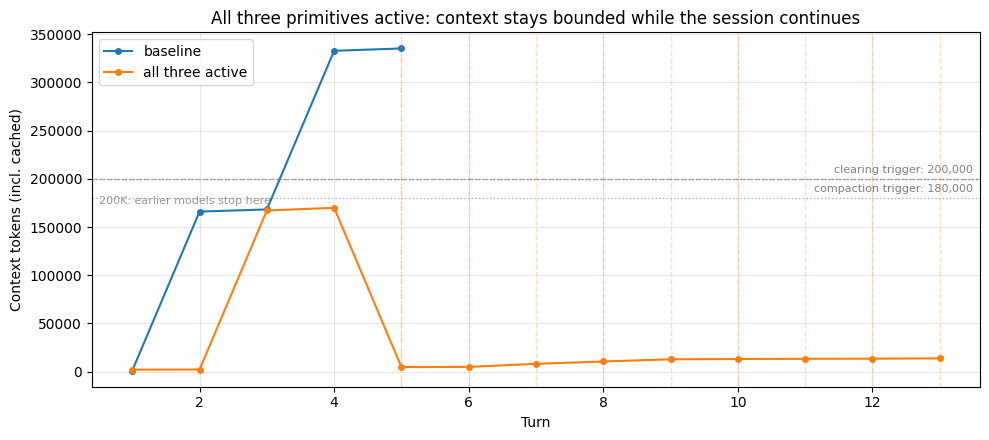
What the timeline shows
With all three primitives active, each one activated for its own reason during the session. The trajectory tracked the baseline through batch 1: both triggers sit above the first batch's size, so neither edit fired until batch 2 pushed context past ~330K. At that point clearing dropped the earliest reads and compaction summarized what remained, letting the agent continue. Memory was active throughout, with the agent checking /memories at the start and saving its comparative notes for future sessions. The timeline above shows all three cooperating across one session.
Getting the primitives to split the work usefully takes some tuning; plan to experiment with the values against your own workload.
The point isn't that running all three produces the "best" numbers; it's that they each handle a different part of the problem when that problem actually arises. The useful question isn't "should I use all three?" but "which of the three problems does my workload actually have?"
When you might NOT want a primitive
Not every workload needs every tool. A few cases where you'd deliberately leave one out:
- Skip memory if you want each session to start fresh. A user-facing chatbot where every conversation should be independent doesn't need cross-session persistence; adding memory would carry state you don't want.
- Skip compaction if your sessions are short enough to stay under the context limit naturally. Compaction is lossy (specific details get summarized away), so if you don't need the headroom, you're paying fidelity for nothing.
- Skip clearing if the agent genuinely needs to see past tool results in full. An agent doing cross-document analysis where it compares passages side by side can't re-fetch its way back to a cleared result fast enough; clearing would force redundant reads.
Takeaways and Next Steps
Lessons from the experiments
Running the research agent under these different configurations surfaces a few practical lessons:
The shape of the trajectory reflects what each tool does. When clearing fires you see a step-down on the turn where old tool results were removed; in longer sessions this can repeat as context climbs back over the trigger. Compaction produces a larger drop each time it fires, since the summary replaces an entire run of turns rather than just the tool results within them. The plots in this cookbook are meant to make those effects visible, so you can see concretely what changes when you turn a knob. Which tool fits your workload is a separate question, driven by what the agent needs to do.
Lossiness is a spectrum, not a binary. Clearing is lossless as long as the tool is re-callable. Compaction is lossy in a controlled way: the summarizer prompt (default or custom) determines what survives. Memory is lossless on what gets saved but is only as good as the agent's judgment about what to save. Each primitive trades fidelity differently.
Layering adds capability and complexity in equal measure. Using all three together covers more of the context problem, but also means more knobs to tune and more interactions to trace. The useful question before adding a primitive is what specific problem in your workload it solves.
On larger context windows. With Sonnet 4.6 and Opus 4.6 providing 1M-token context, that headroom is useful: more verbatim detail can stay around, and lossy operations can be spaced out. But as the baseline's context breakdown showed, the working set on a 1M model fills with stale tool results just as fast as on a 200K model; the difference is where the hard limit sits, not how quickly context accumulates. Context rot and prefill latency scale with how much is in the window, not with the window's limit, so keeping the working set lean is still worth doing even when the hard wall is far away.
Thinking about your workload
This table sketches workload characteristics and which primitive is worth trying first. Treat these as hypotheses to test on your own agent, not as answers. Every workload has quirks a table can't capture.
| If your workload has... | Worth trying first | Watch for |
|---|---|---|
| Sessions spanning days or weeks | Memory tool | Tool-call overhead; stale memory if facts change |
| An agent that should learn user preferences across sessions | Memory tool | PII/sensitive data policy; stale preferences if the user changes their mind |
| Large, re-fetchable tool results | Clearing | Agent re-reading what was just cleared; tune keep and trigger |
| Dialogue as the primary context | Compaction | Specific figures getting summarized away |
| Tool results that aren't easily re-fetchable (ephemeral APIs, uploads) | Compaction over clearing | Summary fidelity on those specific results |
| Every session should start fresh | Skip memory | Cross-session state you don't want |
| Sessions stay well under the window | Skip compaction | Lossiness you don't need |
What this cookbook didn't cover
Tuning beyond the basics. The "Implementing effectively" sections above give you a starting point for each primitive. The next step is experimentation: different use cases will get different value out of the same primitive depending on parameters and prompts. A coding agent and a research agent might both use compaction, but the instructions string that works for one won't work for the other; the same is true of clearing thresholds and what you guide the model to write to /memories.
Setting up a test harness helps here. For a simple example, the agent loop in this cookbook (run_research_session) returns token_trajectory, events, and tool_counts: you can run your agent under a handful of configs, plot the trajectories side by side, and measure what matters to you (task quality, latency, token spend).
Adjacent features. Programmatic tool calling (PTC)(opens in new tab) prevents large results from entering context at all by running tools inside a model-authored program, which is a different approach to the tool-bloat problem. Tool search(opens in new tab) trims tool-definition bloat when you have many tools.
The Memory Cookbook(opens in new tab) goes deeper on memory patterns with a code-review agent, and the Compaction Cookbook(opens in new tab) covers compaction in isolation. For a detailed case study of context management techniques in a multi-session software agent, see Effective harnesses for long-running agents(opens in new tab).
Conclusion
This notebook walked through three context-management primitives for long-running agents: compaction to compress conversational history, tool-result clearing to drop re-fetchable tool output, and the memory tool to persist knowledge across sessions. Each addresses a different slice of the context problem.
Which primitives matter for your agent depends on where its context growth actually comes from. The configs and agent loop in this cookbook are a starting point for running your own workload under different configurations and seeing what changes.