
Build an SRE Incident Response Agent with Claude Managed Agents
Introduction
When a production alert fires at 3 a.m., someone has to pull the logs, find the right runbook, trace the misconfiguration, open a PR, and get it approved. An agent can take that first pass for you and have a fix waiting for review by the time you're at the keyboard — as long as it has the right context and a human makes the final call.
Claude Managed Agents(opens in new tab) gives you the scalable infrastructure, sandboxing, & security pieces to build that with ease. In this tutorial you'll wire them together:
- A simulated PagerDuty webhook triggers your Claude Managed Agent with one API call.
- A Skill teaches the agent your team's runbook conventions, so it knows where to look.
- The built-in
bash/read/edittools let it investigate logs and infrastructure code in a sandbox. - Custom tools let it open a pull request and ask a human to approve before merging — your code handles those calls, so you decide what "open a PR" actually does.
- The Anthropic Console records every step automatically, providing you complete observability.
Everything below runs with only ANTHROPIC_API_KEY. PagerDuty, GitHub, and Datadog are mocked with local fixtures so you can focus on the Managed Agents pieces; the closing section shows how to swap each mock for the real service.
What you'll learn
- Upload a Skill and attach it to a Claude Managed Agent
- Mix the built-in toolset with custom tools your application handles
- Start a session from a webhook payload
- Gate a destructive action behind human approval
- Read the full session trace in the Console
Prerequisites
Set ANTHROPIC_API_KEY in your environment, then install dependencies:
1. Upload a runbook skill
A Skill(opens in new tab) is a small filesystem bundle the platform mounts into the agent's context with progressive disclosure: the agent sees a one-line description up front and reads the body only when it's relevant. It's a good place for team conventions that shouldn't live in the system prompt.
The sample skill below encodes one rule — consult the runbook before touching infrastructure — the way a real team playbook would. You upload it once via the Skills API and reference it by ID on every agent that needs it.
skill: skill_01WPWHALbtEVBUWG6mHa7Tna (version 1775588716519983)
2. Create the agent
The agent's tools list combines three kinds of capability:
agent_toolset_20260401(opens in new tab) — the built-inbash,read,grep,edit, … tools that run inside the sandbox. The agent uses these to investigate.- The runbook skill from step 1.
- Three custom tools —
open_pull_request,request_approval, andmerge_pull_request— that the agent can call but your application executes. They're how the agent reaches systems outside the sandbox, and how you put a human in the loop.
The system prompt is persona and workflow only. The alert itself arrives as the first user event, so the same agent handles any incident.
agent: agent_011CZpw3Y76Vu4t2j2QEosVa v1
3. Create an environment and mount the data
The agent needs three things in its workspace to investigate: the recent service logs, the infrastructure repo, and the team runbooks. Upload each via the Files API and list them as resources so they're mounted into every session at the paths the system prompt expects. A limited-networking cloud environment is enough because the agent only needs its own filesystem.
To keep this notebook runnable with only ANTHROPIC_API_KEY, the infra "repo" is a single manifest with a too-low memory: 128Mi limit. In production you'd replace that upload with a github_repository resource that clones the real repo straight into the sandbox:
environment: env_01R6hmJkd6BhpPotXnoC7rqU
4. Handle the incident alert
The handler below is the one function you'd deploy — a Flask or FastAPI route that your alerting system calls when an incident fires. It creates a session referencing the agent and environment, mounts the data, and sends the alert JSON as the first user.message event. This example uses a PagerDuty V3 webhook(opens in new tab) payload, but any pager that can POST JSON works the same way; here you call the handler directly with the fixture.
session: sesn_011CZpw3gtC691y7qmaLNmLM
5. Service the agent's custom tool calls
This is where the built-in tools and your custom tools come together. The agent's read/bash/edit calls run on the container and appear in the event log as agent.tool_use — that's the investigation, and you just print it. But when the agent calls one of your custom tools, the session goes idle with stop_reason.type == "requires_action" and waits for your application to respond with a user.custom_tool_result.
The loop below polls events.list, answers open_pull_request and merge_pull_request inline by writing to a local list — that's the GitHub mock — but returns when request_approval arrives, because that one needs a human.
In production, "needs a human" usually means post it to Slack: drop the agent's summary into the on-call channel with an Approve button, and send the result back when someone clicks. The slack_data_bot cookbook(opens in new tab) shows the Bolt wiring for that; here you'll approve inline in the next cell so the notebook stays self-contained.
I'll help you triage this production incident. The alert shows checkout-svc pods are crash-looping with 7 restarts in 5 minutes. Let me start by exploring the workspace to find logs and the infrastructure configuration.
  [bash]
Let me check the session directory for logs and infrastructure files:
  [bash]
Perfect! Let me examine the logs first to identify the failure signature:
  [read]
Perfect! I've identified the failure signature. The logs show a clear **OutOfMemoryError** pattern:

**Failure Signature:**
- Service starts and warms pricing cache (14,092 entries)
- Heap memory grows rapidly: 101MB → 118MB → 121MB (against 128MB limit)
- `pricing.recompute` function attempts allocation during garbage collection pause (412ms GC pause observed)
- Container gets OOMKilled (exit 137) after ~2 minutes
- Service restarts and immediately repeats the cycle

Now let me examine the deployment configuration to identify the root cause:
  [read]
**Root Cause Analysis:**

The deployment has memory limits set to **128Mi** (both request and limit). From the logs, I can see:

1. **Pricing cache loads 14,092 entries** during startup (lines 9, 23, 32)
2. **Heap pressure builds immediately:**
   - After 90 seconds: 101MB (79% of 128MB)
   - After 110 seconds: 118MB (92% of 128MB)
   - After 120 seconds: 121MB (94% of 128MB)
3. **Pricing recompute fails** to allocate 8MB (lines 15-16, 26-27, 34)
4. **Consistent pattern:** OOMKilled every ~2 minutes on all restarts

The memory limit is **insufficient** for:
- Service startup + dependencies
- Pricing cache (14k+ entries)
- Normal operation headroom
- GC operations (412ms pause observed suggests high memory pressure)

**Fix:** Increase memory limits to provide adequate headroom for the pricing cache workload.

Let me create a backup and apply the fix:
  [bash]
Now I'll update the memory limits to 512Mi (4x current limit, which is standard practice for memory-pressure issues):
  [edit]
Let me copy to a writable location and work there:
  [bash]
Now let me edit the file with the memory increase:
  [edit]
Now let me create a unified diff:
  [bash]
Perfect! Now let me open a pull request with this fix:
→ open_pull_request

── PR #1: Fix checkout-svc OOMKilled crash-loop by increasing memory limits ──
Excellent! PR #1 has been created. Now requesting approval from the on-call engineer:
→ request_approval
The agent has read the logs, matched the OOMKilled signature to runbooks/oom.md via the skill, found the 128Mi memory limit in infra/k8s/checkout-deploy.yaml, edited it, opened a PR, and is now waiting on you. This is the message that would land in your #oncall Slack channel:
## Issue
checkout-svc pods are in a CrashLoopBackOff state due to OutOfMemoryError. The service consistently crashes after ~2 minutes with 7 restarts in the last 5 minutes.

## Root Cause
The deployment had memory limits set to 128Mi, which is insufficient for the pricing cache operation:
- Pricing cache warms with 14,092 entries during startup
- Heap pressure builds to 118-121MB (92-94% of limit) within 90 seconds
- pricing.recompute fails to allocate 8MB, causing OOMKilled (exit 137)
- Service restarts and repeats the cycle

## Fix
Increase memory allocation to provide adequate headroom:
- **Memory request:** 128Mi → 256Mi
- **Memory limit:** 128Mi → 512Mi

This provides 4x headroom for the pricing cache and normal operations while remaining resource-efficient (512Mi limit is standard for Java/similar workloads with caching).

## Verification
The fix addresses the immediate OOMKilled pattern in logs and aligns memory resources with the actual cache size and operational requirements.

--- a/k8s/checkout-deploy.yaml
+++ b/k8s/checkout-deploy.yaml
@@ -21,10 +21,10 @@ spec:
           resources:
             requests:
               cpu: 250m
-              memory: 128Mi
+              memory: 256Mi
             limits:
               cpu: 500m
-              memory: 128Mi
+              memory: 512Mi
           readinessProbe:
             httpGet:
               path: /healthz

────────────────────────────────────────────────────────────
APPROVAL REQUESTED: **Incident:** checkout-svc CrashLoopBackOff with OOMKilled (7 restarts in 5 min)

**Root Cause:** Memory limit (128Mi) insufficient for 14k-entry pricing cache

**Fix:** Increase memory request to 256Mi and limit to 512Mi

**Impact:** Provides 4x headroom while maintaining resource efficiency. No service logic changes.6. Approve and let the agent merge
Send "approved" back as the request_approval result. The agent resumes, calls merge_pull_request, and ends its turn. In the Slack version this send happens in your button-click handler — the payload is identical.
Great! The fix has been approved. Now merging:
→ merge_pull_request
## ✅ Incident Resolved

**Summary:**
- **Status:** MERGED (PR #1)
- **Failure:** checkout-svc crash-loop with OOMKilled (exit 137)
- **Root Cause:** Memory limit of 128Mi was insufficient for pricing cache (14,092 entries)
- **Fix Applied:**
  - Memory request: 128Mi → 256Mi
  - Memory limit: 128Mi → 512Mi

**What Happened:**
1. Service loaded 14k+ pricing cache entries during startup
2. Heap grew to 118-121MB within ~2 minutes (92-94% of 128Mi limit)
3. pricing.recompute failed to allocate 8MB, triggering OutOfMemoryError
4. Container was OOMKilled and restarted, repeating the cycle

**Expected Outcome:**
With 512Mi limit and 256Mi request, the service will have sufficient memory headroom for:
- Pricing cache operations
- Normal request processing
- JVM garbage collection pauses
- No more CrashLoopBackOff

The deployment update will trigger a rolling restart of the 3 replicas, allowing pods to spawn with the new memory configuration.

PR #1 merged: True
7. Review the run in the Console
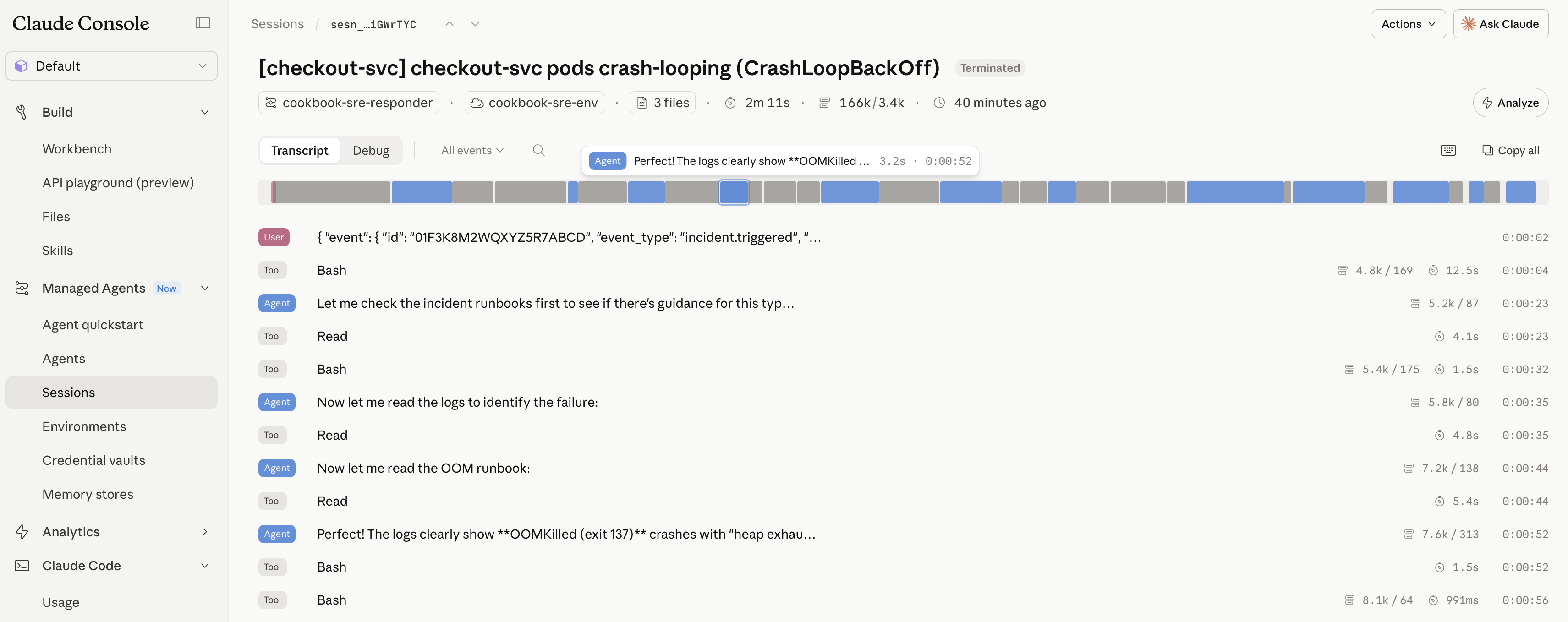
Because the investigation ran as a Managed Agents session, every step above — the file reads, the bash diff, the manifest edit, the three custom tool calls, and the approval you sent — is persisted as an event on the session. Open it in the Console(opens in new tab) under Managed Agents → Sessions for the full audit trail with no extra instrumentation:
Cleanup
Archive the session and the resources you created.
archived
Next steps: production wiring
Three swaps take this from notebook to on-call.
Approve in Slack. When request_approval arrives, post it to the on-call channel with Block Kit buttons and send the user.custom_tool_result back from the action handler. The slack_data_bot cookbook(opens in new tab) covers the Bolt app setup; the approval-specific bit is small:
To drop the polling loop entirely, register a Console webhook on session.requires_action — the platform calls your endpoint the moment the agent pauses, and you post to Slack from there.
GitHub instead of the mock. Drop the open_pull_request / merge_pull_request custom tools and give the agent the GitHub MCP server instead, with the token stored in a vault so it never appears in your code. CMA_operate_in_production.ipynb(opens in new tab) walks through per-user credentials.
Live logs instead of a fixture. Pass DD_API_KEY / DD_APP_KEY through the environment config and let the agent curl the Datadog Logs API from bash instead of reading a mounted file.
See also the Agent SDK site-reliability agent(opens in new tab) for the same problem solved with the local Agent SDK instead of the hosted Managed Agents runtime.
What you learned
- Trigger a session from any external event — one API call from a PagerDuty webhook started the whole run.
- Attach a Skill to give the agent your team's conventions.
- Mount data with resources:
github_repositoryfor code,filefor logs and runbooks. - Use custom tools to call back into your app and gate actions on human approval via
requires_action. - Get the full audit trail for free in the Console session view.
Swap the mocks for GitHub MCP, a Slack approval button, and live logs, and it's ready for on-call.