---
title: 보존된 사고
url: https://platform.claude.com/docs/ko/build-with-claude/preserved-thinking
description: 보존된 사고(preserved thinking)는 이전 턴의 사고 블록을 해당 모델 또는 고정된 다른 모델 집합 중 하나가 생성했고 블록 앞의 내용이 변경되지 않은 경우에만 모델이 사용할 수 있도록 합니다.
---
"Preserved thinking"(보존된 사고)은 distillation(증류)을 방지하는 최신 Claude 모델의 속성입니다. 이는 이전 턴에서 다시 보낸 사고 블록을 모델이 사용할 수 있는지 여부를 결정합니다. Claude Fable 5.1부터는 요청에 `thinking` 또는 `redacted_thinking` 블록이 다시 포함되면 API가 블록의 `signature`를 확인하여 두 가지를 검사합니다:
* **모델이 블록을 읽을 수 있는지.** 각 모델은 자신의 사고 블록과 고정된 다른 모델 집합의 사고 블록을 읽습니다. Claude Fable 5.1은 Claude Opus 5의 블록과, Claude API에서는 Claude Opus 5.5의 블록을 읽습니다. Claude Opus 5와 Claude Opus 5.5는 모두 Claude Fable 5.1의 블록을 읽지 않습니다. 현재 모델이 블록을 읽을 수 없으면 API는 오류 없이 해당 요청에서 그 블록을 제거합니다. [대화 중 모델 전환](https://platform.claude.com/docs/ko/build-with-claude/preserved-thinking#switching-models)을 참조하세요.
* **사고 블록 앞의 내용이 변경되지 않았는지.** 블록 앞에 있는 최상위 `system` 프롬프트, `tools`, `messages`가 해당 블록의 "prefix"(접두사)입니다. 접두사가 블록이 생성될 때 보낸 내용과 다르면 해당 블록과 그 이후의 모든 사고 블록이 무효가 되며, API는 사용자의 선택에 따라 400 오류로 요청을 거부하거나 무효한 블록을 제거합니다. [접두사를 변경하지 않고 유지하기](https://platform.claude.com/docs/ko/build-with-claude/preserved-thinking#prefix-check)를 참조하세요.
Claude Sonnet 5.5 및 Claude Haiku 5.5의 사고 블록은 이를 생성한 계정에도 연결됩니다. API가 이를 적용하는 위치는 [사고 블록은 생성한 계정에 귀속됩니다](https://platform.claude.com/docs/ko/build-with-claude/preserved-thinking#account-bound-thinking)를 참조하세요.
모델 검사는 모든 계정에 적용됩니다. API는 2026년 8월 31일 00:00 UTC 이후에 생성된 계정에 대해 기본적으로 접두사 검사를 적용합니다. 이전 계정에서는 `thinking.block_binding.prefix_mismatch_behavior`를 설정한 요청에만 접두사 검사를 적용합니다. **계정 생성 시기와 관계없이 통합을 "append-only"(추가 전용)로 만드세요.** 그러면 기본적으로 검사가 적용되는 새 계정을 포함한 모든 계정에서 동일한 코드가 작동합니다.
## 변경이 필요한 대상
Claude Code, claude.ai, Claude Managed Agents 또는 Claude Agent SDK가 요청을 구성하거나, 코드가 세션 동안 `system`과 `tools`를 고정하고 `messages`에 추가만 하는 경우에는 변경할 것이 없습니다. Claude Mythos 5.1과 Claude Fable 5.1 이전 모델은 접두사 검사를 실행하지 않습니다. 사고 블록을 다시 보내지 않으면 접두사 검사가 거부할 대상이 없으며, 모델은 이전 추론을 전혀 받지 못합니다.
한 대화의 두 요청 사이에 통합이 다음 중 하나라도 수행한다면 통합을 확인하세요. 각 항목은 대신 수행할 방법으로 연결됩니다:
* [`system` 프롬프트를 다시 구성하는 경우](https://platform.claude.com/docs/ko/build-with-claude/preserved-thinking#new-instructions): 날짜, 모드 플래그, 다시 읽은 프로젝트 지침, 또는 첫 번째 턴 이후에 연결되는 플러그인이나 MCP 서버
* [첫 번째 사용자 메시지의 컨텍스트를 다시 렌더링하는 경우](https://platform.claude.com/docs/ko/build-with-claude/preserved-thinking#changing-context)
* [이전 도구 결과를 지우거나 줄이거나, 이전 이미지를 다시 인코딩하는 경우](https://platform.claude.com/docs/ko/build-with-claude/preserved-thinking#server-side-trimming)
* [클라이언트에서 이전 턴을 요약하거나 제거하고](https://platform.claude.com/docs/ko/build-with-claude/preserved-thinking#custom-compaction-on-the-client) 최근 턴은 사고와 함께 유지하는 경우
* [`tools`의 항목을 추가, 제거 또는 편집하는 경우](https://platform.claude.com/docs/ko/build-with-claude/preserved-thinking#tool-changes)
* [사용자 턴에 리마인더를 추가하고](https://platform.claude.com/docs/ko/build-with-claude/preserved-thinking#per-turn-reminders) 나중에 이를 제거하거나 다시 작성하는 경우
* [일부 `thinking` 블록을 제거하고 이후 블록은 유지하는 경우](https://platform.claude.com/docs/ko/build-with-claude/preserved-thinking#append-assistant-turns-exactly-as-returned), 또는 블록을 제거했다가 [나중에 다시 넣는 경우](https://platform.claude.com/docs/ko/build-with-claude/preserved-thinking#prefix-check)
* 보낸 내용을 재생하는 대신 [템플릿에서 저장된 세션을 다시 구성하는 경우](https://platform.claude.com/docs/ko/build-with-claude/preserved-thinking#faq)
이전 계정에서는 요청이 `prefix_mismatch_behavior`를 설정하지 않는 한 이 중 어느 것도 오류를 발생시키지 않으므로, 자신의 키로 오류 없이 실행되었다고 해서 코드가 영향을 받지 않는다는 의미는 아닙니다. 사용자가 자신의 API 키로 도구를 실행하는 경우, 새 계정을 사용하는 사용자는 여러분보다 먼저 400 오류를 받게 됩니다. 요청 동작을 변경하지 않고 그들이 보는 것을 확인하려면 `thinking-binding-controls-2026-08-01` 베타 헤더를 보내세요. 그러면 이전 계정에서 각 응답이 검사에 실패한 블록을 표시하며, 모델은 여전히 해당 블록을 읽습니다([불일치 동작 설정 및 `input_transformations` 읽기](https://platform.claude.com/docs/ko/build-with-claude/preserved-thinking#preserved-thinking-controls) 참조).
한 계정의 Claude Sonnet 5.5 또는 Claude Haiku 5.5 사고 블록을 다른 계정이 보내는 요청에 포함하는 경우에도 통합을 확인하세요. [사고 블록은 생성한 계정에 귀속됩니다](https://platform.claude.com/docs/ko/build-with-claude/preserved-thinking#account-bound-thinking)를 참조하세요.
## 대화 중 모델 전환
Claude Fable 5.1과 Claude Mythos 5.1은 서로가 생성한 사고 블록과 이전 Claude 모델이 생성한 사고 블록을 읽습니다. 다른 어떤 모델도 Claude Fable 5.1 또는 Claude Mythos 5.1의 사고 블록을 읽지 않습니다.
Claude Opus 5.5는 Claude Opus 5, 이전 Opus, Sonnet, Haiku 모델의 사고 블록을 읽으며, Claude API와 Google Cloud에서는 Claude Sonnet 5.5 및 Claude Haiku 5.5의 사고 블록도 읽지만, Claude Fable 또는 Claude Mythos 모델의 사고 블록은 읽지 않습니다. Claude API에서는 Claude Fable 5.1과 Claude Mythos 5.1이 Claude Opus 5.5의 사고 블록을 읽으며, 다른 모델은 읽지 않습니다. 따라서 Claude Opus 5에서 Claude Opus 5.5로 이동하는 대화는 추론을 유지하며, Claude API에서 Claude Opus 5.5에서 Claude Fable 5.1 또는 Claude Mythos 5.1로 올라가는 대화도 마찬가지입니다. Claude Fable 5.1 또는 Claude Mythos 5.1에서 Claude Opus 5.5로 이동하거나, Claude Opus 5.5에서 이 두 모델 이외의 모델로 이동하는 대화는 전환 이후의 턴을 이전 모델의 추론 없이 실행합니다. 이 섹션의 뒷부분에서 설명하듯이 블록은 거부되지 않고 제거됩니다.
Claude Sonnet 5.5는 Claude Sonnet 5, Claude Opus 4.8, Claude Haiku 4.5 및 이전 모델, 그리고 Claude API와 Google Cloud에서는 Claude Haiku 5.5의 사고 블록을 읽지만, Claude Opus 5, Claude Opus 5.5 또는 Claude Fable이나 Claude Mythos 모델의 사고 블록은 읽지 않습니다. Claude API와 Google Cloud에서는 Claude Opus 5.5가 Claude Sonnet 5.5의 사고 블록을 읽으며, 다른 모델은 읽지 않습니다. 따라서 Claude Sonnet 5에서 Claude Sonnet 5.5로 이동하는 대화는 추론을 유지하며, Claude API와 Google Cloud에서 Claude Sonnet 5.5에서 Claude Opus 5.5로 올라가는 대화도 마찬가지입니다. Claude Opus 5, Claude Opus 5.5 또는 Claude Fable이나 Claude Mythos 모델에서 Claude Sonnet 5.5로 이동하는 대화는 전환 이후의 턴을 이전 모델의 추론 없이 실행합니다. Claude Sonnet 5.5에서 다른 모델로 이동하는 그 밖의 모든 경우도 마찬가지이며, 예를 들어 Claude Sonnet 5로의 [서버 측 폴백](https://platform.claude.com/docs/ko/build-with-claude/refusals-and-fallback#server-side-fallback)이 이에 해당합니다.
Claude Haiku 5.5는 Claude Sonnet 5, Claude Opus 4.8, Claude Haiku 4.5 및 이전 모델의 사고 블록을 읽지만, Claude Opus 5, Claude Opus 5.5, Claude Sonnet 5.5 또는 Claude Fable이나 Claude Mythos 모델의 사고 블록은 읽지 않습니다. Claude API 및 Google Cloud에서 Claude Opus 5.5와 Claude Sonnet 5.5는 Claude Haiku 5.5의 사고 블록을 읽으며, 다른 모델은 읽지 않습니다. 따라서 Claude Haiku 4.5에서 Claude Haiku 5.5로 이동하는 대화는 추론을 유지하며, Claude API 및 Google Cloud에서 Claude Haiku 5.5에서 Claude Opus 5.5 또는 Claude Sonnet 5.5로 올라가는 대화도 마찬가지입니다. Claude Opus 5, Claude Opus 5.5, Claude Sonnet 5.5 또는 Claude Fable이나 Claude Mythos 모델에서 Claude Haiku 5.5로 이동하는 대화는 전환 이후의 턴을 이전 모델의 추론 없이 실행하며, Claude Haiku 5.5에서 벗어나는 다른 모든 이동도 마찬가지입니다.
* **이전 모델에서, 또는 Claude API에서 Claude Opus 5.5에서 Claude Fable 5.1로 이동하는 대화는 추론을 유지합니다.** 이전 모델의 사고 블록을 계속 읽을 수 있으므로, 모델은 전환 후 첫 턴부터 평소처럼 사고합니다.
* **Claude Fable 5.1에서 Claude Mythos 5.1 이외의 모델로 이동하는 대화는 해당 요청에서 Claude Fable 5.1의 추론을 잃습니다.** 이는 라우터가 턴을 더 저렴한 모델로 보낼 때, [분류기 거부 폴백](https://platform.claude.com/docs/ko/build-with-claude/refusals-and-fallback) 이후, 또는 [서버 측 폴백](https://platform.claude.com/docs/ko/build-with-claude/refusals-and-fallback#server-side-fallback) 중에 발생합니다. API는 프롬프트가 모델에 도달하기 전에 읽을 수 없는 블록을 제거합니다. 이 블록은 요금이 청구되지 않으며 `input_tokens`에 포함되지 않습니다.
모든 요청에서 사고 블록을 포함한 전체 기록을 계속 보내고, 현재 모델이 읽을 수 없는 것은 API가 제거하도록 하세요. API는 `messages` 배열을 절대 편집하지 않으므로 제거된 블록은 기록에 그대로 남아 있습니다. 동일한 기록이 다시 Claude Fable 5.1로 전송되면 이전 모델의 사고와 함께 해당 블록을 다시 읽을 수 있습니다. 추론이 영구적으로 손실되는 것은 클라이언트가 직접 블록을 제거하는 경우뿐이며, 예를 들어 모델 전환 시 사고를 제거하거나 각 모델이 사용한 내용으로 기록을 다시 구성하는 하네스가 이에 해당합니다.

`thinking-binding-controls-2026-08-01` [베타 헤더](https://platform.claude.com/docs/ko/api/beta-headers)를 사용하면 응답은 제거된 각 블록을 최상위 `input_transformations` 배열에 `reason: "model_binding_mismatch"`와 함께 나열합니다:
```json
{
"input_transformations": [
{
"type": "thinking_dropped",
"path": "messages.3.content.0",
"reason": "model_binding_mismatch"
}
]
}
```
헤더가 없으면 제거는 조용히 이루어집니다. 이 항목은 통합의 버그가 아니며, `prefix_mismatch_behavior`는 이에 영향을 주지 않습니다. 현재 모델이 읽을 수 없는 블록은 항상 제거됩니다.
## 사고 블록은 생성한 계정에 귀속됩니다
Claude Sonnet 5.5 또는 Claude Haiku 5.5가 생성한 사고 블록은 이를 생성한 계정 또는 그 계정에 연결된 계정에서만 작동합니다. 다른 계정이 이러한 블록 중 하나를 보내면 API는 모델이 보기 전에 블록을 제거하고 요청은 성공합니다. 모델은 제거된 블록의 추론 없이 응답합니다. 이전 모델의 블록은 영향을 받지 않습니다.
Claude API와 Google Cloud에서 `thinking-binding-controls-2026-08-01` [베타 헤더](https://platform.claude.com/docs/ko/api/beta-headers)를 사용하면 응답은 제거된 각 블록을 `input_transformations`에 `reason: "organization_binding_mismatch"`가 포함된 `thinking_dropped` 항목으로 나열합니다. 헤더가 없으면 제거는 조용히 이루어집니다.
## 접두사를 변경하지 않고 유지하기
Claude Fable 5.1, Claude Opus 5.5, Claude Sonnet 5.5, Claude Haiku 5.5에서는 사고 블록 앞에 보낸 모든 내용이 이후 요청에서 변경되지 않은 동안에만 해당 블록이 유효합니다. 검사되는 접두사는 세 부분으로 구성됩니다:
* 최상위 `system` 프롬프트
* `tools` 집합
* 블록 앞의 모든 `message`
참고: 서버 측 [압축](https://platform.claude.com/docs/ko/build-with-claude/compaction)을 사용하는 경우, 검사되는 접두사는 가장 최근의 compaction 블록에서 시작합니다.
`effort`, `max_tokens`, `output_config`, `tool_choice`, `metadata`와 같이 이 세 필드 외부의 요청 매개변수는 접두사 검사에 포함되지 않으며, `cache_control` 마커도 마찬가지입니다. 전체 목록은 [편집으로 간주되는 것](https://platform.claude.com/docs/ko/build-with-claude/preserved-thinking#what-counts-as-an-edit)에 있습니다.
이전 사고 블록은 접두사에 포함되지 않지만, 각 사고 블록은 턴 전반에 걸쳐 자신보다 앞선 사고 블록이 무엇인지 기록합니다. 기록의 시작 부분(가장 오래된 것부터), 끝 부분에서 사고 블록을 제거하거나 모두 제거할 수 있습니다. 실패하는 것은 간격입니다. 유지하는 사고 블록은 원래 순서에서 끊기지 않은 연속이어야 하므로, 중간에서 하나를 제거하면 그 이후의 사고 블록이 무효가 됩니다. 블록을 제거했다면 계속 제외하세요. 다시 넣으면 블록이 없는 동안 생성된 사고 블록이 무효가 됩니다.
세션 동안 `system`과 `tools`를 고정하고 `messages`를 추가 전용으로 취급하세요. 동일한 원칙이 [프롬프트 캐싱](https://platform.claude.com/docs/ko/build-with-claude/prompt-caching)을 위해 접두사를 안정적으로 유지합니다. 사고를 무효화하는 편집은 캐시를 다시 시작하게 하는 편집과 같습니다.
### API가 무효한 블록을 처리하는 방식
`thinking.block_binding.prefix_mismatch_behavior`로 선택합니다:
* **`"error"`(기본값):** API는 첫 번째로 실패한 블록을 명시하는 400 `invalid_request_error`로 요청을 거부합니다.
* **`"drop_block"`:** API는 실패한 각 블록과 그 이후의 모든 사고 블록을 제거하고, 요청은 성공합니다. 제거된 블록은 요금이 청구되지 않습니다. 모델은 제거된 블록의 추론을 사용하지 않고 해당 턴에 응답하며, 프롬프트 캐시는 편집 지점에서 다시 시작됩니다. 응답은 제거된 각 블록을 `input_transformations`(스트리밍 시에는 `message_start` 이벤트)에 `reason: "prefix_binding_mismatch"`와 함께 나열합니다.
`"drop_block"`은 요청이 계속 성공하도록 하지만, 불일치를 일으킨 편집을 수정하지는 않으며 비용이 발생합니다. 블록을 제거하면 생성되는 출력 토큰이 크게 증가할 수 있으며, 특히 높은 effort 수준이거나 매 턴마다 블록이 제거될 때 그렇습니다. 자세한 내용은 [`"drop_block"`의 출력 토큰 비용](https://platform.claude.com/docs/ko/build-with-claude/preserved-thinking#drop-block-cost)을 참조하세요. 제거된 블록은 요금이 청구되지 않지만, Claude는 더 이상 읽을 수 없는 추론을 다시 만들어내므로 더 많은 출력 토큰을 생성합니다. 이후 턴이 이전 추론을 기반으로 하는 작업에서는 출력 품질도 달라질 수 있습니다. `"drop_block"`은 편집을 수정하는 동안의 임시 방편으로 사용하고, 장기적인 설정으로 사용하지 마세요.
각 세션에서 `input_transformations`에 `prefix_binding_mismatch` 항목이 있는 응답의 수를 세고, 이에 대한 알림을 설정하세요. 그런 다음 각 편집을 [접두사를 편집하지 않고 변경하기](https://platform.claude.com/docs/ko/build-with-claude/preserved-thinking#replace-prefix-edits)의 해당 패턴으로 바꾸세요. Message Batches API에서는 이 필드를 설정하지 않은 항목이 실패하지 않습니다. API가 기본적으로 검사를 적용하는 경우에는 실패한 블록을 대신 제거합니다. 이 경우 배치 항목이 실패하도록 하려면 `"error"`를 명시적으로 설정하세요.
이 필드와 `input_transformations` 배열 모두 `thinking-binding-controls-2026-08-01` [베타 헤더](https://platform.claude.com/docs/ko/api/beta-headers)가 필요합니다. [불일치 동작 설정 및 `input_transformations` 읽기](https://platform.claude.com/docs/ko/build-with-claude/preserved-thinking#preserved-thinking-controls)에서 각 SDK의 요청을 보여줍니다.
400 메시지는 다음과 같이 시작합니다:
```text wrap
messages.1.content.0: Invalid `signature` in `thinking` block. The block is bound to a different conversation. Remove the block, or set `thinking.block_binding.prefix_mismatch_behavior` to "drop_block".
```
요청에 베타 헤더를 보내지 않았다면 메시지는 다음과 같이 이어집니다:
```text wrap
That setting requires the `thinking-binding-controls-2026-08-01` value in the `anthropic-beta` header.
```
메시지는 보통 무엇이 변경되었는지 명시하는 문장으로 끝납니다. 예를 들어 `system` 프롬프트나 `tools` 목록이 블록이 생성되었을 때와 다르다는 내용입니다. 이 문장이 명시할 수 있는 내용은 [사고 문제 해결](https://platform.claude.com/docs/ko/build-with-claude/thinking-troubleshooting#error-thinking-block-signature)에 설명되어 있습니다.
변조되었거나 복호화할 수 없는 서명은 다른 종류의 실패입니다. 이 경우 항상 400(대화에 관한 문장 없이 ``Invalid `signature` in `thinking` block``)을 반환하며, `prefix_mismatch_behavior`는 적용되지 않습니다.
#### `"drop_block"`의 출력 토큰 비용
멀티턴 코딩 벤치마크에 대한 Anthropic의 테스트에서, 세션당 한 번 사고 블록을 제거하면 출력 토큰이 low effort에서 2.5%, medium에서 3.9%, high에서 4.5%, max에서 20.1% 증가했습니다. 첫 턴 이후 매 턴마다 제거하면 출력 토큰이 low effort에서 4.6%, medium에서 9.7%, high에서 10.3%, max에서 67.1% 증가했습니다. 이 수치는 오차 범위가 넓은 추정치이며, 워크로드에 미치는 영향은 하네스에 따라 다릅니다.
Claude가 이전 턴의 추론을 더 이상 읽을 수 없으면 그 추론을 다시 만들어내므로, 사고 블록을 제거하는 요청은 더 많은 출력 토큰을 생성하고 응답하는 데 더 오래 걸릴 수 있습니다. 매 턴마다 제거하는 것은 가끔 제거하는 것보다 비용이 더 들며, 얼마나 더 드는지는 하네스에 따라 다릅니다. 즉, 접두사를 얼마나 자주 편집하는지, 그리고 각 턴이 이전 추론을 얼마나 기반으로 하는지에 따라 달라집니다.
`"drop_block"`에 의존하기 전에 자체 워크로드에서 평가를 실행하여 증가량을 측정하세요. 증가량이 작다면 `"drop_block"`은 편집을 수정하는 동안 요청이 계속 성공하도록 할 수 있습니다. 어느 쪽이든 [접두사를 편집하지 않고 변경하기](https://platform.claude.com/docs/ko/build-with-claude/preserved-thinking#replace-prefix-edits)의 패턴으로 편집을 수정하는 것이 더 나은 장기적 해결책입니다.
#### 코드에서 오류 처리하기
이는 이 섹션 앞부분에서 보여준 400 `invalid_request_error`입니다. 동일한 본문을 다시 보내지 마세요. 매번 같은 방식으로 실패합니다. 임시 방편으로 베타 헤더와 `prefix_mismatch_behavior: "drop_block"`을 사용하여 한 번 재시도하고([`"drop_block"`은 출력 토큰을 늘릴 수 있습니다](https://platform.claude.com/docs/ko/build-with-claude/preserved-thinking#drop-block-cost)), 재시작 후를 포함하여 이후의 모든 요청도 이를 보내도록 해당 선택을 세션과 함께 저장하세요. Claude Sonnet 5.5와 Claude Haiku 5.5에서 `block_binding`은 `thinking: {"type": "adaptive"}`에서만 작동합니다. Claude Sonnet 5.5에서 `between_tools`를 사용하거나 Claude Haiku 5.5에서 `thinking: {"type": "disabled"}`를 사용하는 경우, 기록을 추가 전용으로 유지하거나 편집된 턴부터 사고 블록을 제거하세요. 베타 헤더를 보낼 수 없다면 기록에서 모든 `thinking` 및 `redacted_thinking` 블록을 한 번 제거하고, 계속 제외한 채로 진행하세요. 그런 다음 불일치를 일으킨 편집을 수정하세요.
### 불일치 동작 설정 및 `input_transformations` 읽기
`thinking-binding-controls-2026-08-01` [베타 헤더](https://platform.claude.com/docs/ko/api/beta-headers)는 다음을 추가합니다:
* 모든 응답의 최상위 `input_transformations` 배열
* `thinking` 구성의 `block_binding` 객체(유일한 필드는 `prefix_mismatch_behavior`)
`block_binding`은 `thinking.type: "adaptive"` 및 `thinking.type: "enabled"`와 함께 허용됩니다. Claude Sonnet 5.5 및 Claude Haiku 5.5에서는 `block_binding`이 `thinking: {"type": "adaptive"}`에서만 작동합니다. `between_tools`(Claude Sonnet 5.5의 경우) 또는 `thinking: {"type": "disabled"}`(Claude Haiku 5.5의 경우)와 함께 보내면 400 오류가 반환됩니다. 베타 헤더 없이 보내면 메시지가 `block_binding: Extra inputs are not permitted`로 끝나는 400 오류가 반환됩니다. 접두사 검사를 실행하지 않는 모델은 이 객체를 허용하고 모델 검사로 인한 제거만 보고하므로, 하나의 요청 본문이 여러 모델에서 작동합니다. API 레퍼런스에서는 접두사 검사를 대화 검사(conversation check)라고 부릅니다.
다음 요청은 거부 대신 제거를 선택합니다. 첫 번째 턴에는 재생할 내용이 없으므로 `input_transformations`는 비어 있는 상태로 반환됩니다:
```bash cURL
curl https://api.anthropic.com/v1/messages \
-H "x-api-key: $ANTHROPIC_API_KEY" \
-H "anthropic-version: 2023-06-01" \
-H "anthropic-beta: thinking-binding-controls-2026-08-01" \
-H "content-type: application/json" \
-d '{
"model": "claude-fable-5-1",
"max_tokens": 16000,
"thinking": {
"type": "adaptive",
"block_binding": {
"prefix_mismatch_behavior": "drop_block"
}
},
"messages": [
{
"role": "user",
"content": "What is the greatest common divisor of 1071 and 462?"
}
]
}'
```
```bash CLI
ant beta:messages create --beta thinking-binding-controls-2026-08-01 \
--format yaml <<'YAML'
model: claude-fable-5-1
max_tokens: 16000
thinking:
type: adaptive
block_binding:
prefix_mismatch_behavior: drop_block
messages:
- role: user
content: What is the greatest common divisor of 1071 and 462?
YAML
```
```python Python
client = anthropic.Anthropic()
response = client.beta.messages.create(
model="claude-fable-5-1",
max_tokens=16000,
thinking={
"type": "adaptive",
"block_binding": {"prefix_mismatch_behavior": "drop_block"},
},
messages=[
{
"role": "user",
"content": "What is the greatest common divisor of 1071 and 462?",
}
],
betas=["thinking-binding-controls-2026-08-01"],
)
for block in response.content:
if block.type == "text":
print(block.text)
print(f"Input transformations: {len(response.input_transformations or [])}")
```
```typescript TypeScript
const client = new Anthropic();
const response = await client.beta.messages.create({
model: "claude-fable-5-1",
max_tokens: 16000,
thinking: {
type: "adaptive",
block_binding: { prefix_mismatch_behavior: "drop_block" }
},
messages: [
{ role: "user", content: "What is the greatest common divisor of 1071 and 462?" }
],
betas: ["thinking-binding-controls-2026-08-01"]
});
for (const block of response.content) {
if (block.type === "text") {
console.log(block.text);
}
}
console.log(`Input transformations: ${response.input_transformations?.length ?? 0}`);
```
```csharp C#
AnthropicClient client = new();
var response = await client.Beta.Messages.Create(
new()
{
Model = Model.ClaudeFable5_1,
MaxTokens = 16000,
Thinking = new BetaThinkingConfigAdaptive
{
BlockBinding = new()
{
PrefixMismatchBehavior = BetaThinkingPrefixMismatchBehavior.DropBlock,
},
},
Messages =
[
new()
{
Role = Role.User,
Content = "What is the greatest common divisor of 1071 and 462?",
},
],
Betas = [AnthropicBeta.ThinkingBindingControls2026_08_01],
}
);
foreach (var block in response.Content)
{
if (block.TryPickText(out var textBlock))
{
Console.WriteLine(textBlock.Text);
}
}
Console.WriteLine($"Input transformations: {response.InputTransformations?.Count ?? 0}");
```
```go Go
client := anthropic.NewClient()
response, err := client.Beta.Messages.New(context.TODO(), anthropic.BetaMessageNewParams{
Model: anthropic.ModelClaudeFable5_1,
MaxTokens: 16000,
Thinking: anthropic.BetaThinkingConfigParamUnion{
OfAdaptive: &anthropic.BetaThinkingConfigAdaptiveParam{
BlockBinding: anthropic.BetaThinkingBlockBindingParam{
PrefixMismatchBehavior: anthropic.BetaThinkingPrefixMismatchBehaviorDropBlock,
},
},
},
Messages: []anthropic.BetaMessageParam{
anthropic.NewBetaUserMessage(anthropic.NewBetaTextBlock("What is the greatest common divisor of 1071 and 462?")),
},
Betas: []anthropic.AnthropicBeta{anthropic.AnthropicBetaThinkingBindingControls2026_08_01},
})
if err != nil {
log.Fatal(err)
}
for _, block := range response.Content {
if textBlock, ok := block.AsAny().(anthropic.BetaTextBlock); ok {
fmt.Println(textBlock.Text)
}
}
fmt.Printf("Input transformations: %d\n", len(response.InputTransformations))
```
```java Java
import com.anthropic.models.beta.AnthropicBeta;
import com.anthropic.models.beta.messages.BetaMessage;
import com.anthropic.models.beta.messages.BetaThinkingBlockBinding;
import com.anthropic.models.beta.messages.BetaThinkingConfigAdaptive;
import com.anthropic.models.beta.messages.BetaThinkingPrefixMismatchBehavior;
import com.anthropic.models.beta.messages.MessageCreateParams;
import com.anthropic.models.messages.Model;
void main() {
AnthropicClient client = AnthropicOkHttpClient.fromEnv();
MessageCreateParams params = MessageCreateParams.builder()
.model(Model.CLAUDE_FABLE_5_1)
.maxTokens(16000L)
.addBeta(AnthropicBeta.THINKING_BINDING_CONTROLS_2026_08_01)
.thinking(BetaThinkingConfigAdaptive.builder()
.blockBinding(BetaThinkingBlockBinding.builder()
.prefixMismatchBehavior(BetaThinkingPrefixMismatchBehavior.DROP_BLOCK)
.build())
.build())
.addUserMessage("What is the greatest common divisor of 1071 and 462?")
.build();
BetaMessage response = client.beta().messages().create(params);
response.content().stream()
.flatMap(block -> block.text().stream())
.forEach(textBlock -> IO.println(textBlock.text()));
IO.println("Input transformations: "
+ response.inputTransformations().map(List::size).orElse(0));
}
```
```php PHP
use Anthropic\Beta\AnthropicBeta;
use Anthropic\Beta\Messages\BetaThinkingBlockBinding;
use Anthropic\Beta\Messages\BetaThinkingConfigAdaptive;
use Anthropic\Beta\Messages\BetaThinkingPrefixMismatchBehavior;
use Anthropic\Client;
$client = new Client();
$response = $client->beta->messages->create(
model: 'claude-fable-5-1',
maxTokens: 16000,
thinking: BetaThinkingConfigAdaptive::with(
blockBinding: BetaThinkingBlockBinding::with(
prefixMismatchBehavior: BetaThinkingPrefixMismatchBehavior::DROP_BLOCK,
),
),
messages: [
['role' => 'user', 'content' => 'What is the greatest common divisor of 1071 and 462?'],
],
betas: [AnthropicBeta::THINKING_BINDING_CONTROLS_2026_08_01],
);
foreach ($response->content as $block) {
if ($block->type === 'text') {
echo $block->text, PHP_EOL;
}
}
echo 'Input transformations: ', count($response->inputTransformations ?? []), PHP_EOL;
```
```ruby Ruby
client = Anthropic::Client.new
response = client.beta.messages.create(
model: "claude-fable-5-1",
max_tokens: 16_000,
thinking: {
type: "adaptive",
block_binding: {prefix_mismatch_behavior: "drop_block"}
},
messages: [
{role: "user", content: "What is the greatest common divisor of 1071 and 462?"}
],
betas: [Anthropic::AnthropicBeta::THINKING_BINDING_CONTROLS_2026_08_01]
)
response.content.each do |block|
puts block.text if block.type == :text
end
puts "Input transformations: #{response.input_transformations&.length || 0}"
```
```text Output wrap
The greatest common divisor of 1071 and 462 is 21.
Input transformations: 0
```
베타 헤더를 사용하면 사고 기능이 있는 모델의 모든 응답에 `input_transformations`가 포함됩니다. 각 항목은 `path`(예: `messages.1.content.0`)로 하나의 사고 블록을 지정하고 `reason`을 제공합니다. 항목 유형은 두 가지입니다:
* **`thinking_dropped`:** API가 모델이 읽기 전에 블록을 제거하며, 해당 블록은 요금이 청구되지 않습니다. `reason`은 `prefix_binding_mismatch` 또는 `model_binding_mismatch`입니다([대화 중 모델 전환](https://platform.claude.com/docs/ko/build-with-claude/preserved-thinking#switching-models) 참조). `reason`은 `organization_binding_mismatch`일 수도 있으며, 이는 블록이 다른 계정에서 왔음을 의미합니다([사고 블록은 생성한 계정에 귀속됩니다](https://platform.claude.com/docs/ko/build-with-claude/preserved-thinking#account-bound-thinking) 참조).
* **`thinking_mismatch_allowed`:** 블록이 접두사 검사에 실패했지만 API가 이 요청에 대해 해당 검사를 적용하지 않으므로, 블록은 변경 없이 모델에 도달하고 요금이 청구됩니다. `reason`은 항상 `prefix_binding_mismatch`입니다. 이 항목은 이전 계정의 요청처럼 API가 기본적으로 검사를 적용하지 않는 요청에만 나타납니다([API가 확인을 적용하는 시점](https://platform.claude.com/docs/ko/build-with-claude/preserved-thinking#enforcement) 참조). `prefix_mismatch_behavior`를 어느 값으로든 설정하면 요청이 적용 대상이 되므로, 이를 설정한 요청은 이 항목을 받지 않습니다.
제거된 블록이 없고 접두사 검사에 실패한 블록도 없으면 배열은 비어 있습니다. 이후 검사에서 값이 추가되므로, 인식하지 못하는 `type` 또는 `reason`을 가진 항목은 무시하세요.
[스트리밍](https://platform.claude.com/docs/ko/build-with-claude/streaming) 시에는 배열이 `message_start` 이벤트의 `message` 객체에 포함되어 도착합니다. 스트림 도중 서버 측 폴백이 발생한 후에는 최종 `message_delta` 이벤트가 응답을 제공하는 모델의 항목과 함께 배열을 다시 전달합니다. [메시지 배치](https://platform.claude.com/docs/ko/build-with-claude/batch-processing)에서는 명시적인 `"error"` 설정하에 블록이 접두사 검사에 실패한 항목이 `errored`로 처리됩니다. 필드를 설정하지 않은 항목은 실패하지 않습니다. API가 기본적으로 검사를 적용하는 경우에는 대신 실패한 블록을 제거합니다. [토큰 카운팅](https://platform.claude.com/docs/ko/build-with-claude/token-counting) 엔드포인트는 동일한 접두사 검사를 실행하고 동일한 400을 반환합니다.
### API가 확인을 적용하는 시점
API는 새 계정에 대해 Claude Fable 5.1, Claude Opus 5.5, Claude Sonnet 5.5, Claude Haiku 5.5에서 접두사 검사를 적용합니다.
* **2026년 8월 31일 00:00 UTC 이후에 생성된 계정:** API는 Claude Fable 5.1, Claude Opus 5.5, Claude Sonnet 5.5, Claude Haiku 5.5 요청을 검사하고, `"drop_block"`을 설정하지 않는 한 `"error"`를 적용합니다. 새 계정에 대한 동일한 정의가 Claude API와 클라우드 플랫폼에 적용됩니다.
* **이전 계정:** API는 `prefix_mismatch_behavior`를 설정한 요청에만 검사를 적용합니다. 필드를 설정하면 요청이 적용 대상이 되므로, 새 계정을 만들지 않고도 새 계정이 보는 것을 확인할 수 있습니다. 필드를 설정하지 않은 요청에서도 API는 검사를 실행하지만 실패한 블록을 모델에 그대로 전달합니다. 베타 헤더를 사용하면 응답은 각 블록을 `input_transformations`에 `thinking_mismatch_allowed`로 나열하므로, 모델이 받는 내용을 변경하지 않고 접두사 편집을 찾을 수 있습니다.
계정이 어느 그룹에 속하는지 확인하려면 사고 블록이 포함된 Claude Fable 5.1 대화를 가져와 해당 블록 앞의 내용을 변경한 다음, 베타 헤더나 `block_binding` 필드 없이 Claude Fable 5.1로 보내세요. 헤더를 명시하는 400 응답은 계정에 기본적으로 검사가 적용됨을 의미합니다. 200 응답은 그렇지 않음을 의미합니다. 확인하려면 여전히 `block_binding` 없이 베타 헤더와 함께 동일한 요청을 다시 보내세요. 응답은 편집 이후의 모든 사고 블록을 `input_transformations`에 `thinking_mismatch_allowed`로 나열합니다.
### 편집으로 간주되는 것
각 행은 연속된 두 요청을 비교합니다:
| 요청 간 변경 사항 | 이후 사고 블록 |
| ---------------------------------------------------------------------------------------------------------------------------------------------------------- | ---------------------------------------------------------------------------------------------------------------------------------------------------------------------------------------------------------------------------------------------------------------------------------- |
| 끝에 메시지 추가 | 유효 |
| 아직 아무 곳에서도 참조하지 않은 `defer_loading: true` 도구 추가 | 유효 |
| 기록의 시작 부분이나 끝 부분에서 `thinking` 블록 제거, 또는 전부 제거 | 유효(모델은 해당 추론을 잃음) |
| `system`, `tools`, `messages` 이외의 요청 매개변수 변경(`effort`, `max_tokens`, `output_config`, `tool_choice`, `metadata`, `thinking.display` 등) | 유효 |
| `cache_control` 마커 추가, 이동 또는 제거 | 유효 |
| 같은 바이트를 반환하는, 주기적으로 바뀌는 서명 URL | 유효 |
| 서버 측 압축 또는 컨텍스트 편집으로 콘텐츠가 제거되거나 대체됨 | 유효(검사는 서버가 편집한 사본이 아니라 사용자가 보낸 내용을 비교함) |
| 지워진 상태로 그대로 남겨 둔 ["turn-scoped system message"(턴 범위 시스템 메시지)](https://platform.claude.com/docs/ko/build-with-claude/preserved-thinking#per-turn-reminders) | 유효 |
| 이전 `user`, `assistant` 또는 `system` 메시지 편집, 순서 변경 또는 삭제 | 무효. 단, [온디맨드 압축](https://platform.claude.com/docs/ko/build-with-claude/compaction-on-demand)의 서명된 블록이 [유지된 사고가 유효하기 위한 조건](https://platform.claude.com/docs/ko/build-with-claude/compaction-thinking-blocks#conditions-for-kept-thinking-to-stay-valid)에 따라 요약 대상 메시지를 대체하는 경우는 예외 |
| 첫 번째 사용자 메시지에 넣은 컨텍스트를 변경된 값으로 다시 렌더링 | 모든 사고 블록이 무효 |
| 이전 `tool_result`를 지우거나 줄이기, 이전 이미지 다시 인코딩, 또는 이전 `tool_use` 입력 변경 | 이후의 모든 사고 블록이 무효 |
| 이전 사용자 턴에 텍스트 블록 추가, 또는 지난번에 추가한 텍스트 블록 제거 | 무효 |
| 최상위 `system` 문자열 또는 블록 변경 | 무효 |
| `tools`의 도구 추가, 제거, 이름 변경 또는 편집 | 무효 |
| 기록 중간에서 `thinking` 블록을 제거하고 이후 블록은 유지 | 이후의 모든 사고 블록이 무효 |
| 이전 요청에서 제거한 `thinking` 블록을 다시 넣기 | 해당 블록이 빠져 있는 동안 생성된 사고 블록이 무효 |
| 다음 요청에서 다른 바이트를 반환하는 이미지 또는 문서 URL | 무효 |
| 같은 턴 범위 메시지를 이후 요청에서 삭제하거나 문구 변경 | 무효 |
### 코드가 접두사를 편집하는지 확인하기
**Claude API 스킬로 이 검사를 자동화하세요.** 최신 버전의 [Claude Code](https://code.claude.com/docs/en/overview)에서 요청을 구성하는 저장소를 열고 번들로 제공되는 [Claude API 스킬](https://platform.claude.com/docs/ko/agents-and-tools/agent-skills/claude-api-skill#checking-an-integration-for-preserved-thinking)을 실행하세요:
Claude Code가 코드를 대신 확인하도록 하세요
```text
/claude-api preserved-thinking-migration
```
이 스킬은 여러분의 멀티턴 세션 몇 개를 캡처하고 연속된 요청을 비교하여 코드가 접두사를 편집하는 위치를 찾습니다. 그런 다음 `"drop_block"`으로 세션을 재생하고 API가 제거하는 사고 블록의 수를 셉니다. 그 후 한 번에 하나의 원인을 수정하고 각 수정 후 다시 측정합니다.
먼저 보내는 내용을 비교하세요. 압축이나 도구 변경을 포함하여 몇 번의 일반적인 턴 동안 통합이 보내는 요청 본문을 캡처하세요. 연속된 각 요청 쌍에 대해 `system`, `tools`, 그리고 공유하는 `messages`를 비교하세요. 새로 추가된 턴까지는 동일해야 합니다.
그런 다음 API로 확인하세요. `thinking-binding-controls-2026-08-01` 베타 헤더를 추가하고, `prefix_mismatch_behavior`를 `"drop_block"`으로 설정한 다음, claude-fable-5-1에서 통합을 통해 일반적인 멀티턴 세션을 실행하세요. 다음 예제는 통합이 해야 하는 방식으로 두 턴을 실행합니다. `messages`는 늘어나기만 하고, 각 어시스턴트 턴은 `thinking` 블록을 포함하여 API가 반환한 그대로 다시 전송되며, 모든 요청에 `block_binding`이 설정됩니다. 각 턴 후에 응답의 `thinking` 블록 수와 제거된 블록 수를 출력합니다:
```bash cURL
# 응답에 포함된 thinking 블록과 API가 제거한 블록의 수를 셉니다
COUNTS='"thinking blocks: \([.content[] | select(.type == "thinking")] | length), " +
"dropped: \(.input_transformations | length)"'
FIRST=$(curl -s https://api.anthropic.com/v1/messages \
-H "content-type: application/json" \
-H "x-api-key: $ANTHROPIC_API_KEY" \
-H "anthropic-version: 2023-06-01" \
-H "anthropic-beta: thinking-binding-controls-2026-08-01" \
-d '{
"model": "claude-fable-5-1",
"max_tokens": 16000,
"thinking": {
"type": "adaptive",
"block_binding": { "prefix_mismatch_behavior": "drop_block" }
},
"messages": [
{
"role": "user",
"content": "How many positive integers below 500 have exactly 6 positive divisors?"
}
]
}')
echo "$FIRST" | jq -r "$COUNTS"
# 2번째 턴: assistant 턴을 반환된 그대로 다시 보낸 뒤, 다음 user 메시지를 보냅니다
MESSAGES=$(jq -n --argjson first "$FIRST" '[
{
role: "user",
content: "How many positive integers below 500 have exactly 6 positive divisors?"
},
{ role: "assistant", content: $first.content },
{ role: "user", content: "How many of those are odd?" }
]')
jq -n --argjson messages "$MESSAGES" '{
model: "claude-fable-5-1",
max_tokens: 16000,
thinking: {
type: "adaptive",
block_binding: { prefix_mismatch_behavior: "drop_block" }
},
messages: $messages
}' | curl -s https://api.anthropic.com/v1/messages \
-H "content-type: application/json" \
-H "x-api-key: $ANTHROPIC_API_KEY" \
-H "anthropic-version: 2023-06-01" \
-H "anthropic-beta: thinking-binding-controls-2026-08-01" \
-d @- | jq -r "$COUNTS"
```
```bash CLI
# 응답에 포함된 thinking 블록과 API가 제거한 블록의 수를 셉니다
COUNTS='"thinking blocks: \([.content[] | select(.type == "thinking")] | length), " +
"dropped: \(.input_transformations | length)"'
FIRST=$(ant beta:messages create --beta thinking-binding-controls-2026-08-01 \
--format json <<'YAML'
model: claude-fable-5-1
max_tokens: 16000
thinking:
type: adaptive
block_binding:
prefix_mismatch_behavior: drop_block
messages:
- role: user
content: How many positive integers below 500 have exactly 6 positive divisors?
YAML
)
echo "$FIRST" | jq -r "$COUNTS"
# 2번째 턴: assistant 턴을 반환된 그대로 다시 보낸 뒤 다음 user 메시지를 보냅니다
ant beta:messages create --beta thinking-binding-controls-2026-08-01 \
--format json < block.type === "thinking");
const dropped = response.input_transformations ?? [];
console.log(`thinking blocks: ${thinkingBlocks.length}, dropped: ${dropped.length}`);
}
```
```csharp C#
AnthropicClient client = new();
string[] userTurns =
[
"How many positive integers below 500 have exactly 6 positive divisors?",
"How many of those are odd?",
];
// messages는 턴마다 늘어납니다. 각 assistant 턴은 반환된 그대로 다시 전달됩니다
List messages = [];
foreach (var userTurn in userTurns)
{
messages.Add(new() { Role = Role.User, Content = userTurn });
var response = await client.Beta.Messages.Create(
new()
{
Model = Model.ClaudeFable5_1,
MaxTokens = 16000,
Thinking = new BetaThinkingConfigAdaptive
{
BlockBinding = new()
{
PrefixMismatchBehavior = BetaThinkingPrefixMismatchBehavior.DropBlock,
},
},
Messages = messages,
Betas = [AnthropicBeta.ThinkingBindingControls2026_08_01],
}
);
messages.Add(new()
{
Role = Role.Assistant,
Content = response.Content.Select(block => new BetaContentBlockParam(block.Json)).ToList(),
});
var thinkingBlocks = response.Content.Count(block => block.TryPickThinking(out _));
var dropped = response.InputTransformations?.Count ?? 0;
Console.WriteLine($"thinking blocks: {thinkingBlocks}, dropped: {dropped}");
}
```
```go Go
client := anthropic.NewClient()
userTurns := []string{
"How many positive integers below 500 have exactly 6 positive divisors?",
"How many of those are odd?",
}
// messages는 턴마다 늘어납니다: 각 assistant 턴은 반환된 그대로 다시 전송됩니다
messages := []anthropic.BetaMessageParam{}
for _, userTurn := range userTurns {
messages = append(messages, anthropic.NewBetaUserMessage(anthropic.NewBetaTextBlock(userTurn)))
response, err := client.Beta.Messages.New(context.TODO(), anthropic.BetaMessageNewParams{
Model: anthropic.ModelClaudeFable5_1,
MaxTokens: 16000,
Thinking: anthropic.BetaThinkingConfigParamUnion{
OfAdaptive: &anthropic.BetaThinkingConfigAdaptiveParam{
BlockBinding: anthropic.BetaThinkingBlockBindingParam{
PrefixMismatchBehavior: anthropic.BetaThinkingPrefixMismatchBehaviorDropBlock,
},
},
},
Messages: messages,
Betas: []anthropic.AnthropicBeta{anthropic.AnthropicBetaThinkingBindingControls2026_08_01},
})
if err != nil {
log.Fatal(err)
}
messages = append(messages, response.ToParam())
thinkingBlocks := 0
for _, block := range response.Content {
if block.Type == "thinking" {
thinkingBlocks++
}
}
fmt.Printf("thinking blocks: %d, dropped: %d\n", thinkingBlocks, len(response.InputTransformations))
}
```
```java Java
import com.anthropic.models.beta.AnthropicBeta;
import com.anthropic.models.beta.messages.BetaContentBlock;
import com.anthropic.models.beta.messages.BetaMessage;
import com.anthropic.models.beta.messages.BetaThinkingBlockBinding;
import com.anthropic.models.beta.messages.BetaThinkingConfigAdaptive;
import com.anthropic.models.beta.messages.BetaThinkingPrefixMismatchBehavior;
import com.anthropic.models.beta.messages.MessageCreateParams;
import com.anthropic.models.messages.Model;
void main() {
AnthropicClient client = AnthropicOkHttpClient.fromEnv();
List userTurns = List.of(
"How many positive integers below 500 have exactly 6 positive divisors?",
"How many of those are odd?");
// 빌더의 메시지 목록은 턴마다 늘어납니다. 각 assistant 턴은 반환된 그대로 다시 전달됩니다
MessageCreateParams.Builder conversation = MessageCreateParams.builder()
.model(Model.CLAUDE_FABLE_5_1)
.maxTokens(16000L)
.thinking(BetaThinkingConfigAdaptive.builder()
.blockBinding(BetaThinkingBlockBinding.builder()
.prefixMismatchBehavior(BetaThinkingPrefixMismatchBehavior.DROP_BLOCK)
.build())
.build())
.addBeta(AnthropicBeta.THINKING_BINDING_CONTROLS_2026_08_01);
for (String userTurn : userTurns) {
conversation.addUserMessage(userTurn);
BetaMessage response = client.beta().messages().create(conversation.build());
conversation.addMessage(response);
long thinkingBlocks = response.content().stream()
.filter(BetaContentBlock::isThinking)
.count();
int dropped = response.inputTransformations().map(List::size).orElse(0);
IO.println("thinking blocks: " + thinkingBlocks + ", dropped: " + dropped);
}
}
```
```php PHP
use Anthropic\Beta\AnthropicBeta;
use Anthropic\Beta\Messages\BetaThinkingBlockBinding;
use Anthropic\Beta\Messages\BetaThinkingConfigAdaptive;
use Anthropic\Beta\Messages\BetaThinkingPrefixMismatchBehavior;
use Anthropic\Client;
$client = new Client();
$userTurns = [
'How many positive integers below 500 have exactly 6 positive divisors?',
'How many of those are odd?',
];
// $messages는 턴마다 늘어납니다: 각 assistant 턴은 반환된 그대로 다시 전달됩니다
$messages = [];
foreach ($userTurns as $userTurn) {
$messages[] = ['role' => 'user', 'content' => $userTurn];
$response = $client->beta->messages->create(
model: 'claude-fable-5-1',
maxTokens: 16000,
thinking: BetaThinkingConfigAdaptive::with(
blockBinding: BetaThinkingBlockBinding::with(
prefixMismatchBehavior: BetaThinkingPrefixMismatchBehavior::DROP_BLOCK,
),
),
messages: $messages,
betas: [AnthropicBeta::THINKING_BINDING_CONTROLS_2026_08_01],
);
$messages[] = ['role' => 'assistant', 'content' => $response->content];
$thinkingBlocks = array_filter($response->content, fn ($block) => $block->type === 'thinking');
$dropped = $response->inputTransformations ?? [];
echo 'thinking blocks: ', count($thinkingBlocks), ', dropped: ', count($dropped), PHP_EOL;
}
```
```ruby Ruby
client = Anthropic::Client.new
user_turns = [
"How many positive integers below 500 have exactly 6 positive divisors?",
"How many of those are odd?"
]
# messages는 턴마다 늘어납니다: 각 assistant 턴은 반환된 그대로 다시 전달됩니다
messages = []
user_turns.each do |user_turn|
messages << {role: "user", content: user_turn}
response = client.beta.messages.create(
model: "claude-fable-5-1",
max_tokens: 16_000,
thinking: {
type: "adaptive",
block_binding: {prefix_mismatch_behavior: "drop_block"}
},
messages: messages,
betas: [Anthropic::AnthropicBeta::THINKING_BINDING_CONTROLS_2026_08_01]
)
messages << {role: "assistant", content: response.content}
thinking_blocks = response.content.count { |block| block.type == :thinking }
dropped = (response.input_transformations || []).length
puts "thinking blocks: #{thinking_blocks}, dropped: #{dropped}"
end
```
```text Output wrap
thinking blocks: 1, dropped: 0
thinking blocks: 1, dropped: 0
```
이전 내용이 변경되지 않았으므로 어느 턴에서도 블록이 제거되지 않습니다. 첫 번째 응답에 `thinking` 블록이 포함되어 있는지 확인하세요. 적응형 사고에서는 일부 응답에 사고 블록이 없습니다. 세션의 어떤 응답에도 사고 블록이 없으면 검사할 대상이 없으며 무엇을 변경하든 제거된 수는 0이므로, 예제를 다시 실행하세요.
자신의 통합의 모든 턴에서 `input_transformations`를 로깅하세요. API가 블록을 제거하면 항목은 다음과 같습니다:
```json
{
"input_transformations": [
{
"type": "thinking_dropped",
"path": "messages.1.content.0",
"reason": "prefix_binding_mismatch"
}
]
}
```
* **`thinking` 블록이 포함된 세션의 모든 턴에서 비어 있음:** 통합이 접두사를 그대로 유지하고 있습니다.
* **`reason: "prefix_binding_mismatch"`:** 이전 요청 이후 `path`에 있는 블록 앞의 무언가가 변경되었습니다. 해당 턴까지의 `system`, `tools`, `messages`를 비교하여 찾거나, `"error"`로 요청을 다시 보내세요. 400은 보통 변경된 내용을 명시하는 문장으로 끝납니다. 그런 다음 [접두사를 편집하지 않고 변경하기](https://platform.claude.com/docs/ko/build-with-claude/preserved-thinking#replace-prefix-edits)에서 해당하는 대체 방법을 찾으세요.
* **`reason: "model_binding_mismatch"`:** 대화가 이전 모델의 블록을 읽을 수 없는 모델로 이동했습니다. 이는 접두사 편집이 아닙니다. [대화 중 모델 전환](https://platform.claude.com/docs/ko/build-with-claude/preserved-thinking#switching-models)을 참조하세요.
* **`reason: "organization_binding_mismatch"`:** 블록이 다른 계정에서 왔습니다. [사고 블록은 생성한 계정에 귀속됩니다](https://platform.claude.com/docs/ko/build-with-claude/preserved-thinking#account-bound-thinking)를 참조하세요.
의도적으로 실패를 확인하려면 앞의 예제에서 세 번째 턴을 보내되, 해당 요청에만 `system` 프롬프트를 추가하여 `system` 프롬프트가 없었던 처음 두 요청과 다르게 만드세요. `"drop_block"`을 사용하면 제거된 수가 더 이상 0이 아닙니다. 응답에는 기록의 각 사고 블록에 대해 하나씩, 각각 `reason: "prefix_binding_mismatch"`가 포함된 항목이 있습니다. `"error"`를 사용하면 요청은 [API가 무효한 블록을 처리하는 방식](https://platform.claude.com/docs/ko/build-with-claude/preserved-thinking#mismatch-behavior)에 설명된 400을 반환하며, 마지막 문장이 `system` 프롬프트를 명시합니다. cURL 및 CLI 탭에서는 `jq` 필터를 제거하여 오류 본문을 확인하세요. 수가 여전히 0이면 검사할 대상이 없었던 것입니다. 모델이 claude-fable-5-1인지, 요청이 `block_binding`을 설정하는지, 보낸 기록에 `thinking` 블록이 포함되어 있는지, 처음 두 요청에 `system` 프롬프트가 없었는지 확인하세요.
단순한 두 턴으로는 문제가 거의 드러나지 않습니다. 회귀가 CI에서 실패하도록 `"error"`를 설정한 상태로 다음 각 항목에 대해 세션을 실행하세요:
* 첫 번째 클라이언트 측 압축 또는 트리밍
* 첫 번째 턴 이후에 연결되는 도구, 플러그인 또는 MCP 서버
* 모드 또는 지침 변경
* 리마인더를 추가하거나 이전 도구 결과를 줄이는 경우, 긴 도구 루프
* 다른 모델로 전환했다가 다시 돌아오기
* 저장, 재시작, 그리고 이후 날짜에 재개
이전 계정에서는 적용 대상으로 선택하지 않고도 프로덕션 트래픽을 관찰할 수 있습니다. 베타 헤더를 보내고, `block_binding`은 제외하고, `input_transformations`를 로깅하세요. 헤더만 보내는 것은 모델이 받는 내용을 변경하지 않습니다. 편집한 콘텐츠 이후에 오는 모든 사고 블록은 검사에 실패하고, `thinking_dropped` 항목과 동일한 `path` 및 `reason` 필드를 가진 자체 `thinking_mismatch_allowed` 항목을 받습니다. 편집 이전의 블록은 여전히 통과합니다. `system` 또는 `tools`에 대한 편집은 모든 블록보다 앞에 오므로 요청의 모든 사고 블록을 실패시킵니다. 하나의 항목은 다음과 같습니다:
```json
{
"input_transformations": [
{
"type": "thinking_mismatch_allowed",
"path": "messages.1.content.0",
"reason": "prefix_binding_mismatch"
}
]
}
```
새 계정은 세 번째 요청을 400으로 거부하므로, 다음 예제는 [이전 계정](https://platform.claude.com/docs/ko/build-with-claude/preserved-thinking#enforcement)에서 실행하세요. 이 예제는 `block_binding` 없이 헤더를 보내고, 의도적으로 접두사를 변경하는 시스템 프롬프트를 추가한 세 번째 요청으로 앞의 세션을 확장합니다. 각 턴 후에 `thinking` 블록 수와 표시된 블록 수를 출력합니다:
```bash cURL
# 응답의 thinking 블록 수와 접두사 검사에 실패한 블록 수를 셉니다
COUNTS='"thinking blocks: \([.content[] | select(.type == "thinking")] | length), " +
"flagged: \([.input_transformations[] |
select(.type == "thinking_mismatch_allowed")] | length)"'
FIRST=$(curl -s https://api.anthropic.com/v1/messages \
-H "content-type: application/json" \
-H "x-api-key: $ANTHROPIC_API_KEY" \
-H "anthropic-version: 2023-06-01" \
-H "anthropic-beta: thinking-binding-controls-2026-08-01" \
-d '{
"model": "claude-fable-5-1",
"max_tokens": 16000,
"thinking": { "type": "adaptive" },
"messages": [
{
"role": "user",
"content": "How many positive integers below 500 have exactly 6 positive divisors?"
}
]
}')
echo "$FIRST" | jq -r "$COUNTS"
# 2번째 턴: assistant 턴을 반환된 그대로 다시 보낸 뒤 다음 user 메시지를 보냅니다
MESSAGES=$(jq -n --argjson first "$FIRST" '[
{
role: "user",
content: "How many positive integers below 500 have exactly 6 positive divisors?"
},
{ role: "assistant", content: $first.content },
{ role: "user", content: "How many of those are odd?" }
]')
SECOND=$(jq -n --argjson messages "$MESSAGES" '{
model: "claude-fable-5-1",
max_tokens: 16000,
thinking: { type: "adaptive" },
messages: $messages
}' | curl -s https://api.anthropic.com/v1/messages \
-H "content-type: application/json" \
-H "x-api-key: $ANTHROPIC_API_KEY" \
-H "anthropic-version: 2023-06-01" \
-H "anthropic-beta: thinking-binding-controls-2026-08-01" \
-d @-)
echo "$SECOND" | jq -r "$COUNTS"
# 3번째 턴: 이 요청에만 시스템 프롬프트를 추가하여 의도적으로 접두사를 변경합니다
jq -n --argjson messages "$MESSAGES" --argjson second "$SECOND" '{
model: "claude-fable-5-1",
max_tokens: 16000,
thinking: { type: "adaptive" },
system: "Answer briefly.",
messages: ($messages + [
{ role: "assistant", content: $second.content },
{ role: "user", content: "And how many of the odd ones are below 100?" }
])
}' | curl -s https://api.anthropic.com/v1/messages \
-H "content-type: application/json" \
-H "x-api-key: $ANTHROPIC_API_KEY" \
-H "anthropic-version: 2023-06-01" \
-H "anthropic-beta: thinking-binding-controls-2026-08-01" \
-d @- | jq -r "$COUNTS"
```
```bash CLI
# 응답에 포함된 thinking 블록 수와 접두사 검사에 실패한 블록 수를 셉니다
COUNTS='"thinking blocks: \([.content[] | select(.type == "thinking")] | length), " +
"flagged: \([.input_transformations[] |
select(.type == "thinking_mismatch_allowed")] | length)"'
FIRST=$(ant beta:messages create --beta thinking-binding-controls-2026-08-01 \
--format json <<'YAML'
model: claude-fable-5-1
max_tokens: 16000
thinking:
type: adaptive
messages:
- role: user
content: How many positive integers below 500 have exactly 6 positive divisors?
YAML
)
echo "$FIRST" | jq -r "$COUNTS"
# 턴 2: assistant 턴을 반환된 그대로 다시 보낸 뒤 다음 user 메시지를 보냅니다
SECOND=$(ant beta:messages create --beta thinking-binding-controls-2026-08-01 \
--format json < block.type === "thinking");
const flagged = (response.input_transformations ?? []).filter(
(transformation) => transformation.type === "thinking_mismatch_allowed"
);
console.log(`thinking blocks: ${thinkingBlocks.length}, flagged: ${flagged.length}`);
}
```
```csharp C#
AnthropicClient client = new();
string[] userTurns =
[
"How many positive integers below 500 have exactly 6 positive divisors?",
"How many of those are odd?",
"And how many of the odd ones are below 100?",
];
// messages는 턴마다 늘어납니다: 각 assistant 턴은 반환된 그대로 다시 전송됩니다
List messages = [];
for (var turnIndex = 0; turnIndex < userTurns.Length; turnIndex++)
{
messages.Add(new() { Role = Role.User, Content = userTurns[turnIndex] });
var response = await client.Beta.Messages.Create(
new()
{
Model = Model.ClaudeFable5_1,
MaxTokens = 16000,
Thinking = new BetaThinkingConfigAdaptive(),
// 마지막 요청에만 시스템 프롬프트를 추가하며, 이는 의도적으로 접두사를 변경합니다
System = turnIndex == userTurns.Length - 1 ? new("Answer briefly.") : null,
Messages = messages,
Betas = [AnthropicBeta.ThinkingBindingControls2026_08_01],
}
);
messages.Add(new()
{
Role = Role.Assistant,
Content = response.Content.Select(block => new BetaContentBlockParam(block.Json)).ToList(),
});
var thinkingBlocks = response.Content.Count(block => block.TryPickThinking(out _));
var flagged = response.InputTransformations?.Count(transformation =>
transformation.TryPickThinkingMismatchAllowed(out _)
) ?? 0;
Console.WriteLine($"thinking blocks: {thinkingBlocks}, flagged: {flagged}");
}
```
```go Go
client := anthropic.NewClient()
userTurns := []string{
"How many positive integers below 500 have exactly 6 positive divisors?",
"How many of those are odd?",
"And how many of the odd ones are below 100?",
}
// messages는 턴마다 늘어납니다: 각 assistant 턴은 반환된 그대로 다시 전송됩니다
messages := []anthropic.BetaMessageParam{}
for i, userTurn := range userTurns {
messages = append(messages, anthropic.NewBetaUserMessage(anthropic.NewBetaTextBlock(userTurn)))
// 마지막 요청에만 시스템 프롬프트를 추가하며, 이는 의도적으로 접두사를 변경합니다
var system []anthropic.BetaTextBlockParam
if i == len(userTurns)-1 {
system = []anthropic.BetaTextBlockParam{{Text: "Answer briefly."}}
}
response, err := client.Beta.Messages.New(context.TODO(), anthropic.BetaMessageNewParams{
Model: anthropic.ModelClaudeFable5_1,
MaxTokens: 16000,
Thinking: anthropic.BetaThinkingConfigParamUnion{
OfAdaptive: &anthropic.BetaThinkingConfigAdaptiveParam{},
},
System: system,
Messages: messages,
Betas: []anthropic.AnthropicBeta{anthropic.AnthropicBetaThinkingBindingControls2026_08_01},
})
if err != nil {
log.Fatal(err)
}
messages = append(messages, response.ToParam())
thinkingBlocks := 0
for _, block := range response.Content {
if block.Type == "thinking" {
thinkingBlocks++
}
}
flagged := 0
for _, transformation := range response.InputTransformations {
if transformation.Type == "thinking_mismatch_allowed" {
flagged++
}
}
fmt.Printf("thinking blocks: %d, flagged: %d\n", thinkingBlocks, flagged)
}
```
```java Java
import com.anthropic.models.beta.AnthropicBeta;
import com.anthropic.models.beta.messages.BetaContentBlock;
import com.anthropic.models.beta.messages.BetaInputTransformation;
import com.anthropic.models.beta.messages.BetaMessage;
import com.anthropic.models.beta.messages.BetaThinkingConfigAdaptive;
import com.anthropic.models.beta.messages.MessageCreateParams;
import com.anthropic.models.messages.Model;
void main() {
AnthropicClient client = AnthropicOkHttpClient.fromEnv();
List userTurns = List.of(
"How many positive integers below 500 have exactly 6 positive divisors?",
"How many of those are odd?",
"And how many of the odd ones are below 100?");
// 빌더의 메시지 목록은 턴마다 늘어납니다. 각 assistant 턴은 반환된 그대로 다시 전달됩니다
MessageCreateParams.Builder conversation = MessageCreateParams.builder()
.model(Model.CLAUDE_FABLE_5_1)
.maxTokens(16000L)
.thinking(BetaThinkingConfigAdaptive.builder().build())
.addBeta(AnthropicBeta.THINKING_BINDING_CONTROLS_2026_08_01);
for (int turnIndex = 0; turnIndex < userTurns.size(); turnIndex++) {
if (turnIndex == userTurns.size() - 1) {
// 마지막 요청에만 시스템 프롬프트를 추가하며, 이는 의도적으로 prefix를 변경합니다
conversation.system("Answer briefly.");
}
conversation.addUserMessage(userTurns.get(turnIndex));
BetaMessage response = client.beta().messages().create(conversation.build());
conversation.addMessage(response);
long thinkingBlocks = response.content().stream()
.filter(BetaContentBlock::isThinking)
.count();
long flagged = response.inputTransformations().stream()
.flatMap(List::stream)
.filter(BetaInputTransformation::isThinkingMismatchAllowed)
.count();
IO.println("thinking blocks: " + thinkingBlocks + ", flagged: " + flagged);
}
}
```
```php PHP
use Anthropic\Beta\AnthropicBeta;
use Anthropic\Beta\Messages\BetaThinkingConfigAdaptive;
use Anthropic\Beta\Messages\BetaThinkingMismatchAllowedInputTransformation;
use Anthropic\Client;
$client = new Client();
$userTurns = [
'How many positive integers below 500 have exactly 6 positive divisors?',
'How many of those are odd?',
'And how many of the odd ones are below 100?',
];
// $messages는 턴마다 늘어납니다: 각 assistant 턴은 반환된 그대로 다시 전송됩니다
$messages = [];
foreach ($userTurns as $turnIndex => $userTurn) {
$messages[] = ['role' => 'user', 'content' => $userTurn];
$response = $client->beta->messages->create(
model: 'claude-fable-5-1',
maxTokens: 16000,
thinking: BetaThinkingConfigAdaptive::with(),
// 마지막 요청에만 시스템 프롬프트를 추가하며, 이는 의도적으로 접두사를 변경합니다
system: $turnIndex === array_key_last($userTurns) ? 'Answer briefly.' : null,
messages: $messages,
betas: [AnthropicBeta::THINKING_BINDING_CONTROLS_2026_08_01],
);
$messages[] = ['role' => 'assistant', 'content' => $response->content];
$thinkingBlocks = array_filter($response->content, fn ($block) => $block->type === 'thinking');
$flagged = array_filter(
$response->inputTransformations ?? [],
fn ($transformation) => $transformation instanceof BetaThinkingMismatchAllowedInputTransformation,
);
echo 'thinking blocks: ', count($thinkingBlocks), ', flagged: ', count($flagged), PHP_EOL;
}
```
```ruby Ruby
client = Anthropic::Client.new
user_turns = [
"How many positive integers below 500 have exactly 6 positive divisors?",
"How many of those are odd?",
"And how many of the odd ones are below 100?"
]
# messages는 턴마다 늘어납니다: 각 assistant 턴은 반환된 그대로 다시 전송됩니다
messages = []
user_turns.each_with_index do |user_turn, turn_index|
messages << {role: "user", content: user_turn}
# 마지막 요청에만 시스템 프롬프트를 추가하며, 이는 의도적으로 prefix를 변경합니다
system_param = (turn_index == user_turns.length - 1) ? {system_: "Answer briefly."} : {}
response = client.beta.messages.create(
model: "claude-fable-5-1",
max_tokens: 16_000,
thinking: {type: "adaptive"},
messages: messages,
betas: [Anthropic::AnthropicBeta::THINKING_BINDING_CONTROLS_2026_08_01],
**system_param
)
messages << {role: "assistant", content: response.content}
thinking_blocks = response.content.count { |block| block.type == :thinking }
flagged = (response.input_transformations || []).count do |transformation|
transformation.type == :thinking_mismatch_allowed
end
puts "thinking blocks: #{thinking_blocks}, flagged: #{flagged}"
end
```
```text Output wrap
thinking blocks: 1, flagged: 0
thinking blocks: 1, flagged: 0
thinking blocks: 1, flagged: 2
```
새 시스템 프롬프트가 이전 턴의 모든 사고 블록보다 앞에 오므로, 세 번째 응답은 이전 턴의 모든 사고 블록(이 실행에서는 턴당 하나)을 표시합니다. 모델은 여전히 이를 읽었습니다.
이러한 항목은 `prefix_binding_mismatch` 제거와 동일하게 처리하세요. 편집은 나열된 첫 번째 블록 앞에 있습니다. 해당 블록의 `path`까지의 `system`, `tools`, `messages`를 이전 요청과 비교하여 찾은 다음, [접두사를 편집하지 않고 변경하기](https://platform.claude.com/docs/ko/build-with-claude/preserved-thinking#replace-prefix-edits)의 해당 패턴으로 대체하세요. 새 계정이나 `prefix_mismatch_behavior`를 설정한 요청에서는 API가 대신 요청을 거부하거나 실패한 블록을 제거합니다. 이 항목들은 적용 시 제거될 내용의 하한입니다. `"drop_block"`을 사용하면 실패한 블록이 해당 턴의 나머지 사고 블록도 함께 제거하며, 하나의 블록을 제거하면 다음 블록도 실패할 수 있습니다. API가 검사 결과를 기록만 할 때는 각 블록을 개별적으로 판단하고 해당 블록이 실패한 경우에만 나열합니다.
## 접두사를 편집하지 않고 변경하기
일반적인 각 접두사 편집에는 모델에 동일한 정보를 제공하면서 이전 바이트를 변경하지 않는 대체 방법이 있으므로, 이후의 사고가 유효하게 유지됩니다. 현재 코드가 수행하는 편집을 첫 번째 열에서 찾으세요:
| 기존 방식 | 대체 방법 | 베타 헤더 |
| ------------------------------------------------------- | -------------------------------------------------------------------------------------------------------------------------------------------------------------------------------------------------------------------------------------------------------------------------------------------------------------------------------------------------------------------------- | ------------------------------------------------------------------------------------------------------------------------------------------------------------------------------------------ |
| 최상위 `system` 프롬프트 다시 구성 | [대화 중간 시스템 메시지](https://platform.claude.com/docs/ko/build-with-claude/preserved-thinking#new-instructions) | 없음 |
| 요청마다 첫 번째 사용자 메시지의 컨텍스트(환경, 날짜, 메모리, 프로젝트 지침) 다시 렌더링 | 한 번 렌더링하고 변경 없이 다시 보내세요. 무언가 변경되면 [새 버전을 최신 턴에 넣으세요](https://platform.claude.com/docs/ko/build-with-claude/preserved-thinking#changing-context) | 없음 |
| 이전 `tool_result` 콘텐츠를 제자리에서 지우거나 줄이기, 또는 이전 이미지를 다시 인코딩 | 도구 결과를 줄이거나 이미지를 축소하는 작업은 나중이 아니라 처음 보내기 전에 하세요. 나중에 이전 결과를 지우려면 `clear_tool_uses_20250919`로 [서버에서 컨텍스트를 트리밍하세요](https://platform.claude.com/docs/ko/build-with-claude/preserved-thinking#server-side-trimming) | `context-management-2025-06-27` |
| 리마인더를 삽입하고 다음 요청에서 삭제 | [턴 범위 시스템 메시지](https://platform.claude.com/docs/ko/build-with-claude/preserved-thinking#per-turn-reminders)(`clear_at: "next_user_message"`) | `mid-conversation-system-clear-at-2026-08-21` |
| `tools`의 항목 추가 또는 제거 | [`tool_addition` 및 `tool_removal` 블록](https://platform.claude.com/docs/ko/build-with-claude/preserved-thinking#tool-changes) | `inline-tools-2026-09-15`(도구가 MCP 커넥터를 통해 연결된 MCP 서버에서 오는 경우 `mcp-client-2026-09-15` 추가), 또는 Claude API, Amazon Bedrock, Google Cloud에서 작동하는 이전 `mid-conversation-tool-changes-2026-07-01` |
| 최상위 `output_config.effort` 변경(캐시를 다시 시작하지만 사고에는 영향 없음) | [메시지별 `output_config`](https://platform.claude.com/docs/ko/build-with-claude/preserved-thinking#effort-changes) | `mid-conversation-output-config-2026-07-01` |
| 클라이언트에서 이전 턴을 제거하거나 요약 | 최근 턴을 사고와 함께 유지하는 [온디맨드 압축](https://platform.claude.com/docs/ko/build-with-claude/compaction-on-demand), 기타 서버 측 [압축 또는 컨텍스트 편집](https://platform.claude.com/docs/ko/build-with-claude/preserved-thinking#server-side-trimming), 또는 오래된 사고를 유지하지 않는 [클라이언트 측 압축](https://platform.claude.com/docs/ko/build-with-claude/preserved-thinking#custom-compaction-on-the-client) | `compact-2026-09-04` |
| 요청 간에 바이트가 변경되는 이미지 또는 문서 URL | [Files API의 `file_id`](https://platform.claude.com/docs/ko/build-with-claude/preserved-thinking#files-by-id) 또는 base64 | 없음 |
이 모든 방법은 [어시스턴트 턴을 반환된 그대로 다시 보낸다](https://platform.claude.com/docs/ko/build-with-claude/preserved-thinking#append-assistant-turns-exactly-as-returned)고 가정합니다. 대화 중간 시스템 메시지, 턴 범위 시스템 메시지, 도구 변경은 모든 모델에서 사용할 수 있는 것은 아닙니다. [대화 중간 시스템 메시지 및 도구 변경](https://platform.claude.com/docs/ko/build-with-claude/mid-conversation-system-messages)에 이를 허용하는 모델이 나열되어 있습니다. 코드가 여러 모델을 지원하는 경우, 이를 허용하지 않는 모델에 대해서는 계속 최상위 `system` 프롬프트를 편집하세요.
Claude API에서 하나의 요청에 여러 베타를 사용하려면 이름을 하나의 `anthropic-beta` 헤더에 결합하세요:
```text wrap
anthropic-beta: thinking-binding-controls-2026-08-01,mid-conversation-system-clear-at-2026-08-21,inline-tools-2026-09-15
```
이러한 베타를 제공하는 다른 플랫폼도 동일한 이름을 사용합니다. 해당 플랫폼에서 보내는 방법은 [다른 플랫폼의 베타 기능](https://platform.claude.com/docs/ko/api/beta-headers#beta-features-on-other-platforms)을 참조하세요.
### 어시스턴트 턴을 반환된 그대로 다시 보내기
각 응답의 `content` 배열을 저장하고 어시스턴트 턴으로 변경 없이 다시 보내세요. 모든 블록 유형을 받은 순서대로 포함해야 하며, `thinking` 필드가 비어 있는 `thinking` 블록도 포함됩니다. 알 수 없는 블록 유형을 제거하거나, 빈 필드를 제거하거나, 블록 순서를 바꾸는 직렬화기는 이후의 모든 턴에 대해 접두사를 편집합니다.
Claude Fable 5.1, Claude Opus 5.5, Claude Sonnet 5.5, Claude Haiku 5.5에서는 `thinking` 필드가 기본적으로 비어 있고 `signature`가 추론을 담고 있으므로, 빈 블록을 건너뛰는 직렬화기는 사고를 제거합니다. 모든 사고 블록을 제거하면 아무것도 실패하지 않지만 모델은 매 턴마다 이전 추론을 잃습니다. 스트림을 직접 파싱한다면 사고 텍스트가 도착하지 않더라도 블록을 유지하세요. 블록은 열리고, `signature_delta` 이벤트에서 `signature`를 받은 다음 닫힙니다. 빈 `signature`로 다시 보낸 블록은 실패합니다.
### 대화 중 시스템 메시지로 지침 추가하기
일부 하네스는 현재 시간, 토큰 예산, 모드 플래그 또는 새로 발견된 프로젝트 컨텍스트를 전달하기 위해 요청마다 최상위 `system` 프롬프트를 다시 구성합니다. 이렇게 하면 대화의 모든 사고 블록이 무효가 됩니다. 대신 세션 시작 시 `system`을 고정하세요. 무언가 변경되면 변경이 적용되는 시점의 `messages`에 [`role: "system"` 메시지](https://platform.claude.com/docs/ko/build-with-claude/mid-conversation-system-messages)를 추가하세요:
```json
{
"role": "system",
"content": "The user switched the workspace to read-only mode. Do not write files until told otherwise."
}
```
모델은 이 메시지를 시스템 프롬프트 수준의 권한으로 취급하며, 그 이전의 모든 내용은 변경되지 않습니다. 도구 루프에서는 이 메시지를 `tool_result` 사용자 메시지 뒤에 배치하고, 어시스턴트 `tool_use`와 그 `tool_result` 사이에는 절대 배치하지 마세요([제한 사항](https://platform.claude.com/docs/ko/build-with-claude/mid-conversation-system-messages#limitations) 참조). 한 번 보낸 메시지는 이후 사고의 접두사에 포함되므로, 이후 요청에서도 그대로 두세요.
### 변경되는 컨텍스트를 최신 턴에 넣기
일부 하네스는 첫 번째 사용자 메시지에 환경 블록(작업 디렉터리, 브랜치, 날짜, 메모리, 프로젝트 지침)을 넣고 요청마다 다시 렌더링합니다. 어떤 값이든 변경되면 `messages[0]`이 변경되고, 대화의 모든 사고 블록이 무효가 됩니다. 해당 블록은 한 번 렌더링하고 그대로 다시 보내세요. 값이 변경되면 최신 턴에서 이를 알리세요. 보내려는 사용자 메시지에 텍스트 블록을 추가하거나, 변경이 운영자인 여러분에게서 비롯된 경우 [대화 중 시스템 메시지](https://platform.claude.com/docs/ko/build-with-claude/preserved-thinking#new-instructions)를 추가하세요.
```json
{
"role": "user",
"content": [
{
"type": "text",
"text": "Environment update: the current branch is now release-2."
},
{ "type": "text", "text": "Run the tests again." }
]
}
```
한 번 보낸 텍스트 블록은 이후 사고의 접두사에 포함되므로, 이후 요청에서도 그대로 두세요.
### 턴별 리마인더를 턴 범위 시스템 메시지로 보내기
흔한 접두사 편집 중 하나는 턴별 넛지입니다. 코드가 각 도구 결과 묶음 뒤에 추가하는 "독립적인 읽기는 함께 요청하세요"나 "한동안 사용자에게 업데이트를 제공하지 않았습니다" 같은 문장이 이에 해당합니다. 리마인더가 쌓이지 않도록 하려면, 각 넛지를 `clear_at: "next_user_message"`가 설정된 [대화 중 시스템 메시지](https://platform.claude.com/docs/ko/build-with-claude/mid-conversation-system-messages)로 보내고 `tool_result` 사용자 메시지 뒤에 배치하세요. `clear_at`에는 베타 헤더 `mid-conversation-system-clear-at-2026-08-21`이 필요합니다. 다음 `messages` 배열은 두 번의 도구 호출과 그 결과 이후의 요청입니다. `messages[3]`은 그대로 둔 이전 요청의 넛지이고, `messages[6]`은 이번 요청의 사본입니다:
```json
[
{ "role": "user", "content": "Fix the failing test." },
{
"role": "assistant",
"content": [
{ "type": "thinking", "thinking": "", "signature": "..." },
{
"type": "tool_use",
"id": "toolu_01",
"name": "read_file",
"input": { "path": "tests/test_auth.py" }
}
]
},
{
"role": "user",
"content": [{ "type": "tool_result", "tool_use_id": "toolu_01", "content": "..." }]
},
{
"role": "system",
"clear_at": "next_user_message",
"content": "Request every independent read in one turn."
},
{
"role": "assistant",
"content": [
{ "type": "thinking", "thinking": "", "signature": "..." },
{
"type": "tool_use",
"id": "toolu_02",
"name": "read_file",
"input": { "path": "src/auth.py" }
}
]
},
{
"role": "user",
"content": [{ "type": "tool_result", "tool_use_id": "toolu_02", "content": "..." }]
},
{
"role": "system",
"clear_at": "next_user_message",
"content": "Request every independent read in one turn."
}
]
```
`tool_result` 블록만 포함된 사용자 메시지도 "다음 사용자 메시지"로 간주되므로, `messages[3]`은 이미 지워진 상태입니다. 이 메시지는 모델이 보는 내용에 아무것도 추가하지 않고 입력 토큰 비용도 들지 않지만, 배열에 여전히 남아 있기 때문에 `messages[4]`의 사고가 유효하게 유지됩니다. `messages[6]`은 모델이 이번 턴에 보는 사본입니다. 이후 요청에서는 두 메시지를 모두 제자리에 두고, 다음 `tool_result` 메시지 뒤에 새 사본을 추가하세요.
### `tool_addition` 및 `tool_removal`로 도구 추가 또는 제거하기
세션 도중에 `tools` 배열을 편집하면 보존된 사고 블록이 무효화됩니다. 배열은 처음 보낸 그대로 두세요. 모델이 사용할 수 있는 도구를 바꾸려면 `tool_addition` 또는 `tool_removal` 블록을 담은 `role: "system"` 메시지를 추가하세요. 이러한 블록은 [대화 중 도구 변경](https://platform.claude.com/docs/ko/build-with-claude/mid-conversation-system-messages#mid-conversation-tool-changes)에 해당하며, 베타 헤더 `inline-tools-2026-09-15`가 필요합니다. 이 헤더는 Claude API에서 사용할 수 있습니다. 이전 헤더인 `mid-conversation-tool-changes-2026-07-01`도 참조로 도구 이름을 지정하는 변경에는 계속 작동하며, Claude API, Amazon Bedrock, Google Cloud에서 사용할 수 있습니다.
이 블록을 사용하는 방법은 두 가지입니다:
* **모든 도구를 미리 선언하기.** 세션에 필요할 수 있는 모든 도구를 첫 번째 요청의 `tools`에 넣고, 모델이 아직 보지 않아야 하는 도구에는 `defer_loading: true`를 설정하세요. 그런 다음 도구를 지정하는 `tool_addition` 및 `tool_removal` 블록으로 도구를 켜고 끄세요.
* **스냅샷으로 시작하고 진행하면서 도구 추가하기.** 알고 있는 도구를 첫 번째 요청의 `tools`에 넣으세요. 새 도구가 생기면 `tools`를 편집하는 대신 `tool_addition` 블록 안에 정의하세요.
어느 방법이든 `tools`는 절대 바뀌지 않으므로, 이 섹션 뒷부분에서 언급하는 한 가지 예외를 제외하면 이전 사고는 유효하게 유지되고 프롬프트 캐싱도 계속 적중합니다.
예를 들어, 모드 전환 후 위험한 도구를 철회하려면 다음과 같이 합니다:
```json
{
"role": "system",
"content": [
{ "type": "tool_removal", "tool": { "type": "tool_reference", "name": "delete_branch" } },
{ "type": "text", "text": "Branch deletion is disabled for the rest of this session." }
]
}
```
`defer_loading: true`로 선언한 도구를 켜려면, 해당 도구를 지정하는 `tool_addition` 블록을 추가하세요:
```json
{
"role": "system",
"content": [
{ "type": "tool_addition", "tool": { "type": "tool_reference", "name": "deploy" } },
{ "type": "text", "text": "Authentication succeeded. Deployment is now available." }
]
}
```
아직 스키마를 모르기 때문에 도구를 미리 선언할 수 없는 경우도 있습니다. 애플리케이션이 런타임에 발견하는 도구나 첫 번째 턴 이후에 연결되는 MCP 서버가 그 예입니다. `tools`를 건드리는 대신 `tool_addition` 블록 안에 정의하세요. `inline-tools-2026-09-15`를 사용하면 블록의 `tool`은 `tools`에 넣었을 항목과 같은 내용을 담은 `{"type": "tool_definition", "definition": {...}}`가 될 수 있습니다:
```json
{
"role": "system",
"content": [
{
"type": "tool_addition",
"tool": {
"type": "tool_definition",
"definition": {
"name": "db_query",
"description": "Run a read-only SQL query against the analytics database.",
"input_schema": {
"type": "object",
"properties": { "sql": { "type": "string" } },
"required": ["sql"]
}
}
}
}
]
}
```
새 도구는 `messages`로 도착하고, `tools`는 변경되지 않으며, 이전 사고는 유효하게 유지됩니다. `tools`에 `defer_loading: true`가 없는 도구를 최소 하나 유지하세요. 그곳의 모든 도구가 지연 로딩으로 설정되어 있으면, 이 방식으로 처음 정의하는 도구에서 프롬프트 캐시 미스가 한 번 완전히 발생합니다.
API가 [MCP 커넥터](https://platform.claude.com/docs/ko/agents-and-tools/mcp-connector)를 통해 MCP 서버에 대신 연결하는 경우 `mcp-client-2026-09-15`도 보내세요. 이 헤더는 `mcp-client-2025-11-20`이 하는 모든 것을 포함하므로, 그 헤더 대신 이 헤더를 보내세요. 그러면 블록의 `definition`은 `mcp_servers`에 나열된 서버에 대한 `mcp_toolset`이 될 수 있습니다. API가 서버의 도구 목록을 가져와야 하는 경우, 응답은 해당 서버에 대한 `mcp_tool_listing` 블록으로 시작합니다. 이 블록을 어시스턴트 턴의 나머지 부분과 함께 변경 없이 다시 보내고, 이 블록을 포함하는 이후의 모든 요청에서 `mcp-client-2026-09-15`를 계속 보내세요. 이 블록은 도구 세트를 해당 목록에 고정하므로, API는 이를 위해 서버에 다시 연결하지 않습니다. 이러한 MCP 커넥터 기능은 Claude API에서 사용할 수 있습니다.
이전 헤더만 사용하는 경우에도, 세션 도중 알게 된 도구를 `defer_loading: true`와 함께 `tools`에 추가한 다음 `tool_addition` 블록으로 제공할 수 있습니다. 접두사 확인은 `tool_addition` 블록이 참조하기 전까지 지연 로딩 도구를 무시하므로 이 방법은 안전합니다. `defer_loading: true` 없이 도구를 추가하면 접두사가 변경되어 이전 사고가 무효가 됩니다.
이러한 블록을 담은 `role: "system"` 메시지는 이후 사고의 접두사에 포함됩니다. 이후 요청에서도 그대로 두세요.
### 메시지별 `output_config`로 effort 변경하기
요청 간에 최상위 `output_config.effort`를 변경해도 사고는 무효화되지 않습니다. effort는 접두사의 일부가 아니기 때문입니다. 하지만 최상위 effort를 변경하면 프롬프트 캐시가 다시 시작됩니다. 모델과 플랫폼이 [메시지별 effort](https://platform.claude.com/docs/ko/build-with-claude/effort#change-effort-mid-conversation-beta)를 지원하는 경우 대신 이를 사용하세요. 빈 `content`와 새 수준을 담은 `role: "system"` 메시지를 추가하면 됩니다. 이를 위해서는 베타 헤더 `mid-conversation-output-config-2026-07-01`이 필요합니다. Claude Haiku 5.5에서 메시지별 effort는 Claude API와 Google Cloud에서 사용할 수 있으며 적응형 사고가 필요합니다.
```json
{ "role": "system", "content": [], "output_config": { "effort": "low" } }
```
새 수준이 적용되는 시점은 메시지를 어디에 두느냐에 따라 달라집니다. 새 입력이 있는 `user` 메시지 바로 뒤에 두면 해당 메시지에 대한 Claude의 응답부터 적용됩니다. 그 외의 위치, 예를 들어 `assistant` 메시지 뒤나 `tool_result` 블록만 담은 `user` 메시지 뒤에 두면 새 입력이 있는 다음 `user` 메시지부터 적용되므로, 이미 진행 중인 도구 루프는 그때까지 현재 수준을 유지합니다. 일단 전송되면 이 메시지는 `messages`의 일부이므로 이후 사고의 접두사에 포함됩니다. 이후 요청에서도 그 자리에 그대로 두고, effort를 다시 변경하려면 또 다른 메시지를 추가하세요.
### 서버에서 컨텍스트 트리밍하기
또 다른 흔한 접두사 편집은 클라이언트 측 트리밍입니다. 가장 오래된 턴을 제거하거나 요약하고 최근 턴은 그대로 유지하는 방식입니다. 유지된 턴의 사고 블록은 제거된 기록이 아직 있는 동안 생성되었으므로 확인에 실패합니다. 서버 측의 동등한 기능은 편집으로 간주되지 않습니다. 확인은 사용자가 보낸 대화를 비교하기 때문입니다:
* [온디맨드 압축](https://platform.claude.com/docs/ko/build-with-claude/compaction-on-demand)(베타)은 별도의 요청으로 요약을 반환하며, 이 요청은 [백그라운드에서 실행](https://platform.claude.com/docs/ko/build-with-claude/compaction-background)할 수 있습니다. 반환된 블록은 그 블록이 요약하는 메시지 대신 보내면 됩니다. 검사는 이러한 교체를 허용하므로, [유지된 사고의 조건](https://platform.claude.com/docs/ko/build-with-claude/compaction-thinking-blocks#conditions-for-kept-thinking-to-stay-valid)을 충족하면 유지하는 턴의 사고도 유효하게 남습니다. 요청 방법과 필요한 베타 헤더는 [요약 요청하기](https://platform.claude.com/docs/ko/build-with-claude/compaction-on-demand#request-a-summary)에서 확인하세요.
* [토큰 임계값에서의 압축](https://platform.claude.com/docs/ko/build-with-claude/compaction-threshold)은 컨텍스트가 설정한 임계값에 가까워지면 이전 턴을 압축 블록으로 요약합니다. 검사 대상 접두사는 그 블록부터 다시 시작됩니다. [`instructions` 매개변수](https://platform.claude.com/docs/ko/build-with-claude/compaction-threshold#custom-summarization-instructions)에는 "모든 티커, 포지션 규모, 명시된 가정을 보존하세요"와 같은 자체 요약 프롬프트를 지정할 수 있습니다.
* [컨텍스트 편집](https://platform.claude.com/docs/ko/build-with-claude/context-editing)은 규칙에 따라 오래된 도구 결과나 오래된 사고 블록을 가장 오래된 것부터 지웁니다. 사용할 수 있는 전략은 `clear_tool_uses_20250919`와 `clear_thinking_20251015`입니다.
### 클라이언트에서 압축하기
클라이언트에서도 압축할 수 있습니다. 요약을 직접 작성하는 경우, 재작성 전에 생성된 thinking 블록은 다시 보내지 마세요. 온디맨드 압축으로 API가 요약을 작성하는 경우, 유지된 사고가 유효하게 남는 조건은 [유지된 사고가 유효하게 유지되기 위한 조건](https://platform.claude.com/docs/ko/build-with-claude/compaction-thinking-blocks#conditions-for-kept-thinking-to-stay-valid)에서 확인하세요.
#### 단순 압축(권장)
대화가 너무 길어지면 전체 세션을 하나의 사용자 메시지로 요약하고, 그 메시지와 다음 지시만 보내세요. 이전 내용은 전혀 재전송되지 않으므로 검사에 실패할 사고가 남지 않으며, 모델은 요약을 바탕으로 새롭게 추론합니다.
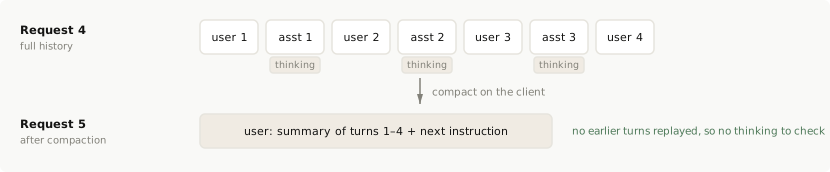
```json
[
{
"role": "user",
"content": "\n\n"
}
]
```
Claude 모델은 이 방식으로 장기 작업에 대해 학습되었으며, 대부분의 워크로드에서 좋은 성능을 보입니다.
#### 최근 턴 유지 압축
최근 턴 유지 압축은 오래된 턴을 요약하고 가장 최근 턴은 그대로 유지하므로, 모델은 마지막 몇 번의 교환을 여전히 원문 그대로 볼 수 있습니다. 요약을 직접 작성하면 규칙을 위반하게 됩니다. 유지된 어시스턴트 턴에는 요약이 아닌 원래 턴이 앞에 있을 때 생성된 사고 블록이 여전히 포함되어 있기 때문입니다. 이러한 블록은 실패합니다.
해당 사고를 유지하려면 온디맨드 압축으로 API가 요약을 작성하도록 하세요. [최근 턴을 유지하는 압축](https://platform.claude.com/docs/ko/build-with-claude/compaction-keep-recent-turns)에서 방법을 확인할 수 있으며, [유지된 사고가 유효하게 유지되기 위한 조건](https://platform.claude.com/docs/ko/build-with-claude/compaction-thinking-blocks#conditions-for-kept-thinking-to-stay-valid)에서 유지된 사고가 유효하게 유지되는 경우를 확인할 수 있습니다.
이 섹션의 나머지 부분은 직접 작성한 요약을 다룹니다.
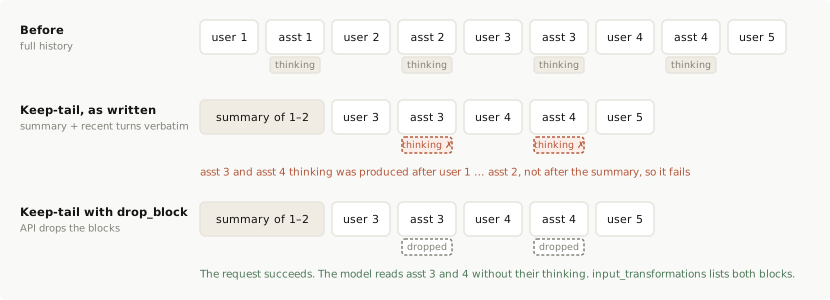
해결 방법: 턴을 정확히 그대로 유지하고 `prefix_mismatch_behavior: "drop_block"`을 보내세요. API는 오래된 사고 블록을 삭제하고, 모델은 유지된 턴의 `text` 및 `tool_use` 블록을 읽으며, 요청은 성공합니다.
압축된 기록을 `messages`로 전달하고 `thinking` 구성에 `block_binding`을 설정하세요. 다음 예제에서 `compacted_messages`는 압축 단계에서 생성된 배열로, 요약 메시지와 그 뒤에 API가 반환한 그대로의 유지된 턴(`thinking` 블록 포함)으로 구성됩니다.
```bash cURL
curl https://api.anthropic.com/v1/messages \
-H "content-type: application/json" \
-H "x-api-key: $ANTHROPIC_API_KEY" \
-H "anthropic-version: 2023-06-01" \
-H "anthropic-beta: thinking-binding-controls-2026-08-01" \
-d "{
\"model\": \"claude-fable-5-1\",
\"max_tokens\": 16000,
\"thinking\": {
\"type\": \"adaptive\",
\"block_binding\": { \"prefix_mismatch_behavior\": \"drop_block\" }
},
\"messages\": $COMPACTED_MESSAGES
}"
```
```bash CLI
ant beta:messages create --beta thinking-binding-controls-2026-08-01 <beta->messages->create(
model: 'claude-fable-5-1',
maxTokens: 16000,
thinking: BetaThinkingConfigAdaptive::with(
blockBinding: BetaThinkingBlockBinding::with(
prefixMismatchBehavior: BetaThinkingPrefixMismatchBehavior::DROP_BLOCK,
),
),
messages: $compactedMessages,
betas: [AnthropicBeta::THINKING_BINDING_CONTROLS_2026_08_01],
);
var_dump($response->inputTransformations);
```
```ruby Ruby
client = Anthropic::Client.new
# compacted_messages: 요약 메시지 다음에 유지된 턴이 반환된 그대로 이어집니다
response = client.beta.messages.create(
model: "claude-fable-5-1",
max_tokens: 16_000,
thinking: {
type: "adaptive",
block_binding: {prefix_mismatch_behavior: "drop_block"}
},
messages: compacted_messages,
betas: [Anthropic::AnthropicBeta::THINKING_BINDING_CONTROLS_2026_08_01]
)
puts response.input_transformations
```
응답에는 평소처럼 새 어시스턴트 턴이 포함되며, 삭제된 블록마다 `input_transformations` 항목이 하나씩 추가됩니다. 다이어그램의 기록에서는 어시스턴트 턴 3과 4의 사고가 해당됩니다.
```json
{
"input_transformations": [
{
"type": "thinking_dropped",
"path": "messages.2.content.0",
"reason": "prefix_binding_mismatch"
},
{
"type": "thinking_dropped",
"path": "messages.4.content.0",
"reason": "prefix_binding_mismatch"
}
]
}
```
이 두 턴이 기록에 남아 있는 동안에는 이후 요청에서도 계속 `"drop_block"`을 보내세요. 이 요청부터 모델이 생성하는 사고는 요약 뒤에 오므로 유효하게 유지됩니다. 베타 헤더에 의존하고 싶지 않다면, 압축된 기록을 구성할 때 유지된 어시스턴트 턴에서 `thinking` 및 `redacted_thinking` 블록을 직접 제거하는 방법도 있습니다.
#### 백그라운드(비동기) 압축
백그라운드 압축은 대화가 계속되는 동안 주요 처리 경로와 별도로 요약을 만든 다음, 몇 번의 요청 후에 요약으로 교체합니다. 그 사이에 생성된 사고를 유지하려면 온디맨드 압축으로 API가 요약을 작성하게 하세요. 단계는 [백그라운드에서의 압축](https://platform.claude.com/docs/ko/build-with-claude/compaction-background)에서 확인할 수 있습니다. 이 경우 그 사고는 유지된 최근 턴과 동일한 [유지된 사고의 조건](https://platform.claude.com/docs/ko/build-with-claude/compaction-thinking-blocks#conditions-for-kept-thinking-to-stay-valid)에서 유효하게 유지됩니다.
직접 생성한 요약은 keep-tail과 같은 방식으로, 다만 지연된 형태로 규칙을 위반합니다. 요약이 생성되는 동안 만들어진 모든 어시스턴트 턴에는 교체 이전의 사고가 포함되어 있으며, 요약이 적용되는 순간 모두 실패합니다. 직접 생성한 요약을 사용한다면 교체를 keep-tail처럼 취급하여 교체 시점부터 `"drop_block"`을 보내거나, 동기적으로 압축하세요.
#### 보존된 사고와 함께 작동하지 않는 패턴
* **중간에서 턴 잘라내기.** 개별 턴을 제거하면 그 뒤의 모든 thinking 블록이 무효화되며, 어떤 압축 방식으로도 이를 피할 수 없습니다. 지시를 변경하기 위해 턴을 잘라내려던 것이라면, 대신 [대화 중간 시스템 메시지](https://platform.claude.com/docs/ko/build-with-claude/preserved-thinking#new-instructions)를 추가하세요. 오래된 도구 결과나 오래된 사고를 선택적으로 제거하려면 서버 측 ["context editing"(컨텍스트 편집)](https://platform.claude.com/docs/ko/build-with-claude/context-editing)을 사용하세요.
* **도구 라운드 중간에 압축하기.** 어시스턴트 턴의 `tool_use`와 이에 응답하는 `tool_result` 사이에서 압축하지 마세요. 모델이 추론을 유지한 채 라운드를 마칠 수 있도록 해당 어시스턴트 턴을 사고가 그대로 포함된 상태로 다시 보내세요. [thinking 블록 보존](https://platform.claude.com/docs/ko/build-with-claude/thinking#preserving-thinking-blocks)을 참조하세요.
### 콘텐츠가 변경되는 URL이 아닌 ID로 파일 참조하기
`url` 소스를 사용하는 `image` 또는 `document` 블록의 경우, 검사는 URL 문자열이 아니라 가져온 바이트를 대상으로 합니다. 콘텐츠가 변경되는 URL은 이후의 사고를 무효화합니다. 예를 들어 "최신 스크린샷" 엔드포인트나 턴 사이에 누군가 편집하는 문서가 이에 해당합니다. 동일한 파일에 대해 주기적으로 바뀌는 서명된 URL은 사고를 무효화하지 않습니다. 여러 턴에 걸쳐 참조하는 콘텐츠는 [Files API](https://platform.claude.com/docs/ko/build-with-claude/files)로 한 번 업로드하고 `file_id`를 사용하거나, base64로 보내세요.
### 라이브러리, 프록시 및 게이트웨이
라이브러리, 프록시 또는 게이트웨이는 다른 사람의 기록과 API 사이에 위치하므로, 자체적으로 수행하는 재작성은 편집으로 간주되며 사용자는 이를 확인하거나 수정할 수 없습니다.
* **인식하지 못하는 항목은 그대로 전달하세요.** 호출자의 `anthropic-beta` 값과 `thinking.block_binding`을 변경 없이 전달하고, `input_transformations`를 호출자에게 반환하세요. 알 수 없는 키를 거부하는 옵션 스키마는 사용자가 `"drop_block"`을 선택하지 못하게 합니다.
* **`role: "system"` 메시지는 호출자가 배치한 위치에 그대로 두세요.** 이를 최상위 `system` 필드로 옮기면 해당 요청의 `system`이 변경되어 대화의 모든 thinking 블록이 무효화됩니다.
* **요청에서 도구 사용을 끄려면 `tool_choice: {"type": "none"}`을 보내세요.** `tools`를 제거하지 마세요.
* **400 오류를 숨기지 마세요.** 코드에서 이를 포착하여 사고를 제거하고 호출자를 대신해 재시도한다면, 그렇게 했다는 사실을 로그로 남기세요. 호출자의 기록은 여전히 편집된 상태이며, 모델은 이후의 모든 요청에서 이전 추론을 잃게 됩니다.
## FAQ
아니요. `thinking-binding-controls-2026-08-01` 베타 헤더를 보내고 `thinking.block_binding.prefix_mismatch_behavior`를 설정하세요. 이 필드를 설정하면 계정 생성 시기와 관계없이 해당 요청에 검사가 적용됩니다. `"error"`는 편집된 기록을 새 계정이 받는 것과 동일한 400 오류로 거부하고, `"drop_block"`은 요청을 통과시키고 삭제된 항목을 `input_transformations`에 나열합니다. 검사를 적용하지 않고 기존 계정의 접두사 편집을 찾으려면 헤더를 보내고 필드는 설정하지 마세요. 실패한 블록은 여전히 모델에 전달되며, `input_transformations`에 `thinking_mismatch_allowed`로 나열됩니다. [코드가 접두사를 편집하는지 확인하기](https://platform.claude.com/docs/ko/build-with-claude/preserved-thinking#how-to-tell-whether-your-integration-is-impacted)를 참조하세요.
아니요. 실패하는 것은 변경한 지점 이후 기록에 이미 있는 사고이며, 이를 어떻게 처리할지는 여러분이 선택합니다. `prefix_mismatch_behavior: "drop_block"`을 사용하면 API가 해당 블록을 삭제하고 요청이 성공합니다. 모델은 그 추론 없이 해당 턴에 응답하며, 프롬프트 캐시는 편집 지점에서 다시 시작됩니다. 기본값인 `"error"`를 사용하면 편집을 되돌리거나 `"drop_block"`으로 다시 보낼 때까지 API가 400 오류로 요청을 거부합니다. [API가 무효한 블록을 처리하는 방식](https://platform.claude.com/docs/ko/build-with-claude/preserved-thinking#mismatch-behavior)을 참조하세요. [편집으로 간주되는 것](https://platform.claude.com/docs/ko/build-with-claude/preserved-thinking#what-counts-as-an-edit)에서 어떤 변경이 중요한지 확인할 수 있습니다.
아니요. `output_config.effort`, `max_tokens`, `thinking` 구성은 검사되는 접두사의 일부가 아니며, 접두사는 `system`, `tools`, `messages`만 포함합니다. 최상위 effort 변경은 프롬프트 캐시의 대부분을 무효화합니다. 모델과 플랫폼이 [메시지별 effort](https://platform.claude.com/docs/ko/build-with-claude/preserved-thinking#effort-changes)를 지원하는 경우, 메시지별 effort 변경은 프롬프트 캐시를 유지하며 다시 변경될 때까지 새 effort 수준으로 사용됩니다.
`tools`를 편집하지 마세요. 세션 시작 시 전체 도구 세트를 선언하고, 아직 사용할 수 없는 도구에는 `defer_loading: true`를 표시한 다음, `tool_addition` 및 `tool_removal` 블록으로 도구를 제공하거나 철회하세요. 세션 도중에야 도구의 스키마를 알게 되는 경우, `tool_addition` 블록 안에 도구를 정의하고(`inline-tools-2026-09-15`, API의 MCP 커넥터가 연결하는 서버의 경우 `mcp-client-2026-09-15` 추가) `tools`는 변경하지 마세요. 이러한 블록을 담은 `role: "system"` 메시지는 이후 사고의 접두사에 포함되므로, 이후에 이동하거나 문구를 바꾸거나 삭제하지 마세요. [`tool_addition` 및 `tool_removal`로 도구 추가 또는 제거하기](https://platform.claude.com/docs/ko/build-with-claude/preserved-thinking#tool-changes)를 참조하세요.
네, API가 요약을 작성한다면 작동합니다. [온디맨드 압축](https://platform.claude.com/docs/ko/build-with-claude/compaction-on-demand)(베타 헤더 `compact-2026-09-04`)은 오래된 턴을 서명된 블록으로 요약하며, 이 블록을 해당 턴 대신 보내면 됩니다. 최근 턴은 [유지된 사고의 조건](https://platform.claude.com/docs/ko/build-with-claude/compaction-thinking-blocks#conditions-for-kept-thinking-to-stay-valid)에 따라 사고를 유지합니다.
요약을 직접 작성하면 유지된 턴의 사고가 검사에 실패합니다. 해당 블록은 여러분이 대체한 기록을 기준으로 생성되었기 때문입니다. 가져가는 턴에서 `thinking` 및 `redacted_thinking` 블록을 제거하고 `text` 및 `tool_use` 블록은 유지하거나, `prefix_mismatch_behavior: "drop_block"`을 보내 API가 이를 삭제하도록 하세요. 단순 압축은 실패할 사고를 남기지 않으며 권장되는 방식입니다. 요약 메시지 하나와 다음 사용자 턴만 보내고, 이전 턴은 재전송하지 않습니다. 서버 측 [압축](https://platform.claude.com/docs/ko/build-with-claude/compaction)과 [컨텍스트 편집](https://platform.claude.com/docs/ko/build-with-claude/context-editing)은 편집으로 간주되지 않습니다. [클라이언트에서 압축하기](https://platform.claude.com/docs/ko/build-with-claude/preserved-thinking#custom-compaction-on-the-client)를 참조하세요.
세션 시작 시 한 번 로드하고, 최상위 `system` 프롬프트와 `tools`는 고정하세요. 파일이 바뀌면 원본을 편집하는 대신 `messages`의 해당 시점에 새 버전을 추가하세요. 운영자인 여러분이 제공하는 지침에는 [대화 중간 시스템 메시지](https://platform.claude.com/docs/ko/build-with-claude/mid-conversation-system-messages)를 사용하세요. 신뢰할 수 없는 것으로 취급하여 시스템 프롬프트 권한을 가져서는 안 되는 파일 텍스트는 대신 다음 `user` 턴에 넣으세요. [대화 중 시스템 메시지로 지침 추가하기](https://platform.claude.com/docs/ko/build-with-claude/preserved-thinking#new-instructions)와 [제한 사항](https://platform.claude.com/docs/ko/build-with-claude/mid-conversation-system-messages#limitations)을 참조하세요.
네. 재개된 세션은 일반적인 후속 요청입니다. `system`, `tools`, 이전 `messages`는 마지막으로 보낸 것과 동일한 내용이어야 합니다. JSON 형식과 키 순서는 중요하지 않지만 값은 중요합니다. 보내고 받은 내용을 정확히 저장하고 그대로 재전송하세요. 렌더링된 시스템 프롬프트, 도구 정의, 반환된 그대로의 각 어시스턴트 턴이 여기에 해당합니다. 날짜, 업데이트된 지침 파일, 새 도구 버전처럼 그 이후 바뀌었을 수 있는 입력으로 다시 렌더링하지 마세요. 새로운 내용은 추가된 메시지에 넣으세요. [어시스턴트 턴을 반환된 그대로 다시 보내기](https://platform.claude.com/docs/ko/build-with-claude/preserved-thinking#append-assistant-turns-exactly-as-returned)를 참조하세요.
저장된 기록에 편집이 포함되어 있으므로 이를 재전송해서는 성공할 수 없습니다. 앞으로 해당 세션을 `prefix_mismatch_behavior: "drop_block"`과 함께 보내거나, `thinking` 및 `redacted_thinking` 블록을 한 번 제거한 후 계속하세요. Claude Sonnet 5.5 및 Claude Haiku 5.5에서는 `block_binding`이 `thinking: {"type": "adaptive"}`에서만 작동합니다. `between_tools`(Claude Sonnet 5.5의 경우) 또는 `thinking: {"type": "disabled"}`(Claude Haiku 5.5의 경우)를 사용하는 경우에는 기록을 추가 전용으로 유지하거나, 편집된 턴부터 사고 블록을 제거하세요. 그 시점부터 모델이 생성하는 사고는 그 앞의 내용이 다시 바뀌지 않는 한 유효하게 유지됩니다. 그런 다음 새 세션에서 같은 문제가 발생하지 않도록 편집을 찾으세요. [코드에서 오류 처리하기](https://platform.claude.com/docs/ko/build-with-claude/preserved-thinking#handle-the-error-in-code)를 참조하세요.
아니요. 기존 기록 뒤에 추가되고 이전 내용이 바뀌지 않는다면 무효화하지 않습니다. 사고 블록이 없는 어시스턴트 메시지는 다른 메시지와 마찬가지로 추가된 메시지입니다. 다른 모델의 출력은 `text` 및 `tool_use` 콘텐츠로 보내세요.
다른 대화로는 가져갈 수 없습니다. 사고 블록은 그것이 생성된 정확한 `system`, `tools`, `messages` 뒤에 올 때만 사용할 수 있습니다. 분기 지점까지 해당 기록을 변경 없이 재전송하는 분기는 사고를 유지합니다. 다른 내용으로 시작하는 대화는 이를 사용할 수 없으므로, [단순 압축](https://platform.claude.com/docs/ko/build-with-claude/preserved-thinking#custom-compaction-on-the-client)에서처럼 작업 상태의 요약으로 해당 대화를 시작하세요. 목표, 내린 결정, 지금까지의 파일과 결과, 다음 단계를 포함하면 됩니다. Claude Sonnet 5.5 및 Claude Haiku 5.5의 사고 블록은 다른 계정에서 재사용할 수도 없습니다([사고 블록은 생성한 계정에 귀속됩니다](https://platform.claude.com/docs/ko/build-with-claude/preserved-thinking#account-bound-thinking) 참조).
## 다음 단계
가장 일반적인 사고 실패를 진단하고 수정하세요: 구성 400 오류, 비어 있거나 누락된 사고 블록, max\_tokens 중단, 캐시 미스.
그 이전에 온 캐시된 접두사를 무효화하지 않고 대화 중간에 시스템 지침이나 도구 가용성을 변경하세요.
컨텍스트 윈도우 한계에 접근하는 긴 대화를 관리하기 위한 서버 측 컨텍스트 압축.
`cache_control`로 프롬프트 접두사를 캐싱하여 비용과 지연 시간을 줄이며, 자동 캐싱 또는 5분 또는 1시간 TTL의 명시적 중단점을 사용합니다.