# Configure Azure Key Vault for CMEK
Use Azure Key Vault to provide an encryption key for your organization.
---
```bash title="Configure with the /claude-api skill in Claude Code"
claude "/claude-api help me configure a customer-managed encryption key with Azure Key Vault"
```
This guide walks through configuring an Azure Key Vault key as a [customer-managed encryption key (CMEK)](/docs/en/manage-claude/cmek) for your Anthropic organization.
Enabling CMEK is permanent. If your Key Vault key is deleted or disabled, Anthropic cannot recover the data encrypted under it. Review the [warnings and limitations](/docs/en/manage-claude/cmek) before you begin.
## Prerequisites
- An Azure Key Vault with **RBAC authorization enabled** (`enableRbacAuthorization: true`) and **public network access allowed**. Anthropic calls your vault over the public data-plane endpoint; private endpoints are not supported.
- **Purge protection enabled** (`enablePurgeProtection: true`) on the vault. Without it, a deleted key can be permanently purged during the soft-delete retention window, causing irreversible loss of your CMEK-protected data. Purge protection cannot be disabled once enabled.
- Permissions to create keys in the vault and to assign RBAC roles on it.
- Permissions to create service principals in your Entra tenant (`Application Administrator`, `Cloud Application Administrator`, or an equivalent custom role).
- An Anthropic Admin API key for your organization.
- The [`az` CLI](https://learn.microsoft.com/en-us/cli/azure/?view=azure-cli-latest) installed and authenticated.
- **Diagnostic Settings** configured on the vault to route the `AuditEvent` log category to Log Analytics, a storage account, or an event hub. Azure Key Vault does not emit data-plane audit logs (such as `KeyWrap`, `KeyUnwrap`, and `KeyGet`) by default, so without this you get no audit trail for Anthropic's key operations.
## Anthropic app information
In order to have Anthropic use your encryption key, you must configure an Anthropic multi-tenant application ID and display name. Those values are:
| Field | Value |
|:------|:------|
| Multi-tenant app client ID (US) | `8635ae1a-3e5d-44e8-a4ed-e0f614466f87` |
| App display name | `anthropic-cmek-client-us` |
Use only this published client ID and display name. Never trust an identifier provided over email, chat, or any onboarding channel.
## Encryption key setup
This creates a service principal in your Entra tenant for Anthropic's CMEK client application. The application requests no Microsoft Graph permissions; it exists solely as a federation target for Key Vault data-plane access.
```bash
az ad sp create --id 8635ae1a-3e5d-44e8-a4ed-e0f614466f87
```
From the output, capture the `id` field. This is the service principal's object ID in your tenant, which you use when you assign the RBAC role.
```json
{
"appId": "8635ae1a-3e5d-44e8-a4ed-e0f614466f87",
"displayName": "anthropic-cmek-client-us",
"id": ""
}
```
If the service principal already exists in your tenant (from a prior attempt or another integration), `az ad sp create` exits with an "already exists" error. Fetch its object ID instead:
```bash
az ad sp show --id 8635ae1a-3e5d-44e8-a4ed-e0f614466f87 --query id -o tsv
```
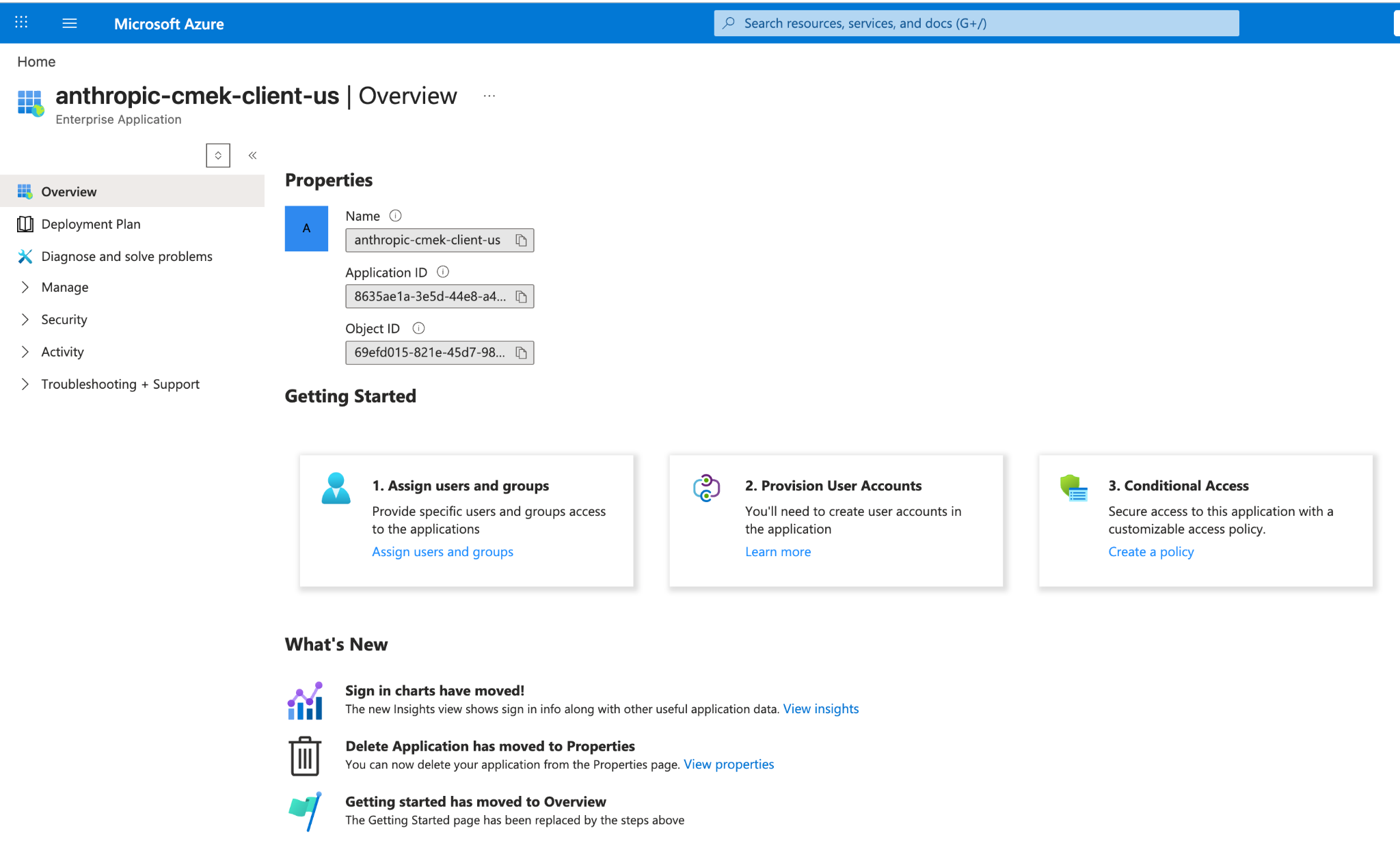
This step has no Portal equivalent. If you do not have the Azure CLI installed locally, open Cloud Shell from the Portal's top navigation bar. After the command succeeds, you can find the service principal's object ID in **Microsoft Entra ID > Enterprise applications** by clearing the default application-type filter and searching for `anthropic-cmek-client-us`.
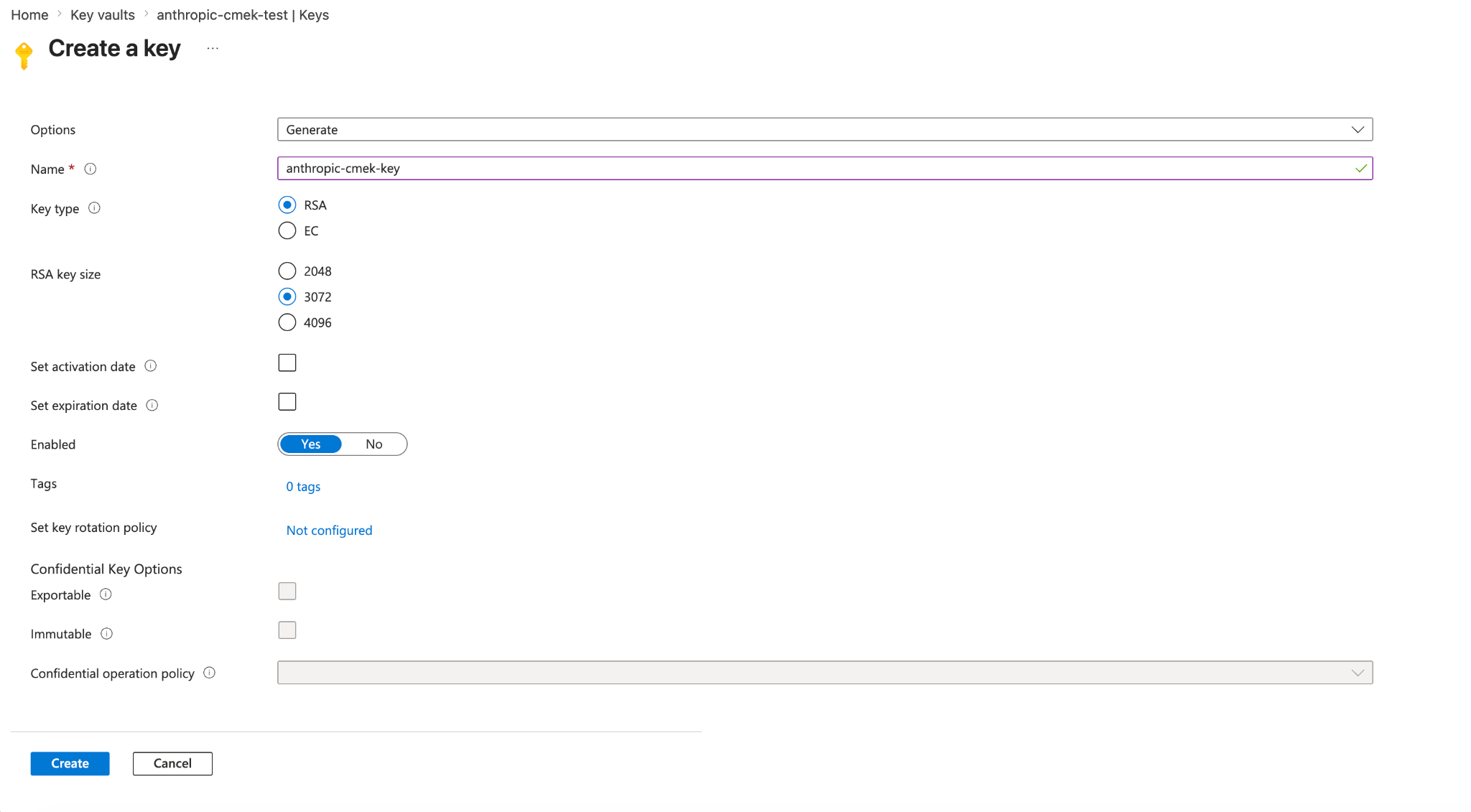
Azure Key Vault does not support symmetric key wrapping, so the key must be RSA (3072-bit or larger) with `wrapKey` and `unwrapKey` in its allowed operations.
```bash
az keyvault key create \
--vault-name \
--name \
--kty RSA --size 3072 \
--ops wrapKey unwrapKey
```
For HSM-backed keys, use `--kty RSA-HSM` (requires a Premium-SKU vault). Software-protected RSA keys are acceptable for this integration.
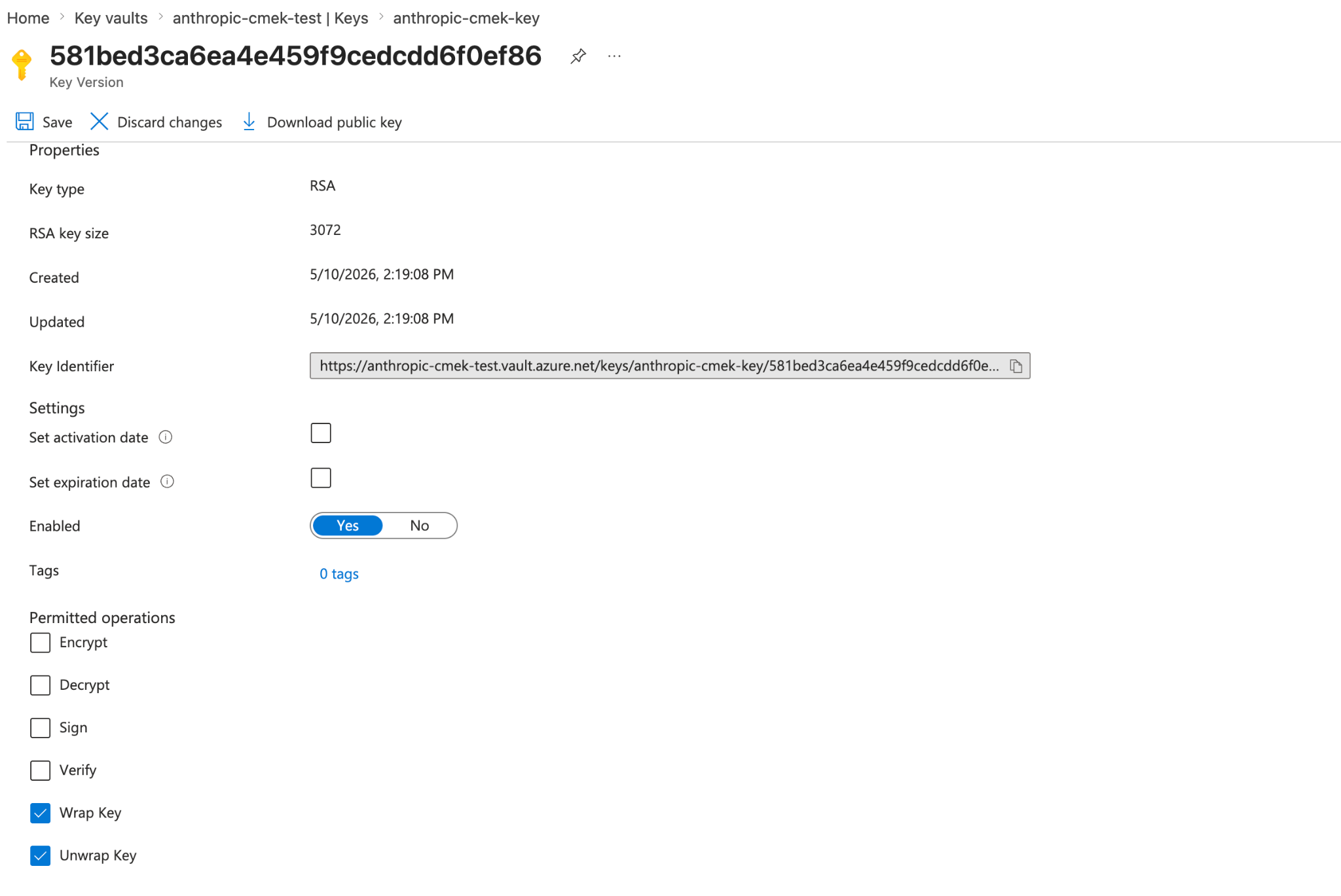
From the Portal, open your Key Vault, select **Keys**, then **Generate/Import**. Set the key type to RSA and the size to 3072 or larger. To restrict the key to wrap and unwrap only, open the key version, scroll to **Permitted operations**, and uncheck everything except **Wrap Key** and **Unwrap Key**.
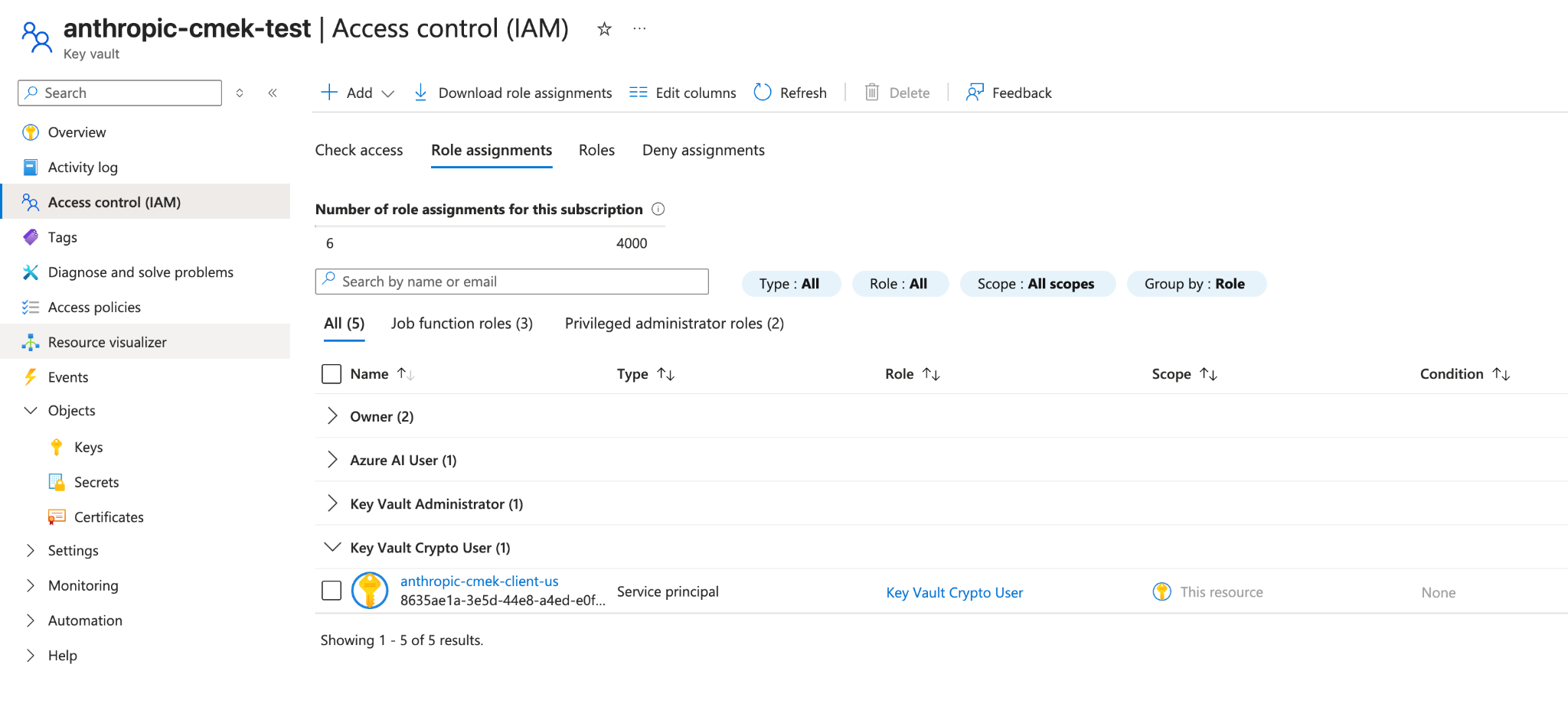
Assign the `Key Vault Crypto User` role to the service principal from the first step, scoped to the **individual key** rather than the whole vault.
```bash
VAULT_ID=$(az keyvault show --name --query id -o tsv)
az role assignment create \
--role "Key Vault Crypto User" \
--assignee-object-id \
--assignee-principal-type ServicePrincipal \
--scope "${VAULT_ID}/keys/"
```
The built-in `Key Vault Crypto User` role grants key cryptographic operations (encrypt, decrypt, wrap, unwrap, sign, verify) plus key read on its assigned scope. The `--ops wrapKey unwrapKey` restriction you set on the key in the previous step further narrows which of those operations can succeed against this key, so in practice Anthropic can only wrap and unwrap.
From the Portal, open the **key** (not the vault), select its **Access control (IAM)** tab, click **Add > Add role assignment**, select **Key Vault Crypto User**, and assign it to the `anthropic-cmek-client-us` service principal.
**Dedicated vault alternative:** Microsoft recommends a dedicated vault per application with roles assigned at the vault scope. If you provision a vault that holds only this Anthropic CMEK key, you can assign the role at the vault scope instead and the effect is identical. Scope to the individual key when the key lives in a shared vault.
```bash
az keyvault show --name \
--query "{rbac:properties.enableRbacAuthorization, purge:properties.enablePurgeProtection, pub:properties.publicNetworkAccess, net:properties.networkAcls.defaultAction, ipRules:properties.networkAcls.ipRules, uri:properties.vaultUri, tenantId:properties.tenantId}"
```
Confirm that:
- `rbac` is `true`.
- `purge` is `true`. If it is `false` or `null`, enable purge protection on the vault before proceeding. Without it, a soft-deleted key can be permanently purged during the retention window, making your CMEK-protected data unrecoverable.
- `pub` is `"Enabled"`. If it is `"Disabled"`, Anthropic cannot reach the vault over its public data-plane endpoint and validation fails.
- `net` is `"Allow"`, or, if it is `"Deny"`, that `ipRules` include Anthropic's egress ranges (contact Anthropic for the current list).
- `uri` is the vault URI you use when you register the key.
- `tenantId` is the tenant that governs the vault. Use this value as `tenant_id` when you register the key, not the tenant of your currently-active subscription (the two can differ in cross-tenant setups).
Create an external key configuration through the Admin API.
```bash
curl -sS https://api.anthropic.com/v1/organizations/external_keys \
-H "x-api-key: " \
-H "anthropic-version: 2023-06-01" \
-H "content-type: application/json" \
-d '{
"display_name": "",
"geo": "us",
"provider_config": {
"type": "azure",
"vault_uri": "https://.vault.azure.net/",
"key_name": "",
"tenant_id": ""
}
}'
```
The response contains the external key ID:
```json
{
"type": "external_key",
"id": "ekey_",
"display_name": ""
}
```
Trigger an encrypt and decrypt round-trip against your key. This confirms that Anthropic can authenticate to your tenant and perform wrap and unwrap operations.
```bash
curl -sS -X POST https://api.anthropic.com/v1/organizations/external_keys/ekey_/validate \
-H "x-api-key: " \
-H "anthropic-version: 2023-06-01" \
-H "content-type: application/json" -d '{}'
```
A successful response looks like this:
```json
{ "type": "external_key_validation", "status": "success", "error": null }
```
If validation fails, the `error` field describes the problem. Common causes are:
- **RBAC propagation delay:** role assignments can take a few minutes to take effect. Wait and retry.
- **Network ACLs blocking Anthropic:** confirm public network access and `ipRules` as described in the verification step.
- **Conditional access policies on workload identities:** if your tenant has conditional access policies that target service principals, exclude the Anthropic service principal or add Anthropic's egress ranges to the policy's named locations.
Once the key is validated, attach it to a workspace to enable CMEK for that workspace's data.
```bash
curl -sS -X POST https://api.anthropic.com/v1/organizations/workspaces/ \
-H "x-api-key: " \
-H "anthropic-version: 2023-06-01" \
-H "content-type: application/json" \
-d '{
"external_key_id": "ekey_"
}'
```
## Terraform
For infrastructure-as-code deployments, the same steps map to the `azurerm` and `azuread` providers.