# Context windows
---
This feature is eligible for [Zero Data Retention (ZDR)](/docs/en/build-with-claude/api-and-data-retention). When your organization has a ZDR arrangement, data sent through this feature is not stored after the API response is returned.
As conversations grow, you'll eventually approach context window limits. This guide explains how context windows work and introduces strategies for managing them effectively.
For long-running conversations and agentic workflows, [server-side compaction](/docs/en/build-with-claude/compaction) is the primary strategy for context management. For more specialized needs, [context editing](/docs/en/build-with-claude/context-editing) offers additional strategies like tool result clearing and thinking block clearing.
## Understanding the context window
The "context window" refers to all the text a language model can reference when generating a response, including the response itself. This is different from the large corpus of data the language model was trained on, and instead represents a "working memory" for the model. A larger context window allows the model to handle more complex and lengthy prompts, but more context isn't automatically better. As token count grows, accuracy and recall degrade, a phenomenon known as *context rot*. This makes curating what's in context just as important as how much space is available.
Claude achieves state-of-the-art results on long-context retrieval benchmarks like [MRCR](https://arxiv.org/abs/2501.03276) and [GraphWalks](https://arxiv.org/abs/2412.04360), but these gains depend on what's in context, not just how much fits.
For a deep dive into why long contexts degrade and how to engineer around it, see [Effective context engineering](https://www.anthropic.com/engineering/effective-context-engineering-for-ai-agents).
The diagram below illustrates the standard context window behavior for API requests1:
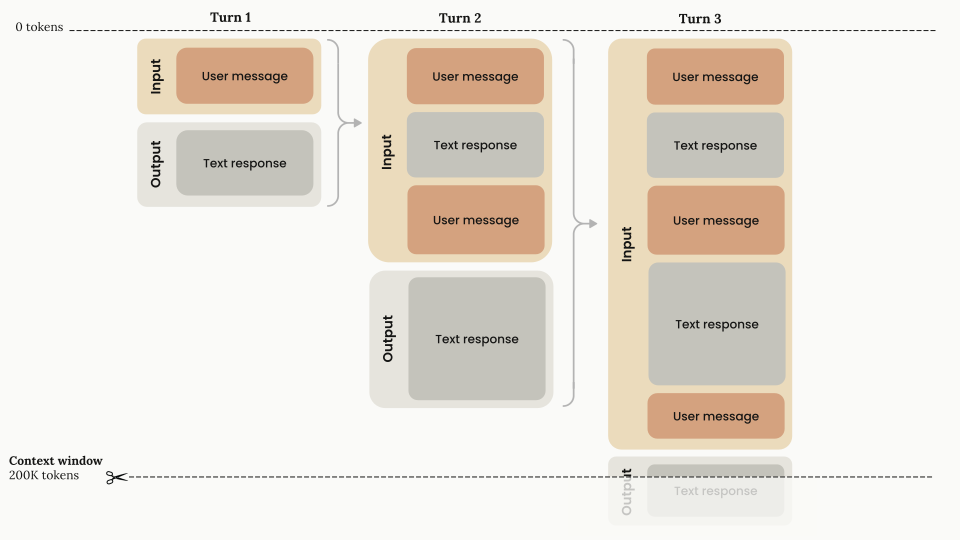
_1For chat interfaces, such as for [claude.ai](https://claude.ai/), context windows can also be set up on a rolling "first in, first out" system._
* **Progressive token accumulation:** As the conversation advances through turns, each user message and assistant response accumulates within the context window. Previous turns are preserved completely.
* **Linear growth pattern:** The context usage grows linearly with each turn, with previous turns preserved completely.
* **Context window capacity:** The total available context window (up to 1M tokens) represents the maximum capacity for storing conversation history and generating new output from Claude.
* **Input-output flow:** Each turn consists of:
- **Input phase:** Contains all previous conversation history plus the current user message
- **Output phase:** Generates a text response that becomes part of a future input
## The context window with extended thinking
When using [extended thinking](/docs/en/build-with-claude/extended-thinking), all input and output tokens, including the tokens used for thinking, count toward the context window limit, with a few nuances in multi-turn situations.
The thinking budget tokens are a subset of your `max_tokens` parameter, are billed as output tokens, and count towards rate limits. With [adaptive thinking](/docs/en/build-with-claude/adaptive-thinking), Claude dynamically decides its thinking allocation, so actual thinking token usage may vary per request.
However, previous thinking blocks are automatically stripped from the context window calculation by the Claude API and are not part of the conversation history that the model "sees" for subsequent turns, preserving token capacity for actual conversation content.
The diagram below demonstrates the specialized token management when extended thinking is enabled:
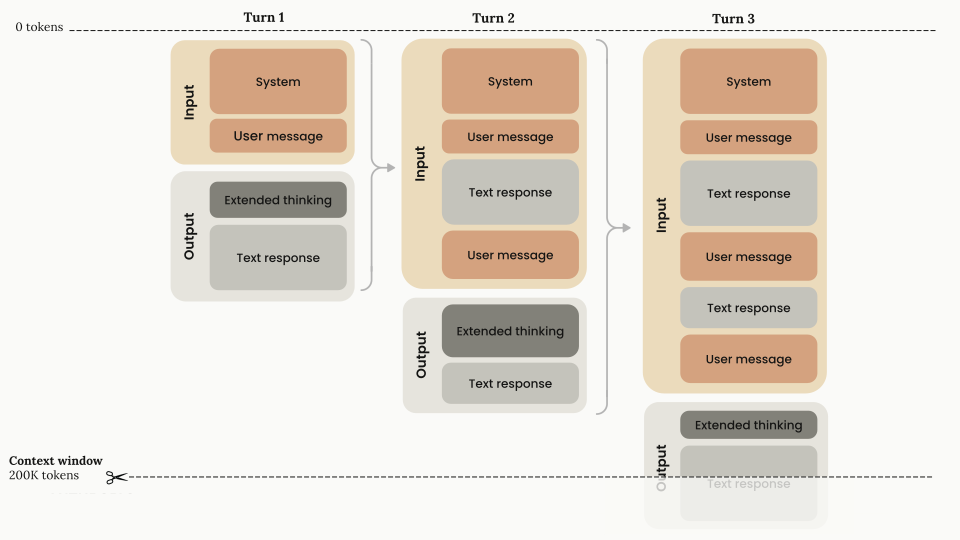
* **Stripping extended thinking:** Extended thinking blocks (shown in dark gray) are generated during each turn's output phase, **but are not carried forward as input tokens for subsequent turns**. You do not need to strip the thinking blocks yourself. The Claude API automatically does this for you if you pass them back.
* **Technical implementation details:**
- The API automatically excludes thinking blocks from previous turns when you pass them back as part of the conversation history.
- Extended thinking tokens are billed as output tokens only once, during their generation.
- The effective context window calculation becomes: `context_window = (input_tokens - previous_thinking_tokens) + current_turn_tokens`.
- Thinking tokens include `thinking` blocks.
This architecture is token efficient and allows for extensive reasoning without token waste, as thinking blocks can be substantial in length.
You can read more about the context window and extended thinking in the [extended thinking guide](/docs/en/build-with-claude/extended-thinking).
## The context window with extended thinking and tool use
The diagram below illustrates the context window token management when combining extended thinking with tool use:
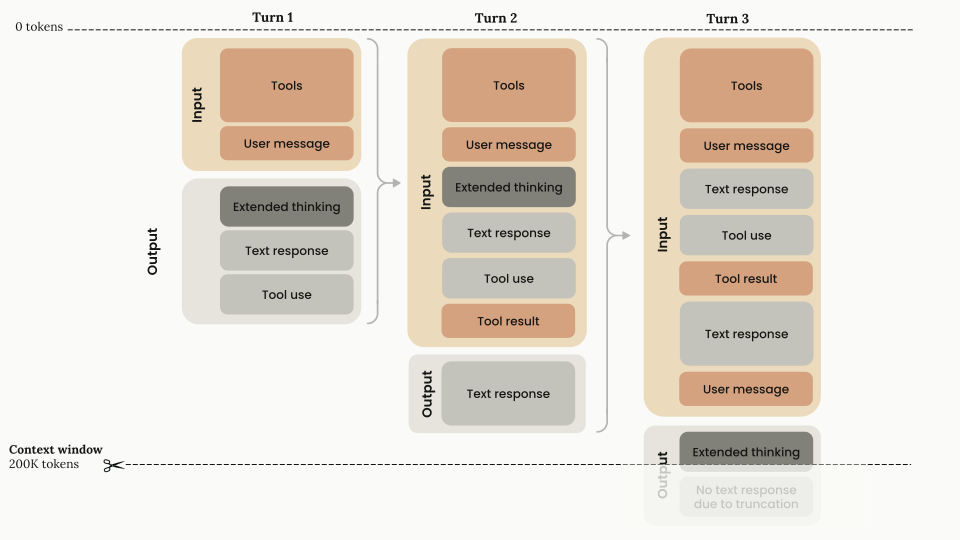
- **Input components:** Tools configuration and user message
- **Output components:** Extended thinking + text response + tool use request
- **Token calculation:** All input and output components count toward the context window, and all output components are billed as output tokens.
- **Input components:** Every block in the first turn and the `tool_result`. The extended thinking block **must** be returned with the corresponding tool results. This is the only case wherein you **have to** return thinking blocks.
- **Output components:** After tool results have been passed back to Claude, Claude responds with only text (no additional extended thinking until the next `user` message, unless [interleaved thinking](/docs/en/build-with-claude/extended-thinking#interleaved-thinking) is enabled).
- **Token calculation:** All input and output components count toward the context window, and all output components are billed as output tokens.
- **Input components:** All inputs and the output from the previous turn are carried forward with the exception of the thinking block, which can be dropped now that Claude has completed the entire tool use cycle. The API will automatically strip the thinking block for you if you pass it back, or you can feel free to strip it yourself at this stage. This is also where you would add the next `user` turn.
- **Output components:** Because there is a new `user` turn outside of the tool use cycle, Claude generates a new extended thinking block and continues from there.
- **Token calculation:** Previous thinking tokens are automatically stripped from context window calculations. All other previous blocks still count as part of the token window, and the thinking block in the current `assistant` turn counts as part of the context window.
* **Considerations for tool use with extended thinking:**
- When posting tool results, the entire unmodified thinking block that accompanies that specific tool request (including signature portions) must be included.
- The effective context window calculation for extended thinking with tool use becomes: `context_window = input_tokens + current_turn_tokens`.
- The system uses cryptographic signatures to verify thinking block authenticity. Failing to preserve thinking blocks during tool use can break Claude's reasoning continuity. Thus, if you modify thinking blocks, the API returns an error.
Claude 4 models support [interleaved thinking](/docs/en/build-with-claude/extended-thinking#interleaved-thinking), which enables Claude to think between tool calls and make more sophisticated reasoning after receiving tool results.
For more information about using tools with extended thinking, see the [extended thinking guide](/docs/en/build-with-claude/extended-thinking#extended-thinking-with-tool-use).
Claude's tool selection is designed to hold with large input documents, choosing the right tool (or correctly abstaining) when the conversation includes 100K+ tokens of non-tool context. For reducing context consumed by the tools themselves, see [Manage tool context](/docs/en/agents-and-tools/tool-use/manage-tool-context), or defer tool definitions with the [tool search tool](/docs/en/agents-and-tools/tool-use/tool-search-tool).
Claude Opus 4.8, [Claude Mythos Preview](https://anthropic.com/glasswing), Claude Opus 4.7, Claude Opus 4.6, and Claude Sonnet 4.6 have a 1M-token context window on the Claude API, Amazon Bedrock, and Vertex AI. On Microsoft Foundry, Claude Opus 4.8 has a 200k-token context window. Other Claude models, including Claude Sonnet 4.5, have a 200k-token context window.
Claude Fable 5 and Claude Mythos 5 (`claude-fable-5` and `claude-mythos-5`) have a 1M-token context window on the Claude API. The 1M maximum is also the default, and a single request can generate up to 128k output tokens (`max_tokens`).
A single request can include up to 600 images or PDF pages (100 for models with a 200k-token context window). When sending many images or large documents, you may approach [request size limits](/docs/en/api/overview#request-size-limits) before the token limit.
## Context awareness in Claude Sonnet 4.6, Sonnet 4.5, and Haiku 4.5
Claude Sonnet 4.6, Claude Sonnet 4.5, and Claude Haiku 4.5 feature **context awareness**. This capability lets these models track their remaining context window (that is, "token budget") throughout a conversation. This enables Claude to execute tasks and manage context more effectively by understanding how much space it has to work. Claude is trained to use this context precisely, persisting in the task until the very end rather than guessing how many tokens remain. For a model, lacking context awareness is like competing in a cooking show without a clock. Context-aware models change this by explicitly receiving information about remaining context, so they can take maximum advantage of the available tokens.
**How it works:**
At the start of a conversation, Claude receives information about its total context window:
```xml
1000000
```
The budget is set to 1M tokens (200k for models with a smaller context window).
After each tool call, Claude receives an update on remaining capacity:
```xml
Token usage: 35000/1000000; 965000 remaining
```
This awareness helps Claude determine how much capacity remains for work and enables more effective execution on long-running tasks. Image tokens are included in these budgets.
**Benefits:**
Context awareness is particularly valuable for:
- Long-running agent sessions that require sustained focus
- Multi-context-window workflows where state transitions matter
- Complex tasks requiring careful token management
For agents that span multiple sessions, design your state artifacts so that context recovery is fast when a new session starts. The [memory tool's multi-session pattern](/docs/en/agents-and-tools/tool-use/memory-tool#multi-session-software-development-pattern) walks through a concrete approach. See also [Effective harnesses for long-running agents](https://www.anthropic.com/engineering/effective-harnesses-for-long-running-agents).
For prompting guidance on leveraging context awareness, see the [prompting best practices guide](/docs/en/build-with-claude/prompt-engineering/claude-prompting-best-practices#context-awareness-and-multi-window-workflows).
## Managing context with compaction
If your conversations regularly approach context window limits, [server-side compaction](/docs/en/build-with-claude/compaction) is the recommended approach. Compaction provides server-side summarization that automatically condenses earlier parts of a conversation, enabling long-running conversations beyond context limits with minimal integration work. It is available in beta for Claude Fable 5, Claude Mythos 5, Claude Opus 4.8, Claude Mythos Preview, Claude Opus 4.7, Claude Opus 4.6, and Claude Sonnet 4.6.
For more specialized needs, [context editing](/docs/en/build-with-claude/context-editing) offers additional strategies:
- **Tool result clearing** - Clear old tool results in agentic workflows
- **Thinking block clearing** - Manage thinking blocks with extended thinking
## Context window overflow behavior
On Claude 4.5 models and newer, if input tokens plus `max_tokens` exceeds the context window size, the API accepts the request. If generation then reaches the context window limit, it stops with `stop_reason: "model_context_window_exceeded"`. On earlier models, the API returns a validation error instead; opt in to the `model_context_window_exceeded` behavior with the `model-context-window-exceeded-2025-08-26` beta header. See [Handling stop reasons](/docs/en/build-with-claude/handling-stop-reasons) for details.
To stay within context window limits, use the [token counting API](/docs/en/build-with-claude/token-counting) to estimate token usage before sending messages to Claude.
See the [model comparison](/docs/en/about-claude/models/overview#latest-models-comparison) table for a list of context window sizes by model.
## Next steps
The recommended strategy for managing context in long-running conversations.
Fine-grained strategies like tool result clearing and thinking block clearing.
See the model comparison table for a list of context window sizes and input / output token pricing by model.
Learn more about how extended thinking works and how to implement it alongside other features such as tool use and prompt caching.