Building Custom Skills for Claude
Learn how to create, deploy, and manage custom skills to extend Claude's capabilities with your organization's specialized knowledge and workflows.
Table of Contents
- Introduction & Setup
- Understanding Custom Skills Architecture
- Example 1: Financial Ratio Calculator
- Example 2: Company Brand Guidelines
- Example 3: Financial Modeling Suite
- Skill Management & Versioning
- Best Practices & Production Tips
- Troubleshooting
1. Introduction & Setup
What are Custom Skills?
Custom skills are specialized expertise packages you create to teach Claude your organization's unique workflows, domain knowledge, and best practices. Unlike Anthropic's pre-built skills (Excel, PowerPoint, PDF), custom skills allow you to:
- Codify organizational knowledge - Capture your team's specific methodologies
- Ensure consistency - Apply the same standards across all interactions
- Automate complex workflows - Chain together multi-step processes
- Maintain intellectual property - Keep proprietary methods secure
Key Benefits
| Benefit | Description |
|---|---|
| Expertise at Scale | Deploy specialized knowledge to every Claude interaction |
| Version Control | Track changes and roll back if needed |
| Composability | Combine multiple skills for complex tasks |
| Privacy | Your skills remain private to your organization |
Prerequisites
Before starting, ensure you have:
- Completed Notebook 1: Introduction to Skills
- An Anthropic API key with Skills beta access
- Python environment with the local SDK installed
Environment Setup
Let's set up our environment and import necessary libraries:
import os
import sys
from pathlib import Path
from typing import Any
# Add parent directory for imports
sys.path.insert(0, str(Path.cwd().parent))
from anthropic import Anthropic
from anthropic.lib import files_from_dir
from dotenv import load_dotenv
# Import our utilities
from file_utils import (
download_all_files,
extract_file_ids,
print_download_summary,
)
# We'll create skill_utils later in this notebook
# from skill_utils import (
# create_skill,
# list_skills,
# delete_skill,
# test_skill
# )
# Load environment variables
load_dotenv(Path.cwd().parent / ".env")
API_KEY = os.getenv("ANTHROPIC_API_KEY")
MODEL = os.getenv("ANTHROPIC_MODEL", "claude-sonnet-4-5")
if not API_KEY:
raise ValueError(
"ANTHROPIC_API_KEY not found. Copy ../.env.example to ../.env and add your API key."
)
# Initialize client with Skills beta
client = Anthropic(api_key=API_KEY, default_headers={"anthropic-beta": "skills-2025-10-02"})
# Setup directories
SKILLS_DIR = Path.cwd().parent / "custom_skills"
OUTPUT_DIR = Path.cwd().parent / "outputs"
OUTPUT_DIR.mkdir(exist_ok=True)
print("✓ API key loaded")
print(f"✓ Using model: {MODEL}")
print(f"✓ Custom skills directory: {SKILLS_DIR}")
print(f"✓ Output directory: {OUTPUT_DIR}")
print("\n📝 Skills beta header configured for skill management")2. Understanding Custom Skills Architecture
Skill Structure
Every custom skill follows this directory structure:
skill_name/
├── SKILL.md # REQUIRED: Instructions with YAML frontmatter
├── *.md # Optional: Any additional .md files (documentation, guides)
├── scripts/ # Optional: Executable code
│ ├── process.py
│ └── utils.js
└── resources/ # Optional: Templates, data files
└── template.xlsx
Important:
- SKILL.md is the ONLY required file - everything else is optional
- Multiple .md files allowed - You can have any number of markdown files in the top-level folder
- All .md files are loaded - Not just SKILL.md and REFERENCE.md, but any .md file you include
- Organize as needed - Use multiple .md files to structure complex documentation
📖 Read our engineering blog post on Equipping agents for the real world with Skills
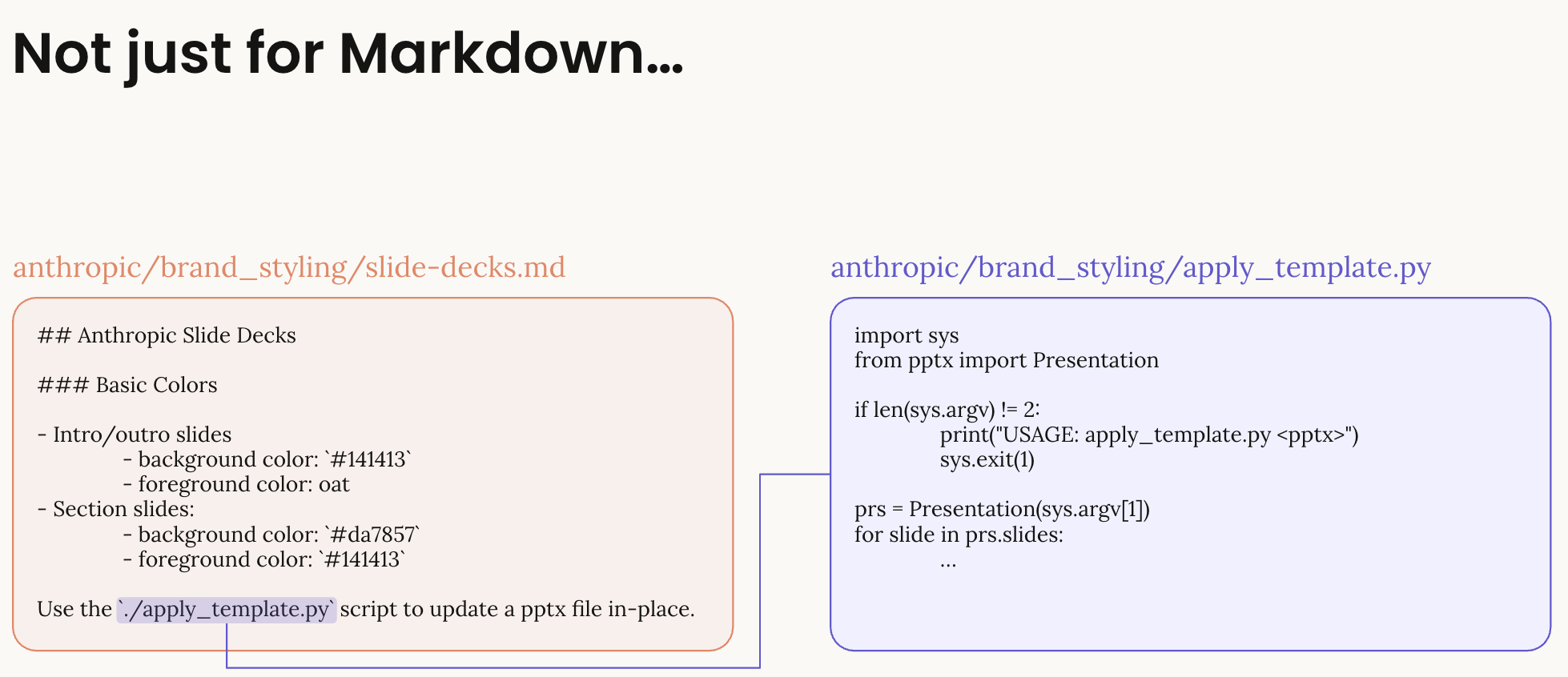
Skills Are Not Just Markdown

Skills can bundle various file types:
- Markdown files: Instructions and documentation (SKILL.md, REFERENCE.md, etc.)
- Scripts: Python, JavaScript, or other executable code for complex operations
- Templates: Pre-built files that can be customized (Excel templates, document templates)
- Resources: Supporting data files, configuration, or assets
SKILL.md Requirements
The SKILL.md file must include:
-
YAML Frontmatter (name: 64 chars, description: 1024 chars)
name: Lowercase alphanumeric with hyphens (required)description: Brief description of what the skill does (required)
-
Instructions (markdown format)
- Clear guidance for Claude
- Examples of usage
- Any constraints or rules
- Recommended: Keep under 5,000 tokens
Additional Documentation Files
You can include multiple markdown files for better organization:
skill_name/
├── SKILL.md # Main instructions (required)
├── REFERENCE.md # API reference (optional)
├── EXAMPLES.md # Usage examples (optional)
├── TROUBLESHOOTING.md # Common issues (optional)
└── CHANGELOG.md # Version history (optional)
All .md files in the root directory will be available to Claude when the skill is loaded.
Bundled Files Example
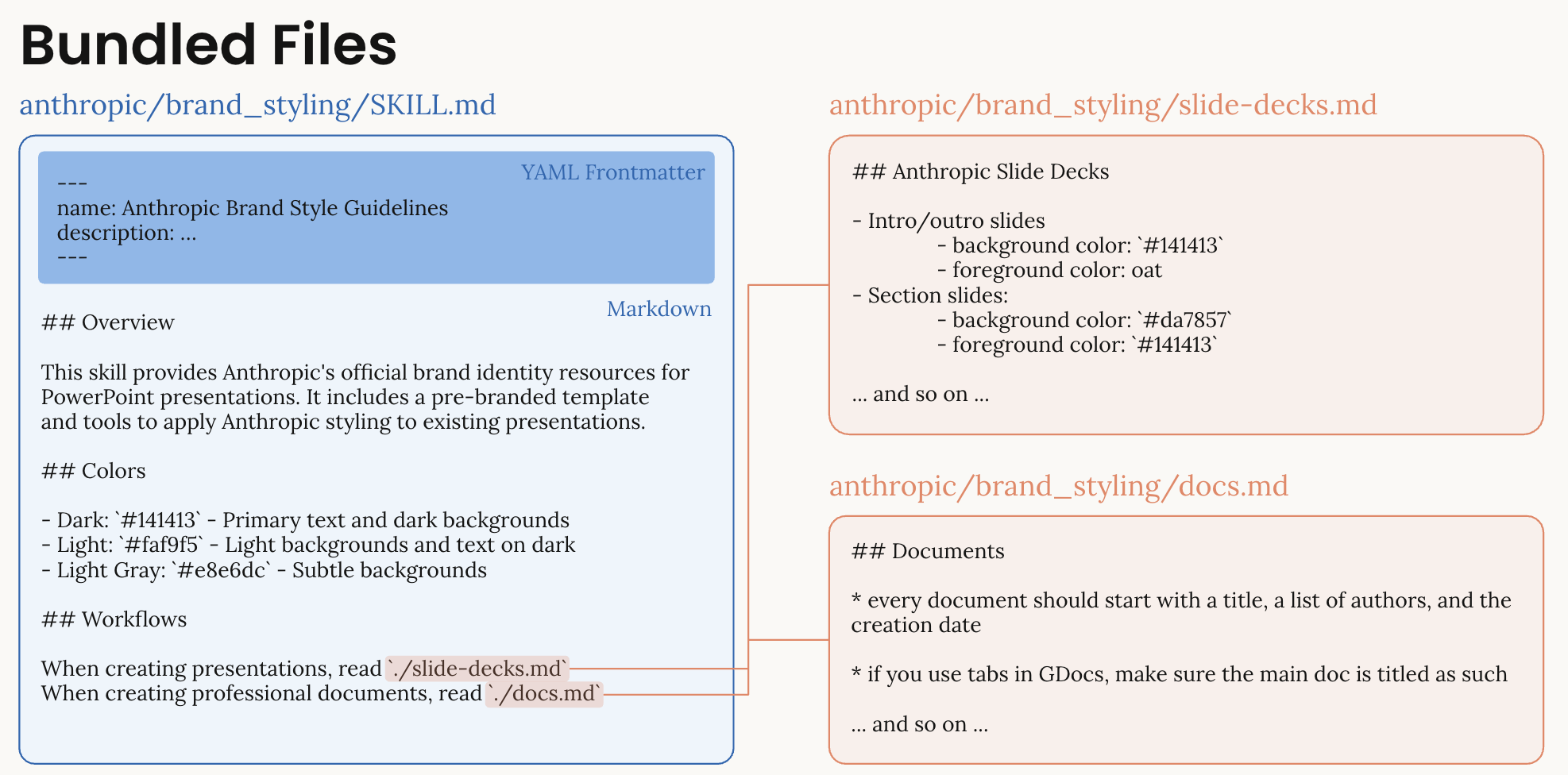
This example shows how Skills can bundle multiple files:
- SKILL.md: Contains the main instructions with colors, typography, and sections
- slide-decks.md: Additional documentation for specific use cases
- Scripts and resources: Can be referenced and used during skill execution
Progressive Disclosure
Skills load in three stages to optimize token usage:
| Stage | Content | Token Cost | When Loaded |
|---|---|---|---|
| 1. Metadata | Name & description | name: 64 chars, description: 1024 chars | Always visible |
| 2. Instructions | All .md files | <5,000 tokens recommended | When relevant |
| 3. Resources | Scripts & files | As needed | During execution |
API Workflow
# 1. Create skill
skill = client.beta.skills.create(
display_title="My Skill",
files=files_from_dir("path/to/skill")
)
# 2. Use in messages
response = client.beta.messages.create(
container={
"skills": [{
"type": "custom",
"skill_id": skill.id,
"version": "latest"
}]
},
# ... rest of message parameters
)Best Practices
For detailed guidance on skill creation and best practices, see:
Create Skill Utility Functions
Let's create helper functions for skill management:
def create_skill(client: Anthropic, skill_path: str, display_title: str) -> dict[str, Any]:
"""
Create a new custom skill from a directory.
Args:
client: Anthropic client instance
skill_path: Path to skill directory
display_title: Human-readable skill name
Returns:
Dictionary with skill_id, version, and metadata
"""
try:
# Create skill using files_from_dir
skill = client.beta.skills.create(
display_title=display_title, files=files_from_dir(skill_path)
)
return {
"success": True,
"skill_id": skill.id,
"display_title": skill.display_title,
"latest_version": skill.latest_version,
"created_at": skill.created_at,
"source": skill.source,
}
except Exception as e:
return {"success": False, "error": str(e)}
def list_custom_skills(client: Anthropic) -> list[dict[str, Any]]:
"""
List all custom skills in the workspace.
Returns:
List of skill dictionaries
"""
try:
skills_response = client.beta.skills.list(source="custom")
skills = []
for skill in skills_response.data:
skills.append(
{
"skill_id": skill.id,
"display_title": skill.display_title,
"latest_version": skill.latest_version,
"created_at": skill.created_at,
"updated_at": skill.updated_at,
}
)
return skills
except Exception as e:
print(f"Error listing skills: {e}")
return []
def delete_skill(client: Anthropic, skill_id: str) -> bool:
"""
Delete a custom skill and all its versions.
Args:
client: Anthropic client
skill_id: ID of skill to delete
Returns:
True if successful, False otherwise
"""
try:
# First delete all versions
versions = client.beta.skills.versions.list(skill_id=skill_id)
for version in versions.data:
client.beta.skills.versions.delete(skill_id=skill_id, version=version.version)
# Then delete the skill itself
client.beta.skills.delete(skill_id)
return True
except Exception as e:
print(f"Error deleting skill: {e}")
return False
def test_skill(
client: Anthropic,
skill_id: str,
test_prompt: str,
model: str = "claude-sonnet-4-5",
) -> Any:
"""
Test a custom skill with a prompt.
Args:
client: Anthropic client
skill_id: ID of skill to test
test_prompt: Prompt to test the skill
model: Model to use for testing
Returns:
Response from Claude
"""
response = client.beta.messages.create(
model=model,
max_tokens=4096,
container={"skills": [{"type": "custom", "skill_id": skill_id, "version": "latest"}]},
tools=[{"type": "code_execution_20250825", "name": "code_execution"}],
messages=[{"role": "user", "content": test_prompt}],
betas=[
"code-execution-2025-08-25",
"files-api-2025-04-14",
"skills-2025-10-02",
],
)
return response
print("✓ Skill utility functions defined")
print(" - create_skill()")
print(" - list_custom_skills()")
print(" - delete_skill()")
print(" - test_skill()")Check Existing Custom Skills
Let's see if any custom skills already exist in your workspace:
⚠️ Important: Clean Up Existing Skills Before Starting
If you're re-running this notebook, you may have skills from a previous session. Skills cannot have duplicate display titles, so you have three options:
- Delete existing skills (recommended for testing) - Clean slate approach
- Use different display titles - Add timestamps or version numbers to names
- Update existing skills with new versions - See Skill Management & Versioning section
Let's check for and optionally clean up existing skills:
# Check for existing skills that might conflict
existing_skills = list_custom_skills(client)
skill_titles_to_create = [
"Financial Ratio Analyzer",
"Corporate Brand Guidelines",
"Financial Modeling Suite",
]
conflicting_skills = []
if existing_skills:
print(f"Found {len(existing_skills)} existing custom skill(s):")
for skill in existing_skills:
print(f" - {skill['display_title']} (ID: {skill['skill_id']})")
if skill["display_title"] in skill_titles_to_create:
conflicting_skills.append(skill)
if conflicting_skills:
print(
f"\n⚠️ Found {len(conflicting_skills)} skill(s) that will conflict with this notebook:"
)
for skill in conflicting_skills:
print(f" - {skill['display_title']} (ID: {skill['skill_id']})")
print("\n" + "=" * 70)
print("To clean up these skills and start fresh, uncomment and run:")
print("=" * 70)
print("\n# UNCOMMENT THE LINES BELOW TO DELETE CONFLICTING SKILLS:")
print("# for skill in conflicting_skills:")
print("# if delete_skill(client, skill['skill_id']):")
print("# print(f\"✅ Deleted: {skill['display_title']}\")")
print("# else:")
print("# print(f\"❌ Failed to delete: {skill['display_title']}\")")
# for skill in conflicting_skills:
# if delete_skill(client, skill['skill_id']):
# print(f"✅ Deleted: {skill['display_title']}")
# else:
# print(f"❌ Failed to delete: {skill['display_title']}")
else:
print("\n✅ No conflicting skills found. Ready to proceed!")
else:
print("✅ No existing custom skills found. Ready to create new ones!")3. Example 1: Financial Ratio Calculator
Let's create our first custom skill - a financial ratio calculator that can analyze company financial health.
Skill Overview
The Financial Ratio Calculator skill will:
- Calculate key financial ratios (ROE, P/E, Current Ratio, etc.)
- Interpret ratios with industry context
- Generate formatted reports
- Work with various data formats (CSV, JSON, text)
Upload the Financial Analyzer Skill
Now let's upload our financial analyzer skill to Claude:
# Upload the Financial Analyzer skill
financial_skill_path = SKILLS_DIR / "analyzing-financial-statements"
if financial_skill_path.exists():
print("Uploading Financial Analyzer skill...")
result = create_skill(client, str(financial_skill_path), "Financial Ratio Analyzer")
if result["success"]:
financial_skill_id = result["skill_id"]
print("✅ Skill uploaded successfully!")
print(f" Skill ID: {financial_skill_id}")
print(f" Version: {result['latest_version']}")
print(f" Created: {result['created_at']}")
else:
print(f"❌ Upload failed: {result['error']}")
if "cannot reuse an existing display_title" in str(result["error"]):
print("\n💡 Solution: A skill with this name already exists.")
print(" Run the 'Clean Up Existing Skills' cell above to delete it first,")
print(" or change the display_title to something unique.")
else:
print(f"⚠️ Skill directory not found: {financial_skill_path}")
print(
"Please ensure the custom_skills directory contains the analyzing-financial-statements folder."
)Test the Financial Analyzer Skill
Let's test the skill with sample financial data:
# Test the Financial Analyzer skill
if "financial_skill_id" in locals():
test_prompt = """
Calculate financial ratios for this company:
Income Statement:
- Revenue: $1,000M
- EBITDA: $200M
- Net Income: $120M
Balance Sheet:
- Total Assets: $2,000M
- Current Assets: $500M
- Current Liabilities: $300M
- Total Debt: $400M
- Shareholders Equity: $1,200M
Market Data:
- Share Price: $50
- Shares Outstanding: 100M
Please calculate key ratios and provide analysis.
"""
print("Testing Financial Analyzer skill...")
response = test_skill(client, financial_skill_id, test_prompt)
# Print response
for content in response.content:
if content.type == "text":
print(content.text)
else:
print("⚠️ Please upload the Financial Analyzer skill first (run the previous cell)")4. Example 2: Company Brand Guidelines
Now let's create a skill that ensures all documents follow corporate brand standards.
Skill Overview
The Brand Guidelines skill will:
- Apply consistent colors, fonts, and layouts
- Ensure logo placement and usage
- Maintain professional tone and messaging
- Work across all document types (Excel, PowerPoint, PDF)
# Upload the Brand Guidelines skill
brand_skill_path = SKILLS_DIR / "applying-brand-guidelines"
if brand_skill_path.exists():
print("Uploading Brand Guidelines skill...")
result = create_skill(client, str(brand_skill_path), "Corporate Brand Guidelines")
if result["success"]:
brand_skill_id = result["skill_id"]
print("✅ Skill uploaded successfully!")
print(f" Skill ID: {brand_skill_id}")
print(f" Version: {result['latest_version']}")
else:
print(f"❌ Upload failed: {result['error']}")
if "cannot reuse an existing display_title" in str(result["error"]):
print("\n💡 Solution: A skill with this name already exists.")
print(" Run the 'Clean Up Existing Skills' cell above to delete it first,")
print(" or change the display_title to something unique.")
else:
print(f"⚠️ Skill directory not found: {brand_skill_path}")Test Brand Guidelines with Document Creation
Let's test the brand skill by creating a branded PowerPoint presentation:
# Test Brand Guidelines skill with PowerPoint creation
if "brand_skill_id" in locals():
# Combine brand skill with Anthropic's pptx skill
response = client.beta.messages.create(
model=MODEL,
max_tokens=4096,
container={
"skills": [
{"type": "custom", "skill_id": brand_skill_id, "version": "latest"},
{"type": "anthropic", "skill_id": "pptx", "version": "latest"},
]
},
tools=[{"type": "code_execution_20250825", "name": "code_execution"}],
messages=[
{
"role": "user",
"content": """Create a 3-slide PowerPoint presentation following Acme Corporation brand guidelines:
Slide 1: Title slide for "Q4 2025 Results"
Slide 2: Revenue Overview with a chart showing Q1-Q4 growth
Slide 3: Key Achievements (3 bullet points)
Apply all brand colors, fonts, and formatting standards.
""",
}
],
betas=[
"code-execution-2025-08-25",
"files-api-2025-04-14",
"skills-2025-10-02",
],
)
print("Response from Claude:")
for content in response.content:
if content.type == "text":
print(content.text[:500] + "..." if len(content.text) > 500 else content.text)
# Download generated file
file_ids = extract_file_ids(response)
if file_ids:
results = download_all_files(
client, response, output_dir=str(OUTPUT_DIR), prefix="branded_"
)
print_download_summary(results)
else:
print("⚠️ Please upload the Brand Guidelines skill first")5. Example 3: Financial Modeling Suite
Let's create our most advanced skill - a comprehensive financial modeling suite for valuation and risk analysis.
Skill Overview
The Financial Modeling Suite skill provides:
- DCF Valuation: Complete discounted cash flow models
- Sensitivity Analysis: Test impact of variables on valuation
- Monte Carlo Simulation: Risk modeling with probability distributions
- Scenario Planning: Best/base/worst case analysis
This demonstrates a multi-file skill with complex calculations and professional-grade financial modeling.
Upload the Financial Modeling Suite
First, upload the financial modeling skill:
# Upload the Financial Modeling Suite skill
modeling_skill_path = SKILLS_DIR / "creating-financial-models"
if modeling_skill_path.exists():
print("Uploading Financial Modeling Suite skill...")
result = create_skill(client, str(modeling_skill_path), "Financial Modeling Suite")
if result["success"]:
modeling_skill_id = result["skill_id"]
print("✅ Skill uploaded successfully!")
print(f" Skill ID: {modeling_skill_id}")
print(f" Version: {result['latest_version']}")
print("\nThis skill includes:")
print(" - DCF valuation model (dcf_model.py)")
print(" - Sensitivity analysis framework (sensitivity_analysis.py)")
print(" - Monte Carlo simulation capabilities")
print(" - Scenario planning tools")
else:
print(f"❌ Upload failed: {result['error']}")
else:
print(f"⚠️ Skill directory not found: {modeling_skill_path}")
print(
"Please ensure the custom_skills directory contains the creating-financial-models folder."
)Test the Financial Modeling Suite
Let's test the advanced modeling capabilities with a DCF valuation request:
# Test the Financial Modeling Suite with a DCF valuation
if "modeling_skill_id" in locals():
dcf_test_prompt = """
Perform a DCF valuation for TechCorp with the following data:
Historical Financials (Last 3 Years):
- Revenue: $500M, $600M, $750M
- EBITDA Margin: 25%, 27%, 30%
- CapEx: $50M, $55M, $60M
- Working Capital: 15% of revenue
Projections:
- Revenue growth: 20% for years 1-3, then declining to 5% by year 5
- EBITDA margin expanding to 35% by year 5
- Terminal growth rate: 3%
Market Assumptions:
- WACC: 10%
- Tax rate: 25%
- Current net debt: $200M
- Shares outstanding: 100M
Please create a complete DCF model with sensitivity analysis on WACC and terminal growth.
Generate an Excel file with the full model including:
1. Revenue projections
2. Free cash flow calculations
3. Terminal value
4. Enterprise value to equity value bridge
5. Sensitivity table
"""
print("Testing Financial Modeling Suite with DCF valuation...")
print("=" * 70)
print("\n⏱️ Note: Complex financial model generation may take 1-2 minutes.\n")
response = client.beta.messages.create(
model=MODEL,
max_tokens=4096,
container={
"skills": [
{"type": "custom", "skill_id": modeling_skill_id, "version": "latest"},
{"type": "anthropic", "skill_id": "xlsx", "version": "latest"},
]
},
tools=[{"type": "code_execution_20250825", "name": "code_execution"}],
messages=[{"role": "user", "content": dcf_test_prompt}],
betas=[
"code-execution-2025-08-25",
"files-api-2025-04-14",
"skills-2025-10-02",
],
)
# Print Claude's response
for content in response.content:
if content.type == "text":
# Print first 800 characters to keep output manageable
text = content.text
if len(text) > 800:
print(text[:800] + "\n\n[... Output truncated for brevity ...]")
else:
print(text)
# Download the DCF model if generated
file_ids = extract_file_ids(response)
if file_ids:
print("\n" + "=" * 70)
print("Downloading generated DCF model...")
results = download_all_files(
client, response, output_dir=str(OUTPUT_DIR), prefix="dcf_model_"
)
print_download_summary(results)
print("\n💡 Open the Excel file to explore the complete DCF valuation model!")
else:
print("⚠️ Please upload the Financial Modeling Suite skill first (run the previous cell)")6. Skill Management & Versioning
Managing skills over time requires understanding versioning, updates, and lifecycle management.
Listing Your Skills
Get an overview of all custom skills in your workspace:
# List all your custom skills
my_skills = list_custom_skills(client)
if my_skills:
print(f"You have {len(my_skills)} custom skill(s):\n")
print("=" * 70)
for i, skill in enumerate(my_skills, 1):
print(f"\n{i}. {skill['display_title']}")
print(f" Skill ID: {skill['skill_id']}")
print(f" Current Version: {skill['latest_version']}")
print(f" Created: {skill['created_at']}")
if skill.get("updated_at"):
print(f" Last Updated: {skill['updated_at']}")
print("\n" + "=" * 70)
else:
print("No custom skills found in your workspace.")Creating New Versions
Skills support versioning to maintain history and enable rollback. Let's make an enhancement to our Financial Analyzer skill and create a new version.
Step 1: Enhance the Financial Analyzer
We'll add healthcare industry benchmarks to make our skill more versatile. This is a real-world scenario where you'd expand a skill's capabilities based on user needs.
# Add healthcare industry benchmarks to the Financial Analyzer
# This demonstrates a realistic skill enhancement scenario
if "financial_skill_id" in locals():
# Read the current interpret_ratios.py file
interpret_file_path = SKILLS_DIR / "analyzing-financial-statements" / "interpret_ratios.py"
with open(interpret_file_path) as f:
content = f.read()
# Add healthcare benchmarks after the 'manufacturing' section
healthcare_benchmarks = """ },
'healthcare': {
'current_ratio': {'excellent': 2.3, 'good': 1.8, 'acceptable': 1.4, 'poor': 1.0},
'debt_to_equity': {'excellent': 0.3, 'good': 0.6, 'acceptable': 1.0, 'poor': 1.8},
'roe': {'excellent': 0.22, 'good': 0.16, 'acceptable': 0.11, 'poor': 0.07},
'gross_margin': {'excellent': 0.65, 'good': 0.45, 'acceptable': 0.30, 'poor': 0.20},
'pe_ratio': {'undervalued': 18, 'fair': 28, 'growth': 40, 'expensive': 55}
"""
# Find the position after manufacturing section and before the closing brace
insert_pos = content.find(" }\n }") # Find the end of the BENCHMARKS dict
if insert_pos != -1:
# Insert the healthcare benchmarks
new_content = content[:insert_pos] + healthcare_benchmarks + content[insert_pos:]
# Save the enhanced file
with open(interpret_file_path, "w") as f:
f.write(new_content)
print("✅ Enhanced Financial Analyzer with healthcare industry benchmarks")
print("\nChanges made:")
print(" - Added healthcare industry to BENCHMARKS")
print(" - Includes specific thresholds for:")
print(" • Current ratio (liquidity)")
print(" • Debt-to-equity (leverage)")
print(" • ROE (profitability)")
print(" • Gross margin")
print(" • P/E ratio (valuation)")
print("\n📝 Now we can create a new version of the skill with this enhancement!")
else:
print("⚠️ Could not find the correct position to insert healthcare benchmarks")
print("The file structure may have changed.")
else:
print("⚠️ Please upload the Financial Analyzer skill first (run cells in Section 3)")Step 2: Create a New Version
Now that we've enhanced our skill, let's create a new version to track this change:
# Create a new version of the enhanced Financial Analyzer skill
def create_skill_version(client: Anthropic, skill_id: str, skill_path: str):
"""Create a new version of an existing skill."""
try:
version = client.beta.skills.versions.create(
skill_id=skill_id, files=files_from_dir(skill_path)
)
return {
"success": True,
"version": version.version,
"created_at": version.created_at,
}
except Exception as e:
return {"success": False, "error": str(e)}
# Create the new version with our healthcare enhancement
if "financial_skill_id" in locals():
print("Creating new version of Financial Analyzer with healthcare benchmarks...")
result = create_skill_version(
client, financial_skill_id, str(SKILLS_DIR / "analyzing-financial-statements")
)
if result["success"]:
print("✅ New version created successfully!")
print(f" Version: {result['version']}")
print(f" Created: {result['created_at']}")
print("\n📊 Version History:")
print(" v1: Original skill with tech, retail, financial, manufacturing")
print(f" v{result['version']}: Enhanced with healthcare industry benchmarks")
else:
print(f"❌ Version creation failed: {result['error']}")
else:
print("⚠️ Please run the previous cells to upload the skill and make enhancements first")Step 3: Test the New Version
Let's verify our enhancement works by analyzing a healthcare company:
# Test the enhanced skill with healthcare industry data
if "financial_skill_id" in locals():
healthcare_test_prompt = """
Analyze this healthcare company using the healthcare industry benchmarks:
Company: MedTech Solutions (Healthcare Industry)
Income Statement:
- Revenue: $800M
- EBITDA: $320M
- Net Income: $160M
Balance Sheet:
- Total Assets: $1,200M
- Current Assets: $400M
- Current Liabilities: $200M
- Total Debt: $300M
- Shareholders Equity: $700M
Market Data:
- Share Price: $75
- Shares Outstanding: 50M
Please calculate key ratios and provide healthcare-specific analysis.
"""
print("Testing enhanced Financial Analyzer with healthcare company...")
print("=" * 70)
response = test_skill(client, financial_skill_id, healthcare_test_prompt, MODEL)
# Print Claude's analysis
for content in response.content:
if content.type == "text":
# Print first 1000 characters to keep output manageable
text = content.text
if len(text) > 1000:
print(text[:1000] + "\n\n[... Output truncated for brevity ...]")
else:
print(text)
print(
"\n✅ The skill now recognizes 'healthcare' as an industry and applies specific benchmarks!"
)
else:
print("⚠️ Please run the previous cells to create the enhanced version first")Cleanup: Managing Your Skills
When you're done testing or need to clean up your workspace, you can selectively remove skills. Let's review what we've created and provide options for cleanup:
# Comprehensive skill cleanup with detailed reporting
def review_and_cleanup_skills(client, dry_run=True):
"""
Review all skills and optionally clean up the ones created in this notebook.
Args:
client: Anthropic client
dry_run: If True, only show what would be deleted without actually deleting
"""
# Get all current skills
all_skills = list_custom_skills(client)
# Skills we created in this notebook
notebook_skill_names = [
"Financial Ratio Analyzer",
"Corporate Brand Guidelines",
"Financial Modeling Suite",
]
# Track skills created by this notebook
notebook_skills = []
other_skills = []
for skill in all_skills:
if skill["display_title"] in notebook_skill_names:
notebook_skills.append(skill)
else:
other_skills.append(skill)
print("=" * 70)
print("SKILL INVENTORY REPORT")
print("=" * 70)
print(f"\nTotal custom skills in workspace: {len(all_skills)}")
if notebook_skills:
print(f"\n📚 Skills created by this notebook ({len(notebook_skills)}):")
for skill in notebook_skills:
print(f" • {skill['display_title']}")
print(f" ID: {skill['skill_id']}")
print(f" Version: {skill['latest_version']}")
print(f" Created: {skill['created_at']}")
else:
print("\n✅ No skills from this notebook found")
if other_skills:
print(f"\n🔧 Other skills in workspace ({len(other_skills)}):")
for skill in other_skills:
print(f" • {skill['display_title']} (v{skill['latest_version']})")
# Cleanup options
if notebook_skills:
print("\n" + "=" * 70)
print("CLEANUP OPTIONS")
print("=" * 70)
if dry_run:
print("\n🔍 DRY RUN MODE - No skills will be deleted")
print("\nTo delete the notebook skills, uncomment and run:")
print("-" * 40)
print("# review_and_cleanup_skills(client, dry_run=False)")
print("-" * 40)
print("\nThis would delete:")
for skill in notebook_skills:
print(f" • {skill['display_title']}")
else:
print("\n⚠️ DELETION MODE - Skills will be permanently removed")
print("\nDeleting notebook skills...")
success_count = 0
for skill in notebook_skills:
if delete_skill(client, skill["skill_id"]):
print(f" ✅ Deleted: {skill['display_title']}")
success_count += 1
else:
print(f" ❌ Failed to delete: {skill['display_title']}")
print(f"\n📊 Cleanup complete: {success_count}/{len(notebook_skills)} skills deleted")
return {
"total_skills": len(all_skills),
"notebook_skills": len(notebook_skills),
"other_skills": len(other_skills),
"notebook_skill_ids": [s["skill_id"] for s in notebook_skills],
}
# Run the review (in dry-run mode by default)
print("Reviewing your custom skills workspace...")
cleanup_summary = review_and_cleanup_skills(client, dry_run=True)
# Store skill IDs for potential cleanup
if cleanup_summary["notebook_skill_ids"]:
skills_to_cleanup = cleanup_summary["notebook_skill_ids"]
print(f"\n💡 Tip: {len(skills_to_cleanup)} skill(s) can be cleaned up when you're done testing")
# UNCOMMENT THE LINE BELOW TO ACTUALLY DELETE THE NOTEBOOK SKILLS:
# review_and_cleanup_skills(client, dry_run=False)7. Best Practices & Production Tips
Skill Design Principles
- Single Responsibility: Each skill should focus on one area of expertise
- Clear Documentation: SKILL.md should be comprehensive yet concise
- Error Handling: Scripts should handle edge cases gracefully
- Version Control: Use Git to track skill changes
- Testing: Always test skills before production deployment
Directory Structure Best Practices
custom_skills/
├── financial_analyzer/ # Single purpose, clear naming
│ ├── SKILL.md # Under 5,000 tokens
│ ├── scripts/ # Modular Python/JS files
│ └── tests/ # Unit tests for scripts
├── brand_guidelines/ # Organizational standards
│ ├── SKILL.md
│ ├── REFERENCE.md # Additional documentation
│ └── assets/ # Logos, templates
Performance Optimization
| Strategy | Impact | Implementation |
|---|---|---|
| Minimal Frontmatter | Faster skill discovery | name: 64 chars, description: 1024 chars |
| Lazy Loading | Reduced token usage | Reference files only when needed |
| Skill Composition | Avoid duplication | Combine skills vs. mega-skill |
| Caching | Faster responses | Reuse skill containers |
Security Considerations
- API Keys: Never hardcode credentials in skills
- Data Privacy: Don't include sensitive data in skill files
- Access Control: Skills are workspace-specific
- Validation: Sanitize inputs in scripts
- Audit Trail: Log skill usage for compliance
Next Steps
🎉 Congratulations! You've learned how to create, deploy, and manage custom skills for Claude.
What You've Learned
- ✅ Custom skill architecture and requirements
- ✅ Creating skills with SKILL.md and Python scripts
- ✅ Uploading skills via the API
- ✅ Combining custom and Anthropic skills
- ✅ Best practices for production deployment
- ✅ Troubleshooting common issues
Continue Your Journey
- Experiment: Modify the example skills for your use cases
- Build: Create skills for your organization's workflows
- Optimize: Monitor token usage and performance
- Share: Document your skills for team collaboration
Resources
- Claude API Documentation
- Skills Documentation
- Best Practices
- Files API Documentation
- Example Skills Repository (coming soon)
Skill Ideas to Try
- 📊 Data Pipeline: ETL workflows with validation
- 📝 Document Templates: Contracts, proposals, reports
- 🔍 Code Review: Style guides and best practices
- 📈 Analytics Dashboard: KPI tracking and visualization
- 🤖 Automation Suite: Repetitive task workflows
Happy skill building! 🚀