
Introduction to Claude Skills
Learn how to use Claude's Skills feature to create professional documents, analyze data, and automate business workflows with Excel, PowerPoint, and PDF generation.
See it in action: The Skills you'll learn about power Claude's file creation capabilities! Check out Claude Creates Files(opens in new tab) to see how these Skills enable Claude to create and edit documents directly in Claude.ai.
Table of Contents
- Setup & Installation
- Understanding Skills
- Discovering Available Skills
- Quick Start: Excel
- Quick Start: PowerPoint
- Quick Start: PDF
- Troubleshooting
1. Setup & Installation
Prerequisites
Before starting, make sure you have:
- Python 3.8 or higher
- An Anthropic API key from console.anthropic.com(opens in new tab)
Environment Setup (First Time Only)
If you haven't set up your environment yet, follow these steps:
Step 1: Create Virtual Environment
Step 2: Install Dependencies
Step 3: Select Kernel in VSCode/Jupyter
In VSCode:
- Open this notebook
- Click the kernel picker in the top-right (e.g., "Python 3.11.x")
- Select "Python Environments..."
- Choose the
./venv/bin/pythoninterpreter
In Jupyter:
- From the Kernel menu → Change Kernel
- Select the kernel matching your venv
Step 4: Configure API Key
Quick Installation Check
Run the cell below to verify your environment is set up correctly:
If you see any ❌ or ⚠️ warnings above, please complete the setup steps before continuing.
If anthropic SDK version is too old (needs 0.71.0 or later):
Then restart the Jupyter kernel to pick up the new version.
API Configuration
Now let's load the API key and configure the client:
API Configuration
⚠️ Important: Create a .env file in the skills directory:
Then edit ../.env to add your Anthropic API key.
Test Connection
Let's verify our API connection works:
2. Understanding Skills
What are Skills?
Skills are organized packages of instructions, executable code, and resources that give Claude specialized capabilities for specific tasks. Think of them as "expertise packages" that Claude can discover and load dynamically.
📖 Read our engineering blog post on Equipping agents for the real world with Skills(opens in new tab)
Why Skills Matter
After learning about MCPs (Model Context Protocol) and tools, you might wonder why Skills are important:
- Skills are higher-level than individual tools - they combine instructions, code, and resources
- Skills are composable - multiple skills work together seamlessly
- Skills are efficient - progressive disclosure means you only pay for what you use
- Skills include proven code - helper scripts that work reliably, saving time and reducing errors
Key Benefits
- Expert-level Performance: Deliver professional results without the learning curve
- Proven Helper Scripts: Skills contain tested, working code that Claude can use immediately
- Organizational Knowledge: Package company workflows and best practices
- Cost Efficiency: Progressive disclosure minimizes token usage
- Reliability: Pre-tested scripts mean fewer errors and consistent results
- Time Savings: Claude uses existing solutions instead of generating code from scratch
- Composable: Multiple skills work together for complex workflows
Progressive Disclosure Architecture
Skills use a three-tier loading model:
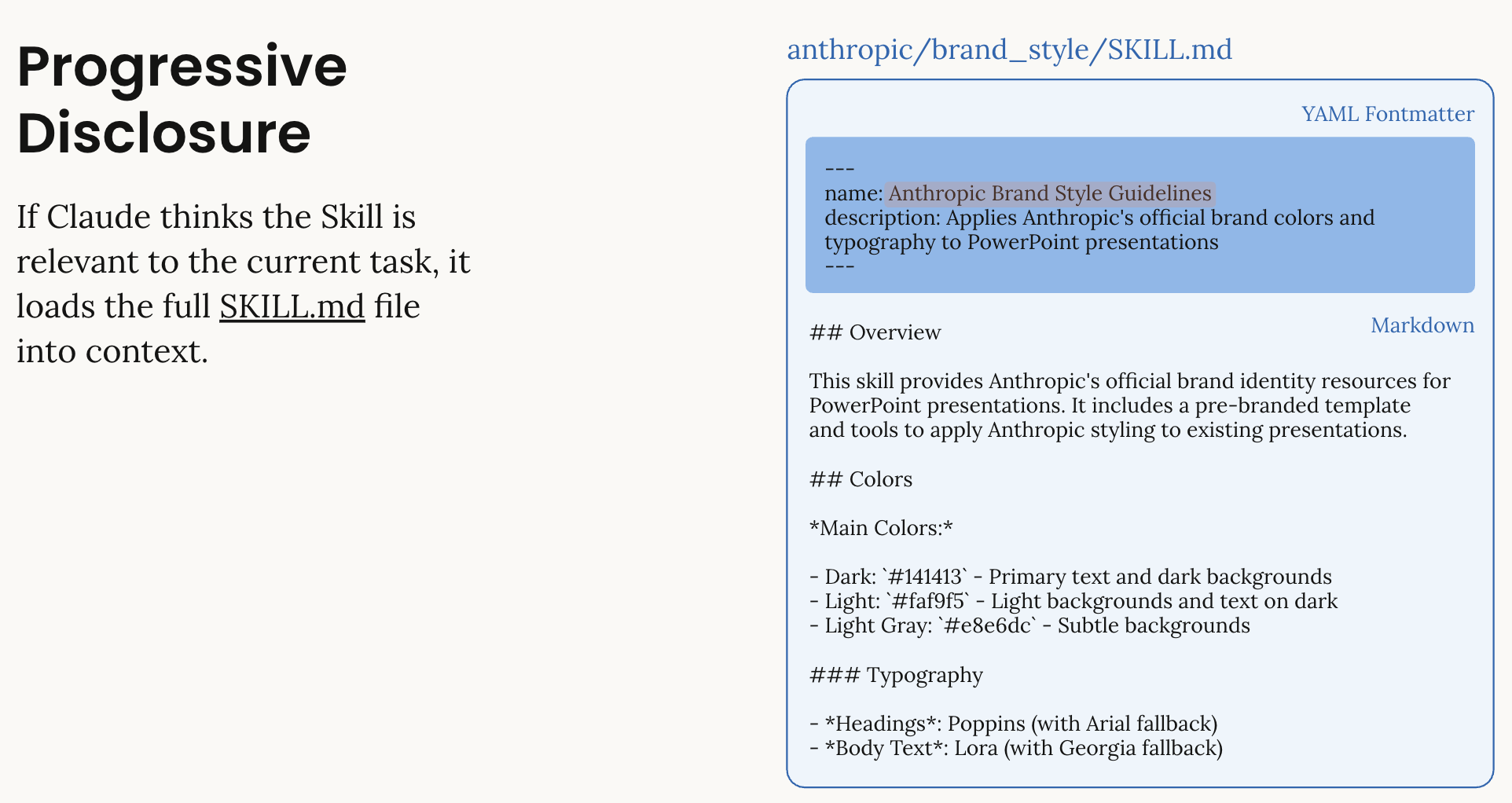
- Metadata (name: 64 chars, description: 1024 chars): Claude sees skill name and description
- Full Instructions (<5k tokens): Loaded when skill is relevant
- Linked Files: Additional resources loaded only if needed
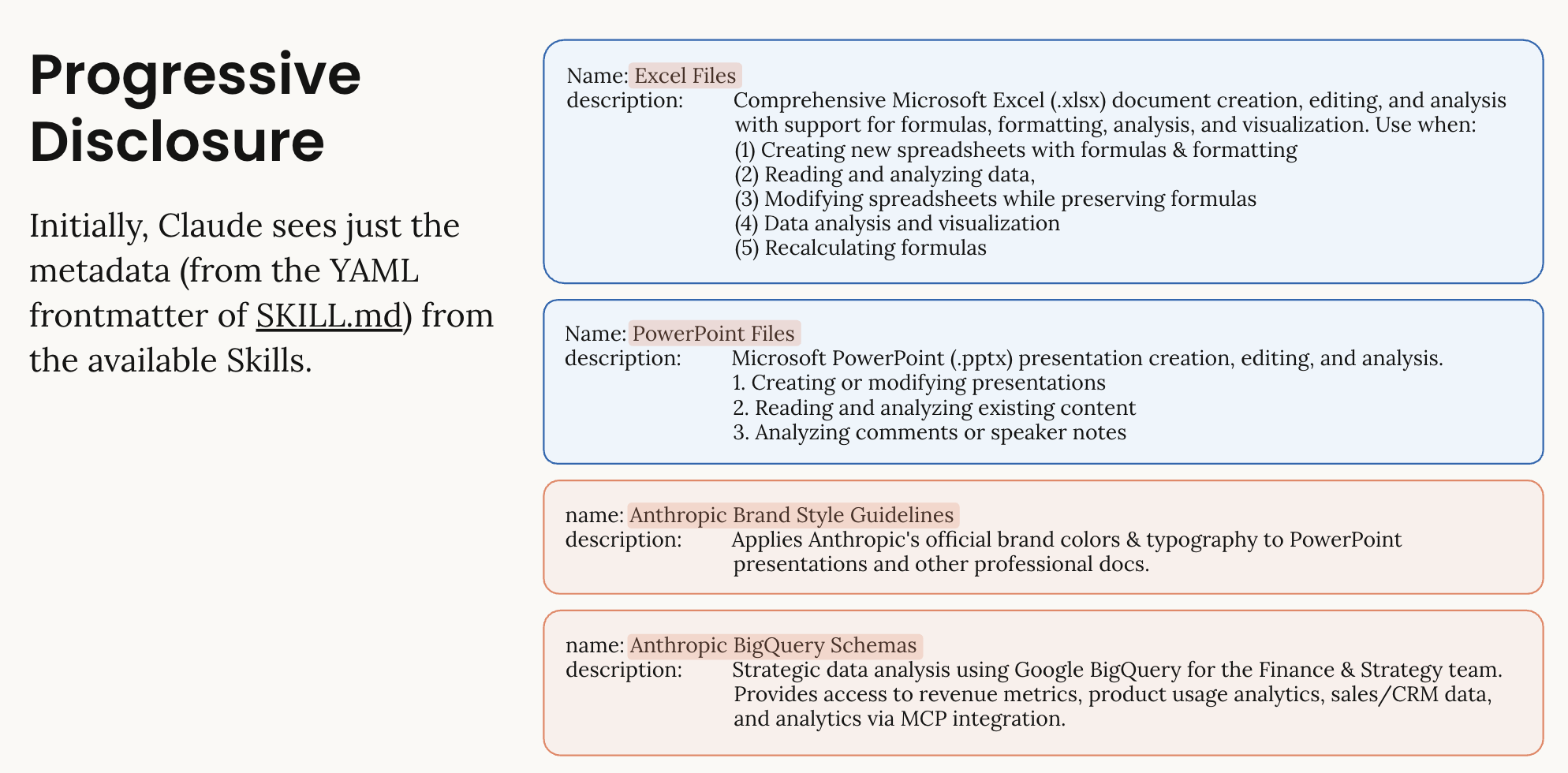
This keeps operations efficient while providing deep expertise on demand. Initially, Claude sees just the metadata from the YAML frontmatter of SKILL.md. Only when a skill is relevant does Claude load the full contents, including any helper scripts and resources.
Skill Types
| Type | Description | Example |
|---|---|---|
| Anthropic-Managed | Pre-built skills maintained by Anthropic | xlsx, pptx, pdf, docx |
| Custom | User-defined skills for specific workflows | Brand guidelines, financial models |
Skills Conceptual Overview
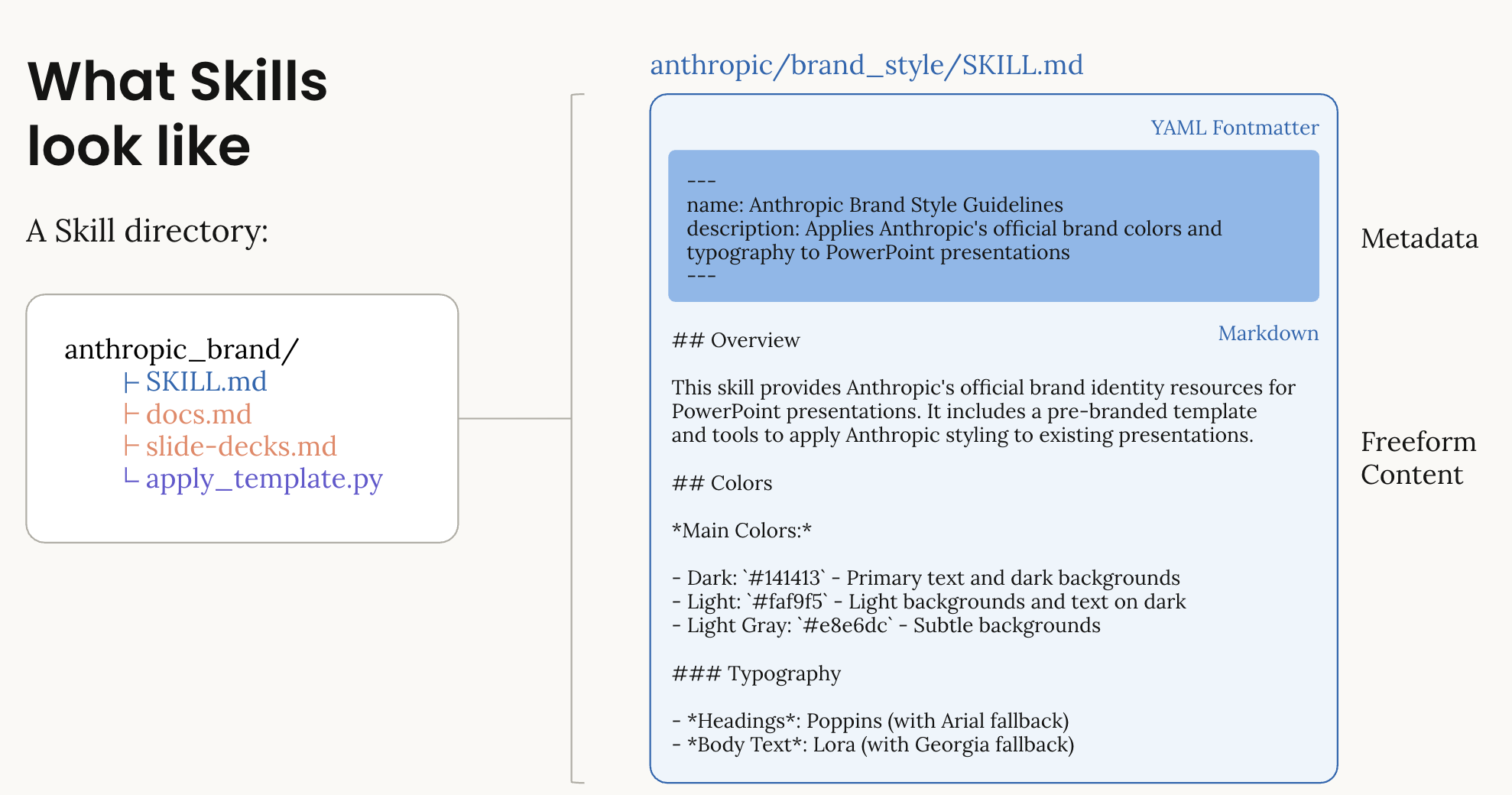
This diagram illustrates:
- Skill Directory Structure: How Skills are organized with SKILL.md and supporting files
- YAML Frontmatter: The metadata that Claude sees initially
- Progressive Loading: How Skills are discovered and loaded on-demand
- Composability: Multiple Skills working together in a single request
How Skills Work with Code Execution
Skills require the code execution tool to be enabled. Here's the typical workflow:
What happens:
- Claude receives your request with the xlsx skill loaded
- Claude uses code execution to create the file
- The response includes a
file_idfor the created file - You use the Files API to download the file
Important: Beta API
- Use
client.beta.messages.create()(notclient.messages.create()) - The
containerparameter is only available in the beta API - Use the
betasparameter to enable beta features:code-execution-2025-08-25- Enables code executionfiles-api-2025-04-14- Required for downloading filesskills-2025-10-02- Enables Skills feature
⚠️ Note: When using Skills, you MUST include the code_execution tool in your request.
Token Usage Optimization
Skills dramatically reduce token usage compared to providing instructions in prompts:
| Approach | Token Cost | Performance |
|---|---|---|
| Manual instructions | 5,000-10,000 tokens/request | Variable quality |
| Skills (metadata only) | Minimal (just name/description) | Expert-level |
| Skills (full load) | ~5,000 tokens when skill is used | Expert-level |
The Big Win: You can pack multiple skills into your prompt without bloating it. Each skill only costs you the metadata (name + description) until you actually use it.
Example: Creating an Excel file with formatting
- Without Skills: ~8,000 tokens to explain all Excel features upfront
- With Skills: Minimal metadata overhead initially, ~5,000 tokens only when Excel skill is invoked
- Key Insight: The 98% savings applies to the initial context. Once you use a skill, the full instructions are loaded.
Additional Benefits:
- Skills contain helper scripts that are known to work, improving reliability
- Claude saves time by using proven code patterns instead of generating from scratch
- You get more consistent, professional results
⏱️ Expected Generation Times
⚠️ IMPORTANT: Document generation with Skills requires code execution and file creation, which takes time. Be patient and let cells complete.
Observed generation times:
- Excel files: ~2 minutes (with charts and formatting)
- PowerPoint presentations: ~1-2 minutes (simple 2-slide presentations with charts)
- PDF documents: ~40-60 seconds (simple documents)
What to expect:
- The cell will show
[*]while running - You may see "Executing..." status for 1-2 minutes
- Do not interrupt the cell - let it complete fully
💡 Recommendations:
- Start simple: Begin with minimal examples to verify your setup
- Gradually increase complexity: Add features incrementally
- Be patient: Operations typically take 40 seconds to 2 minutes
- Note: Very complex documents may take longer - keep examples focused
3. Discovering Available Skills
List All Built-in Skills
Let's discover what Anthropic-managed skills are available:
Understanding Skill Metadata
Each skill has:
- skill_id: Unique identifier (e.g., "xlsx", "pptx")
- version: Version number or "latest"
- name: Human-readable name
- description: What the skill does
- directory: Skill's folder structure
Versioning Strategy
- Use
"latest"for Anthropic skills (recommended) - Anthropic updates skills automatically
- Pin specific versions for production stability
- Custom skills use epoch timestamps for versions
Example: Monthly Budget Spreadsheet
We'll start with two examples - a simple one-liner and a detailed request.
Simple Example (1-2 lines)
First, let's see how Skills work with a minimal prompt:
Detailed Example
For more control, you can provide specific requirements:
- Income and expense categories
- Formulas for totals
- Basic formatting
Example: Monthly Budget Spreadsheet
We'll create a simple budget spreadsheet with:
- Income and expense categories
- Formulas for totals
- Basic formatting
⏱️ Note: Excel generation typically takes 1-2 minutes (with charts and formatting). The cell will show [*] while running - be patient!
Download the Excel File
Now let's extract the file_id and download the generated Excel file:
✨ What just happened?
- Claude used the
xlsxskill to create a professional Excel file - The skill handled all Excel-specific formatting and formulas
- The file was created in Claude's code execution environment
- We extracted the
file_idfrom the response - We downloaded the file using the Files API
- The file is now saved in
outputs/budget_*.xlsx
Open the file in Excel to see the results!
5. Quick Start: PowerPoint
Now let's create a PowerPoint presentation using the pptx skill.
Example: Revenue Presentation
Simple Example (1 line)
Detailed Example
Note: This is intentionally kept simple (2 slides, 1 chart) to minimize generation time and demonstrate the core functionality.
Example: Simple Revenue Presentation
Note: This is intentionally kept simple (2 slides, 1 chart) to minimize generation time and demonstrate the core functionality.
Download the PowerPoint File
⏱️ Note: PDF generation typically takes 1-2 minutes for simple documents. The cell will show [*] while running - be patient!
Example: PDF Documents
Simple Example (1 line)
Detailed Example: Receipt
Note: This is intentionally kept simple to ensure clean formatting.
Example: Simple Receipt
Note: This is intentionally kept simple to ensure clean formatting.
Download and Verify the PDF
7. Troubleshooting
Common Issues and Solutions
Issue 1: API Key Not Found
Error:
Solution:
- Ensure
.envfile exists in the parent directory - Check that
ANTHROPIC_API_KEY=sk-ant-api03-...is set - Restart the Jupyter kernel after creating/editing
.env
Issue 2: Container Parameter Not Recognized
Error:
Solution:
Use client.beta.messages.create() instead of client.messages.create():
Issue 3: Skills Beta Requires Code Execution Tool
Error:
Solution: When using Skills, you MUST include the code_execution tool:
Issue 4: No Files Found in Response
Error:
Solution:
- Check that code execution tool is included in the request
- Verify the skill was loaded (check response content)
- Ensure the task actually requires file creation
- Look for error messages in the response text
Issue 5: File Download Failed
Error:
Solution:
- Files may have a limited lifetime on Anthropic's servers
- Download files immediately after creation
- Check file_id is correctly extracted from response
- Verify Files API beta is included in betas list
Token Optimization Tips
- Use "latest" version for Anthropic skills - automatically optimized
- Batch operations - Create multiple files in one conversation when possible
- Reuse containers - Use
container.idfrom previous responses to avoid reloading skills - Be specific - Clear instructions mean fewer iterations
API Rate Limiting
If you encounter rate limits:
- Implement exponential backoff for retries
- Use batch processing for multiple files
- Consider upgrading your API tier for higher limits
Next Steps
🎉 Congratulations! You've learned the basics of Claude Skills.
See Skills in Action
Check out the official announcement to see how these Skills power Claude's file creation capabilities:
- Claude Creates Files(opens in new tab) - See how Skills enable Claude to create and edit Excel, PowerPoint, and PDF files directly
Continue Learning:
- Notebook 2: Financial Applications(opens in new tab) - Real-world business use cases with financial data
- Notebook 3: Custom Skills Development(opens in new tab) - Build your own specialized skills
Support Articles:
- 📚 Teach Claude your way of working using Skills(opens in new tab) - User guide for working with Skills
- 🛠️ How to create a skill with Claude through conversation(opens in new tab) - Interactive skill creation guide
Resources:
- Claude API Documentation(opens in new tab)
- Skills Documentation(opens in new tab)
- Skills Best Practices(opens in new tab)
- Files API Documentation(opens in new tab)
- Claude Support(opens in new tab)
Try These Experiments:
- Start with simple one-line prompts to see Skills in action
- Modify the budget example to include more categories
- Create a presentation with your own data
- Generate a PDF report combining text and tables
- Use multiple skills together in a single request