Cookbook
Agent Patterns
Integrations
View on GitHub

Build a Slack data analyst bot with Claude Managed Agents

Mention the bot with a CSV to get an analysis report in-thread, with multi-turn follow-ups on the same session.

Charmaine Lee
Charmaine Lee
@charmaine
Published on April 8, 2026
Was this page helpful?

Build a Slack data analyst bot with Claude Managed Agents

Introduction

You'll wrap the agent from data_analyst_agent.ipynb in a Slack bot built with Bolt for Python, Slack's official framework for building apps. Mention the bot with a question and a CSV attachment to get a narrative report posted back to the thread. Follow-up messages continue the same session.

user: @databot what's driving Q1 revenue?  [sales.csv]


bot uploads the CSV and starts an agent session


bot streams the agent's progress back to the thread


bot posts the finished report to the thread

What you'll learn

  • Kick off an agent run from a Slack mention
  • Show the agent's progress as thread updates
  • Post the finished report back to the thread
  • Keep the conversation going with follow-up replies

Prerequisites

  1. Run the install cell below.

  2. Create a Slack app: choose Create New App → From a manifest, paste slack_app_manifest.yaml, and install it to your workspace. The manifest enables Socket Mode (Slack delivers events over a WebSocket, so you don't need a public URL) and the required scopes. Then grab two tokens:

    • OAuth & Permissions → copy the Bot User OAuth Token (xoxb-...)
    • Basic Information → App-Level Tokens → generate one with scope connections:write (xapp-...)

    In a channel you want the bot in, run /invite @databot.

  3. Run data_analyst_agent.ipynb, which saves ANALYST_ENV_ID, ANALYST_AGENT_ID, and ANALYST_AGENT_VERSION to .env.

The setup cell below prompts for your Slack tokens and saves them to .env so you don't re-enter them on restart (or add them to .env beforehand to skip the prompt). .env is already in .gitignore – never commit it to version control. If you don't have a Slack workspace handy you can still read through the code – each section explains what it does – but you'll need one to run the bot.

python
%%capture
%pip install -q "anthropic>=0.91.0" python-dotenv slack_bolt requests markdown-to-mrkdwn
python
import io
import os
import threading
from getpass import getpass
 
import requests
from anthropic import Anthropic
from dotenv import load_dotenv, set_key
from markdown_to_mrkdwn import SlackMarkdownConverter
from slack_bolt import App
from slack_bolt.adapter.socket_mode import SocketModeHandler
 
load_dotenv(override=True)
 
# Prompt for Slack tokens on first run and save them to .env.
for key in ("SLACK_BOT_TOKEN", "SLACK_APP_TOKEN"):
    if not os.environ.get(key):
        os.environ[key] = getpass(f"{key}: ")
        set_key(".env", key, os.environ[key])
 
client = Anthropic()
app = App(token=os.environ["SLACK_BOT_TOKEN"])
 
for key in ("ANALYST_ENV_ID", "ANALYST_AGENT_ID", "ANALYST_AGENT_VERSION"):
    if not os.environ.get(key):
        raise RuntimeError(f"{key} not set. Run data_analyst_agent.ipynb first.")
 
# Set these from the IDs saved by the data analyst notebook. Reusing
# the agent and environment avoids re-provisioning on every bot restart.
ANALYST_AGENT = {
    "id": os.environ["ANALYST_AGENT_ID"],
    "version": int(os.environ["ANALYST_AGENT_VERSION"]),
}
ANALYST_ENV_ID = os.environ["ANALYST_ENV_ID"]
 
# thread_ts -> session_id, so follow-ups land in the same session.
# Sessions stay open for replies. In production, persist this and
# archive sessions when threads go stale.
thread_sessions: dict[str, str] = {}
 
mrkdwn = SlackMarkdownConverter()

1. Start a session when the bot is mentioned

Bolt passes an ack callback into every handler; calling it tells Slack the event was received. Slack retries anything not acknowledged within three seconds, so on_mention calls ack() immediately and hands the slow work (file upload, session creation, streaming) to start_analysis on a background thread.

Each mention creates a session you can open in the Console under Sessions to watch the full trace.

python
@app.event("app_mention")
def on_mention(event, say, ack):
    ack()
    channel = event["channel"]
    thread_ts = event.get("thread_ts") or event["ts"]
    # Mention text arrives as "<@BOTID> question"; drop the mention prefix.
    question = event["text"].split(">", 1)[-1].strip()
    slack_file = (event.get("files") or [None])[0]
 
    say(text="On it. Analyzing now.", thread_ts=thread_ts)
    # Run the slow work in a background thread so this handler
    # returns within Slack's 3s limit.
    threading.Thread(target=start_analysis, args=(channel, thread_ts, question, slack_file)).start()
 
 
def start_analysis(channel: str, thread_ts: str, question: str, slack_file: dict | None) -> None:
    try:
        # If the mention had a file attached, pull it from Slack and
        # re-upload to the Anthropic Files API so the session can mount it.
        resources = []
        if slack_file:
            resp = requests.get(
                slack_file["url_private"],
                headers={"Authorization": f"Bearer {app.client.token}"},
                timeout=30,
            )
            resp.raise_for_status()
            mime = slack_file.get("mimetype", "text/csv")
            uploaded = client.beta.files.upload(
                file=(slack_file["name"], io.BytesIO(resp.content), mime)
            )
            mount = "/mnt/session/uploads/data.csv"
            resources.append({"type": "file", "file_id": uploaded.id, "mount_path": mount})
            question += f"\n\nThe data is mounted at {mount}."
 
        # One session per Slack thread. Store the thread coordinates in
        # metadata so anyone reading the event stream knows where to reply.
        session = client.beta.sessions.create(
            environment_id=ANALYST_ENV_ID,
            agent={"type": "agent", **ANALYST_AGENT},
            resources=resources,
            # Titles are capped at 80 chars and can't contain Unicode
            # control/format characters (Slack sometimes inserts them).
            title="".join(c for c in question if c.isprintable())[:80],
            metadata={"slack_channel": channel, "slack_thread_ts": thread_ts},
        )
        thread_sessions[thread_ts] = session.id
 
        # Send the question as a user.message event. The agent starts
        # working immediately; relay_stream posts its progress to the thread.
        client.beta.sessions.events.send(
            session.id,
            events=[{"type": "user.message", "content": [{"type": "text", "text": question}]}],
        )
        relay_stream(session.id, channel, thread_ts)
    except Exception as e:
        app.client.chat_postMessage(
            channel=channel, thread_ts=thread_ts, text=f"Analysis failed: {type(e).__name__}: {e}"
        )

2. Relay progress and results to the thread

The relay_stream function defined below is the bridge between the two APIs: it reads from the Anthropic session event stream and posts to Slack. It loops until the agent goes idle, then posts the final summary and uploads any files the agent wrote.

files.list(scope_id=...) returns every file in the session – both the CSV we uploaded and anything the agent wrote. We filter to downloadable == True so only agent-generated outputs (the report, charts) get posted back to Slack, not the user's own input.

python
def relay_stream(session_id: str, channel: str, thread_ts: str) -> None:
    summary = ""
    posted_progress = False
    for ev in client.beta.sessions.events.stream(session_id):
        t = ev.type
        if t == "agent.message":
            # Keep the latest text block; it becomes the final summary.
            for b in ev.content:
                if b.type == "text" and b.text.strip():
                    summary = b.text
        elif t == "agent.tool_use" and not posted_progress:
            # Post a one-time progress update when the agent starts
            # running commands.
            app.client.chat_postMessage(
                channel=channel, thread_ts=thread_ts, text="Running analysis..."
            )
            posted_progress = True
        elif t == "session.status_idle":
            break
        elif t == "session.status_terminated":
            trace = f"https://platform.claude.com/sessions/{session_id}"
            app.client.chat_postMessage(
                channel=channel,
                thread_ts=thread_ts,
                text=f"Session terminated unexpectedly. Trace: {trace}",
            )
            return
 
    # Turn is done. Post the summary, then upload any generated files.
    if summary:
        text = mrkdwn.convert(summary)
        if len(text) > 3900:  # Slack text limit ~4000 chars
            text = text[:3900] + "\n_(truncated)_"
        app.client.chat_postMessage(channel=channel, thread_ts=thread_ts, text=text)
    outputs = client.beta.files.list(scope_id=session_id, betas=["managed-agents-2026-04-01"])
    for f in outputs.data:
        if not f.downloadable:
            continue
        content = client.beta.files.download(f.id).read()
        app.client.files_upload_v2(
            channel=channel, thread_ts=thread_ts, filename=f.filename, content=content
        )

3. Handle follow-ups in the same session

A reply in the thread becomes another turn in the existing session – you don't need to @mention the bot again. The container filesystem and conversation history persist across turns.

python
def continue_session(session_id: str, channel: str, thread_ts: str, text: str) -> None:
    try:
        client.beta.sessions.events.send(
            session_id,
            events=[{"type": "user.message", "content": [{"type": "text", "text": text}]}],
        )
        relay_stream(session_id, channel, thread_ts)
    except Exception as e:
        app.client.chat_postMessage(
            channel=channel, thread_ts=thread_ts, text=f"Analysis failed: {type(e).__name__}: {e}"
        )
 
 
@app.event("message")
def on_thread_reply(event, ack):
    ack()
    thread_ts = event.get("thread_ts")
    # Only handle human replies in a thread where we already started
    # a session. Skip edits/deletes and other message subtypes.
    if event.get("subtype"):
        return
    if not thread_ts or event.get("bot_id") or thread_ts not in thread_sessions:
        return
    threading.Thread(
        target=continue_session,
        args=(thread_sessions[thread_ts], event["channel"], thread_ts, event["text"]),
    ).start()

4. Run the bot

The cell below connects to Slack and starts listening. It blocks while the bot runs – stop it with the ■ interrupt button when you're done.

In any channel the bot is in, mention it with a CSV attached. It posts progress, then the summary and report.html in the thread:
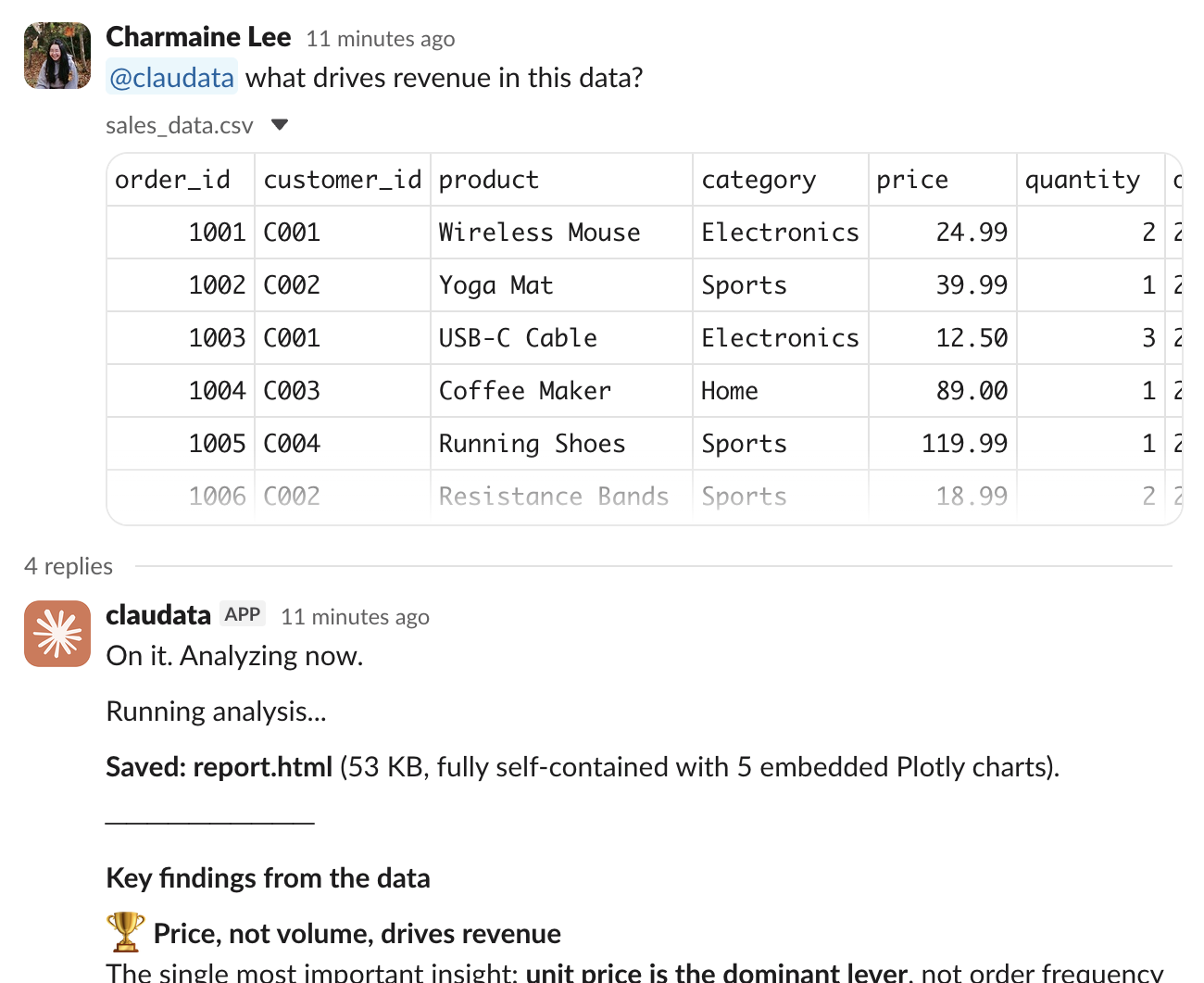
Slack thread showing the bot's analysis

Reply in-thread to go deeper on the same data.

python
SocketModeHandler(app, os.environ["SLACK_APP_TOKEN"]).start()

Next steps

You've wrapped the analyst agent in a Slack bot: mentions start a session, the event stream relays progress to the thread, outputs get uploaded, and replies continue the same conversation.

  • Swap the agent's system prompt in data_analyst_agent.ipynb to change its analysis style. Re-running that notebook creates a new agent and saves its ID to .env for the bot to pick up.
  • Persist thread_sessions to a database so conversations survive bot restarts.
  • Move the bot out of this notebook: copy the code to a .py file and deploy it anywhere that can hold a long-lived WebSocket connection.
Was this page helpful?