Cookbook
Responses
Skills
View on GitHub

Prompting for frontend aesthetics

Guide to prompting Claude for distinctive, polished frontend designs avoiding generic aesthetics.

Prithvi Rajasekaran
Prithvi Rajasekaran
@rgb-prithvi
Published on October 21, 2025

Frontend Aesthetics: A Prompting Guide

Claude can generate high-quality frontends, but without guidance it tends toward generic, conservative designs. This guide shows you how to prompt Claude to produce more distinctive, polished output.

Prompting for Better Outputs

Claude has strong knowledge of design principles, typography, and color theory, but defaults to safe choices unless explicitly encouraged otherwise. Through experimentation, we've found three strategies that consistently produce better results:

  1. Guide specific design dimensions - Direct Claude's attention to typography, color, motion, and backgrounds individually
  2. Reference design inspirations - Suggest sources like IDE themes or cultural aesthetics without being overly prescriptive
  3. Call out common defaults - Explicitly tell Claude to avoid its tendency toward generic choices

The prompt below applies these strategies across four key design areas.

The Prompt

To implement these changes, you can append this prompt section to your system prompt or CLAUDE.md file.

python
DISTILLED_AESTHETICS_PROMPT = """
<frontend_aesthetics>
You tend to converge toward generic, "on distribution" outputs. In frontend design, this creates what users call the "AI slop" aesthetic. Avoid this: make creative, distinctive frontends that surprise and delight. Focus on:
 
Typography: Choose fonts that are beautiful, unique, and interesting. Avoid generic fonts like Arial and Inter; opt instead for distinctive choices that elevate the frontend's aesthetics.
 
Color & Theme: Commit to a cohesive aesthetic. Use CSS variables for consistency. Dominant colors with sharp accents outperform timid, evenly-distributed palettes. Draw from IDE themes and cultural aesthetics for inspiration.
 
Motion: Use animations for effects and micro-interactions. Prioritize CSS-only solutions for HTML. Use Motion library for React when available. Focus on high-impact moments: one well-orchestrated page load with staggered reveals (animation-delay) creates more delight than scattered micro-interactions.
 
Backgrounds: Create atmosphere and depth rather than defaulting to solid colors. Layer CSS gradients, use geometric patterns, or add contextual effects that match the overall aesthetic.
 
Avoid generic AI-generated aesthetics:
- Overused font families (Inter, Roboto, Arial, system fonts)
- ClichΓ©d color schemes (particularly purple gradients on white backgrounds)
- Predictable layouts and component patterns
- Cookie-cutter design that lacks context-specific character
 
Interpret creatively and make unexpected choices that feel genuinely designed for the context. Vary between light and dark themes, different fonts, different aesthetics. You still tend to converge on common choices (Space Grotesk, for example) across generations. Avoid this: it is critical that you think outside the box!
</frontend_aesthetics>
"""

Results

Here are the results of UI generations both with and without the prompt section above.

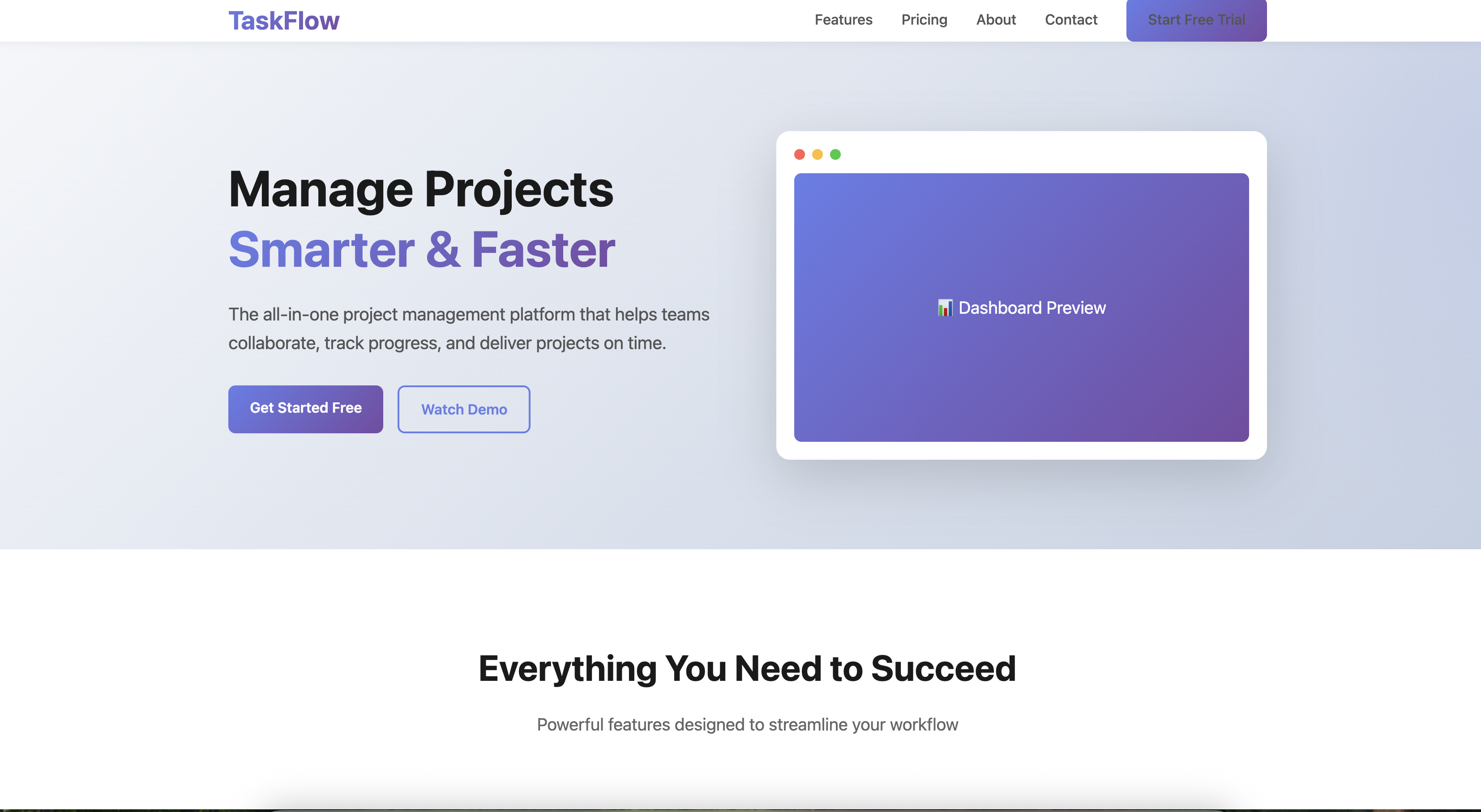
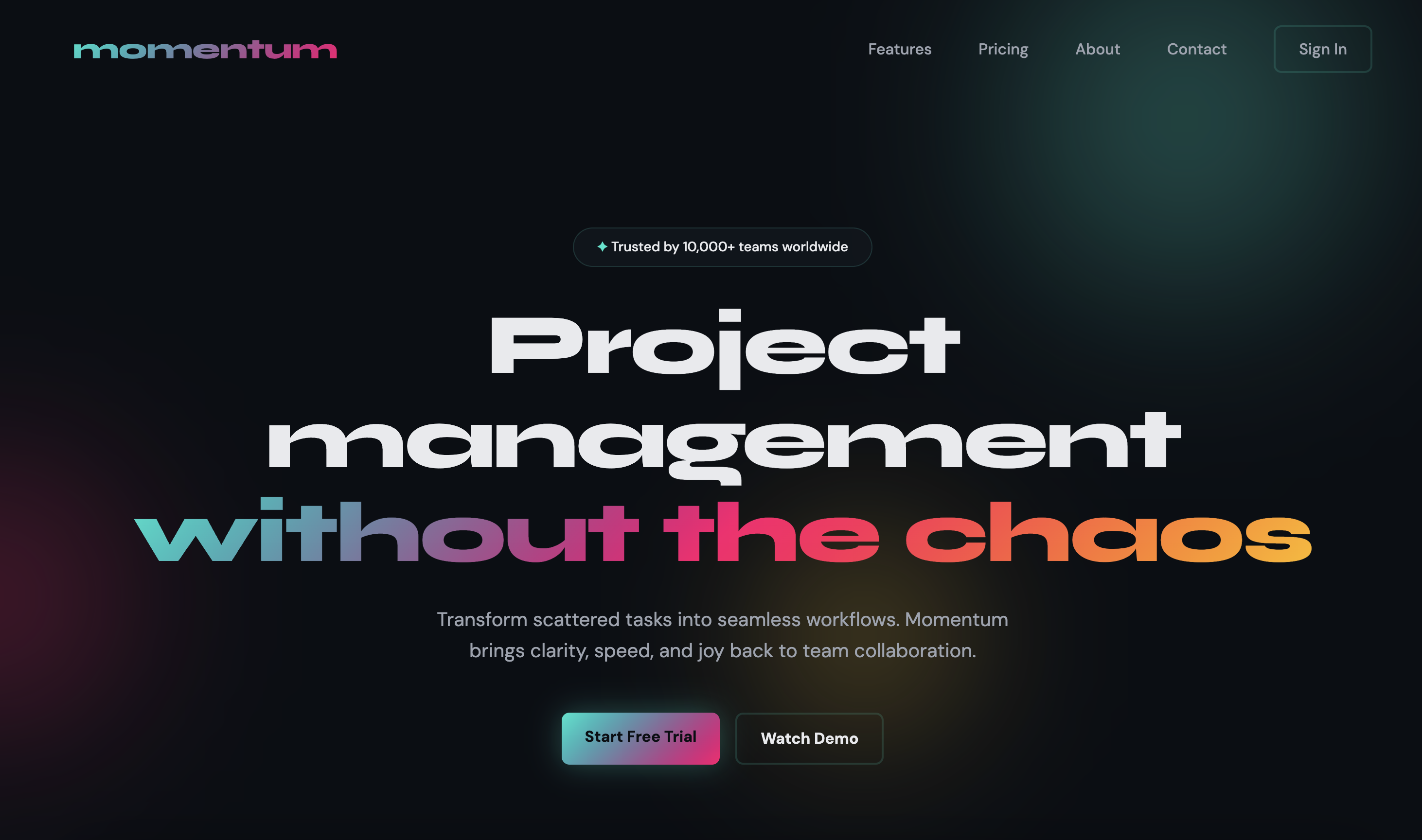
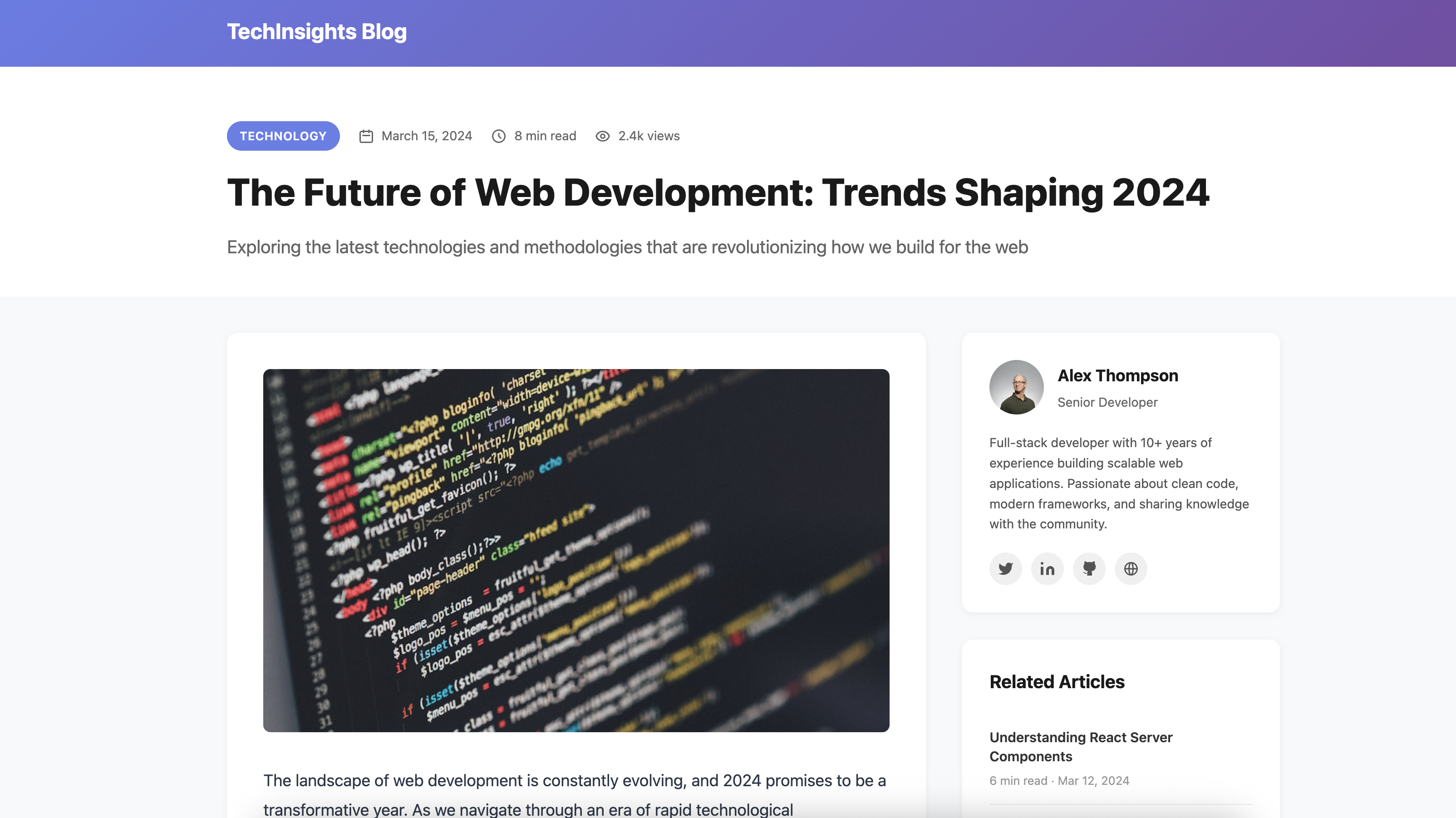
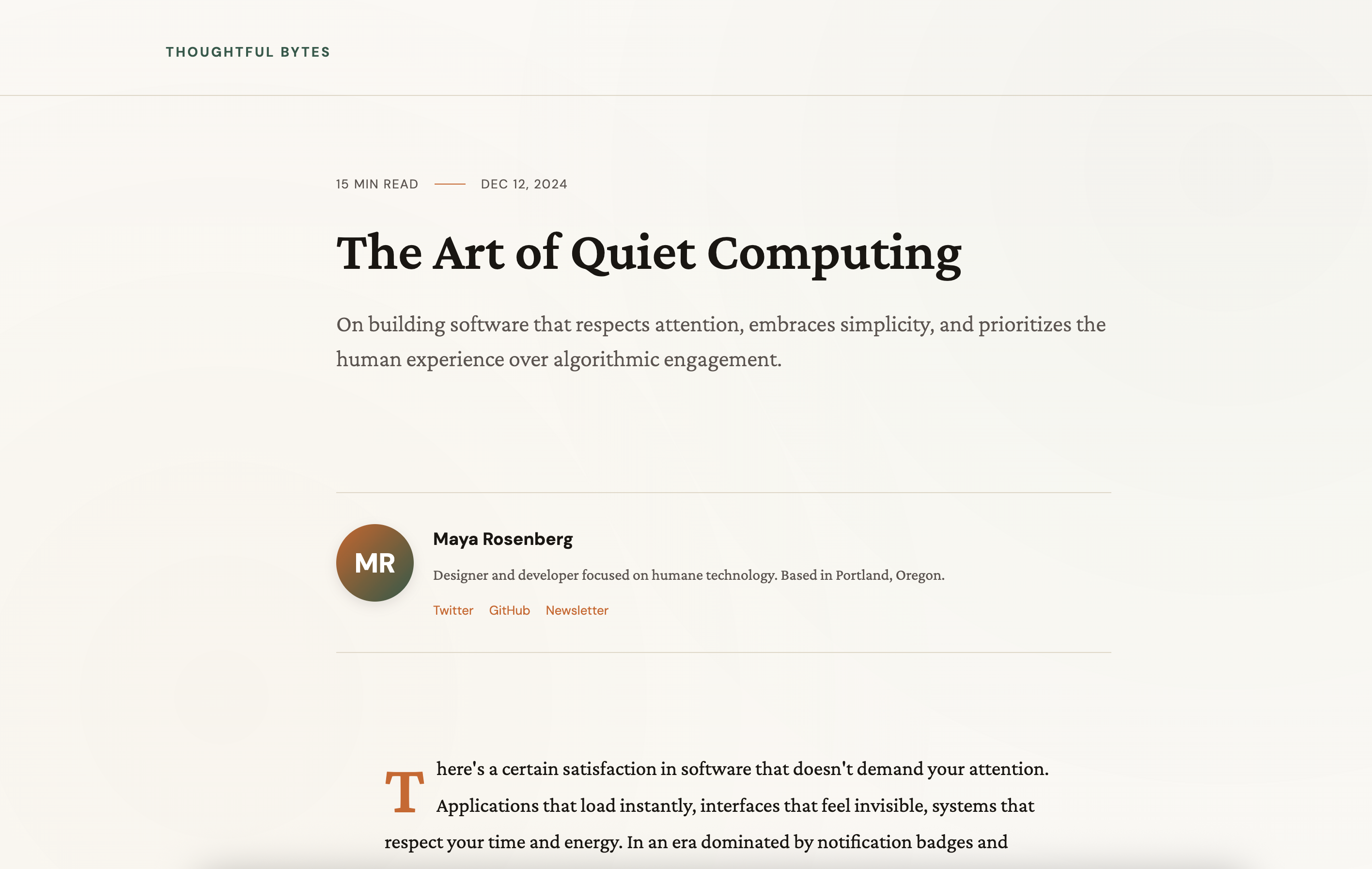
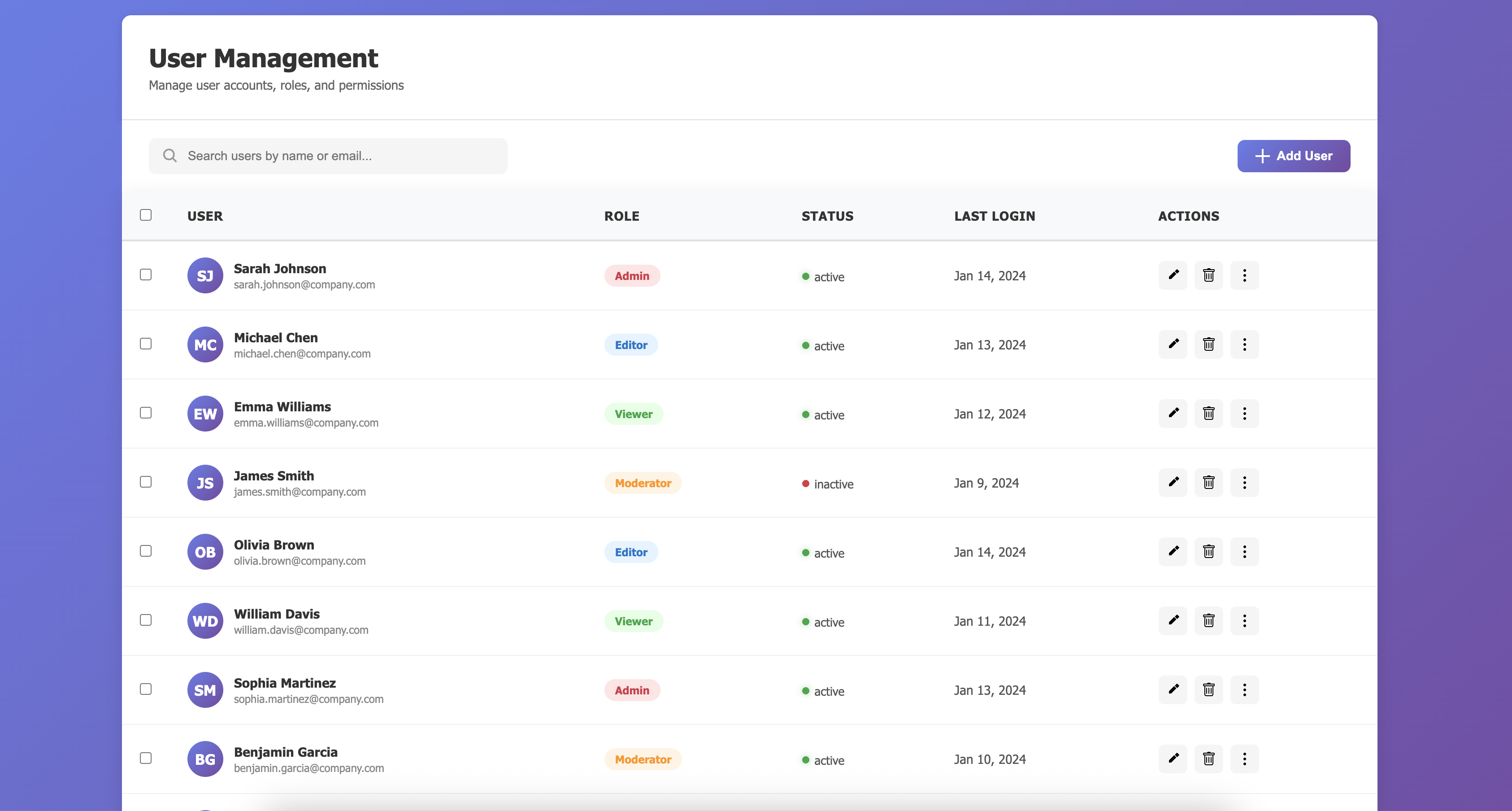
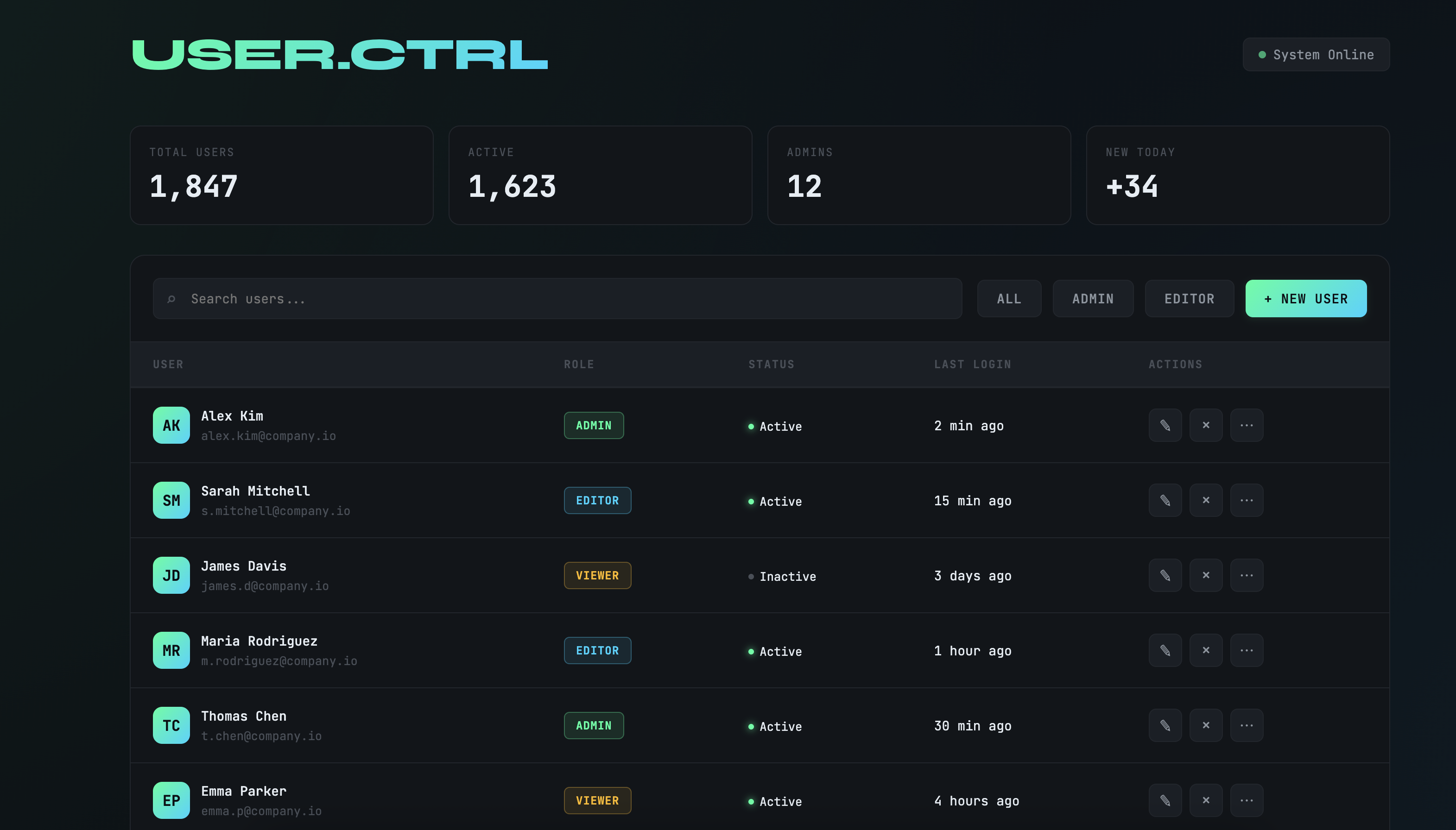
Without guidance, Claude often defaults to simplistic designs with white and purple backgrounds. With the aesthetics prompt, it produces more varied and visually interesting designs.

Example 1: SaaS Landing Page

Prompt: "Create a SaaS landing page for a project management tool"

Without Aesthetics Prompt

Baseline output without aesthetics guidance

With Aesthetics Prompt

Enhanced output with distilled aesthetics prompt

Example 2: Blog Post

Prompt: "Build a blog post layout with author bio, reading time, and related articles"

Without Aesthetics Prompt

Baseline portfolio without aesthetics guidance

With Aesthetics Prompt

Enhanced portfolio with distilled aesthetics prompt

Example 3: Admin Table

Prompt: "Create an admin panel with a data table showing users, their roles, and action buttons"

Without Aesthetics Prompt

Baseline dashboard without aesthetics guidance

With Aesthetics Prompt

Enhanced dashboard with distilled aesthetics prompt

Try It Yourself

First, set up the helper functions:

python
import html
import os
import re
import time
import webbrowser
from datetime import datetime
from pathlib import Path
 
from anthropic import Anthropic
from IPython.display import HTML as DisplayHTML
from IPython.display import display
 
client = Anthropic(api_key=os.environ.get("ANTHROPIC_API_KEY"))
 
 
def save_html(html_content):
    os.makedirs("html_outputs", exist_ok=True)
    timestamp = datetime.now().strftime("%Y%m%d_%H%M%S")
    filepath = f"html_outputs/{timestamp}.html"
    with open(filepath, "w") as f:
        f.write(html_content)
    return filepath
 
 
def extract_html(text):
    pattern = r"```(?:html)?\s*(.*?)\s*```"
    matches = re.findall(pattern, text, re.DOTALL)
    return matches[0] if matches else None
 
 
def open_in_browser(filepath):
    abs_path = Path(filepath).resolve()
    webbrowser.open(f"file://{abs_path}")
    print(f"🌐 Opened in browser: {filepath}")
 
 
def generate_html_with_claude(system_prompt, user_prompt):
    print("πŸš€ Generating HTML...\n")
 
    full_response = ""
    start_time = time.time()
    display_id = display(DisplayHTML(""), display_id=True)
 
    with client.messages.stream(
        model="claude-sonnet-4-5-20250929",
        max_tokens=64000,
        system=system_prompt,
        messages=[{"role": "user", "content": user_prompt}],
    ) as stream:
        for text in stream.text_stream:
            full_response += text
            escaped_text = html.escape(full_response)
            display_html = f"""
            <div id="stream-container" style="border: 2px solid #667eea; border-radius: 8px; padding: 16px; background: #f8f9fa; max-height: 500px; overflow-y: auto;">
                <pre style="margin: 0; font-family: monospace; font-size: 12px; color: #2d2d2d; white-space: pre-wrap; word-wrap: break-word;">{escaped_text}</pre>
            </div>
            <script>
                requestAnimationFrame(() => {{
                    const container = document.getElementById('stream-container');
                    if (container) {{
                        container.scrollTop = container.scrollHeight;
                    }}
                }});
            </script>
            """
            display_id.update(DisplayHTML(display_html))
 
    elapsed = time.time() - start_time
    escaped_text = html.escape(full_response)
    final_html = f"""
    <div style="border: 2px solid #28a745; border-radius: 8px; padding: 16px; background: #f8f9fa; max-height: 500px; overflow-y: auto;">
        <pre style="margin: 0; font-family: monospace; font-size: 12px; color: #2d2d2d; white-space: pre-wrap; word-wrap: break-word;">{escaped_text}</pre>
    </div>
    """
    display_id.update(DisplayHTML(final_html))
 
    print(f"\nβœ… Complete in {elapsed:.1f}s\n")
 
    html_content = extract_html(full_response)
    if html_content is None:
        print("❌ Error: Could not extract HTML from response.")
        raise ValueError("Failed to extract HTML from Claude's response.")
 
    filepath = save_html(html_content)
    print(f"πŸ’Ύ HTML saved to: {filepath}")
    open_in_browser(filepath)
 
    return filepath

Generate with the aesthetics prompt:

python
BASE_SYSTEM_PROMPT = """
You are an expert frontend engineer skilled at crafting beautiful, performant frontend applications.
 
<tech_stack>
Use vanilla HTML, CSS, & Javascript. Use Tailwind CSS for your CSS variables.
</tech_stack>
 
<output>
Generate complete, self-contained HTML code for the requested frontend application. Include all CSS and JavaScript inline.
 
CRITICAL: You must wrap your HTML code in triple backticks with html language identifier like this:
```html
<!DOCTYPE html>
<html>
...
</html>
```
 
Our parser depends on this format - do not deviate from it!
</output>
"""
 
USER_PROMPT = "Create a SaaS landing page for a project management tool"
 
# Generate with distilled aesthetics prompt
generate_html_with_claude(BASE_SYSTEM_PROMPT + "\n\n" + DISTILLED_AESTHETICS_PROMPT, USER_PROMPT)
πŸš€ Generating HTML...


βœ… Complete in 98.2s

πŸ’Ύ HTML saved to: html_outputs/20251021_101010.html
🌐 Opened in browser: html_outputs/20251021_101010.html

'html_outputs/20251021_101010.html'

Isolated Prompting

The full aesthetics prompt works well for general use, but sometimes you want targeted control. You can isolate specific dimensions (typography, color, motion) or lock in a particular theme. This gives you faster generation times and more predictable outputs.

Example 1: Typography Only

Isolate a single design dimension when you want to improve one aspect without changing others:

python
TYPOGRAPHY_PROMPT = """
<use_interesting_fonts>
Typography instantly signals quality. Avoid using boring, generic fonts.
 
**Never use:** Inter, Roboto, Open Sans, Lato, default system fonts
 
**Impact choices:**
- Code aesthetic: JetBrains Mono, Fira Code, Space Grotesk
- Editorial: Playfair Display, Crimson Pro, Fraunces
- Startup: Clash Display, Satoshi, Cabinet Grotesk
- Technical: IBM Plex family, Source Sans 3
- Distinctive: Bricolage Grotesque, Obviously, Newsreader
 
**Pairing principle:** High contrast = interesting. Display + monospace, serif + geometric sans, variable font across weights.
 
**Use extremes:** 100/200 weight vs 800/900, not 400 vs 600. Size jumps of 3x+, not 1.5x.
 
Pick one distinctive font, use it decisively. Load from Google Fonts. State your choice before coding.
</use_interesting_fonts>
"""
 
# Generate with typography-only guidance
generate_html_with_claude(BASE_SYSTEM_PROMPT + "\n\n" + TYPOGRAPHY_PROMPT, USER_PROMPT)

Example 2: Theme Constraint

Lock in a specific aesthetic when you want consistent theming across generations:

python
SOLARPUNK_THEME_PROMPT = """
<always_use_solarpunk_theme>
Always design with Solarpunk aesthetic:
- Warm, optimistic color palettes (greens, golds, earth tones)
- Organic shapes mixed with technical elements
- Nature-inspired patterns and textures
- Bright, hopeful atmosphere
- Retro-futuristic typography
</always_use_solarpunk_theme>
"""
 
# Generate with theme constraint
generate_html_with_claude(
    BASE_SYSTEM_PROMPT + "\n\n" + SOLARPUNK_THEME_PROMPT,
    "Create a dashboard for renewable energy monitoring",
)

Summary

Claude has strong design capabilities but defaults to safe, generic choices. The techniques in this guide - targeting specific design dimensions, referencing concrete inspirations, and explicitly avoiding common defaults - reliably produce more distinctive output. The full aesthetics prompt works well as a baseline. For more control, use isolated prompts to focus on individual aspects or lock in specific themes across multiple generations.