
Text to SQL with Claude
Introduction
Text to SQL is a natural language processing task that converts human-readable text queries into structured SQL queries. This lets users interact with databases using natural language.
Claude can understand context, interpret complex queries, and generate accurate SQL statements. This guide focuses on using Claude to build a robust Text to SQL system.
Why is Text to SQL Useful?
Text to SQL is valuable for several reasons:
-
Accessibility: Non-technical users can query databases without knowing SQL syntax, making data access easier within organizations.
-
Efficiency: Data analysts and scientists can quickly prototype queries using natural language.
-
Integration: It enables more intuitive interfaces for database interactions in applications and chatbots.
-
Complex Query Generation: LLMs can generate complex SQL queries involving multiple joins, subqueries, and aggregations, which can be time-consuming for humans to write.
What This Guide Covers
This guide will walk you through building a Text to SQL system using LLMs. We'll cover:
- Setting up a test SQLite database
- Effective prompting for Text to SQL conversion
- RAG (Retrieval Augmented Generation) to handle more complex database systems
- Self-improvement and iteration of Claude's outputs
- Evaluations
By the end of this guide, you'll understand how to implement and refine Text to SQL tasks using Claude, and have a framework for applying these techniques to your own projects.
Table of Contents
- Introduction
- Setup
- Creating a Basic Text to SQL Prompt
- Improving the Prompt with Examples
- Using Chain-of-Thought Prompting
- Implementing RAG for Complex Database Schemas
- Implementing Query Self-Improvement
- Evaluations
- Further Exploration & Next Steps
Setup
Let's set up our environment and create a test SQLite database with two tables: employees and departments. We'll use this database throughout our guide.
Note: you may need to restart the kernel to use updated packages.
Create a Test Database
Database already exists. Skipping creation and population.

Departments table:

   id              name         location
0   1                HR         New York
1   2       Engineering    San Francisco
2   3         Marketing          Chicago
3   4             Sales      Los Angeles
4   5           Finance           Boston
5   6  Customer Support           Dallas
6   7          Research          Seattle
7   8             Legal  Washington D.C.
8   9           Product           Austin
9  10        Operations           Denver

Employees table:

      id             name  age  department_id     salary   hire_date
0      1    Michael Allen   57              9  151012.98  2016-02-04
1      2        Nora Hall   23              8  186548.83  2018-01-27
2      3  Patricia Miller   49              5   43540.04  2020-06-07
3      4   Alice Martinez   48              7  131993.17  2021-01-21
4      5  Patricia Walker   59              5  167151.15  2020-05-24
..   ...              ...  ...            ...        ...         ...
195  196     Hannah Clark   31             10  195944.00  2017-11-08
196  197      Alice Davis   46              5  145584.16  2022-02-13
197  198     Charlie Hall   37              1   53690.40  2024-06-18
198  199     Alice Garcia   50              5   92372.26  2024-02-01
199  200      Laura Young   25              9   64738.56  2015-08-02

[200 rows x 6 columns]Creating a Basic Text to SQL Prompt
Now that we have our database set up, let's create a basic prompt for Text to SQL conversion. A good prompt should include:
- Clear instructions for what we want the model to do
- The user's query
- The database's schema, so Claude knows how to translate the user's query
Table: departments
  - id (INTEGER)
  - name (TEXT)
  - location (TEXT)

Table: employees
  - id (INTEGER)
  - name (TEXT)
  - age (INTEGER)
  - department_id (INTEGER)
  - salary (REAL)
  - hire_date (DATE)
Now that we have our schema information, let's create a basic prompt:
You are an AI assistant that converts natural language queries into SQL.
        Given the following SQL database schema:

        <schema>
        Table: departments
  - id (INTEGER)
  - name (TEXT)
  - location (TEXT)

Table: employees
  - id (INTEGER)
  - name (TEXT)
  - age (INTEGER)
  - department_id (INTEGER)
  - salary (REAL)
  - hire_date (DATE)
        </schema>

        Convert the following natural language query into SQL:
        <query>
        What are the names of all employees in the Engineering department?
        </query>

        Provide only the SQL query in your response, enclosed within <sql> tags.
Now let's use this prompt with the Claude API to generate SQL:
Generated SQL:
SELECT e.name
FROM employees e
JOIN departments d ON e.department_id = d.id
WHERE d.name = 'Engineering';
Let's test our generated SQL by running it against our database:
Query result:

                name
0         Nora Lewis
1       Oliver White
2      William Clark
3     Tina Rodriguez
4       Diana Taylor
5        Nora Taylor
6       Steve Taylor
7      Oliver Martin
8     Tina Rodriguez
9   Quentin Anderson
10      Julia Miller
11     Jane Thompson
12       Julia Clark
13       Diana White
14       Xena Garcia
15      Ulysses Hall
16       Diana Brown
17   Charlie Johnson
18     Michael Clark
19 Yannick HarrisImproving the Prompt with Examples
Our basic prompt works, but we can make it more effective by including examples. This technique, called few-shot learning, helps the model understand the task better by providing concrete examples of input-output pairs.
Let's modify our generate_prompt function to include some examples:
You are an AI assistant that converts natural language queries into SQL.
        Given the following SQL database schema:

        <schema>
        Table: departments
  - id (INTEGER)
  - name (TEXT)
  - location (TEXT)

Table: employees
  - id (INTEGER)
  - name (TEXT)
  - age (INTEGER)
  - department_id (INTEGER)
  - salary (REAL)
  - hire_date (DATE)
        </schema>

        Here are some examples of natural language queries and their corresponding SQL:

        <examples>

        Example 1:
        <query>List all employees in the HR department.</<query>
        <output>SELECT e.name FROM employees e JOIN departments d ON e.department_id = d.id WHERE d.name = 'HR';</output>

        Example 2:
        User: What is the average salary of employees in the Engineering department?
        SQL: SELECT AVG(e.salary) FROM employees e JOIN departments d ON e.department_id = d.id WHERE d.name = 'Engineering';

        Example 3:
        User: Who is the oldest employee?
        SQL: SELECT name, age FROM employees ORDER BY age DESC LIMIT 1;

        </examples>

        Now, convert the following natural language query into SQL:
        <query>
        What are the names and salaries of employees in the Marketing department?
        </query>

        Provide only the SQL query in your response, enclosed within <sql> tags.
Now let's use this improved prompt to generate SQL:
Generated SQL:
SELECT e.name, e.salary
FROM employees e
JOIN departments d ON e.department_id = d.id
WHERE d.name = 'Marketing';

Query result:

                name     salary
0          Zoe Jones  123511.58
1         Jane Smith  120291.41
2         John Young  179126.29
3       Charlie King   43323.02
4         Jane White   65134.81
5         Bob Harris   44083.34
6      Tina Robinson  131015.71
7       Steve Thomas  191563.64
8         Laura Hall  118691.73
9        Fiona Young  167114.79
10     Bob Rodriguez   64961.43
11       Diana Young  123255.78
12       John Harris  118778.51
13     Edward Taylor  112959.56
14  Michael Thompson  136840.04
15    William Taylor   49565.18
16        Diana King  154917.02
17        John Davis   46914.45
18      Julia Garcia   46486.44
19       Nora Wilson  153063.56
By including examples in our prompt, we've given the model a better understanding of how to structure its responses. This can lead to more accurate and consistent SQL generation, especially for more complex queries.
Note: Another prompting technique that may be worth exploring is to include a few rows of real data within the prompt itself, in addition to the database's schema. This may give Claude more context about the data structure and content.
In the next section, we'll explore how to handle more complex queries and improve the model's reasoning process using chain-of-thought prompting.
Using Chain-of-Thought Prompting
Chain-of-thought prompting encourages the model to break down complex problems into steps. For Text to SQL tasks, this can help with more complex queries that require multiple operations or careful consideration of the database schema.
Let's modify our prompt to incorporate chain-of-thought reasoning using XML tags:
You are an AI assistant that converts natural language queries into SQL.
    Given the following SQL database schema:

    <schema>
    Table: departments
  - id (INTEGER)
  - name (TEXT)
  - location (TEXT)

Table: employees
  - id (INTEGER)
  - name (TEXT)
  - age (INTEGER)
  - department_id (INTEGER)
  - salary (REAL)
  - hire_date (DATE)
    </schema>

    Here are some examples of natural language queries, thought processes, and their corresponding SQL:

    <examples>

    <example>
    <query>List all employees in the HR department.</query>
    <thought_process>
    1. We need to join the employees and departments tables.
    2. We'll match employees.department_id with departments.id.
    3. We'll filter for the HR department.
    4. We only need to return the employee names.
    </thought_process>
    <sql>SELECT e.name FROM employees e JOIN departments d ON e.department_id = d.id WHERE d.name = 'HR';</sql>
    </example>

    <example>
    <query>What is the average salary of employees hired in 2022?</query>
    <thought_process>
    1. We need to work with the employees table.
    2. We need to filter for employees hired in 2022.
    3. We'll use the YEAR function to extract the year from the hire_date.
    4. We'll calculate the average of the salary column for the filtered rows.
    </thought_process>
    <sql>SELECT AVG(salary) FROM employees WHERE YEAR(hire_date) = 2022;</sql>
    </example>

    </examples>

    Now, convert the following natural language query into SQL:
    <query>
    What are the names and hire dates of employees in the Engineering department, ordered by their salary?
    </query>

    Within <thought_process> tags, explain your thought process for creating the SQL query.
    Then, within <sql> tags, provide your output SQL query.
Now let's use this chain-of-thought prompt with XML tags to generate SQL:
Raw response from Claude:
<thought_process>
1. We need to get information about employees in the Engineering department, so we'll need to join employees and departments tables
2. We'll match employees.department_id with departments.id
3. We'll filter for the Engineering department using departments.name
4. We need to select:
   - employee names (from employees table)
   - hire dates (from employees table)
5. The results should be ordered by salary
6. We'll use ORDER BY for the salary sorting
</thought_process>

<sql>
SELECT e.name, e.hire_date
FROM employees e
JOIN departments d ON e.department_id = d.id
WHERE d.name = 'Engineering'
ORDER BY e.salary;
</sql>

Thought Process:
1. We need to get information about employees in the Engineering department, so we'll need to join employees and departments tables
2. We'll match employees.department_id with departments.id
3. We'll filter for the Engineering department using departments.name
4. We need to select:
   - employee names (from employees table)
   - hire dates (from employees table)
5. The results should be ordered by salary
6. We'll use ORDER BY for the salary sorting

Generated SQL:
SELECT e.name, e.hire_date
FROM employees e
JOIN departments d ON e.department_id = d.id
WHERE d.name = 'Engineering'
ORDER BY e.salary;

Query result:

                name   hire_date
0     Tina Rodriguez  2019-09-16
1     Yannick Harris  2020-12-17
2        Nora Taylor  2016-08-24
3   Quentin Anderson  2024-02-12
4    Charlie Johnson  2019-01-16
5      Oliver Martin  2016-07-14
6        Julia Clark  2015-09-24
7       Diana Taylor  2023-07-16
8        Xena Garcia  2016-08-03
9      Jane Thompson  2016-06-27
10    Tina Rodriguez  2020-05-04
11     William Clark  2016-07-01
12       Diana White  2018-03-24
13      Oliver White  2017-03-27
14        Nora Lewis  2016-03-01
15      Julia Miller  2019-03-09
16       Diana Brown  2022-09-12
17      Ulysses Hall  2015-05-22
18     Michael Clark  2022-05-11
19 Steve Taylor 2020-01-26Implementing RAG for Complex Database Schemas
As databases grow larger and more complex, providing the entire schema in each prompt becomes impractical. Retrieval Augmented Generation (RAG) can helps manage this complexity by dynamically retrieving the most relevant schema information based on the user's query.
First, lets build a simple VectorDB class that leverages the embedding models created by VoyageAI:
Search results:
Similarity: 0.7318002364429477, Metadata: {'table': 'employees', 'column': 'salary', 'type': 'REAL'}
Similarity: 0.7284569547956667, Metadata: {'table': 'employees', 'column': 'department_id', 'type': 'INTEGER'}
Similarity: 0.6810496067975434, Metadata: {'table': 'departments', 'column': 'name', 'type': 'TEXT'}
Similarity: 0.6697669330753087, Metadata: {'table': 'employees', 'column': 'name', 'type': 'TEXT'}
Similarity: 0.6666317064533499, Metadata: {'table': 'departments', 'column': 'location', 'type': 'TEXT'}
Now, let's update our prompt generation function to use RAG:
Generated prompt:
You are an AI assistant that converts natural language queries into SQL.
    Given the following SQL database schema:

    <schema>
    Table: employees, Column: salary, Type: REAL
Table: employees, Column: department_id, Type: INTEGER
Table: departments, Column: name, Type: TEXT
Table: employees, Column: name, Type: TEXT
Table: departments, Column: location, Type: TEXT
Table: employees, Column: id, Type: INTEGER
Table: departments, Column: id, Type: INTEGER
Table: employees, Column: age, Type: INTEGER
Table: employees, Column: hire_date, Type: DATE
    </schema>

    Here are some examples of natural language queries, thought processes, and their corresponding SQL:

    <examples>

    <example>
    <query>List all employees in the HR department.</query>
    <thought_process>
    1. We need to join the employees and departments tables.
    2. We'll match employees.department_id with departments.id.
    3. We'll filter for the HR department.
    4. We only need to return the employee names.
    </thought_process>
    <sql>SELECT e.name FROM employees e JOIN departments d ON e.department_id = d.id WHERE d.name = 'HR';</sql>
    </example>

    <example>
    <query>What is the average salary of employees hired in 2022?</query>
    <thought_process>
    1. We need to work with the employees table.
    2. We need to filter for employees hired in 2022.
    3. We'll use the YEAR function to extract the year from the hire_date.
    4. We'll calculate the average of the salary column for the filtered rows.
    </thought_process>
    <sql>SELECT AVG(salary) FROM employees WHERE YEAR(hire_date) = 2022;</sql>
    </example>

    </examples>

    Now, convert the following natural language query into SQL:
    <query>
    What is the average salary of employees in each department?
    </query>

    Within <thought_process> tags, explain your thought process for creating the SQL query.
    Then, within <sql> tags, provide your output SQL query.


Generated result:
<thought_process>
1. We need to get salary information from the employees table and department names from the departments table
2. We'll need to JOIN these tables using department_id and id
3. We want to group the results by department since we need averages per department
4. We need to show both the department name and the average salary
5. We'll use AVG() function to calculate the average salary
6. GROUP BY will be used on the department name to get per-department averages
</thought_process>

<sql>
SELECT d.name, AVG(e.salary) as average_salary
FROM employees e
JOIN departments d ON e.department_id = d.id
GROUP BY d.name;
</sql>

Extracted SQL:
SELECT d.name, AVG(e.salary) as average_salary
FROM employees e
JOIN departments d ON e.department_id = d.id
GROUP BY d.name;

Query result:

               name  average_salary
0  Customer Support   140937.064615
1       Engineering   131710.790500
2           Finance   134658.368800
3                HR   106710.123750
4             Legal   127712.166667
5         Marketing   109579.914500
6        Operations   141913.497619
7           Product    99374.619167
8          Research   115082.171667
9 Sales 136531.167826Implementing Query Self-Improvement
Here, we'll build a self-improvement loop with Claude. This lets Claude execute the SQL it generates, analyze the results or errors, and improve the query if necessary.
This technique helps with:
- Error Handling: It can catch and respond to SQL syntax errors or other execution issues.
- Iterative Refinement: The model can learn from its mistakes and thought processes, and improve its output.
- Performance: It increases the likelihood of generating a valid and executable SQL query.
In practice, you might want to adjust the max_attempts value based on your specific use case and performance requirements.
Let's start by creating a function that tries to execute the SQL and provides feedback:
Attempt 1:
SQL executed successfully!

Final SQL query:
SELECT
    d.name,
    MAX(e.salary) / MIN(e.salary) as salary_ratio
FROM
    departments d
    JOIN employees e ON d.id = e.department_id
GROUP BY
    d.id, d.name
HAVING
    MAX(e.salary) / MIN(e.salary) > 3;

Query result:

               name  salary_ratio
0                HR      4.542060
1       Engineering      3.106824
2         Marketing      4.421752
3             Sales      4.750024
4           Finance      4.474439
5  Customer Support      4.520068
6          Research      3.420039
7             Legal      4.888909
8           Product      3.687899
9        Operations      4.357528
This self-improvement loop makes our Text to SQL system far more reliable for real-world applications.
Evaluations
Evaluating Text to SQL systems isn't always straightforward. A SQL query might be written correctly but not give the right answer, or it might work but not be the best way to get the result. Some queries are simple and easy to generate, while others are very complex.
Here, we'll explore building an evaluation framework using Promptfoo(opens in new tab), an open source LLM evaluation toolkit. To get started,check out ./evaluation/README.md.
The tests in our framework vary in difficulty and evaluate the system across several dimensions:
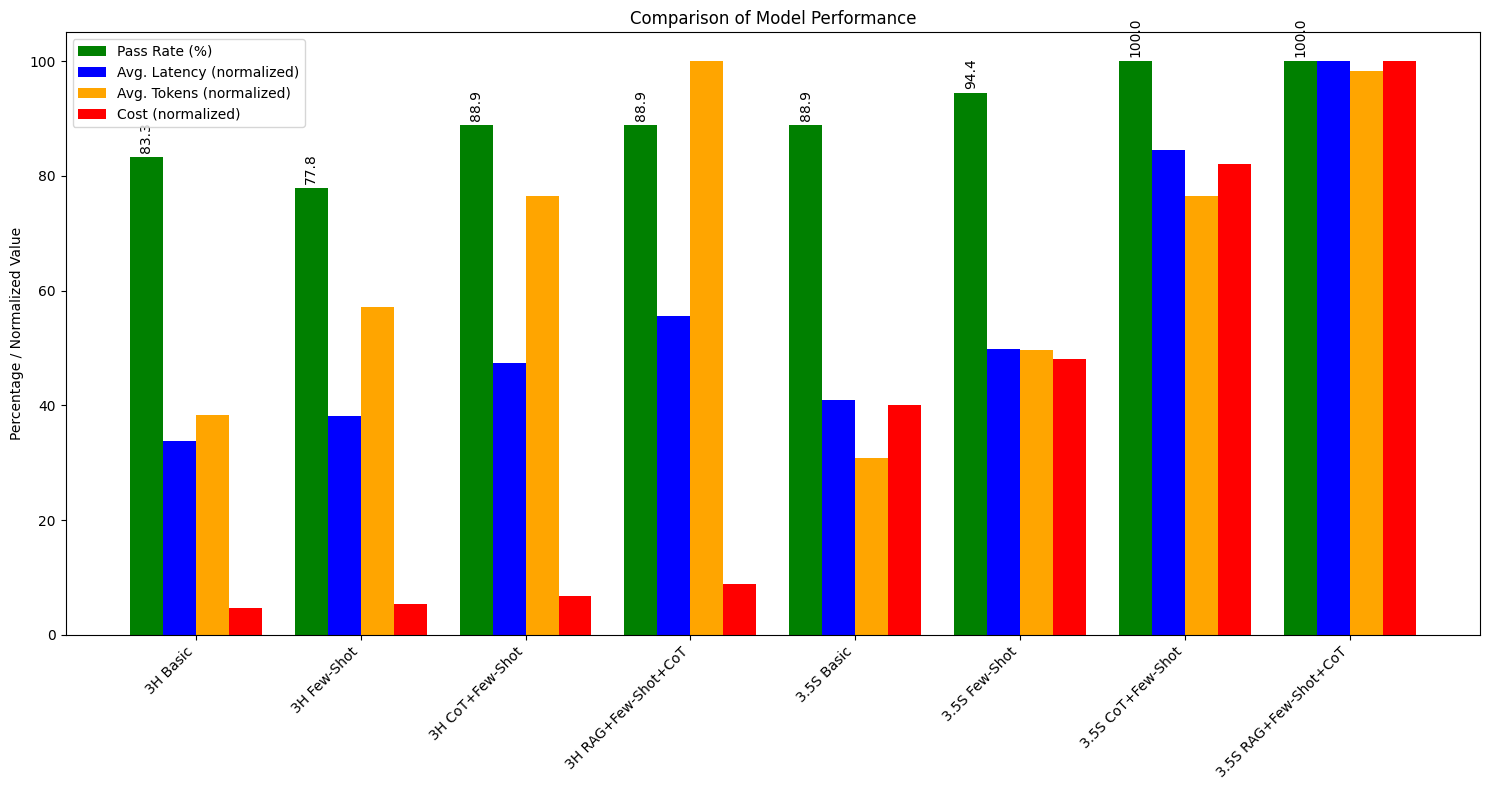
- Model Type: We evaluate both Claude 3 Haiku and Claude 3.5 Sonnet.
- Syntax: We check if the generated SQL is syntactically valid and can be executed without errors. This is a basic requirement for any Text-to-SQL system.
- Query Semantics: We verify if the generated SQL correctly captures the intent of the natural language query -- for example, correct table selections, proper joins, and appropriate use of aggregations and groupings.
- Result Correctness: We execute the generated SQL against a test database and compare the results with expected outcomes. This ensures that the query not only looks correct but also produces the right data.
- Handling Complex Queries: We test the system's ability to handle increasingly complex queries, including multi-table joins, subqueries, window functions, and complex aggregations.
Results
We'll use the code below to visualize our results. You can see that Claude 3.5 Sonnet more consistently passes our assertions using the techniques we covered, but it may incur slightly higher latency, cost, or token usage than Claude 3 Haiku.
You can create and use evaluations like this one to make the appropriate tradeoffs based on your use case.
Running Promptfoo
You can run an evaluation with the command promptfoo eval. You can render the eval results via the command promptfoo view. Here's a preview of what the results look like:


Further Exploration & Next Steps
This guide covers the basics of building a Text-to-SQL system with Claude. Here are some directions to explore that can help improve your solution:
Refining Retrieval Performance
As databases grow, it's important to make sure your RAG system finds the most relevant and current information:
-
Recent usage filter: Focus on actively-maintained and fresh data by only including tables in the RAG lookup that have been queried a certain number of times in a set timeframe.
-
Query frequency ranking: Prioritize more commonly-used data by ranking RAG results based on how often tables are queried in production.
-
Regular updates: Set up a system to update your vector database when schemas change, keeping it current with your database.
-
Context-aware embeddings: Try embedding table relationships and usage patterns, along with their names, to improve search relevance.
Adding More Context to Prompts
Giving Claude more information about your data structure and content in prompts, in addition to database schemas, can help it generate better queries:
- Data samples: Include a few rows of actual data for each relevant table in your prompts. For example:
-
Column statistics: Add useful facts about each column, such as:
- Percentage of empty values
- Lowest and highest values for number columns
- Most common values for category columns
-
Data quality notes: Mention any known issues or special cases with specific columns or tables.
-
Data catalog information: If you use tools like dbt to manage your data, include relevant details from your data catalog:
- Table overviews from dbt .yml files
- Column explanations, including calculations or business rules
- Table relationships and data lineage
- Data quality checks and expectations
- Update frequency for time-sensitive queries
-
Business context: Add information about how the data is used in your organization, common types of analyses performed, or important business metrics derived from the data.